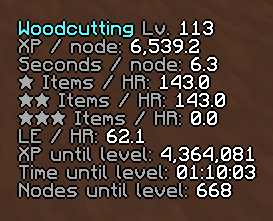
Stats in-game.
WynnCraft Stat Tracker
Create your game server with 

Description

WynnCraft Stat Tracker
One configurable in-game overlay for Wynncraft gathering, crafting, and combat. It automatically switches to the most relevant tracker and shows session pace, level progress, recipe requirements, confirmed pickups, and optional Trade Market estimates without making you arrange three separate GUI elements.
WynnCraft Stat Tracker is a client-side Fabric mod for Minecraft 1.21.11. The shared overlay defaults to the vertically centered right edge, away from the top-left minimap position used by many players, and can be repositioned and styled through the Wynntils overlay editor.
Development highlights
- Crafting support for all eight professions, with rolling XP per craft, XP and crafts until the next tenth level, and projected base-material and ingredient requirements.
- Optional WynnVentory prices beside every projected crafting input, shown in EB below one LE and in LE at or above one LE.
- One shared WynnCraft Profession Stats overlay for gathering, combat, and crafting.
- Fixed display priority: gathering overrides combat and crafting; combat overrides crafting.
- Crafting samples restart when the profession, base materials, material tiers, or ingredient setup changes.
- Crafting bomb transitions affect the sample window only after a craft is actually completed under the new Profession XP bomb state. Profession Speed bombs change material projections without clearing the XP window.
See CHANGELOG.md for versioned release notes.
Requirements
- Minecraft 1.21.11
- Fabric Loader 0.18.4 or newer
- Wynntils 4.2.2 or newer
- Java 21
Optional:
- WynnVentory 2.2.1 or newer, for live Trade Market valuation and projected crafting costs.
The current development build uses Fabric Loader 0.19.3 while retaining 0.18.4 as the declared minimum. The mod is compiled against its minimum supported Wynntils version, 4.2.2. Because Wynntils does not expose public third-party feature registration, this mod uses a small mixin shim against its FeatureManager internals; a future Wynntils update that changes those internals may require a compatibility update.
Shared overlay and priority
Gathering, combat, and crafting use one GUI element because their statistics do not need to be shown at the same time. Priority controls only which mode is visible; the underlying trackers can continue receiving relevant events while another mode is displayed.
| Priority | Mode | Becomes active when | Display behavior |
|---|---|---|---|
| 1 | Gathering | A Mining, Woodcutting, Farming, or Fishing XP event is received | Overrides combat and crafting until its activity window expires |
| 2 | Combat | Combat XP or a kill label is received while combat tracking is enabled | Appears when gathering is inactive and overrides crafting |
| 3 | Crafting | A completed craft and its consumed station inputs are captured | Appears when gathering and combat are inactive |
The default activity timeout is five minutes and can be configured. Open the Wynntils overlay editor and select WynnCraft Profession Stats to change the shared element's position, size, enabled state, render order, font scale, background, and text shadow.
What it tracks
Gathering
- XP / node: rolling average of recent gathering XP gains.
- Seconds / node: rolling average of completion-to-completion intervals, including traversal time.
- ★, ★★, and ★★★ Items / HR: estimated hourly material output for each quality tier.
- LE / HR: estimated Trade Market value of the material rates when WynnVentory is installed.
- XP until level: remaining XP supplied by the Wynntils profession model.
- Time until level: estimated whole nodes multiplied by the rolling seconds-per-node average.
- Nodes until level: remaining XP divided by rolling XP per node, rounded up.
The header shows the active gathering profession, its level, and current-world Profession XP and Profession Speed bombs. Wynntils reports the server-adjusted XP, so bomb XP is not applied a second time.
All gathering rates use the same rolling node window. It defaults to 20 nodes and can be set to any positive size. Material quality is matched from Wynncraft's MaterialItem data when the floating harvest label does not include tier stars.
Combat
- XP / HR from timed Wynntils combat XP events, with kill-label data as a fallback.
- Items / HR for picked-up copies of the item selected with
/gatherstats track <itemName>. - XP until level up and Time until level from Wynntils' combat XP model.
- XP per kill and Kills per HR from Wynntils kill labels, including shared kill credit.
- LE / HR for the selected item when WynnVentory is installed.
An item counts only after your character collects it. Combat ingredients count whether Wynncraft places them in the ingredient pouch or normal inventory; seeing a drop, leaving it behind, or having another player collect it does not count.
Command suggestions are populated from live Wynntils registries, your inventory, and items observed in game. Unknown names are still accepted for exact-name tracking, so newly added Wynncraft items do not require a mod update. Combat tracking is enabled by default and can be disabled in the feature settings.
Crafting
Crafting mode supports Alchemism, Armouring, Cooking, Jeweling, Scribing, Tailoring, Weaponsmithing, and Woodworking. It shows:
- The active crafting profession, current level, and bomb status.
- XP / craft from the rolling average of the last
Nmatching crafts. - XP until level N, where
Nis the next higher tenth level. - Crafts until level N, calculated from the same rolling XP-per-craft average and rounded up.
- Items until level N, listing both base crafting materials with their quality tiers and every ingredient.
- The projected total cost beside each input when WynnVentory is installed.
For example, level 73 targets level 80. A character at level 80 targets level 90, and targets above level 130 are capped at the profession maximum of 132.
Crafting starts after the first completed craft whose selected and consumed station inputs can be captured. The craft window defaults to 20 samples. Only crafts with the same profession, base material names and tiers, and ingredient setup share a rolling window; changing any of those inputs clears the XP-per-craft samples and starts a new counter.
Crafting bombs
- Profession XP bomb: Wynncraft's reported XP already includes the multiplier, so the observed XP per craft naturally doubles. Throwing a bomb or letting one expire does not immediately clear the counter. The window restarts only when the first craft is completed under the changed XP-bomb state, preventing boosted and unboosted crafts from being averaged together.
- Profession Speed bomb: each base material's normal per-craft requirement is halved with integer rounding down. Ingredient requirements are unchanged. Starting or ending a Speed bomb does not clear the XP window.
Projected quantities are the rounded-up craft count multiplied by each per-craft requirement. An unbombed base-material observation is preserved across later Speed-bomb transitions so odd material requirements remain exact.
WynnVentory integration
WynnVentory is optional. When available:
- Gathering values each material and quality tier separately for LE / HR.
- Combat values the pickup rate of the selected item for LE / HR.
- Crafting shows the projected total price beside every base material and ingredient.
The default source is the lowest current listing. The feature setting can instead use moving median, 80% trimmed average, or average.
Crafting totals below 4,096 emeralds are formatted in EB; totals at or above 4,096 emeralds are formatted in LE. If WynnVentory is installed but has no price for an input, its cost is shown as —. For gathering, missing prices are skipped while available material tiers continue contributing; LE / HR is — only when none of the relevant materials has market data. WynnVentory-only rows and crafting cost suffixes are omitted when the mod is not installed.
Commands
| Command | Purpose |
|---|---|
/gatherstats track <itemName> |
Select the exact pickup used by combat Items / HR and LE / HR, with autocomplete from live Wynntils data where possible |
/gatherstats track |
Show the currently selected combat item |
/gatherstats reset |
Clear gathering, crafting, and combat samples without changing the selected combat item |
Settings
Open Wynntils settings and select WynnCraft Gathering Stats.
| Setting | Purpose |
|---|---|
| Enable Combat Tracking | Enables combat XP, kill, and selected-item pickup tracking. Default: on |
| Tracked Combat Item | Exact item name used for combat Items / HR and LE / HR; /gatherstats track is recommended for autocomplete |
| Activity Timeout (Minutes) | Inactivity window used to hide and clear each mode's samples. Default: 5; minimum: 1 |
| Node Window Size | Recent nodes used for gathering XP, timing, item, and value rates. Default: 20; minimum: 1 |
| Craft Window Size | Recent matching crafts used for XP-per-craft and target projections. Default: 20; minimum: 1 |
| Trade Market Price | WynnVentory price metric used for hourly values and crafting projections. Default: lowest listing |
| Gathering display toggles | Independently show or hide the profession header, bomb status, and each gathering statistic row |
Changing a node or craft window size clears that mode's current rolling samples. Crafting and combat rows are fixed; the shared overlay's general appearance and placement are managed in the Wynntils overlay editor.
Reset behavior
- Changing character or world resets all three trackers.
/gatherstats resetresets all three trackers manually and preserves the selected combat item.- Each mode hides and clears its rolling samples after its own configured inactivity timeout.
- Changing gathering profession clears the gathering session.
- Changing crafting profession, either base material or its tier, or the ingredient setup clears the crafting XP window.
- Changing the tracked combat item or disabling combat tracking clears combat samples.
- Gathering Profession XP bomb transitions immediately clear only gathering XP samples.
- Gathering Profession Speed bomb transitions immediately clear gathering timing and material-rate samples.
- Crafting Profession XP bomb transitions clear crafting XP samples only when a craft is completed under the changed state.
- Crafting Profession Speed bomb transitions change projected base-material quantities without clearing XP samples; ingredients are unaffected.
License
Copyright © 2026 Dospacite. Licensed under the MIT License.
WynnCraft Gathering Stats is an independent community project and is not affiliated with or endorsed by Wynncraft, Wynntils, or WynnVentory. Those are separate projects distributed under their respective terms.
The WynnCraft Stat Tracker Team