WorldPanel
- By
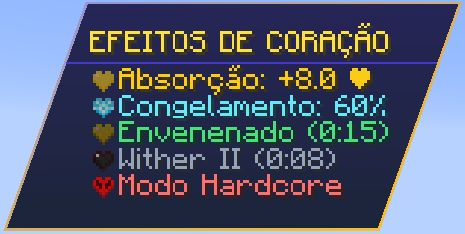
Create immersive Minecraft interfaces with floating windows, customizable panels, 3D text, custom shapes, textures, transparency, and animated visual effects.
Captura_de_tela_20261026_200124.png
Captura_de_tela_20261026_200542.png
Captura_de_tela_20261026_200049.png
Captura_de_tela_20261026_200004.png
Captura_de_tela_20261102_141716.png
Description
WorldPanel
WorldPanel is a Kotlin library for creating and rendering visual panels, floating windows, and 3D text directly in the Minecraft 3D world (NeoForge).
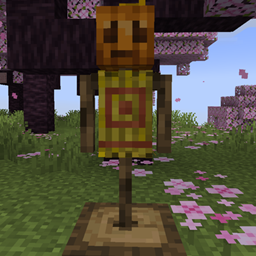
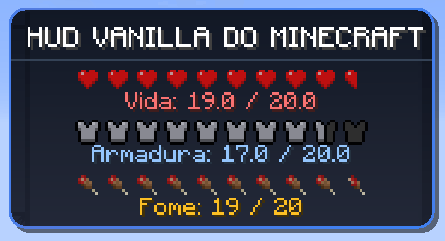
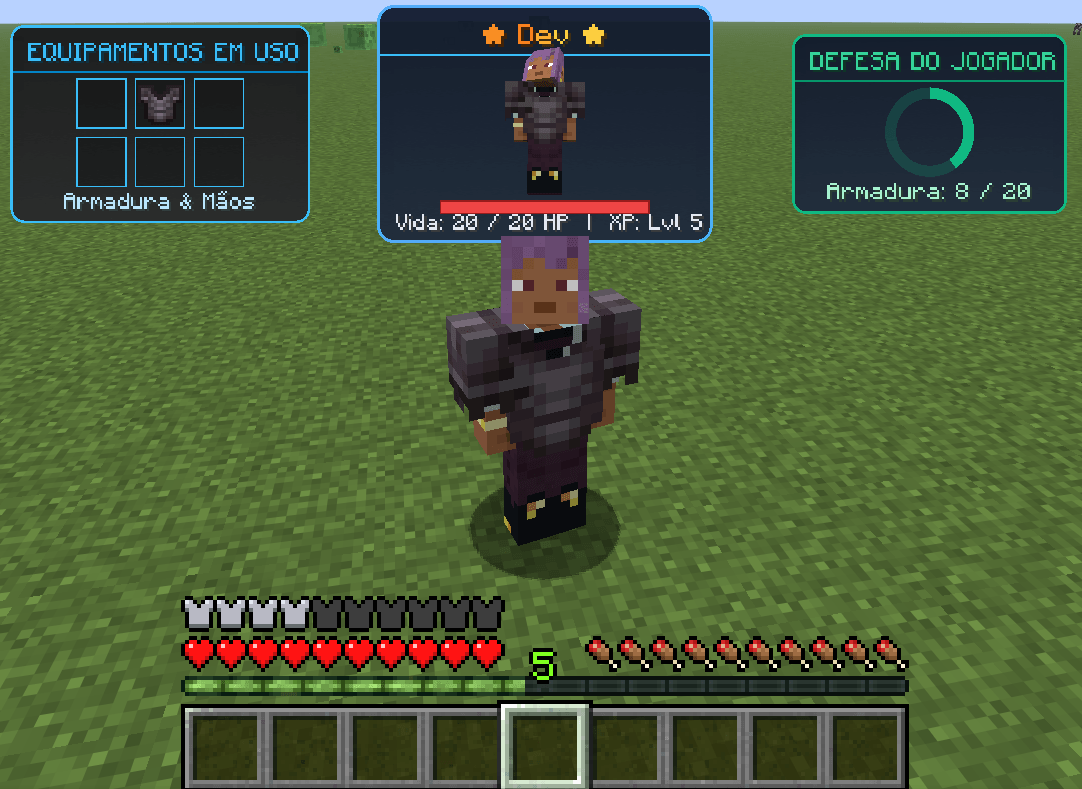
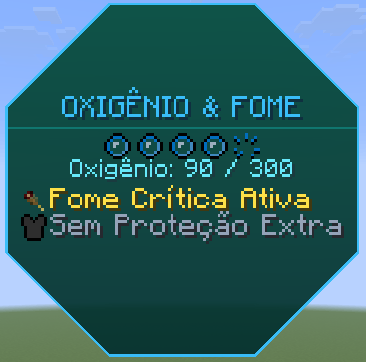
Ideal for displaying floating entity nametags, training dummy status panels, machine/block info boards, boss health bars, 3D signs, rotating holographic cubes, multi-faceted prisms, and immersive in-world UIs.
Why use WorldPanel?
- Decoupled and under your control: Does not register hidden global events or interfere with vanilla rendering. You decide when, where, and for whom to render by calling
.render(poseStack, buffer, packedLight). - Multi-Faced 3D Meshes: Create real 3D polyhedra (
FloatingCube,FloatingPrism, andFloatingCarousel) where each face is an independent panel fully configurable with continuous tumbling or smooth lock-on targeting toward the player. - Ready-to-Use HUD Elements: Native support for health/energy progress bars (
ProgressBar), radial gauges (RadialProgress), inventory item grids (ItemGrid), instant templates (FloatingWindowPresets), and frustum culling utilities (WorldPanelCulling). - Advanced Camera & Lighting Controls: Animated holographic scanlines (
setHologram), full bright neon mode (setFullBright), see-through wall rendering (setSeeThrough), distance-based fade/culling (setDistanceFade), and constant screen scaling (setConstantScreenSize). - Smart Geometry & Shape-Aware Layout: Supports everything from rounded rectangles to circles, triangles, hexagons, and rhombuses. The layout engine automatically adjusts the position and scale of each text line, item icon, and separator to fit cleanly inside the actual contour of the chosen shape.
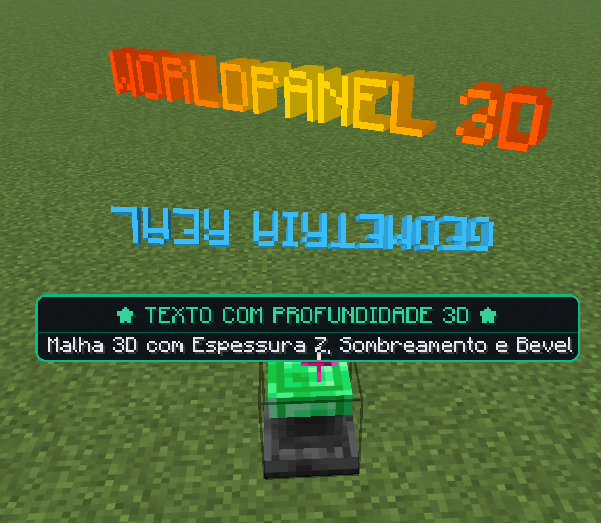
- 2D & Volumetric 3D Rendering: Create classic flat panels or thick 3D plates complete with front, shaded side walls, back faces, and extruded 3D text.
- Animated Colors & Visual Effects: Built-in static and animated gradients, rainbow (
Rainbow), pulsing (Pulse), and smooth color transitions (Fade) ready for backgrounds, borders, and text.
📚 Step-by-Step Guides
- 📘 How to Create a Simple Window Step by Step — Complete guide with builder examples, sizing, padding, borders, item icons, automatic shape fitting, and rendering hooks.
- 🔤 How to Create 3D Signs and Floating Text — Guide showing how to render backgroundless floating text (
textOnly()), animations, and physically extruded 3D signs viaFloatingText.
📦 Supported Versions
| Minecraft | Loader | Artifact | Java | Kotlin | Language Provider |
|---|---|---|---|---|---|
| 1.21.1 | NeoForge 21.1.x | worldpanel-neoforge-1.21.1 |
Java 21 | 2.1.20 | KotlinForForge 5.10.0+ |
| 26.2 | NeoForge 26.2.x | worldpanel-neoforge-26.2 |
Java 25 | 2.4.21 | KotlinLangForge 2.15.0+ |
🚀 Getting Started (Adding to Your Mod)
You can add WorldPanel to your project via Modrinth Maven or CurseMaven.
In build.gradle.kts (Kotlin DSL)
repositories {
    mavenCentral()
    maven("" rel="noopener nofollow" target="_blank">https://thedarkcolour.github.io/KotlinForForge/")
    maven("" rel="noopener nofollow" target="_blank">https://api.modrinth.com/maven") {
        content { includeGroup("maven.modrinth") }
    }
    maven("https://cursemaven.com") {
        content { includeGroup("curse.maven") }
    }
}

dependencies {
    // Kotlin language provider for NeoForge
    implementation("thedarkcolour:kotlinforforge-neoforge:5.10.0")

    // WorldPanel via Modrinth (replace <version> with the desired version)
    implementation("maven.modrinth:worldpanel:<version>")

    // Or via CurseMaven:
    // implementation("curse.maven:worldpanel-<project-id>:<file-id>")
}
In build.gradle (Groovy DSL)
repositories {
    mavenCentral()
    maven { url = "" rel="noopener nofollow" target="_blank">https://thedarkcolour.github.io/KotlinForForge/" }
    maven {
        url = "" rel="noopener nofollow" target="_blank">https://api.modrinth.com/maven"
        content { includeGroup "maven.modrinth" }
    }
    maven {
        url = "https://cursemaven.com"
        content { includeGroup "curse.maven" }
    }
}

dependencies {
    // Kotlin language provider for NeoForge
    implementation 'thedarkcolour:kotlinforforge-neoforge:5.10.0'

    // WorldPanel via Modrinth (replace <version> with the desired version)
    implementation "maven.modrinth:worldpanel:<version>"

    // Or via CurseMaven:
    // implementation "curse.maven:worldpanel-<project-id>:<file-id>"
}
⚡ Quick Start Example
Build your window using FloatingWindow.builder() and call .render(poseStack, buffer, packedLight) inside your EntityRenderer, BlockEntityRenderer, or RenderLevelStageEvent:
import dev.ian.worldpanel.FloatingWindow
import dev.ian.worldpanel.WindowAlignment
import dev.ian.worldpanel.WindowColor
import dev.ian.worldpanel.WindowElement
import dev.ian.worldpanel.shape.PanelShape
import com.mojang.blaze3d.vertex.PoseStack
import net.minecraft.client.renderer.MultiBufferSource

fun renderStatusPanel(
    poseStack: PoseStack,
    buffer: MultiBufferSource,
    packedLight: Int
) {
    val window = FloatingWindow.builder()
        // 1. World position and orientation
        .setFaceCamera(true)                       // Automatically rotates to face the player
        .setOffset(0.0, 2.2, 0.0)                  // 2.2 blocks above the origin
        .setScale(0.025f)                          // Visual scale in 3D space

        // 2. Shape and visual style
        .setShape(PanelShape.roundedRectangle(4f)) // Rounded rectangle
        .setAlignment(WindowAlignment.CENTER)
        .setPadding(4f)
        .setBackground(WindowColor.Solid(0xDD181C2A))
        .setBorder(WindowColor.Solid(0xFF38BDF8), width = 0.75f)
        .setShadow(WindowColor.Solid(0x88000000), offset = 1.5f)

        // 3. Window content
        .addText(
            text = "Entity Status",
            color = WindowColor.Solid(0xFF38BDF8),
            shadow = true,
            textScale = 1.1f,
            alignment = WindowElement.Text.TextAlignment.CENTER
        )
        .addSeparator(
            color = WindowColor.Solid(0xFF475569),
            thickness = 0.75f,
            margin = 2f
        )
        .addProgressBar(
            progress = 0.85f,
            width = 65f,
            height = 3.5f,
            fillColor = WindowColor.Solid(0xFF4ADE80L)
        )
        .addText(
            text = "HP: 85 / 100",
            color = WindowColor.Solid(0xFF4ADE80),
            shadow = true
        )
        .build()

    // 4. Render in the scene
    window.render(poseStack, buffer, packedLight)
}
🎨 Instant HUD Presets (FloatingWindowPresets)
Quickly instantiate common HUD elements without building the entire layout manually:
// Entity or Boss health bar
val healthBar = FloatingWindowPresets.healthBar(
    name = "Elder Dragon",
    currentHp = 180f,
    maxHp = 200f,
    level = 50
).build()

// Futuristic hologram panel for sci-fi machines and terminals
val holoDisplay = FloatingWindowPresets.hologramDisplay(
    title = "CENTRAL CORE",
    subtext = "Operational - 100%"
).build()

// Machine stored energy gauge (FE/RF)
val machinePanel = FloatingWindowPresets.machineStatus(
    machineName = "Solar Generator",
    storedEnergy = 75000L,
    maxEnergy = 100000L
).build()

// Triangular danger / warning sign
val danger = FloatingWindowPresets.dangerSign(warningText = "HIGH VOLTAGE").build()
📐 Shape System & Smart Content Fitting
WorldPanel provides a variety of 2D geometric shapes with high-precision continuous borders (seamless miter joins on corners and smooth 72-segment curves) and true contour-aware content fitting:
- Automatic Contour Fitting: For non-rectangular shapes (triangles, circles, rhombuses, trapezoids, parallelograms, and regular polygons), each line of text or icon is positioned according to the actual horizontal width available at that exact vertical height (\(Y\)). Short lines fit neatly into narrow tips while longer lines settle into wider sections without overflowing angled or curved borders.
- Automatic Content Scaling (
autoScaleContent): When a fixed size is specified (.setSize(width, height)), the content is proportionally scaled up or down to fill the shape's interior cleanly. Without.setSize(...), the shape automatically grows around its content.
| Shape | Factory Method | Description |
|---|---|---|
| Rectangle | PanelShape.rectangle() |
Straight rectangle with 45° mitered border joins. |
| Square | PanelShape.square() |
Square centered on the smaller dimension. |
| Rounded Rectangle | PanelShape.roundedRectangle(radius) |
Uniform or per-corner rounded radii (topLeft, topRight, etc.). |
| Circle | PanelShape.circle() |
Circle with 72 radial segments and smooth border. |
| Ellipse | PanelShape.ellipse() |
Ellipse fitted to total width and height. |
| Triangle | PanelShape.triangle(), equilateralTriangle(), rightTriangle() |
Isosceles, equilateral, or right triangle with orientation (UP, DOWN, LEFT, RIGHT). |
| Rhombus (Diamond) | PanelShape.rhombus() |
Diamond connecting the midpoints of all four edges. |
| Trapezoid | PanelShape.trapezoid(topWidthRatio) |
Trapezoid with adjustable top width ratio. |
| Parallelogram | PanelShape.parallelogram(skewRatio) |
Parallelogram with adjustable horizontal skew. |
| Regular Polygon | PanelShape.polygon(sides, rotation) |
Pentagon (sides = 5), Hexagon (sides = 6), Octagon (sides = 8), etc. |
| PNG Silhouette | PanelShape.texture("modid:textures/gui/panel.png") |
Freeform shape based on a PNG texture's alpha silhouette. |
➖ Shape-Adaptive Separators (addSeparator)
.addSeparator(...) automatically calculates its horizontal length based on the shape's inner contour at the exact vertical height (\(Y\)) where it is placed:
window.addSeparator(
    color = WindowColor.Solid(0xFF808080L),
    thickness = 0.5f,
    margin = 2f,
    includeBorder = false, // Default: stops cleanly at the inner edge of the border
    edgeToEdge = true      // Default: spans from one side of the shape to the other at height Y
)
In curved shapes (circles/ellipses) or angled shapes (triangles/trapezoids), the separator follows the geometry of the window without ever poking through the border.
🧱 Volumetric 3D Panels (PanelRenderMode.VOLUME_3D)
In addition to flat rendering (PanelRenderMode.FLAT_2D), any shape can be rendered as a thick 3D plate complete with front, shaded side walls, and back face:
val volumetricPanel = FloatingWindow.builder()
    .setShape(PanelShape.roundedRectangle(cornerRadius = 4f))
    .setRenderMode(PanelRenderMode.VOLUME_3D)
    .setVolume3D(
        thickness = 3.0f,         // Physical depth along the Z axis
        sideColor = null,         // Automatically shaded from the front color
        sideDarkening = 0.65f,    // Side wall darkening factor
        lightAngleDegrees = 45f   // Light source angle for relief shading
    )
    .setBackground(WindowColor.Solid(0xFF2C3E50))
    .setBorder(WindowColor.Solid(0xFF1ABC9C), width = 1f)
    .addText("Volumetric 3D Panel", WindowColor.Solid(0xFFFFFFFF))
    .addSeparator()
    .addText("Side walls with physical depth")
    .build()
🎲 Multi-Faced 3D Meshes (FloatingCube, FloatingPrism & FloatingCarousel)
WorldPanel provides native support for real 3D polyhedra where each face is an independent, fully configurable FloatingWindow:
- Zero Z-Fighting: Faces meet seamlessly at exact border vertices without overlapping.
- Backface Culling Compatible: All outward normals guarantee Minecraft only rasterizes faces visible to the camera.
- Procedural Tumbling & Smooth Targeting: Continuous rotation (
animateTumble,animateSpin) or smooth interpolation toward a specific player-facing face (targetFace,targetSide,targetPanel).
1. 3D Holographic Cube (FloatingCube)
val holographicCube = FloatingCube.builder()
    .setSize(size = 48f)
    .setScale(0.025f)
    .setOffset(0.5, 2.0, 0.5)
    // Smooth 3-axis continuous rotation (or lock with .targetFace(CubeFace.FRONT))
    .animateTumble(speedX = 0.4f, speedY = 0.8f, speedZ = 0.2f)
    .configureFace(CubeFace.FRONT) { face ->
        face.setBackground(WindowColor.Solid(0xEE0F172A))
            .setBorder(WindowColor.Solid(0xFF38BDF8), width = 1f)
            .addText("MAIN STATUS", color = WindowColor.Solid(0xFF38BDF8))
            .addProgressBar(progress = 0.85f, width = 40f)
    }
    .configureFace(CubeFace.BACK) { face ->
        face.setBackground(WindowColor.Solid(0xEE1E1B4B))
            .addItemText(ItemStack(Items.NETHER_STAR), "Star Core")
    }
    .configureFace(CubeFace.TOP) { face ->
        face.setBackground(WindowColor.Solid(0xEE064E3B))
            .addText("ORBITAL TELEMETRY", color = WindowColor.Solid(0xFF34D399))
    }
    .build()

// Inside your render event (BlockEntity, Entity or RenderLevelStageEvent):
holographicCube.render(poseStack, bufferSource, packedLight)
2. Regular Hexagonal / N-Sided Prism (FloatingPrism)
Perfect for arcane totems, energy pylons, and modular reactors:
val prism = FloatingPrism.builder()
    .setSides(6) // Hexagonal prism
    .setSize(width = 36f, height = 48f)
    .setScale(0.025f)
    .animateSpin(speedY = 0.5f)
    .configureSide(0) { side ->
        side.setBackground(WindowColor.Solid(0xDD111827))
            .addText("GENERATOR A", WindowColor.Solid(0xFFF59E0B))
            .addProgressBar(progress = 0.9f, width = 30f)
    }
    .configureTop { top ->
        top.setBackground(WindowColor.Solid(0xFF1F2937))
            .addText("▲", WindowColor.Solid(0xFFF59E0B))
    }
    .build()
3. Circular 360° Carousel & Wheel (FloatingCarousel)
Ideal for roulette wheels, radial skill selectors, and rotating item showcases:
val carousel = FloatingCarousel.builder()
    .setPanelCount(8)
    .setPanelSize(width = 32f, height = 32f)
    .setScale(0.025f)
    .targetPanel(0) // Smoothly rotates to bring selected panel front-facing
    .configurePanel(0) { p ->
        p.addItem(ItemStack(Items.DIAMOND_SWORD), size = 20f)
    }
    .configurePanel(1) { p ->
        p.addItem(ItemStack(Items.NETHERITE_CHESTPLATE), size = 20f)
    }
    .build()

// Cycle through panels with smooth transitions:
carousel.nextPanel()
4. Regular 3D Pyramid & Tetrahedron (FloatingPyramid)
Supports square base (PyramidBase.SQUARE) or triangular base (PyramidBase.TRIANGLE), automatically calculating exact dihedral angles and positioning panel content flush against the inclined triangular faces:
val pyramid = FloatingPyramid.builder()
    .setBaseType(PyramidBase.SQUARE)
    .setSize(baseWidth = 48f, height = 40f)
    .setScale(0.025f)
    .animateSpin(speedY = 0.5f)
    .configureFace(PyramidFace.FACE_1) { face ->
        face.setBackground(WindowColor.Solid(0xEE0F172A))
            .setBorder(WindowColor.Solid(0xFFF59E0B), width = 1f)
            .addText("SUN TEMPLE", color = WindowColor.Solid(0xFFF59E0B))
    }
    .configureBase { base ->
        base.setBackground(WindowColor.Solid(0xFF1E293B))
    }
    .build()
5. Regular 3D Octahedron (FloatingOctahedron)
8 symmetrical equilateral triangular faces in 3D space, perfect for power crystals, orbital cores, and floating magical artifacts:
val octahedron = FloatingOctahedron.builder()
    .setSize(size = 40f)
    .setScale(0.025f)
    .animateTumble(speedX = 0.3f, speedY = 0.6f, speedZ = 0.2f)
    .configureFace(OctahedronFace.TOP_FRONT_RIGHT) { face ->
        face.setBackground(WindowColor.Solid(0xCC3B82F6))
            .setBorder(WindowColor.Solid(0xFF60A5FA), width = 1f)
            .addText("⚡", textScale = 1.4f)
    }
    .build()
6. 3D Orbital Ring / Holographic Torus (FloatingOrbitalRing)
Segmented polygonal 3D ring with radial band thickness, physical depth, continuous inclined orbital spin (orbitalTilt, spinSpeed), and floating satellite panels:
val orbitalRing = FloatingOrbitalRing.builder()
    .setRadius(48f)
    .setBandWidth(6f)
    .setDepth(3f)
    .setOrbitalTilt(25f)
    .animateSpin(0.4f)
    .setColor(WindowColor.Solid(0xCC00F0FF))
    .attachSatellite(angleDegrees = 0f) { sat ->
        sat.setBackground(WindowColor.Solid(0xEE0F172A))
            .addText("SATELLITE ALPHA", color = WindowColor.Solid(0xFF38BDF8))
    }
    .build()
📺 In-Window Entity Rendering & Video Feeds
WorldPanel allows displaying entity models (players, mobs, companions) directly inside any window:
1. 2D Video Feed (addEntityVideoFeed)
Renders an entity inside a flat 2D monitor strictly mapped to the window plane (\(Z = 0.01\)), ensuring 3D geometry never leaks or pokes out of the panel. Includes styling filters:
VideoFeedStyle.CLEAN— Crisp, clean direct visual.VideoFeedStyle.SECURITY_CAMERA_CCTV— Security monitor with blinkingREC ●badge, OSD timestamp, and scanlines.VideoFeedStyle.CRT_SCANLINES— Retro CRT tube monitor with scanlines and vignette.VideoFeedStyle.CYBER_GREEN_HOLOGRAM— Neon green HUD visor with animated laser raster line.
val cctvMonitor = FloatingWindow.builder()
    .setShape(RectangleShape())
    .addText("SECURITY SYSTEM", color = WindowColor.Solid(0xFF38BDF8))
    .addEntityVideoFeed(
        entity = targetMobOrPlayer,
        width = 64f,
        height = 48f,
        style = VideoFeedStyle.SECURITY_CAMERA_CCTV,
        spinSpeed = 0.3f // 0 = static frontal view, >0 = smooth turntable spin
    )
    .build()
2. Rotating 3D Miniature (addEntityPreview)
Ideal for bestiaries, showcases, and character selection screens:
window.addEntityPreview(
    entity = bossEntity,
    size = 40f,
    spinSpeed = 1.0f,
    pitchAngle = 10f
)
3. Real-Time Entity Mirror (addLiveEntityMirror)
Displays a live entity mirroring its bodily animations, limb swings, armor equipment, and red damage flash in real time:
window.addLiveEntityMirror(
    entity = player,
    size = 42f,
    mirrorRotation = true
)
📹 Virtual Cameras with Real 2D Video Feed & CCTV System (VirtualCameraConfig)
WorldPanel provides a complete virtual camera and 2D video feed transmission system, engineered specifically to render closed-circuit television (CCTV), security monitors, tactical HUDs, and live video feeds directly inside windows:
- Strictly Flat 2D Screen Quad (Zero 3D Protrusion): The virtual camera output is rendered onto an isolated dynamic offscreen texture target and projected onto the panel as a flat 2D textured quad (\(Z = 0.01\)). This guarantees that world blocks and tracked entities never poke out of the window frame, even when the display panel is mounted flat on a wall and observed from acute or oblique angles.
- Comprehensive Configuration (
VirtualCameraConfig): Complete control over 3D world coordinates (\(X, Y, Z\)), camera orientation (\(yaw, pitch\)), field of view (\(FOV\)), aspect ratios (aspectRatio16x9,aspectRatio4x3), custom resolutions, and update rate throttling (FPS throttling) for maximum performance. - Entity Tracking & Follow Modes (
CameraFollowMode):- First Person (
FIRST_PERSON): Camera attaches directly to the entity's eyes and head rotation. - Third Person Chase Cam (
THIRD_PERSON): Smoothly trails the entity from behind and above with configurable distance and elevation. - Security Camera PTZ (
ENTITY_TRACKING): Mounted at a stationary world coordinate (e.g., warehouse ceiling, lamppost), automatically computing yaw and pitch in real time to keep the target entity dead-center. - Fixed Relative Offset (
FIXED_OFFSET): Maintains a fixed offset vector (\(dX, dY, dZ\)) relative to the entity's position.
- First Person (
- Multi-Camera Switcher (
CameraSwitcher): Effortlessly switch between multiple surveillance cameras in the same window (e.g., "CAM-01 ENTRANCE", "CAM-02 VAULT", "CAM-03 PERIMETER"). - OSD HUD & CRT Effects: Blinking "● REC" indicator, channel name stamp, live clock, horizontal scanlines, analog vignette, and beveled monitor frame.
- Graceful Fallback ("NO SIGNAL"): If the target region is in unloaded chunks, the entity is despawned, or signal is lost, the display automatically falls back to an animated CRT noise static screen with an informative alert ("NO SIGNAL / UNLOADED CHUNK").
Example 1: Security Camera at Fixed Location (16:9, 20 FPS)
// 1. Configure virtual camera
val entranceCamera = VirtualCameraConfig.builder("cam_entrance")
    .position(120.5, 72.0, -340.5)
    .rotation(yaw = 180f, pitch = -15f)
    .fov(75f)
    .aspectRatio16x9(baseWidth = 256)
    .updateRate(fps = 20) // Throttled to 20 FPS for maximum performance
    .build()

// 2. Display the 2D feed inside a monitor window
val securityMonitor = FloatingWindow.builder()
    .setShape(RectangleShape())
    .addText("SECURITY MONITOR", color = WindowColor.Solid(0xFF38BDF8))
    .addVirtualCameraFeed(
        config = entranceCamera,
        width = 80f,
        height = 45f,
        style = VideoFeedStyle.SECURITY_CAMERA_CCTV
    )
    .build()
Example 2: PTZ Tracking Camera (Following Player / Boss)
// Camera mounted at (100, 75, -200) that pivots dynamically to track the boss
val ptzSource = CameraSource.securityPTZ(
    entity = targetBoss,
    mountPos = Vec3(100.0, 75.0, -200.0),
    fov = 60f
)

val ptzWindow = FloatingWindow.builder()
    .addText("PTZ TRACKING // ACTIVE", color = WindowColor.Solid(0xFF4ADE80))
    .addCameraFeed(
        cameraSource = ptzSource,
        width = 72f,
        height = 48f,
        style = VideoFeedStyle.SECURITY_CAMERA_CCTV
    )
    .build()
Example 3: Multi-Channel Camera Switcher
val switcher = CameraSwitcher()
    .addCamera("ENTRANCE", CameraSource.of(Vec3(10.0, 65.0, 20.0), 180f, -10f))
    .addCamera("VAULT", CameraSource.of(Vec3(-40.0, 42.0, 85.0), 90f, -5f))
    .addCamera("GUARD POV", CameraSource.firstPerson(guardNpc))

// Switch channels dynamically via code, event, or interaction
switcher.next() // or switcher.select("VAULT")

val switcherMonitor = FloatingWindow.builder()
    .addCameraSwitcherFeed(
        switcher = switcher,
        width = 72f,
        height = 48f,
        style = VideoFeedStyle.CRT_SCANLINES
    )
    .build()
🗺️ 3D Terrain Holographic Map & Entity Radar (FloatingHoloMap)
WorldPanel includes a real-time volumetric holographic terrain projection system reminiscent of sci-fi and tactical war tables:
- Cached Chunk Sampling: Captures elevation and surface blocks without impacting frame rate (throttled caching ~700ms).
- Full Projection: Emissive pedestal ring, 4 corner light emitter beams, volumetric relief columns with authentic block colors, animated altitude scanline, and real-time entity neon blips.
- Color Coding by Entity Type: Neon cyan for players, crimson red for hostiles, emerald green for passives, and golden yellow for neutral/ambient entities.
1. Standalone Holographic Table (FloatingHoloMap)
- Coherent 360° Perspective: Complete 4-sided walls (+Z, -Z, +X, -X) for all relief columns with directional lighting shading (
FaceShade), preventing false occlusions and void gaps when moving around the table. - Stable Rotation Hierarchy: Table world heading (
facingYaw) and elevation tilt (tiltPitch) are applied to the base prior to the terrain spin (animateSpin), eliminating perspective wobble. - Distance Culling: Automatic distance culling (
setMaxRenderDistance) saving GPU cycles when players move away.
val holoMap = FloatingHoloMap.builder()
    .setChunkRadius(1) // Chunk radius around center (1 = 3x3 chunks)
    .setSize(width = 140f, height = 90f)
    .setScale(0.025f)
    .setOffset(0.0, 1.5, 0.0)
    .setFacingYaw(0f) // World orientation of the table
    .setTiltPitch(25f) // Stable table tilt
    .animateSpin(speedY = 0.4f) // Terrain spin atop the table
    .setMaxRenderDistance(64.0) // Automatic distance culling
    .setWireframe(true) // Blends block relief with holographic scanlines
    .setShowEntityBlips(true) // Floating 3D neon diamond markers
    .build()

// In your renderer:
holoMap.render(poseStack, bufferSource, packedLight)
2. In-Window Holographic Map Element (addHoloMap)
Can also be added as a standard UI layout element to any FloatingWindow:
val tacticalWindow = FloatingWindow.builder()
    .addText("SECTOR RADAR", color = WindowColor.Solid(0xFF00F0FF))
    .addHoloMap(
        radiusChunks = 1,
        width = 64f,
        height = 48f,
        wireframeHologram = true,
        showEntityBlips = true,
        spinSpeedY = 0.5f
    )
    .build()
🏛️ Real 1:1 Miniature Cubic Diorama (FloatingChunkDiorama)
FloatingChunkDiorama renders a genuine three-dimensional cubic miniature maquette of the Minecraft world, displaying authentic textured blocks and live entities in real time (with models, limb animations, and 1:1 synchronized movements).
Highlights & Architecture:
- Zero Recursion Safeguard: Automatic prevention of infinite render recursion when entities within the diorama carry overhead nametags or windows (
IS_RENDERING_DIORAMA = ThreadLocal.withInitial { false }). - Authentic 1:1 Block Rendering: Every sampled block is rendered with its authentic textures, state models, and Minecraft geometry.
- Occlusion Optimization (
cullHiddenBlocks): Blocks fully obscured by 6 solid neighbors are pruned before entering the render pipeline, drastically reducing draw calls and maintaining high FPS. - Live Entities in Real Time: Players, mobs, and NPCs inside the sample volume move and animate in real time.
- Display Pedestal & Protective Dome: Optional beveled base plate, translucent glass dome enclosure, and 3D wireframe boundary frame with customizable colors.
- Rotation and Tilt Hierarchy: Smooth turntable rotation (
animateSpin) and isometric view tilt (setTiltPitch).
1. Standalone Miniature Diorama (FloatingChunkDiorama)
- Solid 3D Prism Boundary Frame: Bounding box edges are rendered as solid 3D beams with full face shading, cleanly visible from any vantage point without vanishing at tangential angles.
- Isometric Tilt Hierarchy: World orientation (
facingYaw) and tilt angle (tiltPitch) applied to the base pedestal, keeping content spin (animateSpin) perfectly uniform without axial wobble. - Distance Culling & Shared Sample Cache: Intelligent block state caching and distance culling (
setMaxRenderDistance) allowing dozens of simultaneous dioramas with minimal overhead.
val diorama = FloatingChunkDiorama.builder()
    .setRadius(radiusX = 4, radiusZ = 4) // 9x9 block volume
    .setHeight(heightBelow = 3, heightAbove = 5) // 3 blocks below surface, 5 above
    .setScale(0.035f)
    .setOffset(0.0, 1.8, 0.0)
    .setFacingYaw(0f) // World orientation of the base
    .setTiltPitch(22f) // Fixed isometric tilt
    .animateSpin(speedY = 0.3f) // Smooth content spin
    .setMaxRenderDistance(64.0) // Distance culling
    .setRenderEntities(true) // Renders live moving entities
    .setCullHiddenBlocks(true) // Internal block culling optimization
    .setShowBasePlate(true) // Elegant beveled pedestal
    .setBasePlateColor(WindowColor.Solid(0xEE1E293B))
    .setShowBoundaryBox(true) // Solid 3D beam boundary frame
    .setShowGlassEnclosure(true) // Glass dome surrounding the diorama
    .setGlassColor(WindowColor.Solid(0x33E0F2FE))
    .build()

// In your renderer (e.g., RenderLevelStageEvent):
diorama.render(poseStack, bufferSource, packedLight)
2. In-Window Diorama Element (addChunkDiorama)
You can also embed a live cubic maquette directly inside any FloatingWindow panel:
val architecturalWindow = FloatingWindow.builder()
    .addText("LIVE SITE MODEL", color = WindowColor.Solid(0xFF38BDF8))
    .addChunkDiorama(
        radiusX = 3,
        radiusZ = 3,
        heightBelow = 2,
        heightAbove = 4,
        width = 72f,
        height = 54f,
        renderEntities = true,
        spinSpeedY = 0.4f,
        tiltPitch = 25f
    )
    .build()
🔤 3D Signs, Volumetric Text & Floating Text
WorldPanel offers both minimalist windowless text (FloatingText) and real extruded volumetric 3D text geometry (FloatingVolumetricText):
1. Real Extruded 3D Volumetric Text (FloatingVolumetricText)
Unlike flat 2D layered hacks or artificial bounding boxes, FloatingVolumetricText constructs true extruded 3D geometry for every glyph:
- Typographic Contour Extrusion: Individual letter outlines are extruded while strictly preserving internal counters/holes (in glyphs like
O,A,B,D,P,Rand numbers0,4,6,8,9), curves, and notches (such asW,M,V). - Preserved Voids and Windows: Holes between and within letters remain transparent and unobstructed, allowing players to look through the 3D volume.
- Aligned Back Faces: The posterior face of each glyph is mirrored and aligned pixel-by-pixel with the front face at the configured depth (
setThickness). - Directional Shading with Exact Normals: Lateral bevel walls calculate physical lighting based on segment normals and light angle (
sideDarkening,lightAngleDegrees). - Unrestricted 3-Axis Rotation: Freely tumble or spin (
animateSpin,animateTumble) without visual distortion.
val volumetricSign = FloatingVolumetricText.builder()
    .setText("WORLD PANEL", WindowColor.Rainbow(speed = 1.0f))
    .setThickness(2.5f)
    .setBevel(0.3f)
    .setSideDarkening(0.65f)
    .setLightAngle(45f)
    .setScale(0.035f)
    .setOffset(0.0, 2.5, 0.0)
    .animateTumble(speedX = 0.2f, speedY = 0.8f, speedZ = 0.1f)
    .build()

volumetricSign.render(poseStack, bufferSource, packedLight)
2. Fast 3D Signs (FloatingText)
For lightweight floating text in the world — such as boss titles, damage numbers, or 3D signage with physical depth:
Single-Line Direct Call
FloatingText.render3D(
    poseStack = poseStack,
    buffer = buffer,
    text = "3D SIGN",
    y = 2.5,
    color = WindowColor.Rainbow(speed = 1.0f),
    extrusionDepth = 0.8f,
    packedLight = packedLight
)
Multi-Line Builder
val sign = FloatingText.builder()
    .setOffset(0.0, 2.8, 0.0)
    .setScale(0.03f)
    .set3D(enabled = true, extrusionDepth = 0.6f)
    .addLine("FINAL BOSS", color = WindowColor.Solid(0xFFFF4500), textScale = 1.4f)
    .addLine("HP: 10,000 / 10,000", color = WindowColor.Solid(0xFF00FF00))
    .build()

sign.render(poseStack, buffer, packedLight)
(You can also use FloatingWindow.builder().textOnly() if you want to use window layout features like item icons and text alignment without rendering a background or border).
🌈 Colors & Visual Effects (WindowColor)
All background, border, separator, and text colors accept dynamic visual effects:
WindowColor.Solid(argb: Long)— Static color (0xAARRGGBBor0xRRGGBB).WindowColor.Gradient(argbStart, argbEnd, isVertical)— Static linear gradient.WindowColor.AnimatedGradient(argbStart, argbEnd, speed, scale)— Continuously scrolling gradient.WindowColor.Rainbow(speed, saturation, brightness)— Animated rainbow cycle.WindowColor.Fade(colorA, colorB, speed)— Smooth periodic transition between two colors.WindowColor.Pulse(color, minAlpha, speed)— Continuous brightness/opacity pulse.
🤖 AI Assistance Disclosure
This project utilized Artificial Intelligence (AI) as an assistive tool during code development, geometric calculations, automated testing, and documentation writing.
📄 License
Distributed under the license specified in the LICENSE file.
WorldPanel Team