World Painter
- By
In-game terrain editor for Minecraft inspired by WorldPainter. Features an interactive GUI, height sculpting, materials and biome painting, custom brushes, and undo history.
WorldPainter (In-Game Terrain Editor)
An in-game world editing and terrain sculpting suite for Minecraft. It replicates the layout, tools, and workflows of the standalone WorldPainter application directly inside Minecraft through a dedicated interface.
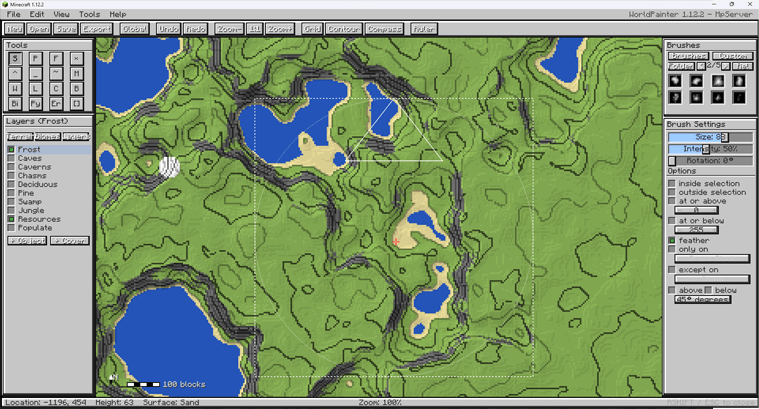
Getting Started & Controls
- Open / Close GUI:
Right Shift(configurable in Controls) - Pan Map: Click and drag with
Middle Mouse ButtonorRight Mouse Button - Zoom Map:
Ctrl+Mouse Wheel - Adjust Brush Size:
Mouse Wheel - Paint / Sculpt:
Left Mouse Button(apply / raise),Right Mouse Button(erase / lower)
Tools & Sculpting Suite
- Height (Raise / Lower): Raise terrain with left-click, lower with right-click.
- Flatten: Level terrain toward a target elevation (Modes: Normal, Raise Only, Lower Only).
- Smooth: Smooth elevation differences across terrain.
- Mountain: Sculpt steep peaks and ridges.
- Pyramid: Form sharp, geometric elevations.
- Erode: Apply erosion-style terrain smoothing.
- Spray Paint: Scatter materials, biomes, or layers using brush intensity.
- Pencil: Solid placement of materials and biomes.
- Fill (Bucket): Contiguous surface flood fill for blocks and biomes.
- Biome Painter: Paint biome IDs directly onto terrain columns.
- Water / Lava: Place surface water or lava bodies.
- Sponge: Remove water and lava within the brush radius.
- Flood Basin: Fill enclosed basins with water or lava up to a target level.
- Select: Create rectangular selections for filtering and global operations.
- Spawn Point: Set the world spawn coordinates.
Brushes & Filtering
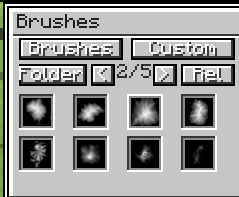
Brush Engine
- Built-in Brush Shapes: Circle, Dome, Cone, Plateau, Mountain, Noise, Square, Ring.
- Custom Bitmap Brushes: Load grayscale
.pngbrushes placed in.minecraft/worldpainter/brushes/. - Adjustable Parameters: Radius (Size), Intensity (0–100%), and Rotation angle.
Constraints & Mask Filters
- Height Constraints: Restrict application to
At or Above/At or Belowspecific Y-levels with optional edge feathering. - Slope Constraints: Limit application based on surface angle (
Slope Above/Slope Belowdegrees). - Block Masking: Restrict painting to
Only OnorExcept Onselected block types. - Selection Mask: Apply operations only
InsideorOutsidethe active selection.
Layers & Palettes
- Terrain Palette: Surface blocks (Grass, Dirt, Sand, Stone variants, Clay, Snow, Ice, etc.) with custom block picker support.
- Biome Palette: Standard Minecraft biomes.
- Built-in Layers:
- Frost: Places snow layers and freezes water.
- Caves / Caverns / Chasms: Subterranean cave carving.
- Resources: Places underground ore clusters.
- Tree Layers: Deciduous, Pine, Swamp, and Jungle tree placement.
- Custom Layers:
- Custom Objects: Spawns
.schematicstructures placed in.minecraft/worldpainter/schematics/. - Custom Ground Cover: Configurable block state and surface thickness.
- Custom Objects: Spawns
Generator, Heightmaps & History
- Procedural World Generation: Generate terrain using presets (Island, Hills, Alpine) with custom seed and size settings.
- Heightmap Import / Export: Import grayscale PNG images directly into world height, or export terrain to PNG heightmaps.
- Global Operations: Apply fill, raise/lower, biome changes, or layer applications across entire selections.
- Undo / Redo: Multi-step history system for terrain modifications.
The World Painter Team