World Finder
- By
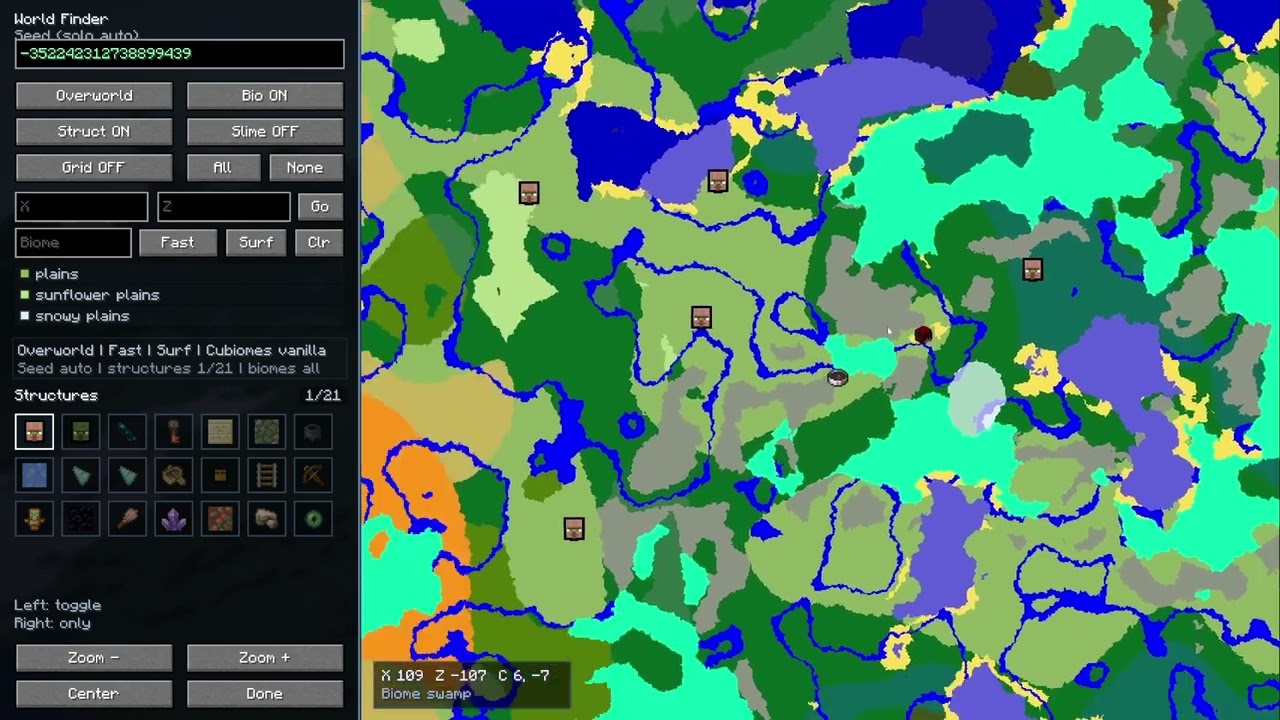
World Finder is a client-side seed map and structure finder for vanilla Minecraft worlds, built as an in-game ChunkBase-style helper.
2026-06-16_10.16.51.png
2026-06-16_10.16.59.png
Description
WorldFinder
Explore Minecraft seeds, biomes, and structures directly from inside the game.
WorldFinder is a client-side seed map and structure finder for Minecraft, available for both Fabric and NeoForge.
Enter a known seed, or let WorldFinder detect it automatically in a supported singleplayer world, then browse the Overworld, Nether, and End without constantly switching to an external website.
WorldFinder is designed as an in-game ChunkBase-style exploration and planning tool.
WorldFinder does not bypass server seed protection. Multiplayer use requires the exact server seed.
Features
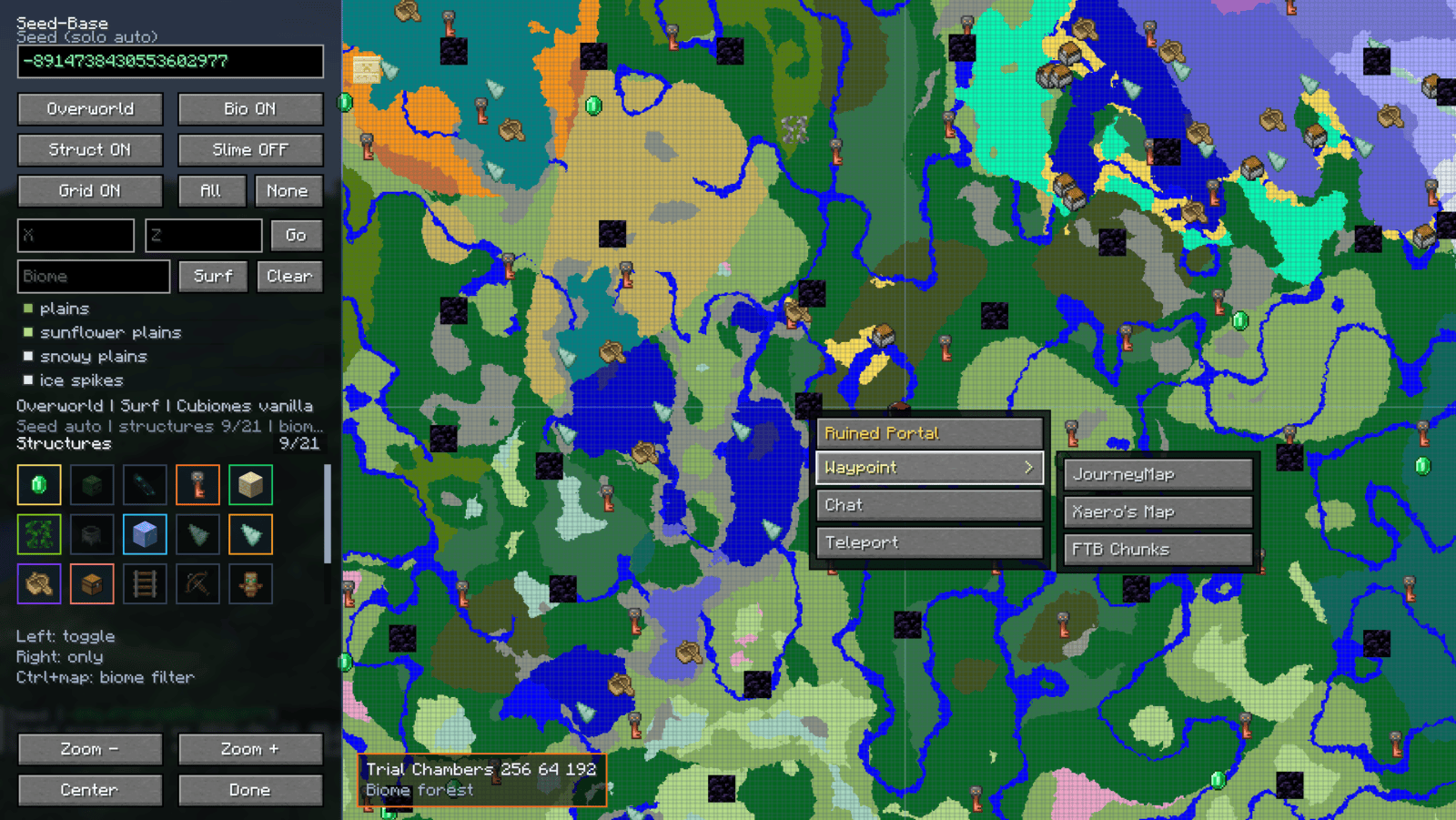
In-game seed map
- Fullscreen map available directly inside Minecraft.
- Opens on the player's current dimension.
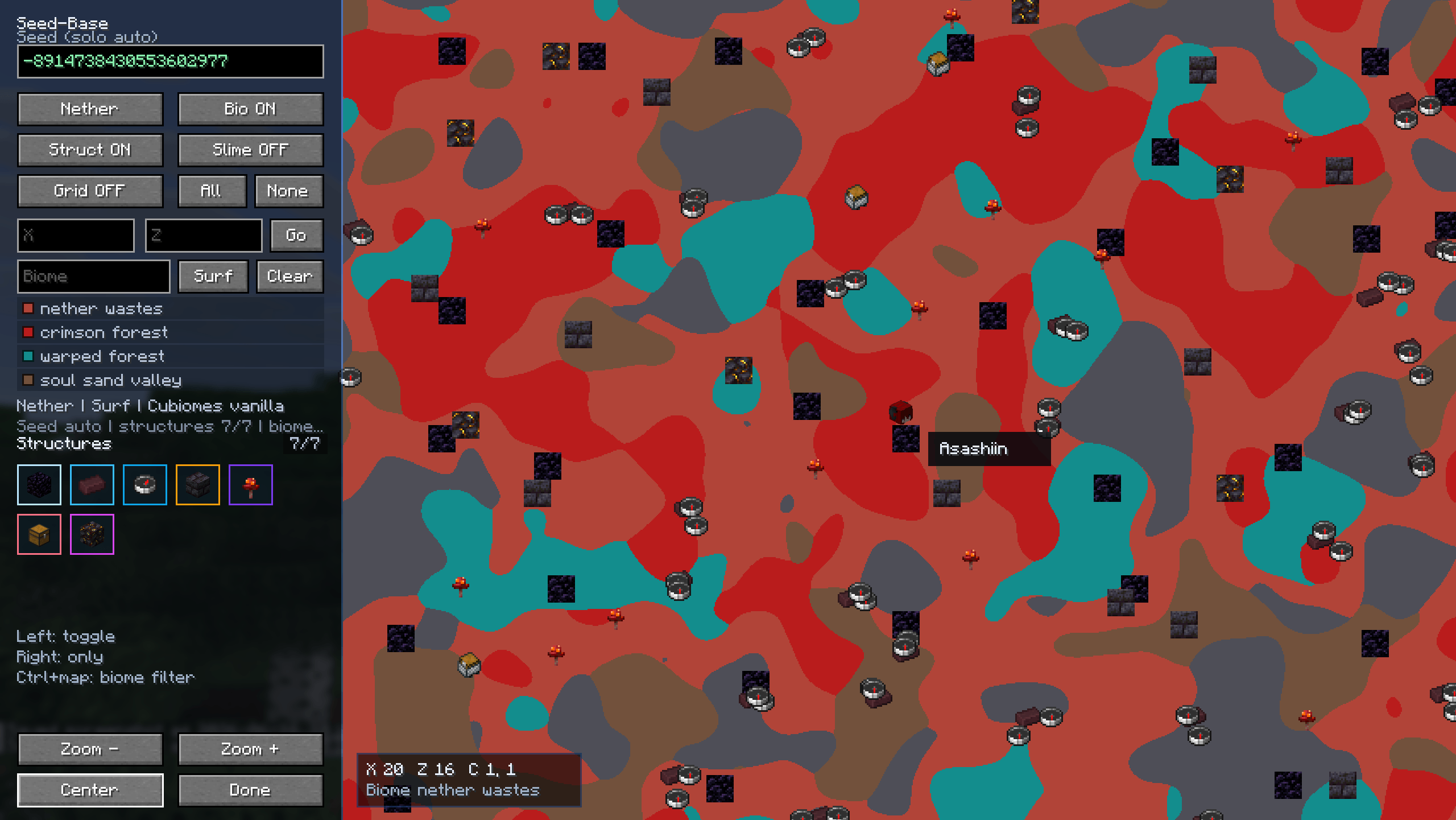
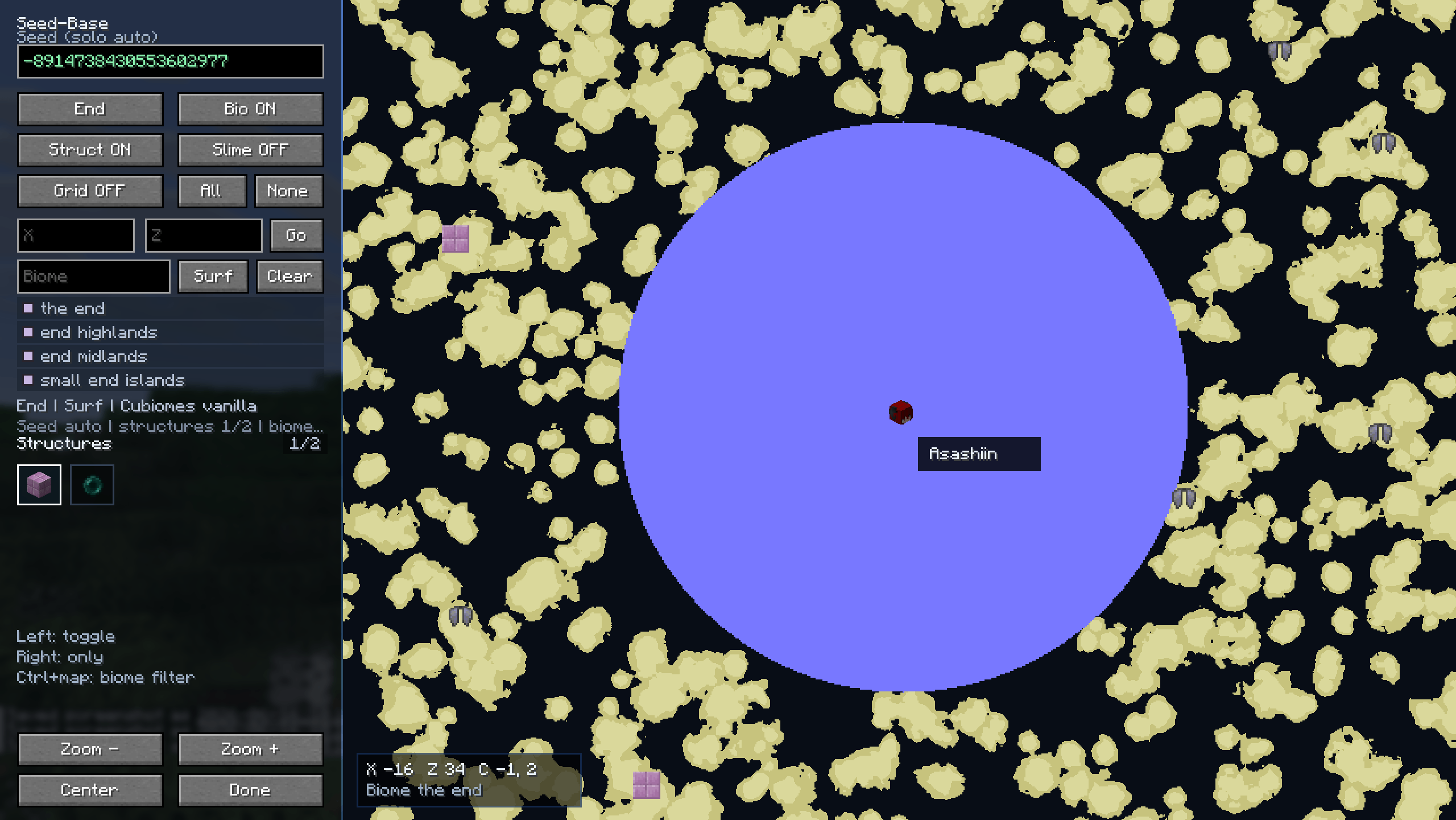
- Supports the Overworld, Nether, and End.
- Progressive background generation for a smoother interface.
- Progressive structure-marker discovery.
- Player and world-spawn markers.
- Chunk grid overlay.
- Slime chunk overlay.
- End island and void rendering.
- End navigation-radius overlay.
- Right-click context menu for coordinates, teleportation, and waypoints.
Biome exploration
Searchable biome list.
Multiple biome selections.
Biome filtering and highlighting.
Dedicated Overworld map modes:
- Surface
- Underground
- Highlight
Version-specific biome support.
Progressive map rendering backed by bounded caches.
Structure discovery
- Seed-based vanilla structure markers.
- Minecraft item icons used as structure markers.
- Searchable structure list.
- Multiple structure selections.
- Persistent structure filters.
- Progressive marker display across all dimensions.
- Completed structure markers saved locally.
- Safe handling of unsupported filters instead of displaying misleading locations.
Seed management
Automatic seed detection in supported vanilla singleplayer worlds.
Manual seed input for multiplayer servers.
Session-safe manual seed memory.
Automatically separated caches for each:
- Minecraft version
- Seed
- Server connection
- Dimension
- World-generation profile
Seed Map Controls
Opening the map
- QWERTY:
M - French AZERTY:
; - The key binding can be changed in Minecraft's Controls menu.
Navigation and zoom
| Action | Control |
|---|---|
| Pan the map | Hold the left mouse button and drag |
| Zoom around the cursor | Mouse wheel |
| Pan horizontally | Ctrl + mouse wheel |
| Pan vertically | Shift + mouse wheel |
| Return to the player | Center button |
| Center on a structure | Left-click its icon |
Biome filters
| Action | Control |
|---|---|
| Filter the biome under the cursor | Shift + left-click the map |
| Add or remove that biome from the selection | Repeat Shift + left-click |
| Reset the biome filter | Shift + right-click the map |
| Isolate a biome from the list | Left-click or right-click its name |
| Add a biome to the current selection | Shift + right-click its name |
| Search for a biome by name | Use the Biome... field, then press Enter or select Filter |
| Clear all biome filters | Reset button next to Biomes |
Biomes outside the current selection remain visible in a desaturated form.
Structure filters
| Action | Control |
|---|---|
| Enable or disable a structure | Left-click its name |
| Display only one structure | Right-click its name |
| Add a structure to the current filter | Shift + right-click its name |
| Restore the default visible structures | Reset button next to Structures |
Use the mouse wheel to scroll the list currently under the cursor.
Overworld biome height
The button below the biome search field provides three modes:
Underground: fixed sampling atY: -51;Surface: fixed sampling atY: 64;Highlight: searches for the actual terrain surface.Left-click: select the next mode.
Right-click: select the previous mode.
The button remains visible but is disabled in the Nether and the End.
Context menu and structure clusters
- Right-click the map or a structure: open the context menu.
- Depending on the destination and installed mods, the menu may provide
Waypoint,Chat, andTeleportactions. - Click a structure cluster: open the list of grouped structures.
- In that list, left-clicking centers the map and right-clicking opens the context menu.
- Press
Escapeto close the open menu.
Teleport and waypoint actions are only offered when they are available and compatible with the selected destination.
Display buttons
Overworld,Nether,End: change dimension;Biomes: show or hide biomes;Structures: show or hide structures;Chunk Grid: show or hide the chunk grid;Slime Chunks: show or hide slime chunks in the Overworld.
Supported versions
WorldFinder 0.2.0 targets the following Minecraft version branches:
- Minecraft 1.21.1
- Minecraft 1.21.5
- Minecraft 1.21.11
- Minecraft 26.1–26.1.2
- Minecraft 26.2
Supported mod loaders:
- Fabric
- NeoForge
Always download the file matching both your exact Minecraft version and your mod loader.
Client-side installation
WorldFinder is a client-side mod.
It does not need to be installed on the server.
Automatic seed detection is available in supported vanilla singleplayer worlds. Multiplayer servers require the exact seed to be entered manually.
Unsupported or unidentified world-generation configurations may also require manual seed entry or a compatible WorldFinder addon.
Optional waypoint integrations
WorldFinder can create waypoints through compatible versions of:
- JourneyMap
- Xaero's Minimap / World Map
- FTB Chunks
Waypoint availability depends on the installed Minecraft version, mod loader, and map-mod API.
An unavailable or incompatible waypoint provider is disabled automatically and will not prevent WorldFinder from starting.
PixelBiomes
WorldFinder 0.2.0 introduces PixelBiomes, WorldFinder's own biome-map engine.
The map renderer, caching system, world-generation profiles, version architecture, and addon system were rebuilt from scratch to create a cleaner and more maintainable foundation.
Compatible Minecraft versions can share dedicated generation profiles without requiring the entire mod to be duplicated for every release.
Custom world generation and addons
WorldFinder provides a public, loader-neutral addon API for compatibility mods.
Separate addons can contribute:
- Searchable custom biomes
- Searchable custom structures
- Custom biome-generation results
- Custom structure-generation results
- Vertical biome sampling
- Terrain-coverage information
- Optional waypoint providers
Addons do not need to depend directly on WorldFinder's internal Fabric, NeoForge, or Minecraft-version-specific implementation.
Unsupported world-generation profiles, dimensions, sampling modes, or heights can be rejected safely instead of returning guessed or inaccurate vanilla results.
Developer resources
The public repository contains the stable worldfinder-api, the Minecraft-independent worldfinder-core, developer documentation, build instructions, and addon compatibility contracts.
The main WorldFinder mod, its user interface, native Minecraft adapters, and Fabric or NeoForge builds are not included in that repository.
Important notes
- WorldFinder 0.2.0 is a complete rewrite.
- Map and session state from previous WorldFinder versions is not migrated.
- Custom key bindings saved through Minecraft's Controls menu are preserved.
- No manual cache cleanup is required.
- Multiplayer accuracy requires the exact server seed.
- Structure markers are seed-based predictions and should still be verified in-game.
- Teleport actions require permission to use teleport commands.
- Some exact structure filters require information available only from supported local worlds.
- These filters may be hidden on remote servers or unsupported generation profiles instead of returning inaccurate markers.
Support and feedback
Encountered a bug, crash, performance problem, incorrect biome, missing structure, or compatibility issue?
Please report it, even if the problem appears minor. Reports from different Minecraft versions, loaders, seeds, and mod configurations are particularly useful.
You can also contact me directly through Discord, and I will respond whenever possible.

Thank you for downloading, testing, and supporting WorldFinder.
World Finder Team