Hire villager worker
- By
Hire and manage your own villager workers. Equip pickaxes, bind a chest with a Wand, auto‑mine stone/deepslate, and control them with /worker start/stop. Version 1.2 by maiky_hda.
maiky_hda | Hire villager worker
Create your game server with 

Hire Villager Worker
Turn villagers into reliable miners. Equip them with pickaxes, bind a chest with a wand, and let them auto‑mine stone and deepslate. Manage each worker by name with simple commands.
Version 1.2 • Forge 1.20.1 • by maiky_hda
Overview
Workers you purchase are truly yours: only you can equip them, bind their chest, and toggle their mining. They dig downward efficiently, collect cobblestone, teleport to their bound chest when full, deposit automatically, and return to the mine. Pickaxe durability is tracked; when a tool breaks, mining pauses and you get a chat message.
Highlights
Ownership: villagers bought via the shop are tagged to you and respect permissions.
Mining: fast, downward‑focused stone/deepslate mining with automatic deposits.
Wand Binding: select a worker, then bind a chest to define the drop‑off location.
Control: toggle mining in‑world or start/stop by worker name using commands.
Feedback: clear chat messages for equipping, enabling, deposits, and tool breaks.
Getting Started
Buy a villager in /shop, give them a Name Tag, equip a pickaxe with right‑click, then bind a chest using the wand: right‑click the worker, then right‑click the chest. Place the worker on stone or deepslate to begin. Sneak + right‑click with an empty hand toggles mining on the spot.
Commands
/shop # Open the shop
/papers # Get your ownership papers
/worker start <Name> # Start mining for the named worker
/worker stop <Name> # Stop mining; worker teleports to chest and deposits
/policecheck # Optional themed check and dialog
/papers # Get your ownership papers
/worker start <Name> # Start mining for the named worker
/worker stop <Name> # Stop mining; worker teleports to chest and deposits
/policecheck # Optional themed check and dialog
Crafting
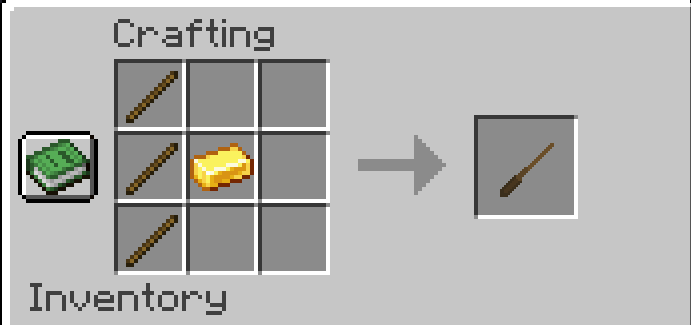
tipp: Name Tag your worker so you can control them precisely with /worker start/stop .
Bind a chest before enabling mining for smooth first deposits.
Better pickaxes last longer; when one breaks, re‑equip to resume.
Compatibility
Minecraft 1.20.1
Forge 47.4.10+
Credits
Mod by maiky_hda.
Custom texture support for owned workers via assets/vilagershop/textures/.
Hire villager worker Team