Who has Mending?
- By
Displays villager trade information (only enchanted books and their costs) above their heads. Useful for finding mending books!
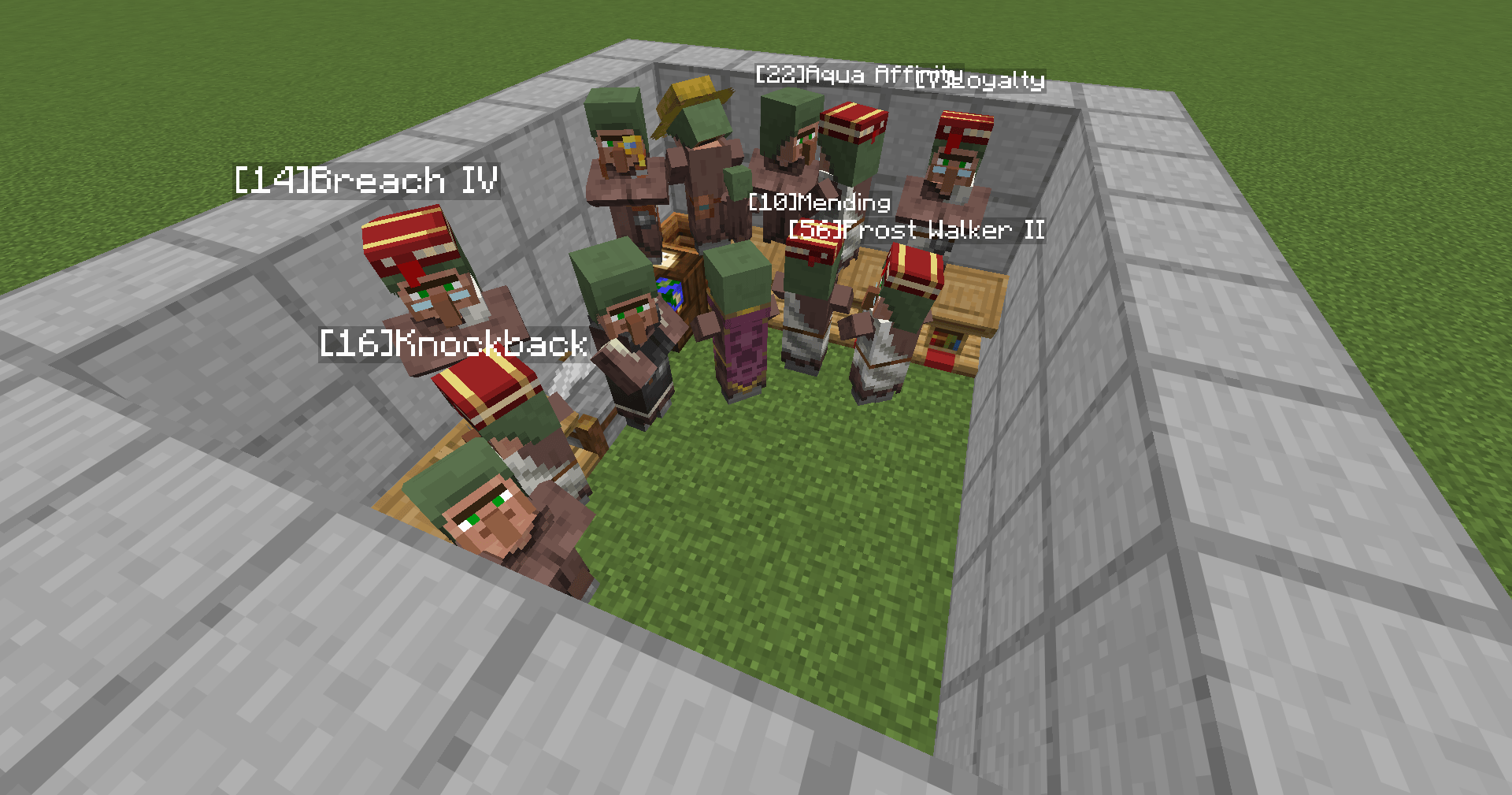
Easily identify which villager offers which enchantment, putting an end to the "Who has Mending?" mystery.
Description
Who has Mending?
A client-side utility mod that visualizes villager trades (only enchanted books) as nameplates above their heads. No more signs, no more manual naming, and no more forgetting "Who has Mending?".
Key Features
- Auto-Detection: Automatically records trade information just by opening the trade screen.
- Virtual Nameplates: Displays what matters most (e.g.,
[10]Mending) directly above the villager's head. - Smart Filtering:
- First Book Only: Only displays the first (topmost) enchanted book in the trade list.
- Enchanted Books Only: Ignores junk trades like paper or glass.
- Librarians Only: Only tracks Librarians, ignoring farmers or clerics.
- Empty Trade Hiding: If a Librarian has no enchanted books, no nameplate is shown.
- Data Persistence: Trade data is saved per world/server. Your records won't disappear!
- Customizable: Toggle display with a keybind (Default: 'H', customizable in Controls).
Installation
Fabric
- Install Fabric Loader.
- Install Fabric API.
- Download
whohasmending-fabric-x.x.x-MCversion.jarand place it in yourmodsfolder.
NeoForge
- Install NeoForge.
- Download
whohasmending-neoforge-x.x.x-MCversion.jarand place it in yourmodsfolder. (No other dependencies are required)
How to Use
- Find a Librarian: Right-click to open their trade window.
- Done!: Close the window. The mod has already recorded the enchanted books.
- Check Nameplates: Look at the villager. You'll see
[Cost]Enchantment Name Level.- Example:
[10]Mendingor[30]Sharpness V
- Example:
Controls
- Toggle Display: Default is H. Go to
Options > Controls > Key Binds > Miscellaneous > Toggle Villager Trade Displayto change the key binding if needed. - Reset Data: Use
/whohasmending reset(or/whm reset) to clear all saved data for the current world. - Backup Data: Use
/whm backupto manually create a backup of the current world trade data. - Restore Data: Use
/whm restoreto restore trade data from the latest backup. - Validate Data: Use
/whm validateto check for and fix any data corruption.
Compatibility
- Client-Side Only: Works on servers without needing to be installed on the server. Of course, it also works in singleplayer.
- Version Support: Currently supports Minecraft 26.1 and 26.1.x on both Fabric and NeoForge.
License
MIT License. Feel free to use this in your modpacks!
Who has Mending? Team