Create: Wearable Toolbox
- By
A mod that turns Create’s toolboxes into wearable chest-slot inventories with the full toolbox GUI, Alt radial menu, hotbar binding, auto-refill, and armor-stand support.
Description
Wearable Toolbox
Overview
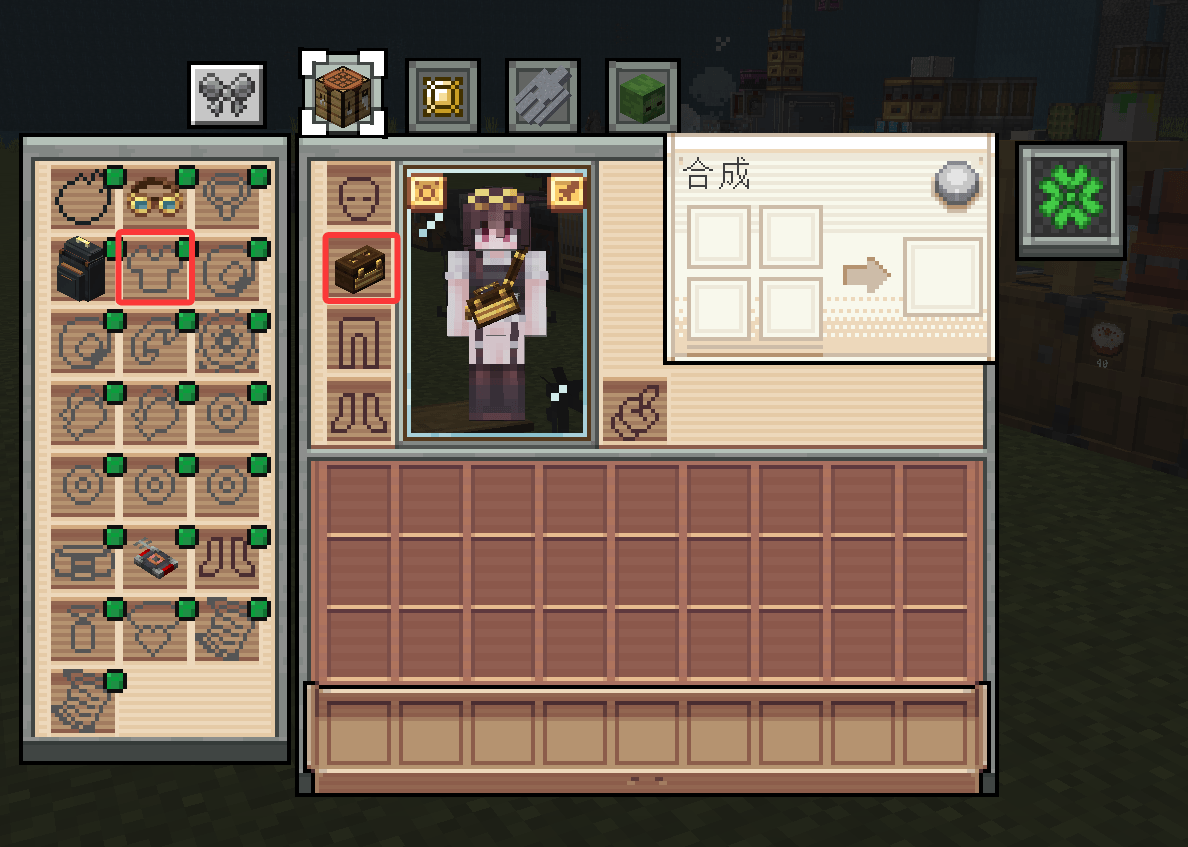
Wearable Toolbox is an add-on for Create that converts the toolbox from a placeable block into equipment worn in the chest slot. It preserves the original container structure, interface, and hotbar interaction while removing the need to place the toolbox in the world.
Features
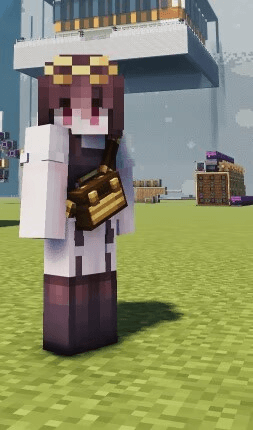
- Chest-slot equipment: The toolbox can be equipped in the chest slot without occupying hotbar or inventory space.
- Full toolbox interface: Press
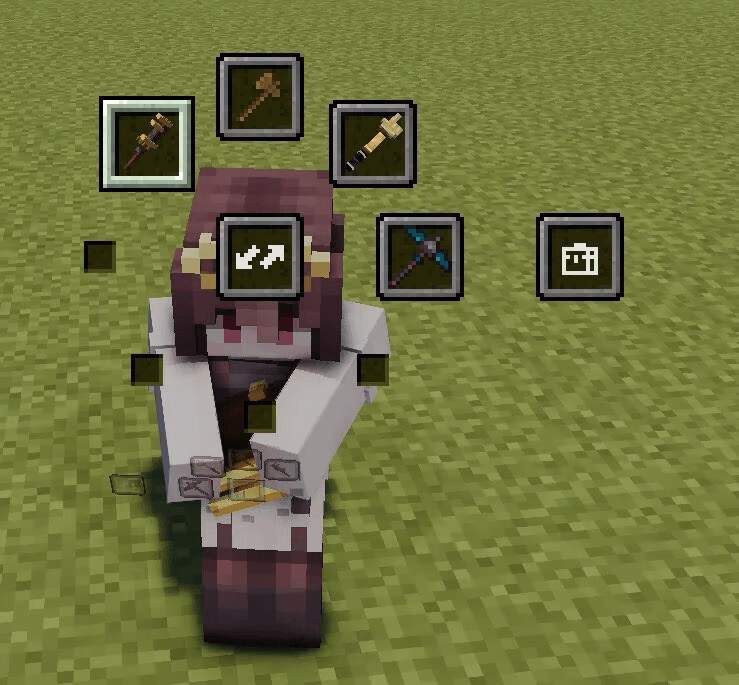
Vto open the same eight-compartment interface as the placed toolbox. - Radial menu: Press Create's toolbox key (left Alt by default) to open the radial menu, select a compartment, and bind it to the current hotbar slot.
- Hotbar binding and automatic refill: Bound hotbar slots are automatically replenished from the corresponding compartment when the stack falls below its threshold, and excess items are returned when it exceeds the threshold.
- Bulk deposit: The "return items to toolbox" button stores all eligible items from the player's inventory.
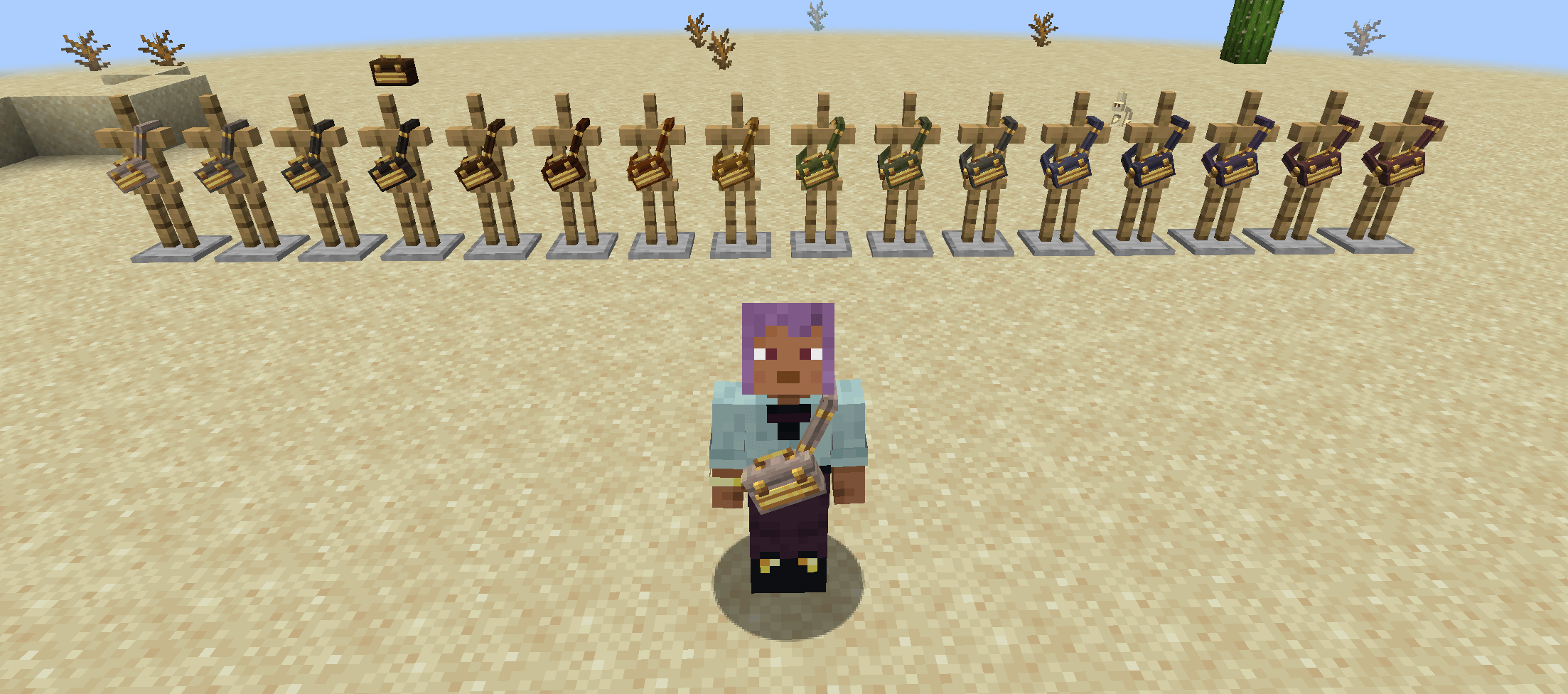
- Visual presentation: Supports all sixteen Create toolbox colours. The equipped toolbox is rendered on the player's chest in the matching colour and switches to its open model while the interface is active.
- Optional Curios integration: With Curios installed, the toolbox can also be equipped in the body slot.
- Armor stand display: The toolbox can be placed in an armor stand's chest slot and is rendered with a dedicated orientation.
Usage
- Obtain a toolbox of any Create colour.
- Equip it in the chest slot, or in the body slot when Curios is installed.
- Press
Vto open the toolbox interface, or press the toolbox key to open the radial menu. - Select a compartment in the radial menu to bind it to the current hotbar slot.
- Hold
Shiftand left- or right-click the toolbox in the inventory to equip it quickly.
Compatibility
- Required: Create.
- Optional: Curios, for body-slot equipment.
- Priority: When both a worn toolbox and a nearby placed toolbox are present, the worn toolbox takes priority for the toolbox key.
- Item system: No new items or blocks are added; the mod uses Create's existing sixteen toolbox colours.
Notes
The mod does not alter Create's toolbox recipes or item system. All functions of the placed toolbox remain available, and both forms can coexist.
Development Notes
A fair share of this mod's code and documentation was written with AI assistance; the models and textures are hand-made. Design, code review and in-game testing are the maintainer's job, and nothing is merged before it runs in game; where something falls short, that is on us rather than on the tooling. Issues are welcome as usual.
可穿戴的工具箱
概述
可穿戴的工具箱是机械动力(Create)的附属模组。该模组将原本只能放置于世界的工具箱转化为可装备于胸甲栏的物品,同时保留工具箱的容器结构、操作界面与快捷栏协作逻辑。
主要特性
- 胸甲栏装备:工具箱可装备于胸甲栏,不占用快捷栏或背包空间。
- 完整工具箱界面:默认按
V键打开与放置版一致的八隔间界面,可直接存取物品。 - 径向菜单:按下机械动力的工具箱快捷键(默认左 Alt),打开与放置版一致的径向菜单,用于选择隔间并绑定当前快捷栏。
- 快捷栏绑定与自动补充:绑定后,快捷栏物品低于阈值时自动从对应隔间补足,高于阈值时回收多余部分。
- 批量收纳:界面中的“把物品收回工具箱”按钮可将背包内可容纳的物品批量存入当前工具箱。
- 外观呈现:支持机械动力全部十六种工具箱颜色;装备后以对应颜色的模型渲染于玩家胸前,打开界面时切换为开启状态。
- 可选饰品栏兼容:安装 Curios 后,工具箱亦可装备于胸饰栏。
- 盔甲架展示:工具箱可放置于盔甲架的胸甲槽,并以独立朝向渲染。
使用方式
- 获取机械动力的任意颜色工具箱。
- 将工具箱装备于胸甲栏;安装 Curios 时亦可装备于胸饰栏。
- 按
V打开工具箱界面,或按工具箱快捷键打开径向菜单。 - 在径向菜单中选择隔间,将其绑定至当前快捷栏槽位。
- 在物品栏中按住
Shift并左键或右键点击工具箱,可快速装备。
兼容性
- 必需:机械动力(Create)。
- 可选:Curios,用于胸饰栏装备。
- 优先级:同时存在穿戴版与附近放置版工具箱时,穿戴版优先响应工具箱快捷键。
- 物品体系:不新增独立物品或方块,直接使用机械动力已有的十六色工具箱。
说明
本模组不改变机械动力工具箱的原有配方与物品体系,仅扩展其装备方式与交互入口。放置版工具箱的全部功能仍然可用,两种形态可同时存在。
关于开发
本模组的代码与文档有相当一部分是在 AI 辅助下完成的,模型与贴图均为手工制作。设计方向、代码审查和实机测试由维护者负责,所有改动都要在游戏里跑通才会合入;若有疏漏,那是我们的责任,不是工具的。欢迎照常报 issue。
Create: Wearable Toolbox Team