Waystone SworldCraft
- By
Ancient arcane waystones with custom 3D models and a searchable teleportation menu. Name your stones, discover them through exploration, and travel between unlocked destinations. Each player's discoveries are saved individually.
Sworld Waystones
Ancient magic. Personal discoveries. Connected worlds.
Give your journeys a destination worth remembering.
Sworld Waystones brings an ancient arcane atmosphere to Minecraft with custom 3D teleportation stones, glowing runes, and a dedicated travel interface. Connect your home, distant settlements, mining outposts, and builds through a network of named waystones.
Every destination must be discovered first. Visit a waystone and interact with it to unlock it for future journeys.
✨ An Ancient Arcane Design
Build your travel network around a distinctive magical monument:
- A custom 3D model with dark stone and golden details.
- Purple runes and a floating cyan crystal.
- A matching interface with dark stone tones, antique gold borders, and cyan selection highlights.
Designed for forgotten sanctuaries, fantasy settlements, and magical bases.
🧭 Explore First, Travel Later
Each player builds their own collection of destinations.
Placing a waystone does not automatically make it available to everyone. Other players must travel to its location and right-click it themselves before they can teleport there.
Discoveries are saved individually and persist between sessions and server restarts. Your friends may know routes you have yet to uncover!
📜 Your Destinations, Clearly Listed
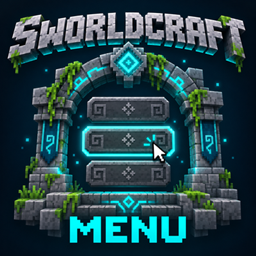
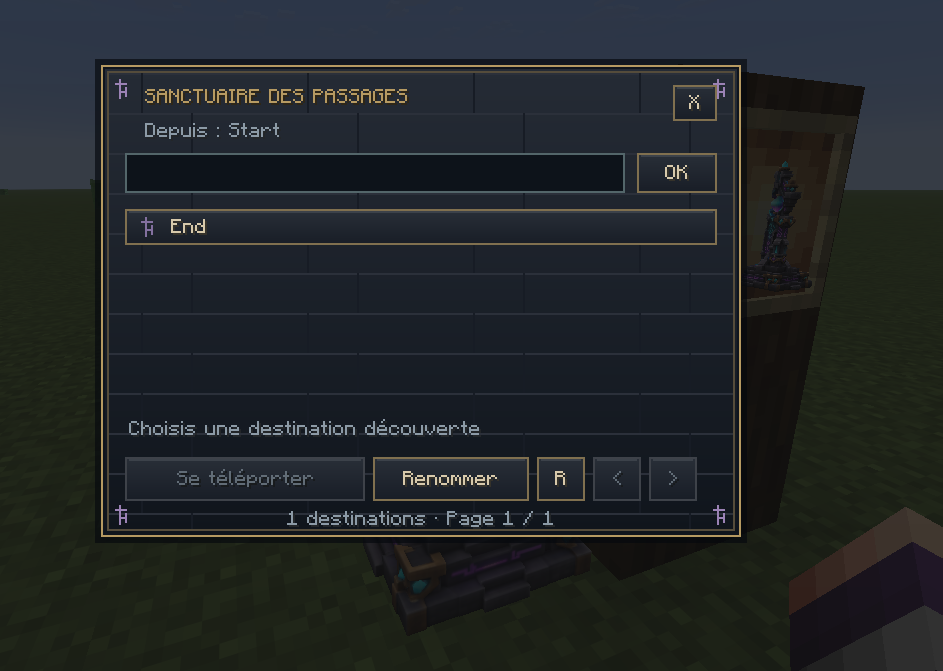
Right-click a waystone to open the arcane travel menu.
- Browse your discovered destinations by name.
- Search for a specific waystone.
- Navigate destinations across multiple pages.
- Select a destination to view its coordinates and dimension.
- Click Teleport to travel.
The interface focuses on your destinations, without displaying your inventory beneath the menu.
🏷️ Name Your Network
Give each waystone a name when you place it: Home, Crystal Mine, Northern Village, or anything that helps you find your way.
The owner can rename their waystone through the interface. Names are shared, while discoveries remain personal to each player.
🌌 Travel Across Dimensions
Connect locations within a dimension or travel between dimensions available in your world.
Teleportation is free, with no experience or consumable cost. You must use a waystone to begin your journey, and your destination must already be unlocked.
Before teleporting, the mod checks for a suitable arrival space near the destination. Keep the area around your stones accessible!
🔨 Crafting
Craft a waystone in a crafting table using:
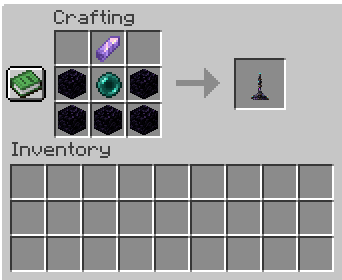
Total: 5 Obsidian, 1 Ender Pearl, and 1 Amethyst Shard.
Leave two blocks of vertical space when placing your waystone.
🚀 Getting Started
- Craft and place your first waystone.
- Give it a memorable name.
- Place another waystone at a second location.
- Right-click stones during your travels to discover them.
- Open a waystone, select an unlocked destination, and teleport!
On multiplayer servers, every player must discover destinations individually.
💾 Persistent Discoveries
Waystone names, ownership, and player discoveries are saved with the world.
Breaking and replacing a waystone creates a new destination, even at the same coordinates. Players must discover the replacement again.
📦 Installation
For this release:
- Minecraft 26.3
- NeoForge 26.3.0.102
- Java 25
Install the mod on both the client and the server for multiplayer. For single-player, install it in your Minecraft profile’s mods folder.
🐛 Feedback & Bug Reports
Found an issue? Include the mod version, Minecraft and NeoForge versions, steps to reproduce it, and relevant logs when reporting a bug.
Explore the world. Discover its stones. Make every journey part of your network.
Waystone SworldCraft Team