

WaCanvas 画像貼り付け
- By
ss03.png
ss04.png
Description
Supported Versions:
- Minecraft 1.20.1 — Forge 47.4.0 or later within the 47.x series
- Minecraft 1.21.1 — NeoForge 21.1.250 or later within the 21.1.x series
WaCanvas lets you import images from your computer and display them in your Minecraft world. Decorate your builds with artwork, posters, signs, and animated GIFs.
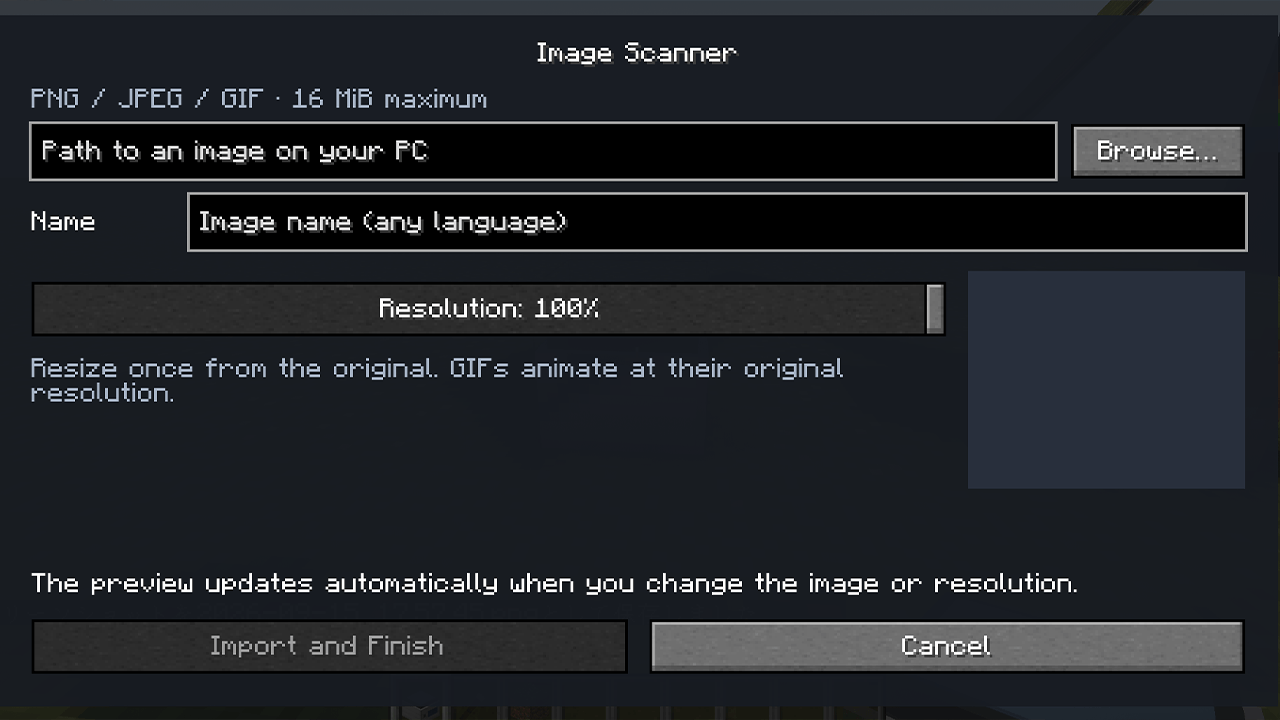
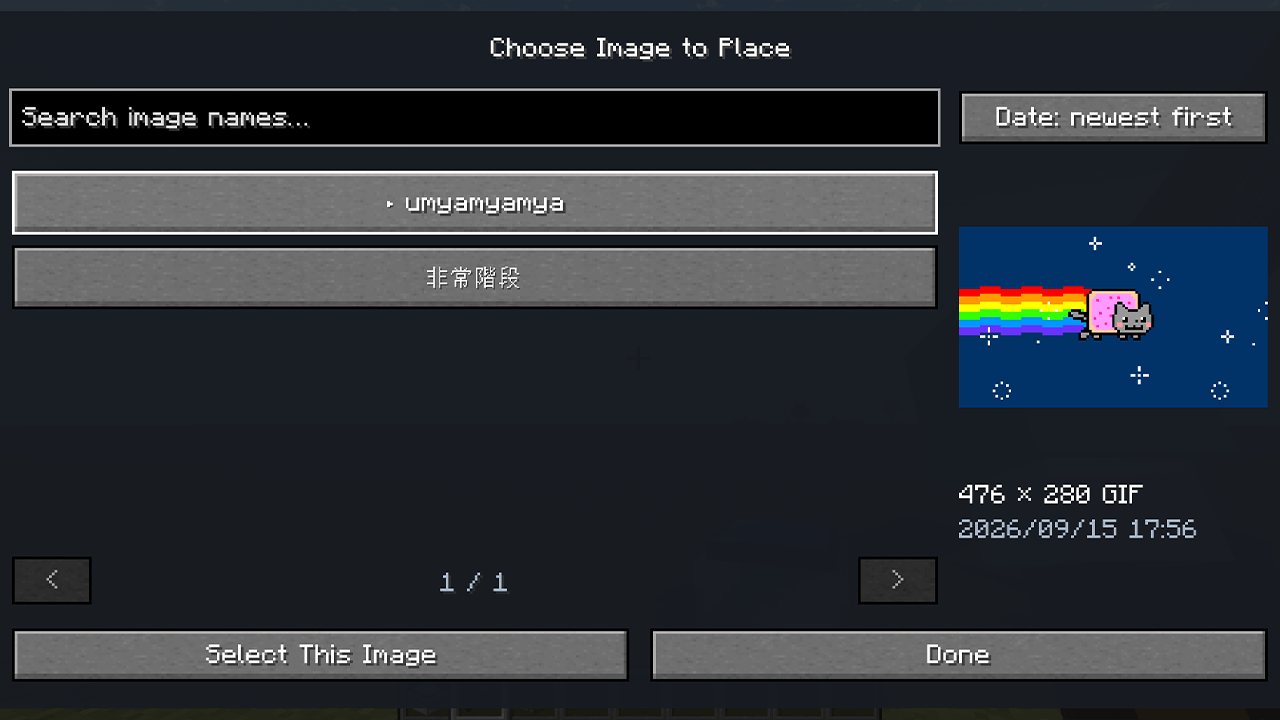
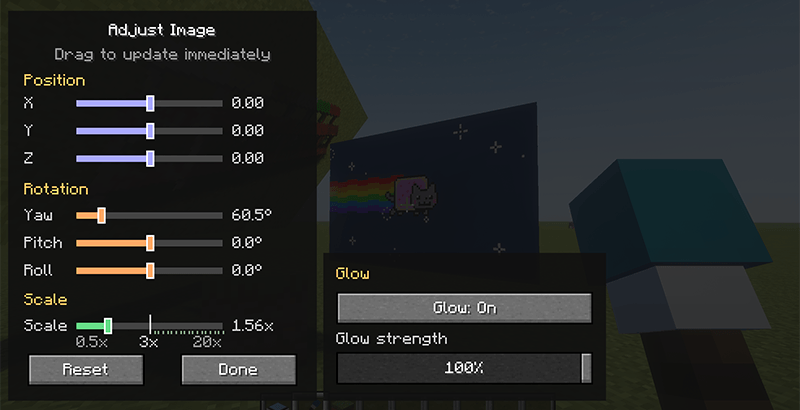
Import your files using the Image Scanner, then place them with the Image Placement Wand. After placing an image, adjust its position, rotation, and size in real time through a dedicated editing screen.
Features:
- PNG, JPEG, and animated GIF support
PNG transparency is preserved, and GIFs play as animations at their original resolution. - Resolution control with automatic previews
Choose a resolution percentage from 1–100% for still images before importing. Changing the file or resolution automatically updates the preview. Your original file remains untouched. - Original aspect ratio preserved
Images initially fit within a 2×2-block area. Adjust the scale smoothly from 0.5× to 3×, then use whole-number steps up to 20×. - Real-time positioning and rotation
Move images along the X, Y, and Z axes, and adjust yaw, pitch, and roll while seeing the results immediately. - Adjustable glow without emitting light
Toggle an emissive appearance and adjust its strength for each placed image. Images can appear brighter without lighting nearby blocks. - Multilingual names and a searchable library
Name your images in English, Japanese, and other languages. Search by name and sort by import date. - Multiplayer image sharing
Imported images are stored with the world and shared with players on the server. Other players do not need their own copy of the original file.
Getting started:
- Place an Image Scanner and right-click it.
- Choose an image from your computer, enter a name, select the resolution, and click Import and Finish.
- Hold the Image Placement Wand and right-click the air to select an imported image.
- Right-click a block face to place it. Images can be placed on walls, floors, and ceilings.
- Right-click a placed image with the wand to adjust it. To remove it, hold the wand and Shift + left-click the image.
WaCanvas also supports survival gameplay. Craft an Image Placement Wand by arranging Blue Dye, a Brush, and a Stick vertically, from top to bottom. The wand has 10 durability and normally breaks after 10 successful placements. It supports Mending and Unbreaking. Selecting, adjusting, or removing images—and unsuccessful placement attempts—do not consume durability. Creative-mode placement is free.
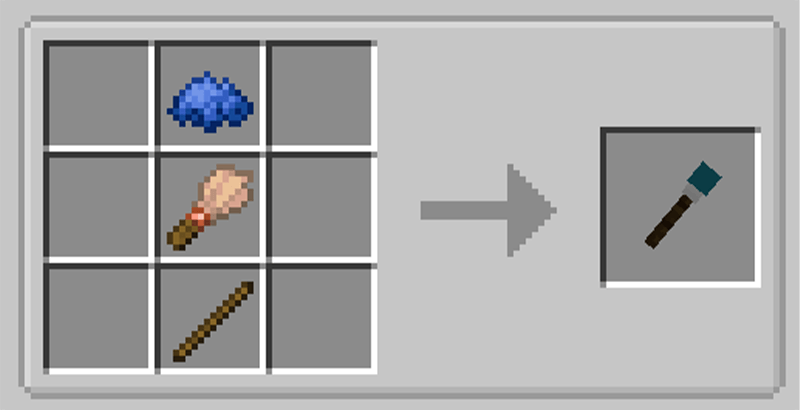
Image Scanner recipe:
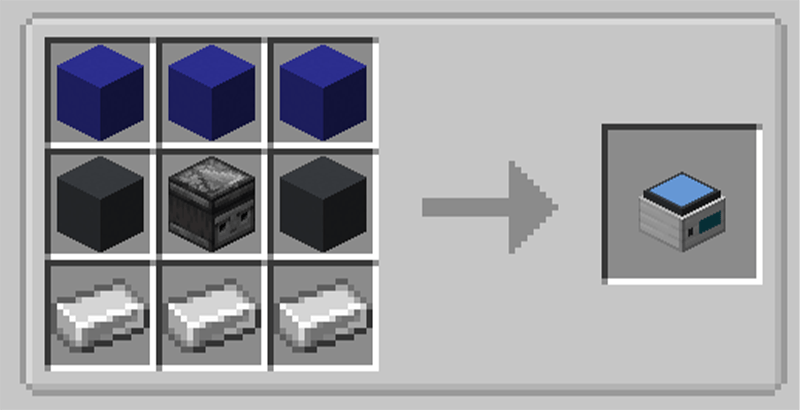
Available for Minecraft 1.20.1 with Forge and Minecraft 1.21.1 with NeoForge. For multiplayer, install the appropriate version of WaCanvas on both the server and every player's client.
Files can be up to 16 MiB each. GIFs support up to 512 frames and a total of 33,554,432 pixels across all frames.
対応バージョン:
- Minecraft 1.20.1 — Forge 47.4.0以上(47.x)
- Minecraft 1.21.1 — NeoForge 21.1.250以上(21.1.x)
WaCanvasは、PCに保存した画像をMinecraftのワールドに取り込み、自由に飾れるMODです。お気に入りのイラスト、ポスター、案内板、動くGIFなどで、自分の建築や拠点を彩れます。
「画像読み取り機」で画像を取り込み、「画像貼り付け棒」でワールドに配置します。配置後も専用画面から位置・回転・サイズをリアルタイムに調整できます。
主な機能:
- PNG・JPEG・アニメーションGIFに対応
PNGの透過部分を反映し、GIFは元の解像度のままアニメーション再生します。 - 解像度の調整と自動プレビュー
静止画は取り込み前に解像度を1〜100%で指定できます。画像や解像度を変更するとプレビューが自動更新され、PC上の元ファイルは変更されません。 - 元画像の縦横比を維持
初期サイズは2×2ブロックの範囲に収まります。倍率は0.5〜3倍まで細かく調整でき、3倍を超える範囲は1倍刻みで最大20倍まで拡大できます。 - リアルタイムの位置・回転調整
X・Y・Z方向の移動と、水平・上下・傾きの回転に対応。その場で見た目を確認しながら調整できます。 - 光源にならない発光表現
画像ごとに発光のオン/オフと強度を設定できます。画像自体を明るく表示し、周囲のブロックは照らしません。 - 多言語の画像名と画像一覧
日本語・英語などで名前を付けられます。取り込み済み画像は名前で検索でき、取り込み日時で並べ替えられます。 - マルチプレイで画像を共有
取り込んだ画像はワールド内に保存され、サーバーの参加者へ共有されます。他のプレイヤーが元画像を持っている必要はありません。
基本の使い方:
- 画像読み取り機を設置して右クリックします。
- PCの画像を選び、名前と解像度を設定して「取り込んで完了」を押します。
- 画像貼り付け棒を持って空中を右クリックし、配置する画像を選びます。
- ブロックの面を右クリックして貼り付けます。壁・床・天井に配置できます。
- 配置した画像を棒で右クリックすると調整画面が開きます。撤去する場合は、棒を持ってShift+左クリックします。
サバイバルにも対応しています。画像貼り付け棒は、青色の染料・ブラシ・棒を上から縦1列に並べて製作できます。耐久値は10で、通常は10回の貼り付け成功で壊れます。修繕・耐久エンチャントに対応し、画像の選択・調整・撤去や配置失敗では消耗しません。クリエイティブでは耐久を消費しません。
対応環境は Minecraft 1.20.1/Forge と Minecraft 1.21.1/NeoForge です。マルチプレイでは、サーバーと参加者全員に対応するWaCanvasを導入してください。
画像は1ファイル16MiBまで対応しています。GIFは最大512フレーム、全フレーム合計33,554,432画素以内です。
The WaCanvas 画像貼り付け Team
