VoxelPort
- By
Open to VoxelPort
Share your Minecraft world or Fabric server with friends in one click. No port forwarding, no account, and your friends need nothing but normal Minecraft.



⚡ Zero to online in four steps
- Install the mod in your Fabric
modsfolder. - Open your world and use Minecraft's Open to LAN.
- Press Esc, then Open to VoxelPort. The address is copied for you.
- Send it to your friends. They paste it into Multiplayer → Add Server.
Running a dedicated Fabric server? Put the jar in mods/, start the server and run /voxelport start.
✨ What you get
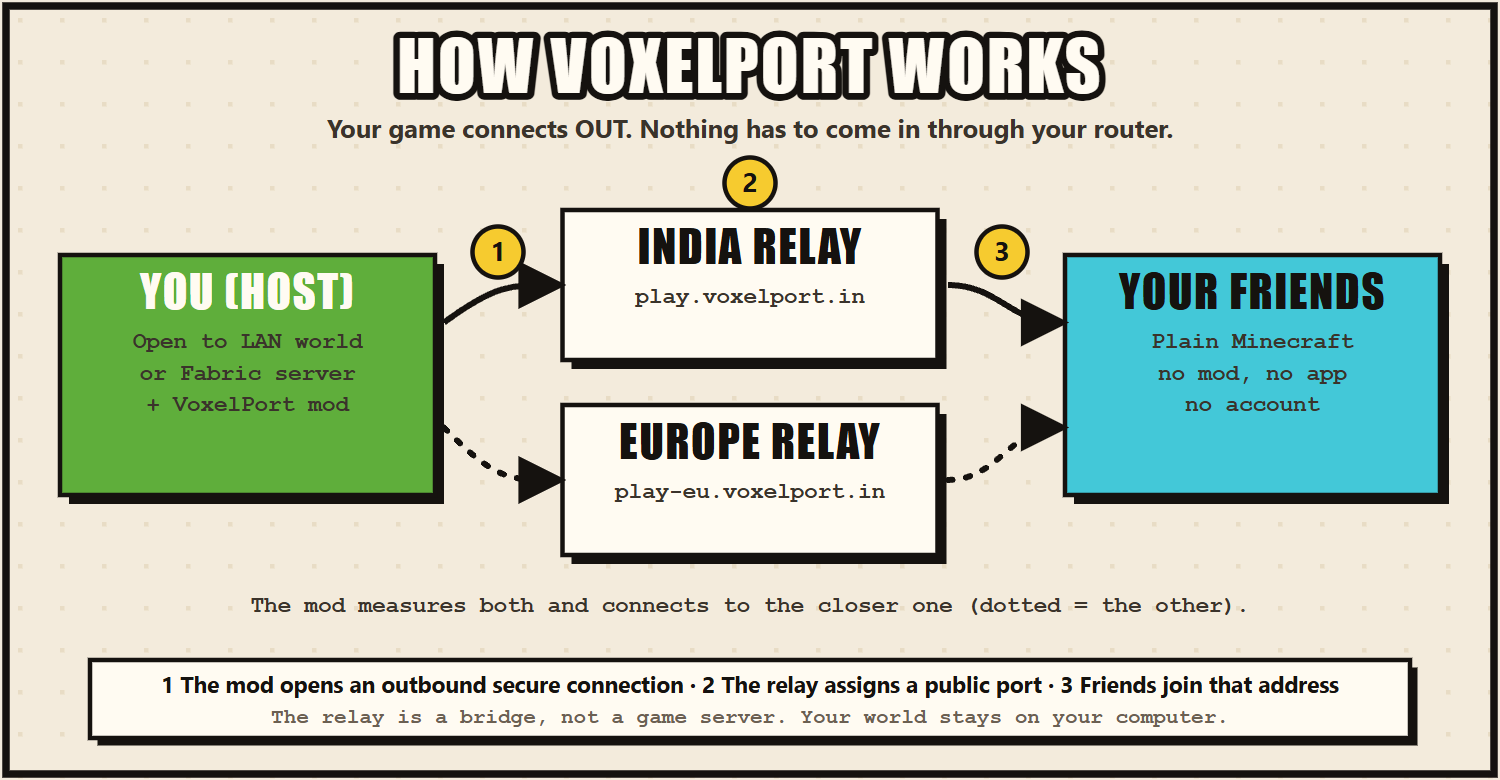
- 🌍 No port forwarding. The mod dials out to a relay, so it works behind CGNAT, on mobile data and on hostel or campus Wi-Fi.
- 🎮 Vanilla players. Friends join from an unmodified Minecraft. Only the host installs the mod.
- 🇮🇳🇪🇺 Two relay regions. India (
play.voxelport.in) and Europe (play-eu.voxelport.in). The mod measures both and uses the closer one automatically. - 🖱️ One click. Open to VoxelPort in the pause menu starts sharing and turns into VoxelPort: Live.
- 📺 Live screen. Address, uptime and connected players, with the relay ping in the player-list header (Tab).
- 🖥️ Dedicated servers too.
/voxelport start,statusandstop. - 📣 Relay announcements. If the relay is about to restart, you see it on the Live screen and in the log.
- 🔒 No account. A private device token is created on first use. Nothing to sign up for, copy or paste.
- 🧩 One jar for every 26.x. The same file runs on Minecraft 26.1, 26.1.1, 26.1.2, 26.2 and 26.3.
📋 Requirements
| Minecraft | 26.1, 26.1.1, 26.1.2, 26.2 or 26.3 |
| Fabric Loader | 0.18.6 or newer |
| Java | 25 or newer |
| Network | Outbound HTTPS/WSS to relay.voxelport.in and eu.voxelport.in on port 443 |
⚙️ This mod needs an external service. It connects to VoxelPort's relay servers to give you a public address, so it does not work offline.
🧰 Commands
/voxelport also works as /voxel and /vp. They need game-master permissions (operator level 2).
| Command | What it does |
|---|---|
/voxelport start [port] |
Go public (uses the server's own port unless you give one) |
/voxelport status |
Show the address, uptime, players and relay ping |
/voxelport stop |
Stop sharing |
❓ FAQ
Do my friends need the mod? No. They join with normal Minecraft: Java Edition using the address VoxelPort gives you.
Does my game have to stay open? Yes. The address works while your world or server is running. VoxelPort is not a 24/7 host, and the relays are run by one student with no uptime guarantee, so check the status page if something looks wrong.
Can't connect? Allow outbound HTTPS/WSS to relay.voxelport.in and eu.voxelport.in on port 443, make sure your world or server is still running, and have friends use the exact address on the Live screen or in /voxelport status.
Can I use my own relay or token? Optional. Settings live in config/voxelport/settings.properties (relay_url, public_host). Set the VOXELPORT_TOKEN environment variable to use your own token. With the defaults, the mod picks India or Europe for you.
🔐 Privacy
Stored on your computer: a random device token (vp_…).
Sent to the relay: that token, the mod name and version (for support), and your game's network traffic while you share, which is passed on and never inspected.
Not collected: passwords, email, Discord identity, chat, inventory, world data or analytics.
Full policy: https://voxelport.in/legal
Open source (MIT): https://github.com/VOXELPORT/VoxelPort · Questions or bugs: GitHub issues or the Discord. Not affiliated with Mojang or Microsoft.
VoxelPort Team