


Visual Weapons
Visual Weapons
Don't just carry your weapons in your inventory — wear them visibly on your character!
Visual Weapons adds weapon holsters to Minecraft, allowing you to display your equipment directly on your character.
With a weapon belt and various modules, you can equip your weapons and tools to suit your needs.
Features
-
Visible Weapons: Your equipped weapons are displayed on your character.
-
Customizable Holsters: Use different modules for different weapons and tools.
-
More Immersion: Give your character a unique, battle-ready look.
Controls and Usage
The key bindings can be changed in Minecraft's Controls settings.
Default Key Bindings:
-
H: Swords
-
X: Tools
-
B: Pistols
-
N: Long guns, such as rifles
Installing and Removing Modules:
-
Right-click in your inventory to insert a module.
Crafting Recipes
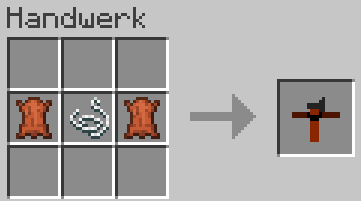
Here you can find the crafting recipes for the items added by Visual Weapons.
Leather Belt
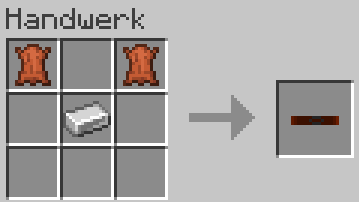
Weapon Belt
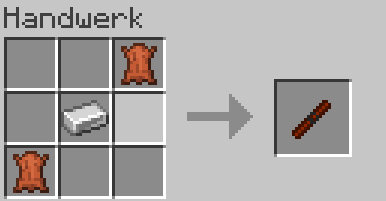
Sheath Module
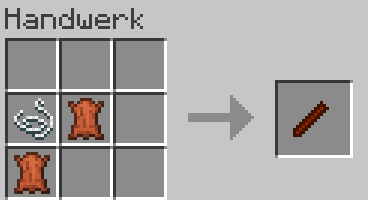
Holster Module
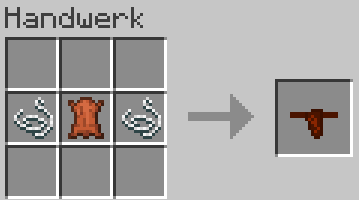
Tool Sling Module
Requirements
Minecraft Java Edition 1.21.1
NeoForge 21.1.235
Curios for Minecraft 1.21.1
Visual Weapons Team
