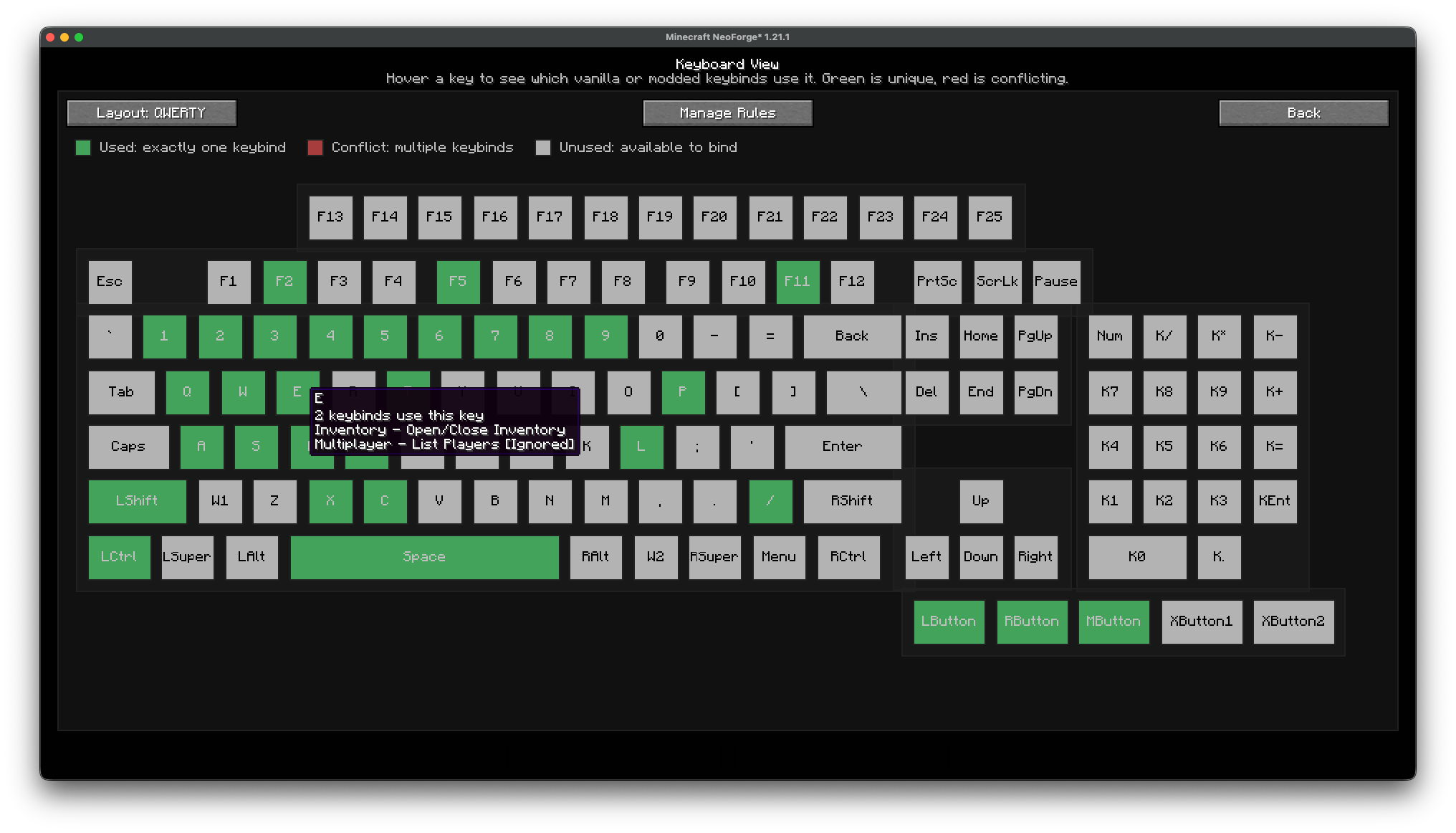
Main ViewBoard GUI on 1.1.0+

Conflicting Keybinds with Ignore Conflict ON in ViewBoard 1.2.1+
Description


The Controlling mod is officially supported by ViewBoard 1.2.0+
IMPORTANT NOTE: A GUI scale of 3 or below is heavily recommended to display the keyboard at a resolution of 1080p or more.
TL;DR
This mod adds a button in the bottom-right corner of the keybinds settings. It opens a preview of your keyboard and color codes each key depending on whether it's:
- Free (No keybinds are using the key)
- Used (The key is being used by one keybind)
- Conflicting (Multiple keybinds use the key)
This mod is especially useful if you are playing a large modpack with multiple keybinds using the same key. You can also use it to find which key on the keyboard is free and can be assigned to a new keybind.
New Features in ViewBoard 1.2.0
- Official support for the Controlling mod
- Full compatibility with Controlling's replacement keybind screen:
- Ignore/group conflict rules now apply there as well
- Conflict filtering support
- Keybind tooltip integration
- Saved Controls / Key Binds width modes:
DefaultLargeVery Large
- Wider layouts prevent long modded keybind names from overlapping ViewBoard tools
- Improved compatibility with FancyMenu:
- Avoids widget-discovery slowdowns
- Compatibility with KeyBind Bundles:
- Proper handling of bundled keybind rows
New Features in ViewBoard 1.1.0
- Support for most GUI scales (best results at GUI scale 3 or below)
- Ignore system for keybinds that lets intentional conflicts exist without warnings
- Integration with Vanilla Controls / Key Binds:
- Respects ignored keybinds
- Suppresses warnings there as well
- Keybind group system:
- Grouped keybinds share a forced key
- Key is removed when bindings leave the group
- Multiple keyboard layouts in keyboard view:
QWERTY,AZERTY, andQWERTZ
- Mouse button support in keyboard view
- Detection and display of custom keys assigned via Minecraft's keybind settings
Usage
- Open Minecraft → Controls / Key Binds
- Click the Keyboard View button (bottom-right) to open the keyboard map
- Hover keys to inspect:
- Conflicts
- Ignored bindings
- Grouped bindings
- Use Manage Rules to configure keybind rules
- In Keybind Rules:
- Search keybinds
- Toggle ignored bindings
- Jump into group editing for specific keybinds
- In Keybind Groups:
- Create and rename groups
- Assign a shared trigger key
- Add or remove bindings
- Ignored bindings will no longer trigger conflict warnings in:
- ViewBoard
- Vanilla keybind screen
Bugs
- Fixed issue: UI rendering and logic conflict when paired with the Controlling mod on older ViewBoard versions. (Fixed on ViewBoard 1.2.0+)
If you encounter any other bugs, please report them on the mod's GitHub page.
If you need a server: https://url-shortener.curseforge.com/Gg4yU
ViewBoard Team

Owner