🚦 Traffic Lights
Realistic 3D traffic lights for Minecraft 1.20.1 Forge.
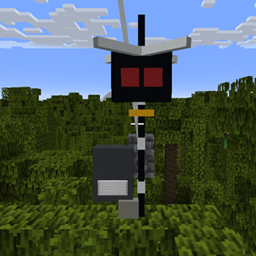
Traffic Lights adds detailed, three-dimensional road traffic equipment to Minecraft, including realistic traffic lights, an overhead signal structure, animated lights and a separate traffic cone.
Designed for roads, cities, intersections, maps, roleplay servers and realistic builds.
✨ Features
🚦 Realistic 3D Traffic Lights
-
Detailed 3D traffic-light geometry
-
Round vertical pole
-
Large overhead traffic light
-
Horizontal support arm
-
Separate red, amber and green lights
-
Designed with realistic proportions in mind
💡 Smooth Light Animation
The traffic lights use a smooth brightness transition instead of instantly switching between states.
-
🔴 Red
-
🟠 Amber
-
🟢 Green
-
Smooth fade-in
-
Smooth fade-out
-
No flashing effect
🔻 Traffic Cone
A separate 3D traffic cone is included for road construction, temporary road closures and realistic city scenes.
⚙️ Automatic Operation
Traffic lights can operate automatically and cycle through their different states.
The system is designed so that the traffic lights can be expanded with additional control features in future versions.
📦 Content
Traffic Light
A complete 3D traffic-light installation with:
-
Vertical pole
-
Overhead arm
-
Traffic-light housing
-
Red light
-
Amber light
-
Green light
-
Smooth light animation
Traffic Cone
A standalone 3D traffic cone that can be placed independently from the traffic-light system.
🎮 Compatibility
| Requirement | Version |
|---|---|
| Minecraft | 1.20.1 |
| Mod Loader | Forge |
| Java | 17 |
🏙️ Perfect For
Traffic Lights is intended for:
-
🏙️ Modern cities
-
🛣️ Roads and highways
-
🚦 Intersections
-
🏗️ Construction areas
-
🚧 Roadworks
-
🎭 Roleplay servers
-
🏘️ Realistic Minecraft cities
-
🚆 Transport-themed maps
-
📸 Realistic builds and screenshots
🚧 Development Status
Traffic Lights is currently in development.
The project is actively being improved, with future updates potentially adding:
-
More traffic-light designs
-
Additional road equipment
-
More control options
-
Additional animations
-
More realistic models
-
More traffic infrastructure
🔧 Installation
-
Install Minecraft 1.20.1.
-
Install Minecraft Forge 1.20.1.
-
Install Java 17.
-
Download the Traffic Lights
.jarfile. -
Place the
.jarfile into your Minecraftmodsfolder. -
Start Minecraft using the Forge profile.
📜 License & Credits
Author: Radim
Traffic Lights is an independent Minecraft mod project.
Minecraft is a trademark of Microsoft Corporation. This project is not affiliated with or endorsed by Mojang Studios or Microsoft.
❤️ Support the Project
If you enjoy the mod, consider following the project and checking back for future updates.
More realistic traffic infrastructure is planned for future releases! 🚦
The traffic light a cone Team