
TradeChest
- By
A Minecraft Fabric mod that adds automatic trading chests with a 9x5 inventory layout. Set up vending machine-style shops where customers place buy items and automatically receive sell items in return.
TradeChest Mod
A Minecraft Fabric mod that adds automatic trading chests with a 9x5 inventory layout. Set up vending machine-style shops where customers place buy items and automatically receive sell items in return.



Features
- Automatic Trading System: Place buy items, get sell items automatically delivered to pickup zone
- 9x5 Inventory Layout: Dedicated areas for buy items, pickup, configuration, owner collection, and sell storage
- Ownership System: Secure your trade setups with username-based ownership
- No Normal Chest Usage: Trade chests can only be used when properly configured
- Item Movement: Buy items automatically move to owner collection area after trades
Requirements
- Minecraft 1.20.1
- Fabric Loader 0.15.7+
- Fabric API
- Java 17 or higher
Installation
For Players
Install Fabric Loader
- Download and run the Fabric Installer
- Select Minecraft 1.20.1 and install Fabric
Download Dependencies
- Download Fabric API for 1.20.1
- Place the Fabric API JAR in your
.minecraft/modsfolder
Install TradeChest Mod
- Download the latest TradeChest mod JAR file
- Place it in your
.minecraft/modsfolder
Launch Game
- Start Minecraft with the Fabric profile
- The Trade Chest item will be available in the Functional Blocks creative tab
For Developers
Clone Repository
git clone https://github.com/rodortega/mc-tradechest.git
cd mc-tradechest
Build from Source
./gradlew buildRun in Development
./gradlew runClient
How to Use
Crafting
Craft a Trade Chest using this recipe:
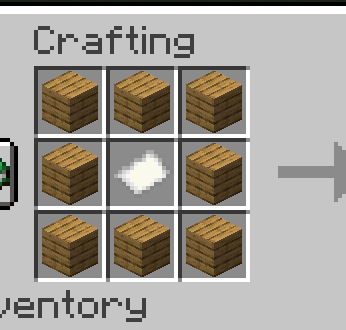
[Planks] [Planks] [Planks]
[Planks] [Paper ] [Planks]
[Planks] [Planks] [Planks]
Basic Setup
Place the Trade Chest - Cannot be used until configured with an owner
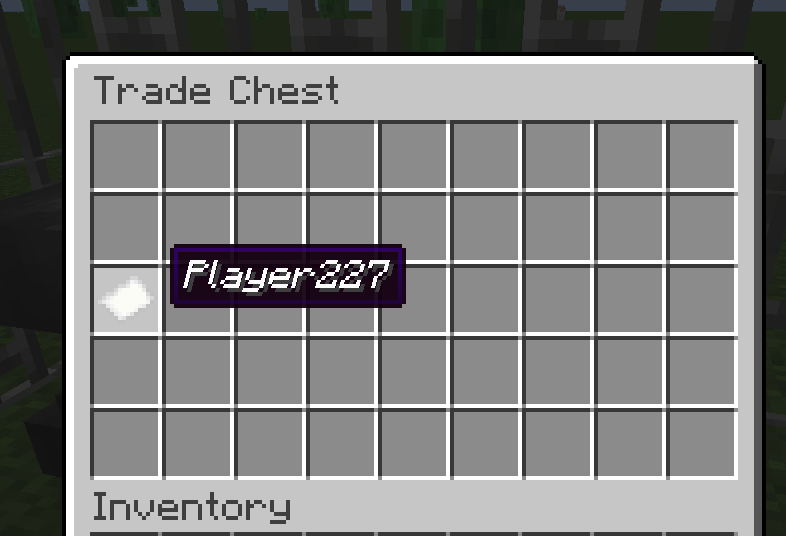
Set Ownership (Slot 18):
- Rename a paper with your exact username using an anvil
- Place it in slot 18 (first slot of third row)
- You are now the owner and can manage the chest
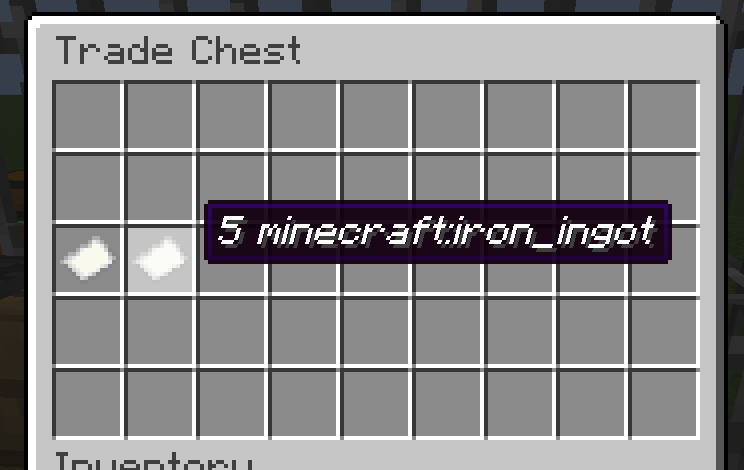
- Configure Buy Requirements (Slot 19):
- Rename a paper:
10 minecraft:iron_ingot - Place in slot 19
- This determines what customers must provide
- Rename a paper:
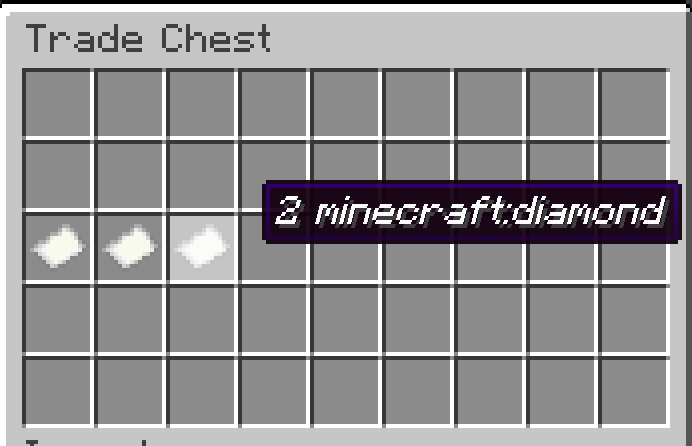
- Configure Sell Items (Slot 20):
- Rename a paper:
5 minecraft:diamond - Place in slot 20
- This determines what customers receive
- Rename a paper:
- Stock Sell Items:
- Place diamonds in the bottom row (slots 36-44)
- Only the configured sell item type can be placed there
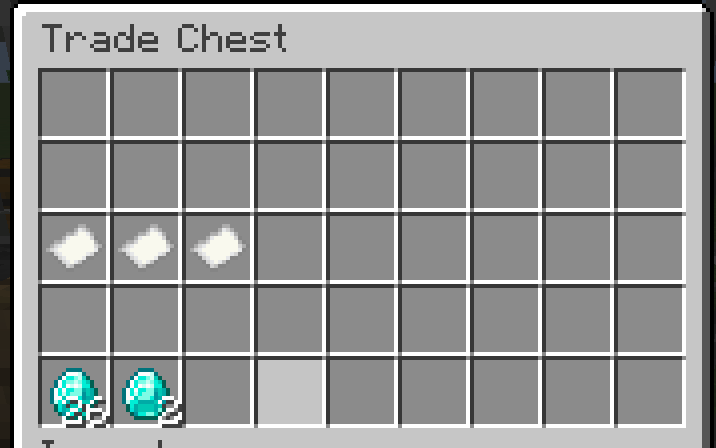
- Ready to Trade:
- Customers place iron ingots in top row (slots 0-8)
- Diamonds automatically appear in pickup zone (slots 9-17)
- Iron ingots move to your collection area (slots 27-35)
Inventory Layout (9x5)
Row 1: [Buy Items Input Area - Customers place buy items here]           (Slots 0-8)
Row 2: [Pickup Zone - Traded items appear here automatically]           (Slots 9-17)
Row 3: [OWNER] [BUY] [SELL] [----LOCKED CONFIGURATION AREA----]         (Slots 18-26)
Row 4: [Owner Collection - Buy items go here after trades]              (Slots 27-35)
Row 5: [Sell Items Storage - Owner stocks sell items here]              (Slots 36-44)
How Trading Works
- Customer Action: Places 10 iron ingots in row 1
- Automatic Processing: System detects complete trade
- Item Movement:
- 5 diamonds move from row 5 to row 2 (pickup zone)
- 10 iron ingots move from row 1 to row 4 (owner collection)
- Customer Pickup: Customer takes diamonds from row 2
- Excess Handling: If customer placed 15 iron, 5 excess remain in row 1 for pickup
Example: Automatic Diamond Shop
Setup Phase:
- Rename papers:
YourUsername,10 minecraft:iron_ingot,5 minecraft:diamond - Place papers in slots 18, 19, 20 respectively
- Stock 64 diamonds in bottom row (slots 36-44)
- Rename papers:
Customer Transaction:
- Customer places 20 iron ingots in top row
- System automatically processes 2 trades (20 ÷ 10 = 2)
- 10 diamonds appear in pickup zone (5 × 2 = 10)
- 20 iron ingots move to owner collection area
- Customer takes 10 diamonds from pickup zone
Owner Benefits:
- Collect 20 iron ingots from row 4 anytime
- Restock diamonds in row 5 as needed
- No manual intervention required
Permissions
| Slot Range | Area | Customers Can | Owner Can |
|---|---|---|---|
| 0-8 | Buy Items Input | Place buy items, take excess | Full access |
| 9-17 | Pickup Zone | Take any items | Full access |
| 18-20 | Configuration | None | Place/remove papers |
| 21-26 | Locked Area | None | None |
| 27-35 | Owner Collection | None | Full access |
| 36-44 | Sell Storage | None | Stock sell items |
Paper Formats
- Owner Paper: Just your exact username (e.g.,
Steve) - Buy Paper:
[amount] [item_id](e.g.,10 minecraft:iron_ingot) - Sell Paper:
[amount] [item_id](e.g.,5 minecraft:diamond)
Troubleshooting
- Can't use chest at all: You need to place an owner paper in slot 18 first
- Can't remove owner paper: Make sure the paper name exactly matches your in-game username
- Can't place buy/sell papers: You must be the owner (have your name paper in slot 18)
- Trading not working: Ensure both buy and sell papers are configured in slots 19-20
- Can't place items in bottom row: Only the configured sell item type is allowed in slots 36-44
- Items not moving automatically: Check that you have sell items stocked and pickup zone isn't full
Building
This mod uses the Fabric toolchain:
# Clean and build
./gradlew clean build

# Run client for testing
./gradlew runClient

# Generate sources jar
./gradlew sourcesJar
Development
Project Structure
src/main/java/com/rodmod/tradechest/- Main mod codesrc/main/resources/- Assets and data filesbuild.gradle- Build configurationgradle.properties- Project properties
Key Classes
RodMod- Main mod initializerTradeChestBlock- Block implementationTradeChestBlockEntity- Block entity with inventory logicTradeChestMenu- Container menu for GUITradeChestSlot- Custom slot with placement restrictions
License
This mod is available under the CC0 license. Feel free to learn from it and incorporate it in your own projects.
TradeChest Team
