Trade window
- By
Trade Window is a server-side Minecraft mod for secure player-to-player trading. Players use a Ghast Tear token to open a shared chest GUI, lock their offer, and swap items atomically—all compatible with vanilla clients.
hero.png
recipe.png

request.png
Description
🪟 Trade Window

🔒 Server-side only — players install nothing
Put the jar where the world runs — a dedicated server, or your own single-player world — and that's the whole installation. People who join need no mod, no resource pack, no data pack. Nothing at all.
It works because the trade window is a plain chest. The mod adds no item, no block, no packet and no screen to the game; it only uses what vanilla Minecraft already has, so a vanilla client cannot be kicked for not knowing something, and there is nothing for your players to keep up to date. That is also why one design runs on every version from 1.21.1 to 26.3.
❗ IMPORTANT: Fabric API Required This mod requires Fabric API to be installed on your server. Without it, the mod will not load or work at all. ✅
🕹️ How a trade goes
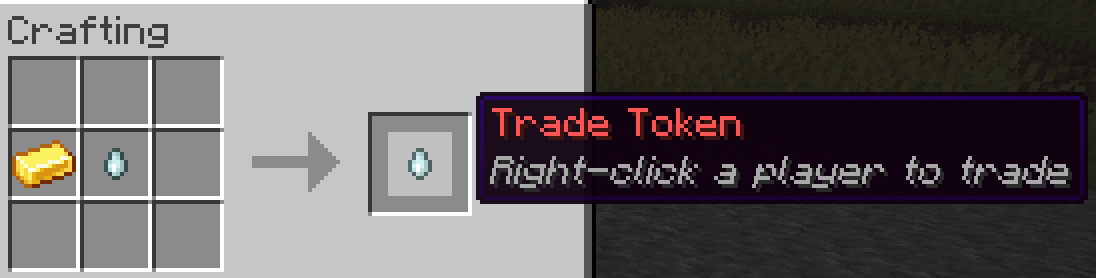
- 🪙 Craft a Trade Token — a red Ghast Tear.
- 👤 Hold it and right-click another player, or type
/trade <name>. - 💬 They click [ Accept ] in chat and the window opens.

One line, two buttons. Nothing has been spent yet.
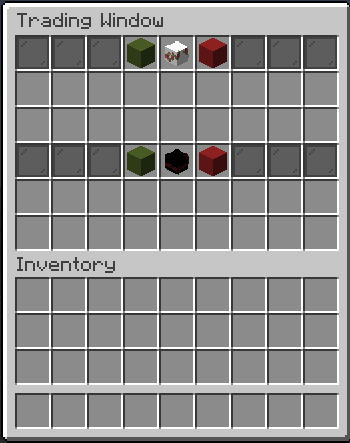
- 📦 Both players drop items into their own rows and click the 🟩 green block.
- ✅ Both sides locked → the items swap and the window closes.
Until a side is locked, that player can keep changing their offer — and neither player can ever touch the other player's items.
🪙 The Trade Token

Ghast Tear + Gold Ingot, anywhere in a crafting grid. It is the only thing you ever craft.
The token is spent when the window opens, not when the request is sent — a request that is never accepted costs you nothing.
🪟 The window


The same trade, the same moment, on both players' screens.
* **Your offer is the middle rows, theirs are the bottom rows** — always, for both players. Look at the two pictures: it is the same armour, moved to whichever rows belong to the player looking at it. Neither player has to translate anything, and nobody sees their own items in the other player's half. * 🟩 **Green block = LOCK** your side. It turns into a green pane saying `LOCKED`, which both players can see. * 🟥 **Red block = CANCEL.** Either player can cancel at any time. * **Every click is checked on the server** — the other side's items simply do not move.Closing the window cancels the trade, and so do a disconnect, a death, a timeout, or walking too far away. Whatever happens, every item goes back to its owner — nothing is dropped on the floor and nothing is lost.
💬 Commands
Players
/trade <player>— Sends a trade request. Needs a Trade Token in your inventory./trade accept— Accepts the request currently shown to you./trade decline— Declines it.
Operators (permission level 2)
/tradeadmin crossdistance <on|off>— Trade from any distance, or enforce the block limit. Saved to the config straight away./tradeadmin list— Every live trade: both players, elapsed time, who has locked./tradeadmin spectate <player>— Watch a live trade read-only. Nothing changes for the players, and the timer is not affected./tradeadmin history [player]— The last 20 finished trades, optionally for one player.
There is no /trade lock and no /trade cancel: locking and cancelling are clicks on the green and red blocks inside the window. Two things, two blocks, no commands to remember.
📦 Install
- Install Fabric Loader 0.19.3 or newer where the game runs.
- Put Fabric API and the jar for your Minecraft server in that
mods/folder. - Start it. Players connect with no mods at all.
Trade window Team