


🪧 Trade Board
- By

Curse Maven Snippet
What's new
Trade Board
Trade Board — это декоративная и настраиваемая доска обмена для Minecraft 26.2 на Fabric.
Мод позволяет создавать наглядные схемы обмена предметами прямо в игровом мире. На доске отображаются необходимые предметы, их количество и результат обмена в формате:
x3 предмета = x1 предметTrade Board подходит для торговых залов, серверных магазинов, складов, RPG-карт, производственных помещений и декоративных игровых построек.
Возможности
- 3 строки обмена
- 6 отдельных ячеек: 3 входных и 3 выходных
- Отображение предметов в виде настоящих 3D-моделей
- Поддержка стандартных предметов Minecraft
- Поддержка предметов из других модов
- Настройка количества предметов от 1 до 99
- Отображение количества возле каждого предмета
- Поиск предметов по названию
- Поиск по идентификатору предмета
- Сохранение выбранных предметов в мире
- Правильное отображение доски с разных сторон
- Фронтальная ориентация моделей предметов
- Установка доски на стену
- Настройка входных и выходных ячеек через удобный интерфейс
Мод является информационной и декоративной системой отображения обменов. Он не списывает предметы у игрока и не выдаёт результат автоматически.
Крафт
Доска создаётся на верстаке по следующей схеме: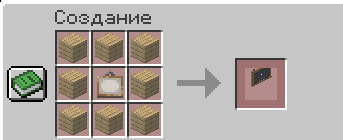
Для крафта требуется:
- 8 деревянных досок
- 1 картина
Вид в игре: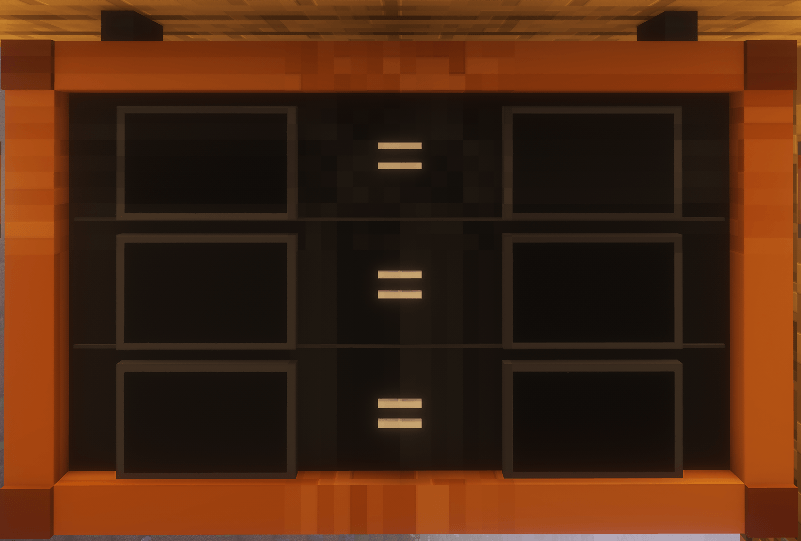
Поддерживаются разные типы досок:
- дубовые
- еловые
- берёзовые
- тропические
- акациевые
- тёмно-дубовые
- мангровые
- вишнёвые
- бамбуковые
- багровые
- искажённые
Результат крафта — 1 Trade Board.
Использование
- Создайте Trade Board на верстаке
- Установите доску на стену
- Нажмите по ней правой кнопкой мыши
- Выберите входную или выходную ячейку
- Найдите нужный предмет в каталоге
- Укажите количество
- Настройте остальные ячейки
После настройки доска будет показывать готовую схему обмена непосредственно в игровом мире.
Trade Board
Trade Board is a decorative and configurable trading board for Minecraft 26.2 on Fabric.
The mod allows you to create clear item exchange layouts directly in the game world. The board displays the required items, their quantities, and the exchange result in the following format:
x3 items = x1 itemTrade Board is suitable for trading halls, server shops, storage rooms, RPG maps, production areas, and decorative builds.
Features
- 3 exchange rows
- 6 separate slots: 3 input slots and 3 output slots
- Items displayed as real 3D models
- Support for vanilla Minecraft items
- Support for items from other mods
- Adjustable item quantities from 1 to 99
- Quantity indicators displayed next to each item
- Search by item name
- Search by item ID
- Selected items are saved in the world
- Correct board rendering from all directions
- Front-facing item model orientation
- Can be placed on walls
- Easy configuration of input and output slots through an in-game interface
Trade Board is an informational and decorative exchange display system. It does not take items from the player and does not provide the exchange result automatically.
Crafting Recipe
The board is crafted in a crafting table using the following recipe:
Required materials:
- 8 wooden planks
- 1 painting
The recipe supports different plank types:
- Oak
- Spruce
- Birch
- Jungle
- Acacia
- Dark Oak
- Mangrove
- Cherry
- Bamboo
- Crimson
- Warped
The crafting recipe produces 1 Trade Board.
How to Use
- Craft a Trade Board in a crafting table
- Place the board on a wall
- Right-click the board
- Select an input or output slot
- Find the required item in the catalog
- Set the desired quantity
- Configure the remaining slots
This mod has no additional files