Total Storage
- By
Total Storage is a Minecraft fabric mod that allows sorting, searching, tagging, and more across many containers in a storage network.
highlight.png
deposit.png
filter.png
containers.png
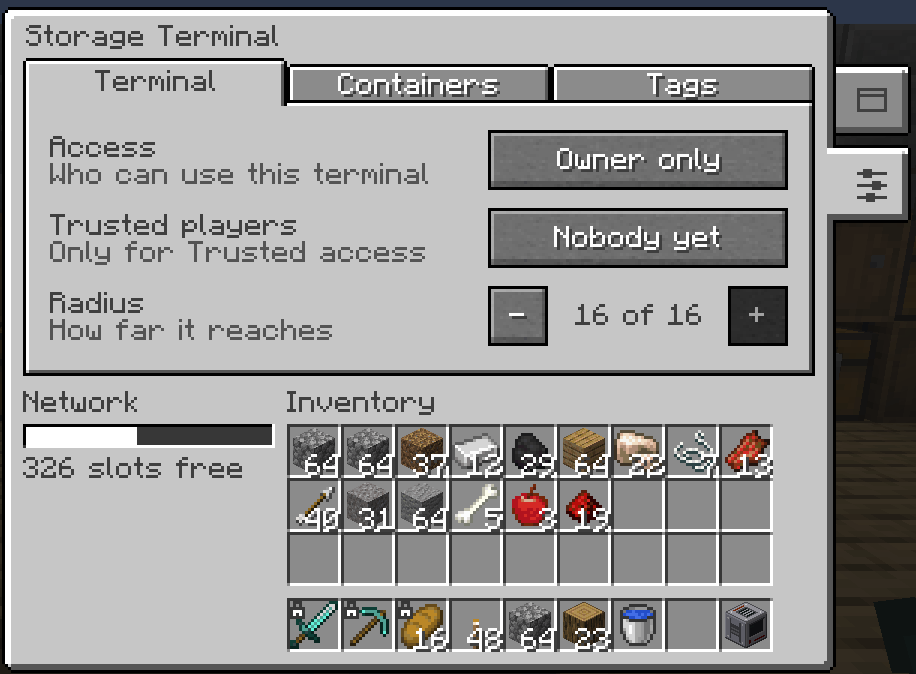
access.png
Description



Total Storage
Total Storage turns a room full of chests into one searchable inventory. Place a storage terminal near your chests, power it with redstone, and you can reach everything in them from one screen. Search it, take what you need, and empty your pockets into it with one click. A sort button on every container and a lock for your inventory slots come along too, and those work with no terminal at all.
Alpha: Total Storage is in alpha and we would love your feedback. Open an issue and tell us what you think.
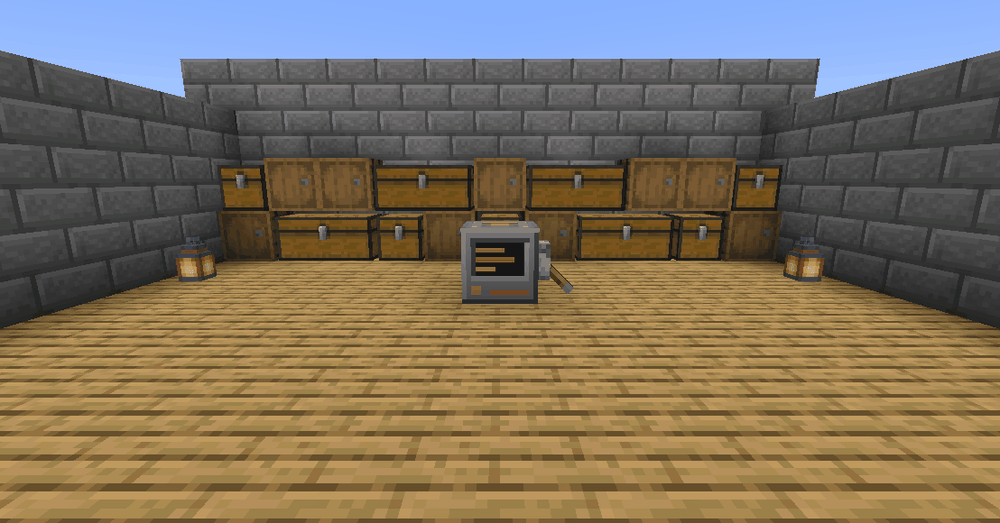
The storage terminal
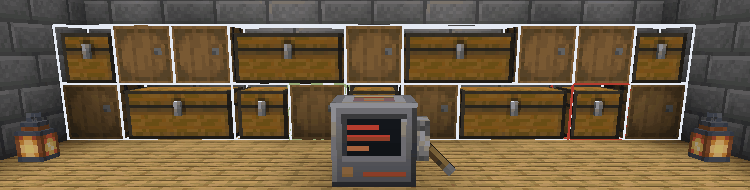
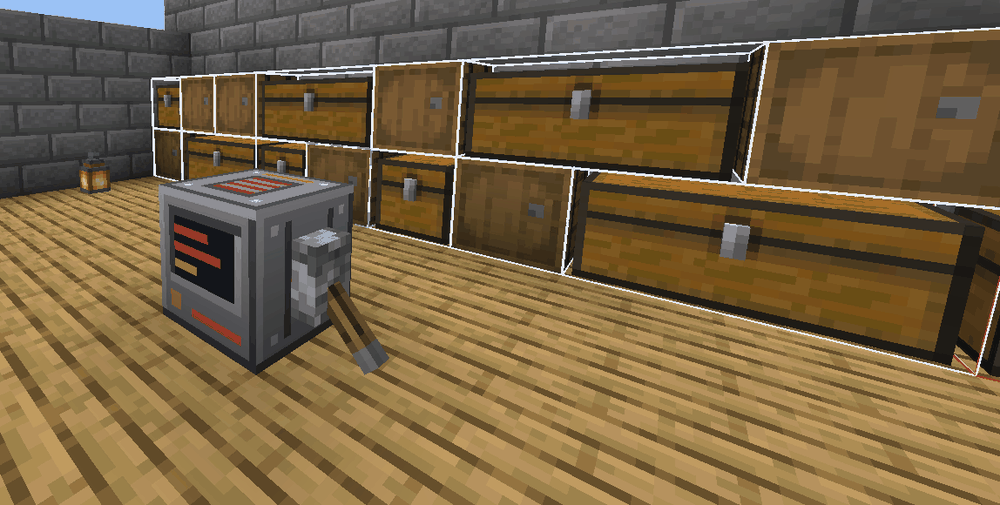
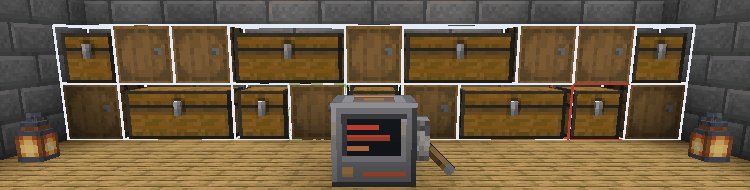
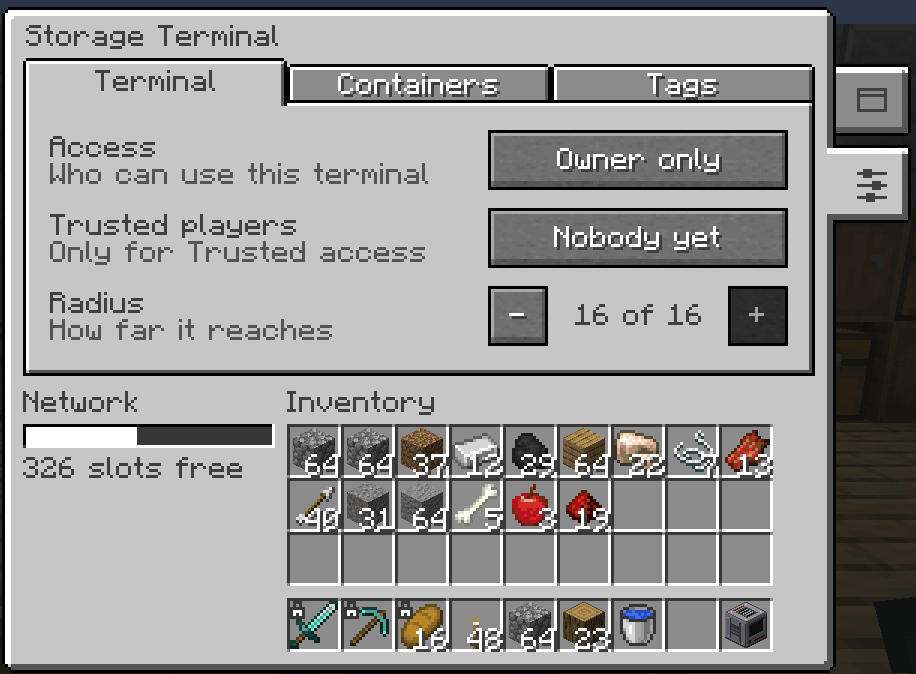
Craft a terminal, put it near your chests, and power it. A lever on any side works, but keep the front clear: that is its screen, and clicking it opens the terminal. Every chest, barrel and shulker box within 16 blocks in every direction joins the network (you can change the reach per terminal), and the terminal outlines them so you can see what it reaches. Drop a new chest in range and it joins on its own. Cut the power and the terminal goes dark, but it remembers everything you set up.
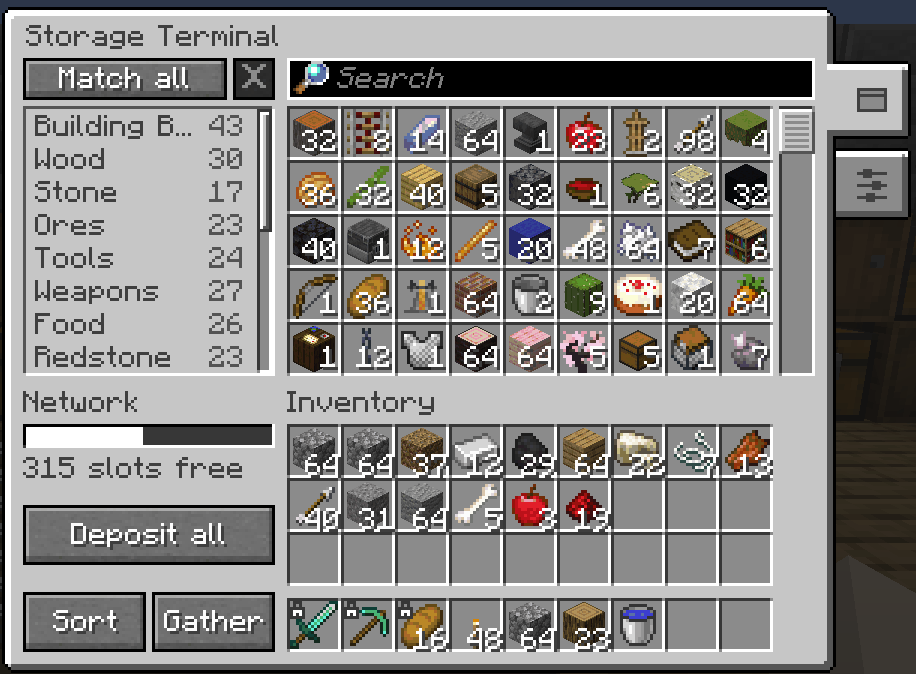
Right-click the terminal and the whole network is on one screen, above your own inventory.
What you can do
- Find anything. The search box is ready the moment the screen opens. Type part of a name, or a few of its letters in
order, and the closest matches come first, so
dpickfinds a Diamond Pickaxe.#tagsearches by tag and@modnarrows to one mod, and both mix with plain text, so@create cogfinds the cogwheels Create adds.
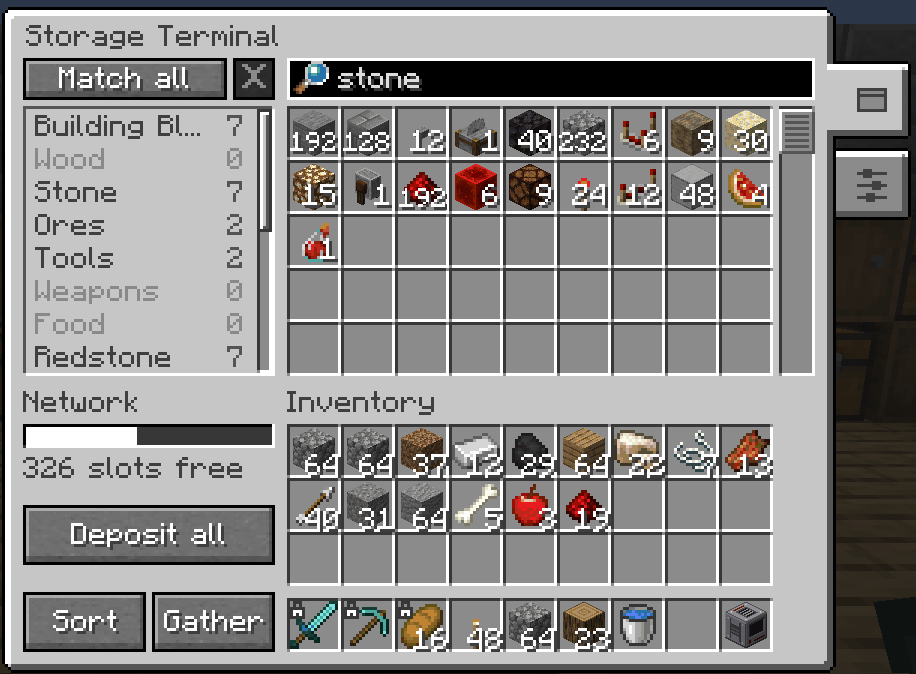
- Take what you need. Left-click a cell for a stack, right-click for half, shift-click to send it straight to your inventory, and middle-click to type an exact amount. With something on your cursor, left-click to put it all in and right-click to put in one.
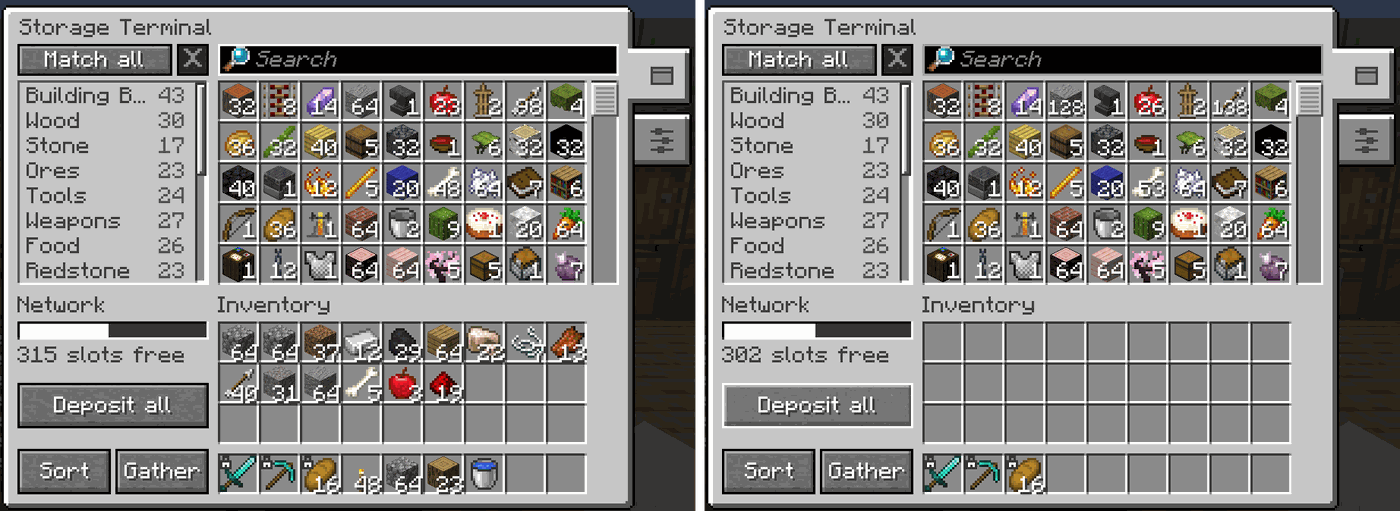
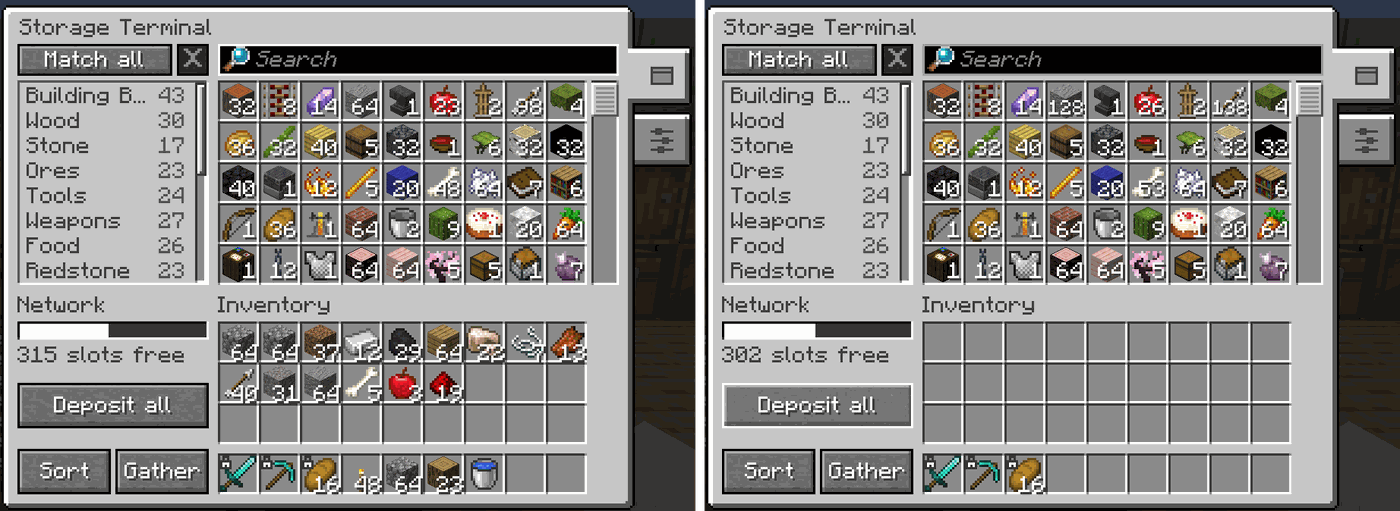
- Empty your pockets. Press Deposit all, or
R, and your inventory goes into the network with each item routed to the chest it belongs in. Locked slots, armour and your offhand stay put. The bar on the left shows how full the network is and warns you before it runs out of room.
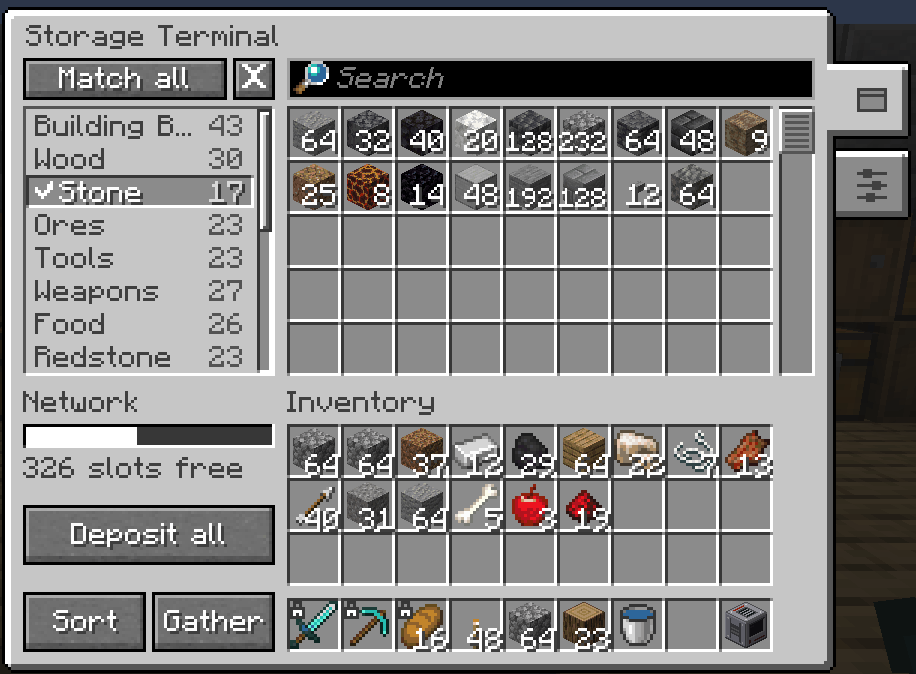
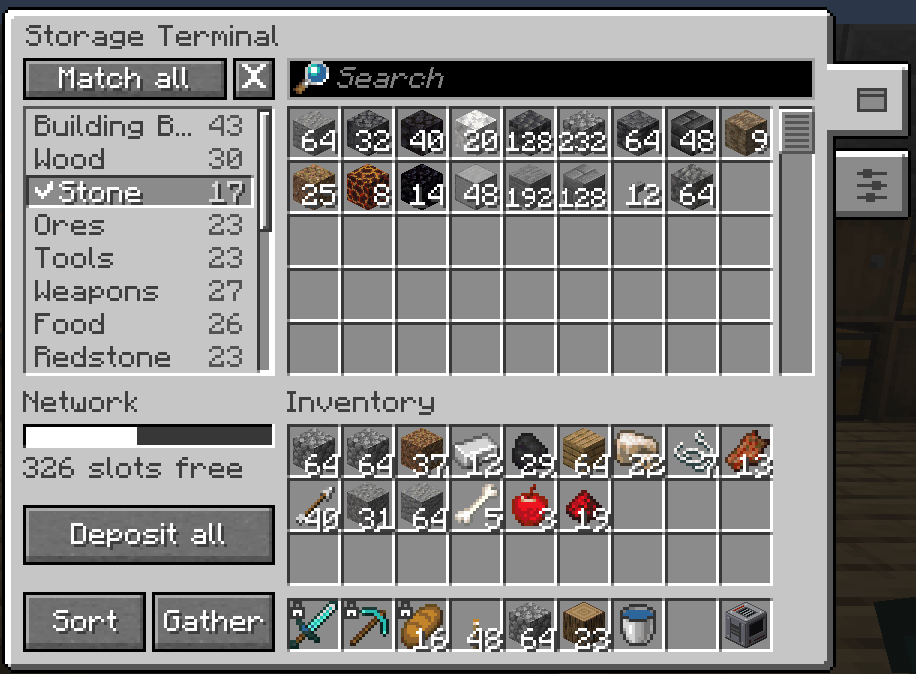
- Browse by tag. Every item already sits in a category like Tools, Food or Redstone. Click a tag to narrow the grid
to it, pick several and choose whether an item needs all of them or any of them. Tags and the search box work together,
so the Castle tag plus
stonetyped finds the stone you filed under Castle.
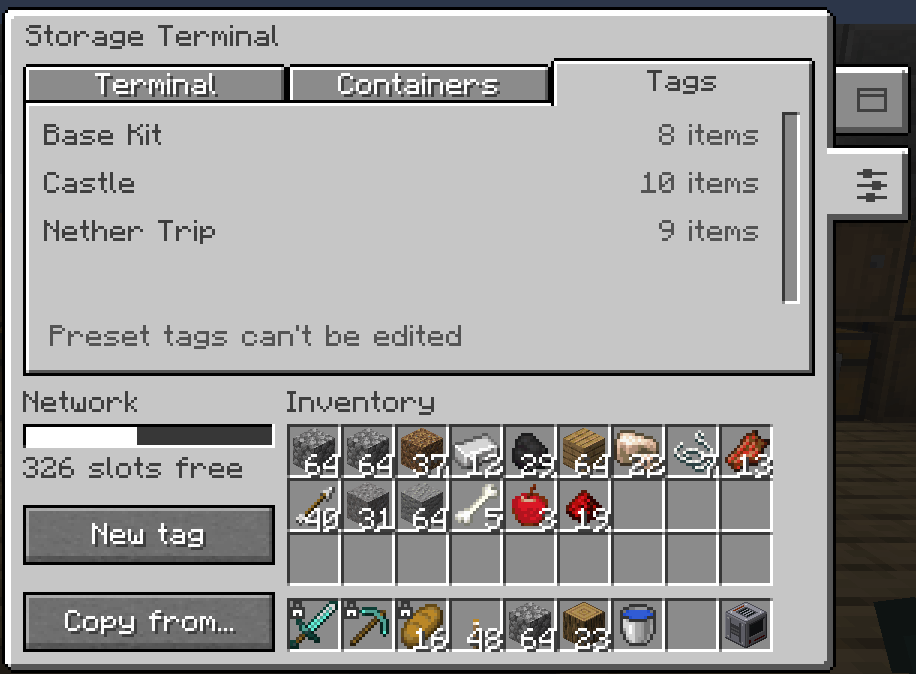
- Make your own tags. Open the sliders tab on the right of the terminal screen, go to Tags and press New tag to make tags such as Base Kit or Castle for your own world. Ctrl-click an item (Cmd on a Mac) to file it, or shift-click a tag to file everything the grid is showing at once. Tags can be copied to your other terminals.
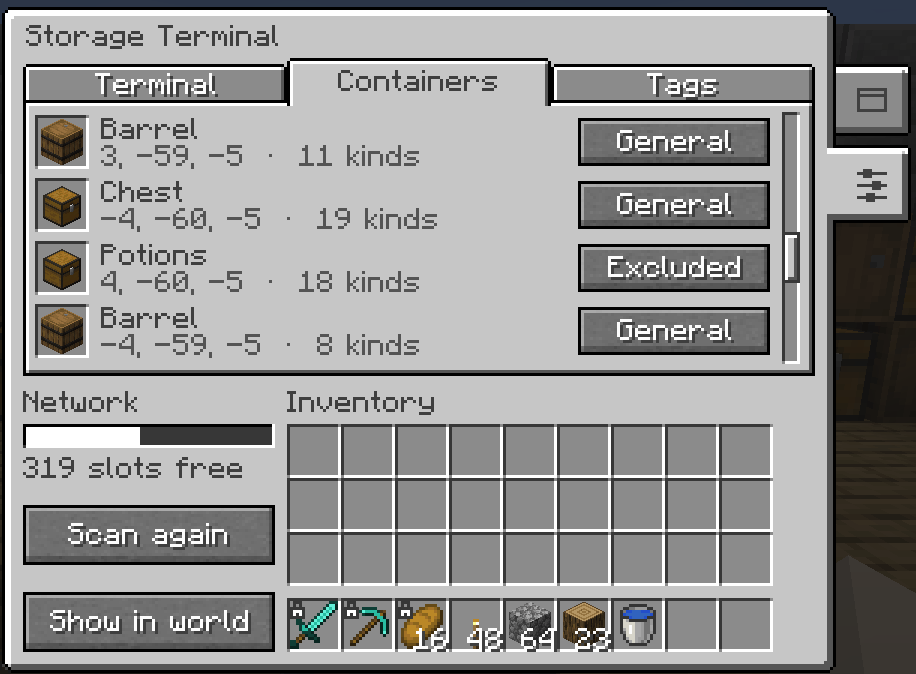
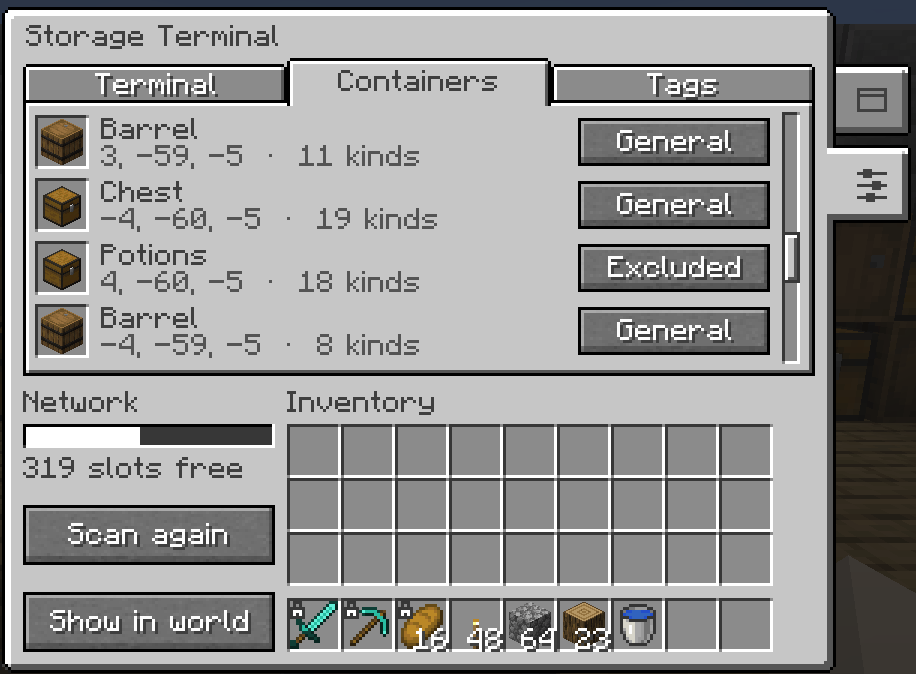
- Decide what the network may touch. Each container has a role, set under Containers on that same sliders tab. General takes anything. Filtered only takes the tags you tick. Excluded is searchable and you can take from it, but the network never puts items in it or rearranges it, so your hand-arranged potion chest keeps its layout. Give containers names so the list says Potions instead of coordinates, and press Show in world to outline them: a white outline for General, a green dashed one for Filtered and a red double one for Excluded.
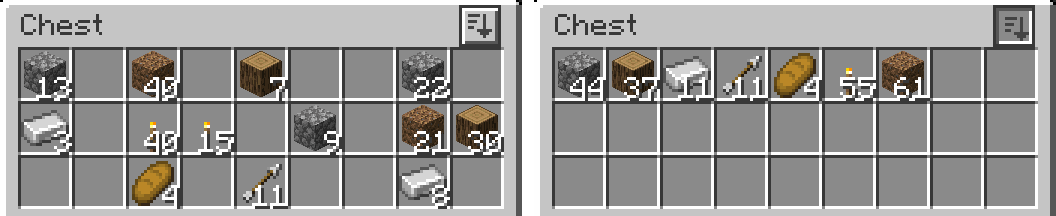
- Keep the chests tidy. Sort orders every chest in the network and Gather pulls each item into as few chests as possible, so opening a chest by hand still makes sense. Big jobs ask before they start, run in the background without lagging the server, and can be stopped part way.
- Sort anything, anywhere. A sort button sits on every chest, barrel and shulker box screen and on your inventory,
and it works on modded containers too. Press
Bto sort without the mouse, or use/ts sort.
- Quick stack. The other button on your inventory tops up matching stacks in the containers around you and leaves
everything else alone.
Vdoes the same.
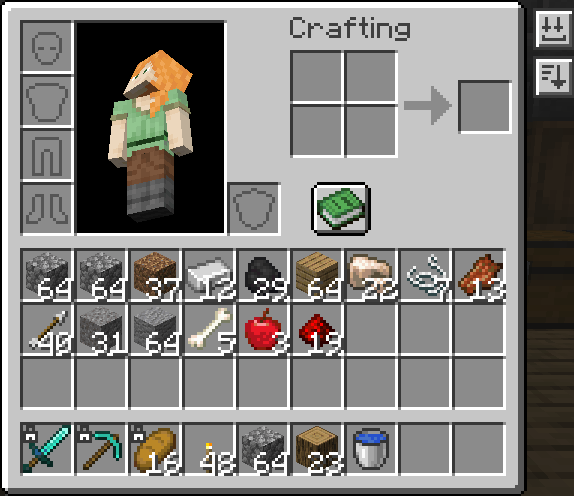
- Lock slots. Alt-click (Option on a Mac) any slot in your inventory and sorting, Deposit all and quick stack will leave it alone. You can still move it yourself. Hold Alt in any inventory screen to see which slots can be locked.
- Share safely. A terminal opens only for the player who placed it until they say otherwise. Switch it to Trusted players and add friends by name, or set it to Anyone. Operators can always get in, and the server logs when they do.
Install
- Install Fabric Loader, then put Total Storage
and Fabric API in your
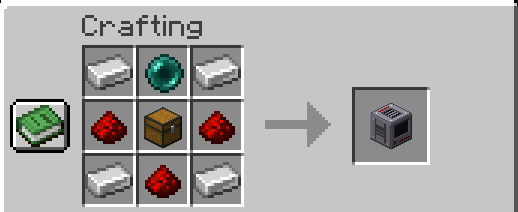
modsfolder. The mod has to be on the server and on every player's game. A player without it cannot join, and is told to install it. - Craft a terminal from a chest, four iron ingots, three redstone dust and one ender pearl.
- Place it near your chests, power it, and right-click it.
The keys are R for Deposit all, V for quick stack and B for sort. Change them under Options > Controls > Key Binds, in the Total Storage section.
Settings
Change server settings on the Mod Menu screen, or in chat with /ts config. In singleplayer you can change them. On a server, only
operators can, and everyone else can read them. Each terminal keeps its own settings on the block: open the sliders tab on the
right of its screen for radius and access under Terminal, roles and names under Containers, and your tags under Tags.
All server settings
Settings live in total-storage/server-config.json inside the world folder, so each world has its own. A value out of
range is clamped when the file loads and refused by the command. The command id is what /ts config set takes.
| Setting | Command id | Default | Range | What it does |
|---|---|---|---|---|
| Maximum terminal radius | maxTerminalRadius |
16 | 1 to 64 | The furthest any terminal may reach. Lowering it shrinks the reach of terminals already placed. Raising it again gives them back the reach they were set to. |
| Default access mode | defaultTerminalAccessMode |
Owner only | Owner only (owner), Trusted players (trusted), Anyone (open) |
What a newly placed terminal starts as. Terminals already placed keep theirs. |
| Quick stack radius | quickStackRadius |
8 | 1 to 64 | How far quick stack looks for containers to top up. |
| Sort ordering | sortOrdering |
Registry order | Registry order (registry_id), Display name (display_name) |
How sorted containers are ordered. Registry order does not change with the game language. |
| Sort button | sortButtonEnabled |
On | On or off (true or false) |
Whether the sort button and key are offered. /ts sort keeps working either way. |
| Quick stack | quickStackEnabled |
On | On or off (true or false) |
Whether quick stack is offered on the button, the key and the command. |
| Deposit all skips the hotbar | depositAllSkipsHotbar |
Off | On or off (true or false) |
Keeps the whole hotbar out of Deposit all, for players who would rather not lock slots. |
| Near capacity warning | nearCapacityWarningPercent |
90% | 0 to 100 | How full the network has to be before the terminal warns you. |
| Expensive operation cooldown | expensiveOperationCooldownTicks |
10 ticks (half a second) | 0 to 200 (10 seconds) | Per player wait between rescans, deposits, quick stacks, sorts and gathers. 0 turns it off. Raise this first on a busy server. |
| Moves per tick budget | movesPerTickBudget |
64 | 1 to 1024 | How much work one network-wide sort or gather does at a time. Lower is smoother and slower. |
| Ask above this many containers | largeOperationContainers |
8 | 0 to 1024 | A sort or gather touching more containers than this asks before it starts. 0 never asks. |
/ts config eligibility forces a block into or out of every network, which is how you admit a modded container the mod
does not recognise, or keep one out. Furnaces, hoppers, brewing stands and ender chests are left out by default.
The locked slot badge is always drawn. A tint behind locked slots is off by default: set lockedSlotTintVisible to
true in config/total-storage/client.json in your game folder to switch it on.
Commands
/totalstorage and /ts are the same. /ts on its own lists them. Terminal commands take the terminal's block
position, and container commands take the container's.
/ts config list
/ts config get <setting>
/ts config set <setting> <value>
/ts config reset <setting>
/ts config reset all
/ts config eligibility list
/ts config eligibility set <block> <true|false>
/ts config eligibility clear <block>
/ts config eligibility clear all
/ts terminal <pos> info
/ts terminal <pos> radius [blocks]
/ts terminal <pos> access [owner|trusted|open]
/ts terminal <pos> trust [players]
/ts terminal <pos> untrust <players>
/ts terminal <pos> role <container> [general|filtered|excluded]
/ts terminal <pos> name <container> [set <name>|clear]
/ts terminal <pos> filter <container> [add <tag>|remove <tag>|clear]
/ts terminal <pos> rescan
/ts terminal <pos> highlight
/ts terminal <pos> tags export <file>
/ts terminal <pos> tags import <file> <merge|replace>
/ts terminal <pos> tags copy <from> <merge|replace>
/ts sort
/ts quickstack
Anyone can read a setting, sort what they have open or are looking at, and quick stack. Changing a server setting
needs operator permission. Changing a terminal needs its owner or an operator. Settings and values tab-complete, and
changes apply at once. Tag exports and imports use total-storage/tag-sets/<file>.json inside the world folder.
Works well with
None of these are needed.
Requirements
Minecraft 1.21.1 on Java 21.
| Mod | Version |
|---|---|
| Fabric Loader | >=0.16.5 |
| Fabric API | >=0.116.12+1.21.1 |
Languages
Total Storage is in English. Want to add your language? Copy
en_us.json, translate the text, and open a pull request.
Keep the keys and the %s placeholders as they are, and leave command names and arguments untranslated.
Credits
How every part of the mod is meant to work is written down in the product requirements.
Total Storage is made by Vitória Vedana and Graham Bartley and released under the MIT License.
If you enjoy Total Storage, a star on GitHub or a coffee on Ko-fi helps a lot.

Total Storage Team