e1d7309e-1fd1-495b-8ffb-17cea2b8c5eb.png
Description
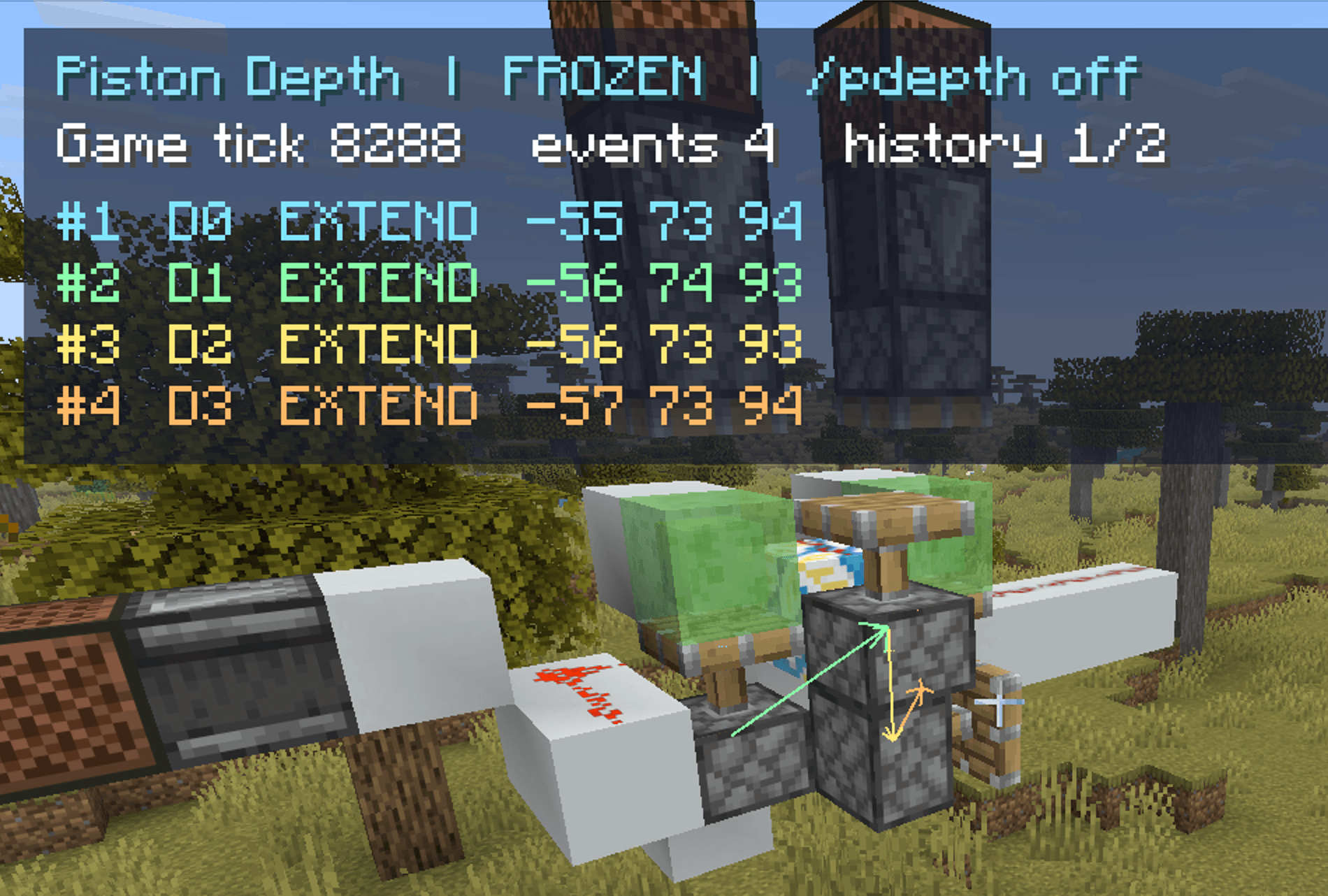
TickWeave is a Fabric mod for observing Minecraft redstone microtiming. Freeze game ticks, step through a circuit, and inspect server-recorded piston block events and redstone dust evaluations. The client displays execution order, event depth, and observed propagation links, making it easier to analyze BED encoders, decoders, and other order-sensitive contraptions.
Features
- Piston execution order: Mark piston events as
#1,#2, and so on in the order they actually execute within a game tick. - Block event depth: Mark causal layers as
D1,D2, and so on, with arrows between parent and child events when that relationship can be confirmed. - Redstone dust tracking: Show observed dust power, associated event depths, and direct trigger relationships within the selected tick.
- Piston state diagnostics: Record power both when an event is queued and when it executes, distinguishing actual extension, retraction, unchanged state, and cancellation.
- 0t redstone block output: Detect an extension that pushes a redstone block followed by a block-dropping retraction in the same tick, and mark the physical output in the second block space.
- Trace history: Browse the latest 40 ticks with recorded events or inspect individual events within a coordinate range.
- Configurable display: Control piston and dust overlays separately, and adjust world text, HUD, colors, distance, and hotkeys.
Installation
- Download the
tickweave-*.jarfor your Minecraft version from GitHub Actions or Releases. A-sources.jarcontains source code and is not an installable mod. - Singleplayer: Put TickWeave, Fabric API, and MaLiLib in the client's
modsfolder. - Multiplayer: Install the same TickWeave version and Fabric API on the server as well as the client. MaLiLib and Mod Menu are only needed on the client.
- Start the game and confirm that TickWeave appears in the mod list.
Usage
In a world where you can use /tick, enable the overlay and freeze game ticks:
/tickweave on
/tick freeze
Trigger a redstone signal, then advance one game tick at a time:
/tick step 1
Look for order and depth labels above pistons and for labels on redstone dust. If the signal passes through an observer or another delayed component, advance additional ticks.
Client commands
/tickweave onand/tickweave off: Enable or disable the visualization./tickweave prevand/tickweave next: Select an earlier or later recorded tick./tickweave clear: Clear the client's current trace history./tickweave config: Open the MaLiLib settings screen./tickweave inspect <x1> <y1> <z1> <x2> <y2> <z2>: Inspect the cuboid defined by two opposite corners.
For example:
/tickweave clear
/tick step 1
/tickweave inspect 0 64 0 10 70 10
inspect summarizes actual extensions, retractions, cancellations, dust power changes, and 0t redstone block outputs. It prints the last 48 matching details with their game tick and order within that tick. Use prev or inspect to find brief extensions that happened before a later retraction. Narrow the coordinate range if the output is too large; the summary still includes all matching records.
Traces are collected and rendered only while ticks are frozen. The client receives records from the same dimension within 96 blocks of the player; world labels are also limited by the configured render distance.
Reading the labels
- Large
#3above a piston: This is the third piston event executed in the selected game tick. D2 · produced D3: This event belongs to the second causal layer and produced a child event in the third layer. A single piston does not have two depths, and the numbers are not added together. Root events areD1.D2,3 P15on redstone dust: This position was associated with second- and third-layer events during the tick; its last observed power was 15.Rmeans no parent block event could be attributed. It does not automatically identify a reference or reset line.E0→E1andE1→E0: The piston'sextendedstate changed to extended or retracted, respectively.E0→E0means the event did not actually extend the piston.- “Queued power 1→execution power 0”: The event was powered when queued but unpowered when processed. This can explain some cancelled extension events.
R10→01: Redstone block occupancy in the first and second spaces in front of a piston changed from10to01. A moving redstone block counts as occupied.
The 0t redstone block output label appears only when both an extension pushing a redstone block and a later block-dropping retraction are observed in the same game tick. It describes a physical output; it does not mean that an event depth was “consumed.”
Configuration and languages
Run /tickweave config, or use the Mod Menu configuration button, to open the MaLiLib settings screen. Client settings are saved in config/tickweave.json; size and color changes can be previewed immediately.
- Visibility: Master switch plus separate piston event and redstone dust switches.
- Text: Overall world-label scale and separate sizes for piston order, event details, and dust labels.
- HUD: Overall scale and screen X/Y position.
- Colors: HUD text and background, trigger arrows, and cycling colors for D1–D6.
- Distance: World-label render distance from 8 to 96 blocks.
- Hotkeys: Toggle the overlay, select the previous or next tick, and open settings; all are unbound by default.
The interface follows the game's language setting. Simplified Chinese, Traditional Chinese, and English are provided; other languages fall back to English. Color settings change text or arrow colors. The font comes from the active Minecraft resource pack.
TickWeaveSin Team