Thyagosafio 4
- By
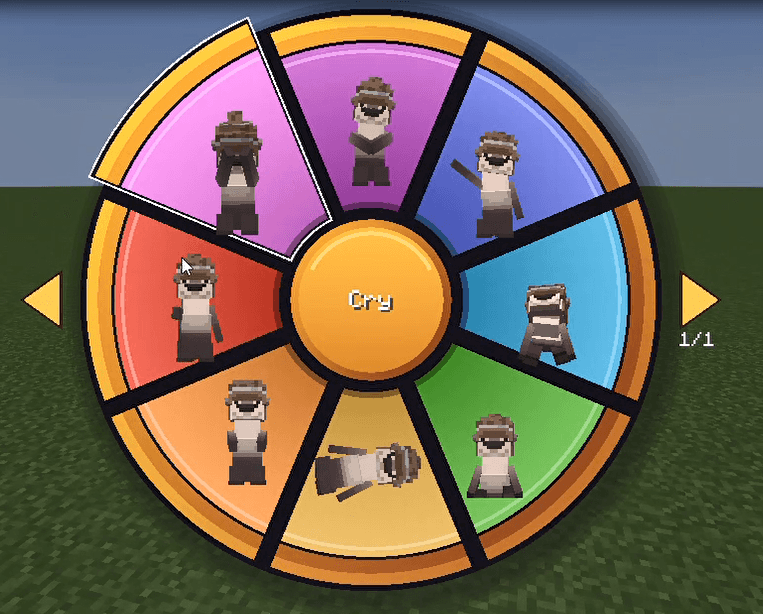
imagen_2026-11-11_183106711.png
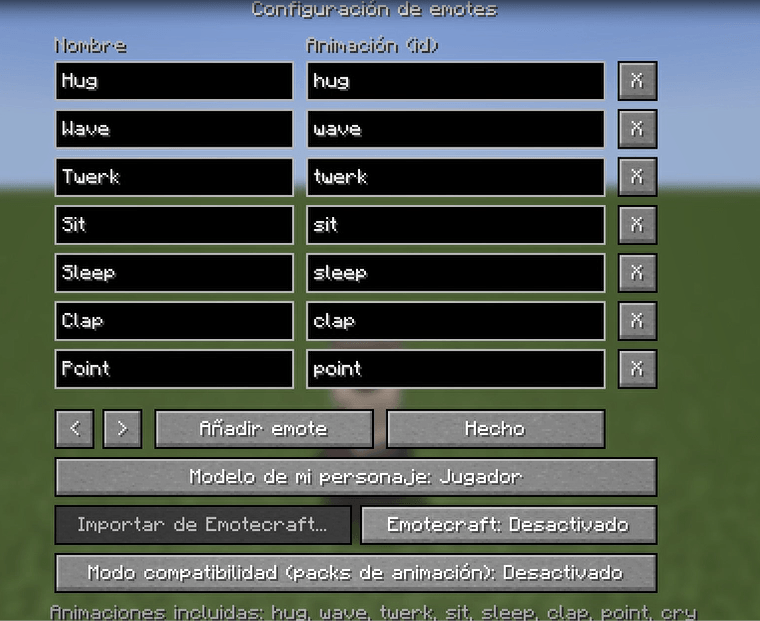
imagen_2026-11-11_183142951.png
Description
#Thyagosafio 4
Thyagosafio 4 adds a colorful, animated **emote wheel** to Minecraft. Press one key, pick an emote with your mouse, and your character plays it in front of everyone on the server. No commands and no menus to dig through.
Inspiration: Eufonia Studios Dedsafio Minecraft 4
Your own character is shown inside every slice of the wheel, so you can see what each emote looks like before you pick it. It works with normal player skins and with otter models made in Customizable Player Models.
## Features
**Emote wheel**
- A colorful 8-slice wheel with an orange ring and centre. The centre shows the name of the emote you are hovering.
- The wheel pops open and closed with a small bounce animation.
- The emote that is currently playing is highlighted with a clock icon. Click it, or click the centre, to stop it.
- More than 8 emotes? Use the arrows (or the left/right keys) to change pages.
**Built-in emotes, animated from scratch**
Wave, Clap, Point, Hug, Cry, Twerk, Sit and Sleep. Some add small touches, like tears while crying, hearts while hugging and notes while twerking. Moving, jumping or sneaking cancels the emote, and the head and body return to normal when it ends.
**Make the wheel yours**
- Change the open key in *Options → Controls → Thyagosafio Emotes* (default: **G**).
- A config screen lets you add, rename, reorder and delete emotes.
- Choose which model the wheel previews: player or otter.
**Multiplayer and singleplayer**
Emotes are synchronised, so other players with the mod see what you play. This works in singleplayer, on LAN and on servers. **The mod must be installed on the server and on the clients** that want to see the emotes.
## Compatibility
- **Customizable Player Models (CPM):** supports both standard player skins and otter models. The emotes move the normal body parts, so CPM models attached to them follow the animation. CPM animations can also be launched from the wheel.
- **Emotecraft (optional):** if you have it installed, you can import its emotes into the wheel from the config screen. It is not required and it can be switched off in the config.
- **Animation mods and packs (experimental):** the mod re-applies its poses after other animation systems, including Entity Model Features, so packs such as Fresh Animations can work. Results can vary from pack to pack. If an emote looks wrong with a specific pack, please report it.
## Requirements
- Minecraft **1.21.1**
- **Fabric Loader** 0.16.0 or newer
- **Fabric API**
- Java 21
- Optional: Customizable Player Models, Emotecraft
## Installation
1. Install Fabric Loader and Fabric API for Minecraft 1.21.1.
2. Put the mod's `.jar` file in your `mods` folder.
3. Start the game, press **G** in a world and pick an emote.
## Feedback
Found a bug, or an emote that looks wrong with your skin or animation pack? Please open an issue or leave a comment with your Minecraft version, your mod list and, if possible, a screenshot or video.
## Special Thanks
A huge thank you to everyone who supported this project:
Goldito, Neo_core, sanchez, vrex, yoshi, breccsito13, el churro, elkn_u, Jotaa.rar, josemyrMC, lau_xtz, matiusXddd_YT, nuxar, ramaa_nose, SebasOWO.YML, SirPrisma, Spreen mascota, Srgelito, zColombina, zzzuriel, Haddy, Prime, Kxccy and DARK PLAYER <3.
Your help, ideas and testing made Thyagosafio 4 possible. Thank you!
Made by **ThyagoFM**. Licensed under MIT.
Thyagosafio 4 Team