Thorium Optimization
- By

2.png
Description
Thorium - Client-Side Optimization Engine
Thorium is a client-side performance and frame-pacing optimization engine for Minecraft. It is engineered to eliminate micro-stutters, smooth out frametime spikes, and boost FPS without changing vanilla graphics or gameplay.
While most mods only focus on maximum peak FPS, Thorium focuses on 1% and 0.1% frame lows, ensuring smooth and consistent gameplay even when flying fast with Elytras or exploring crowded bases.
---
Key Features
1. Built-in Stutter Monitor HUD (Press F6)
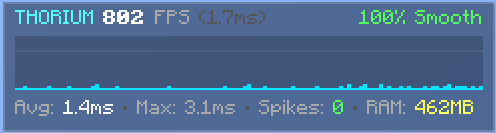
A clean, real-time performance overlay showing live frametimes, average and max ms spikes, frame stability score, and active RAM usage.
2. Budgeted Chunk Upload Pacer
Spreads chunk mesh uploads across frames to eliminate freezing and hitching when loading new terrain or flying with an Elytra.
3. Occlusion & Frustum Culling
Automatically skips rendering hidden chunks and concealed block entities (like chests and hoppers) before they reach the GPU, significantly increasing FPS in large bases.
4. Proactive Memory Management
Performs smart memory cleanups during idle moments to prevent sudden Java Garbage Collection (GC) lag spikes during gameplay.
5. Dynamic Entity LOD
Optimizes animations and tick updates for distant mobs, keeping gameplay smooth even near massive mob farms.
6. Modern Video Settings Screen (Press F8)
A clean, translucent settings menu with 100% working options and 3 built-in hardware presets.
---
Performance Profiles
Potato Mode: Designed for low-end laptops and integrated GPUs. Maximizes FPS by aggressively reducing rendering overhead.
Balanced Mode (Recommended): The ideal balance for everyday gaming. Delivers stable 60+ FPS frametimes with full vanilla graphics.
Nuclear Max Mode: Built for high-refresh rate monitors (144Hz+) and dedicated GPUs. Uncaps frame pacing for ultra-low latency response.
---
Hotkeys
F6: Toggle Stutter Monitor HUD (On / Off)
F7: Toggle Extreme FPS Boost Mode
F8: Open Thorium Video Settings
---
Compatibility
Modloader: Fabric Loader
Supported Minecraft Versions: 1.21.1, 26.1, 26.2, 26.3
Safe for Multiplayer: Yes, 100% client-side. Safe to use on Hypixel, Realms, and public SMP servers.
---
How to Install
1. Download the Thorium .jar file matching your Minecraft version.
2. Place the file inside your `.minecraft/mods` folder.
3. Launch Minecraft using your Fabric profile.
Thorium Optimization Team