** Since PML 10.3 has been released the mod is finally working on Forge **
What's this mod do?
Did you ever thought to make the leaves more realistic?
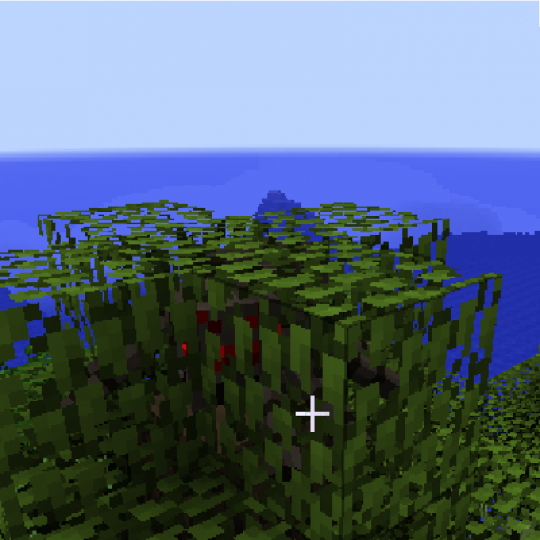
With this mod, the leaves blocks can now be penetrated, I mean that things can go inside them, similar to how they can go inside of webbing or similar to real life leaves.
These things are the players, the entities, the dropped items, but not the arrows and other projectiles from other mods.
This mod can be installed on both sides, universal, (client & server, on server I think you need it on client too).
Pictures, videos?
A player in a tree.

What is this mob?
Spotlights:
Not for now, ;(
Cool, but now, how do I install it?
This isn't a forge mod, and like if the installation process is like for a forge mod, it should be hard to install for a beginner.
Video tutorials coming soon.
Client installation (Official Minecraft Launcher):
- Firstly, make sure that you have launched at least one time mc 1.7.10 (forge, liteloader or vanilla)
- Download PML : [with ads, manual install] [no ads, manual install]
- Extract the contents of PML's zip folder (the one you just downloaded) directly into the Minecraft directory you are using (usually the .minecraft folder)
- Open the Minecraft launcher, and click the "edit profile" button for the profile you want to add PML to.
a. In the "JVM Arguments" section, add the following (with one space before and after any other jvm arguments), then save the profile:
-javaagent:PMLCore/PMLPremain.jar=-MCSide:Client
b. Change the option for launcher visibility so the launcher stays open after launch. This will help significantly with debugging simple installation problems. - Download this zip file and extract it. Place the [Un][1.7.10][PML]TheRealisticLeavesMod-1.1.pmlm file into the PMLMods folder.
Create the folder if it doesn't exist, directly in the .minecraft. - Run the game & enjoy :D
Other ways:
- Do the step 2 & 3 of the above way (Minecraft Launcher Client Installation).
- Check the PML installation guide located into the zipped file you just downloaded, and do the step 5 of the above way (if not already done).
Use on modpacks:
You feel free to use this mod on private modpack, but you must ask me, or The_WeatherPony to get the permission to use this on public modpacks.
F.A.Q.:
- Q.: Where can I report a bug?
A.: Here in the curse forge comments or in the issues section this thread of curseforge. - Q.: Why the mod still in 1.7.10? Will you update it to mc 1.8.X/1.9.X/1.10.X/Future versions?
A.: It's because I didn't have the time to finish the next versions, but yeah it will be easily updated to the mc versiosn listed above, :D - Q.: Could I get the source code of this mod?
A.: Just ask me or The_WeatherPony, but don't forget to say why you need it. - Q.: Why do I chose to use some hard-to-install dependency (PML), instead of using ASM bytecode editing "like everyone else" ?
A.: This mod is editing the base code of the game (Base Edit), so I needed something more simple to deel with when coding than ASM. - Q.: How did you get the idea to make this mod?
A.:Weed leaves. When sleeping in my bed during the nightwith my girlfriend. - Q.: Why do I need this mod?
A.: To be cool, ... xD - Q.: What's your age, FellFromTheSky?
A.: For now, I'm still minor at Canada, but every year, I am getting one more year of existence, xD - Q.: How can I make a good picture/video?
A.: Good question, take me in it with my family, :P - Q.: Where can I contact you, vrackfall?
A.: On skype or on minecraftforum. My username on both is vrackfall. - Q.: Q .: Do this mod supports all Vanilla's leaves and those from mods?
A.: Yep :D, because this mod edit the BlockLeaveBase class file of minecraft vanilla.
All the mod leaves are based on it.
Special Thanks:
- The_WeatherPony, to help me to finish the major part of this awesome mod and because he's the creator of PML.
Licence:
You should look at the right of this thread or on Pastebin.
Other languages:
Français/French: Sur le forum de minecraft-france.fr, ou sur le forum de minecraft.fr./On the minecraft-france.fr forum or on the minecraft.fr forum
The Realistic Leaves Mod Team