Tensura Slot Clear
- By
Screenshot 2026-10-04 204953.png
Description
Tensura Slot Clear
A tiny client-side quality-of-life addon for Tensura: Reincarnated.
What it does
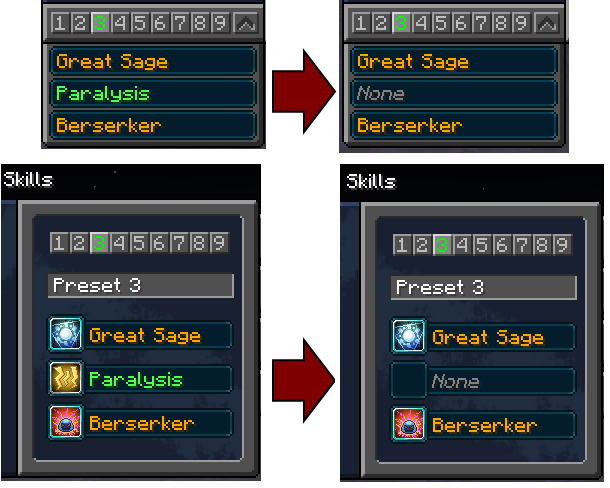
Right-click an assigned skill’s icon or name in the main Skills window, or an assigned slot in the ability preset dropdown, to clear that assignment back to None.
The skill remains learned, its mastery is unchanged, and normal left-click and middle-click behaviour is preserved.
Compatibility
- Minecraft 1.21.1
- NeoForge 21.1.222 or newer
- Tensura: Reincarnated 2.0.0.1 or newer
This addon is client-only. Install it on your client; the server does not need Tensura Slot Clear. Clearing uses Tensura’s existing server-validated request.
No additional mod dependencies are required beyond Tensura. Tensura’s own dependencies are still required.
Use
- Open the main Skills window or the Tensura ability selector.
- Right-click an assigned skill’s icon or name in the Skills window, or expand the preset-slot dropdown and right-click an assigned slot.
- The slot assignment is cleared without removing the learned skill.
Configuration
config/tensuraslotclear-client.toml contains rightClickClear = true.
Set it to false to disable the addon’s right-click clearing in both interfaces.
Development note: This addon was developed with assistance from OpenAI’s Codex AI, then built and tested in the author’s local Minecraft instance.
Tensura Slot Clear Team