Tensura:Key binding
- By
Three independently keybound skill slots for Tensura: Reincarnated, letting you cast your favorite skills without switching presets.
1.png
2.png
3.png
Description
Tensura: Key binding
English
An add-on for Tensura: Reincarnated that provides three dedicated skill shortcut slots, independent of the native skill bar. Each slot has its own keybind, so you can cast frequently used skills without switching presets.
- Mod id:
tensura_keybinding - Display name:
Tensura: Key binding - Version:
1.0.0 - Environment: Minecraft 1.21.1 / NeoForge 21.1.244+
- License: MIT
Features
- Three skill slots, fully independent of Tensura's native presets.
- Dedicated keys:
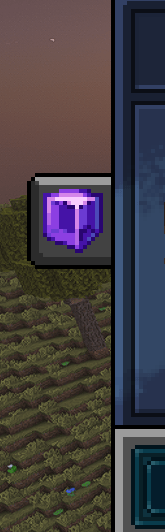
J/K/Ltrigger slots 1 / 2 / 3 by default, rebindable in Options → Controls → Key Binds. - B-menu entry: a tab button in the middle of the left edge of Tensura's main screen (opened with
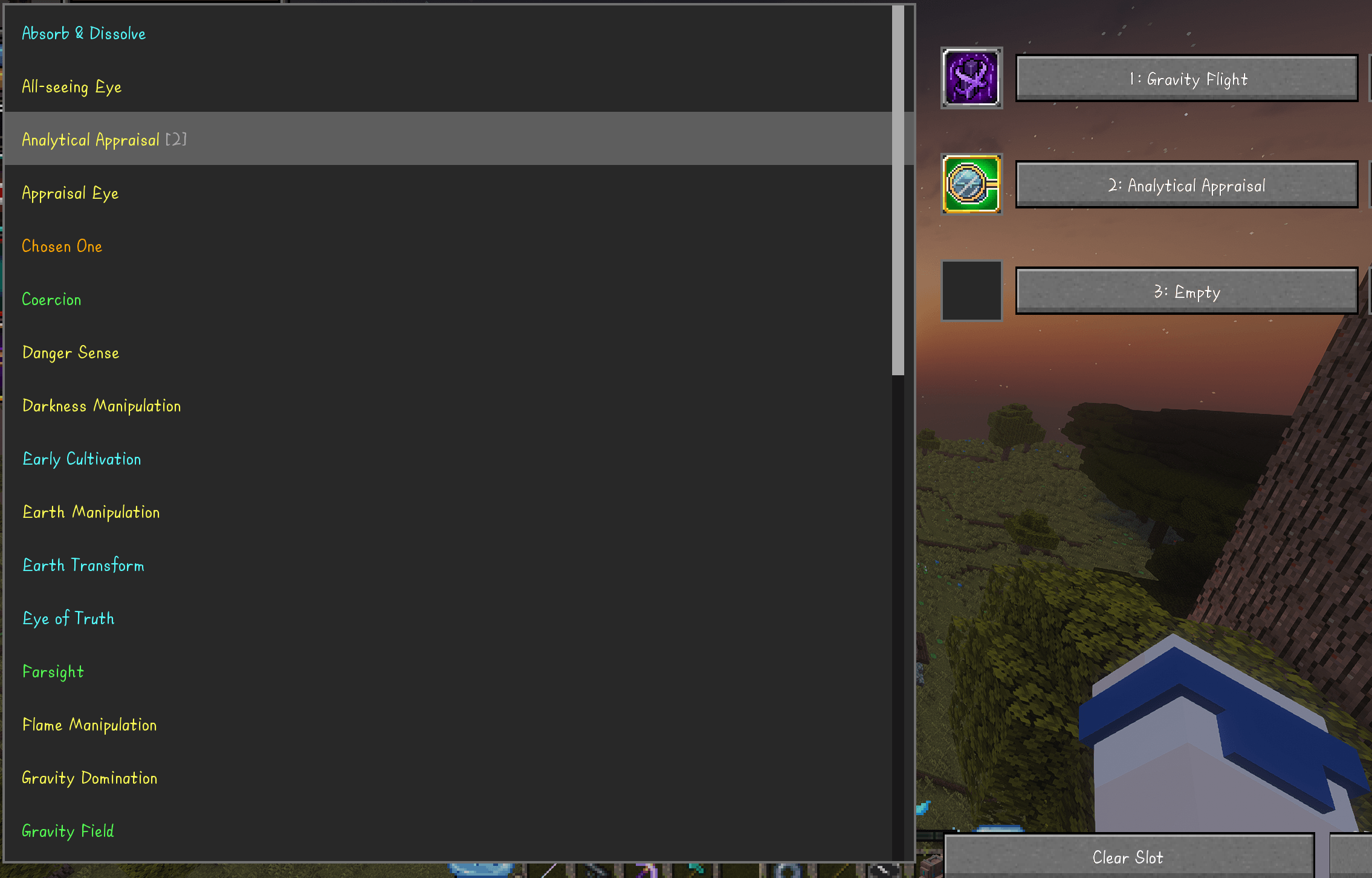
B) leads to the slot configuration screen. - Slot configuration screen: browse your learned skills on the left (resistance skills are filtered out), click a skill then click a slot to bind it; slots can be cleared.
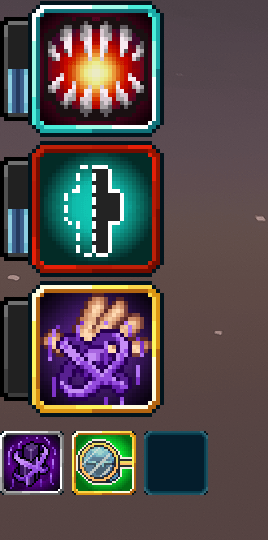
- Persistent HUD: three slot icons are drawn below Tensura's native ability frames, following the native HUD's position and scale. The icons use Tensura's native cooldown overlay (darkened icon plus remaining seconds).
- Native activation: key presses ultimately go through Tensura's own
startHoldSkill/handleSkillRelease, so cooldowns, mastery, and costs behave exactly like the native skill bar.
Usage
- Press
Bto open Tensura's main screen and click the new tab on the left to open Key Slots. - Select a learned skill from the list on the left (it highlights in green).
- Click any slot on the right to bind it. Repeat for the other slots.
- Back in game, press
J/K/Lto cast the bound skills. - If a skill has multiple modes, hold Tensura's next/previous ability mode key (Left Alt by default) and press a slot key to cycle modes. The current mode is shown on the action bar.
Slot data is stored client-side per world. In singleplayer the file is kept inside the world save as tensura_keybinding-client.json; on remote servers it is stored per server address under config/tensura_keybinding/servers/.
Note: These slots are shortcuts, not real equipment. Effects that only apply while a skill is equipped in Tensura's native ability bar will not take effect through these slots.
When a skill is removed from the player, every slot bound to that skill is cleared automatically.
Installation
- Install Minecraft 1.21.1 and NeoForge 21.1.244 or newer.
- Place the following mods in your
mods/folder:- Tensura: Reincarnated 2.0.1.3 or newer (NeoForge build)
- ManasCore 4.0.0.2
- Architectury API 13.0.11
- GeckoLib 4.9.3
- SmartBrainLib 1.16.11
- TerraBlender 4.1.0.8
- This mod:
tensura_keybinding-1.0.0.jar
- Launch the game.
This mod must be installed on both the client and the server. A client-only install cannot trigger skills.
License
Released under the MIT License.
This is an unofficial add-on for Tensura: Reincarnated. Tensura: Reincarnated is © ManasMods and licensed All Rights Reserved; this project does not bundle or redistribute its code or assets. Publishing derivative add-ons or reusing Tensura assets requires permission from the Tensura authors.
中文
Tensura: Reincarnated 的附属模组,为技能提供一个独立于原生技能栏的三个快捷槽,并为每个槽位绑定独立按键,方便在不切换技能栏 preset 的情况下直接释放常用技能。
- mod id:
tensura_keybinding - 显示名:
Tensura: Key binding - 版本:
1.0.0 - 环境:Minecraft 1.21.1 / NeoForge 21.1.244+
- 开源协议:MIT
功能
- 三个技能快捷槽:与 Tensura 原生技能栏(preset)相互独立,互不干扰。
- 独立按键:默认
J/K/L分别触发槽位 1 / 2 / 3,可在「选项 → 控制 → 按键绑定」中修改。 - B 界面入口:在 Tensura 主界面(B 键)左侧边缘的中间位置新增一个入口标签按钮,点击进入槽位设置界面。
- 槽位设置界面:左侧是已学会技能列表(自动过滤抗性技能),先点击技能再点击槽位即可绑定;支持清除槽位。
- 常驻 HUD:在 Tensura 原生三个技能框下方横向显示三个槽位图标,位置与缩放跟随原生 HUD;图标上显示与原生技能栏一致的冷却遮罩(变暗 + 剩余秒数)。
- 原生触发逻辑:按键最终走 Tensura 自己的
startHoldSkill/handleSkillRelease,冷却、精通、消耗与原生技能栏完全一致。
使用方法
- 按
B打开 Tensura 主界面,点击左侧新增的标签按钮进入快捷槽设置; - 在左侧列表中选择一个已学会的技能(绿色高亮);
- 点击右侧任意槽位完成绑定,重复操作可配置其余槽位;
- 返回游戏后,按
J/K/L释放对应槽位的技能; - 若技能有多段模式,按住 Tensura 的「下一个/上一个技能模式」键(默认左 Alt 等)再按槽位键即可切换模式,动作栏会显示当前模式。
槽位配置按世界分别保存:单人游戏保存在世界存档目录下的 tensura_keybinding-client.json;连接远程服务器时按服务器地址保存在 config/tensura_keybinding/servers/ 下。
注意:本模组的槽位只是快捷槽,并非实际装备。仅在技能装备于 Tensura 原生技能栏时才生效的效果,通过快捷槽不会生效。
当玩家失去某个技能时,绑定该技能的所有槽位会自动清空。
安装
- 安装 Minecraft 1.21.1 与 NeoForge 21.1.244 或更高版本;
- 将以下模组放入
mods/目录:- Tensura: Reincarnated 2.0.1.3 或更高版本(NeoForge 版本)
- ManasCore 4.0.0.2
- Architectury API 13.0.11
- GeckoLib 4.9.3
- SmartBrainLib 1.16.11
- TerraBlender 4.1.0.8
- 本模组
tensura_keybinding-1.0.0.jar
- 启动游戏。
本模组同时需要安装在客户端与服务端;仅客户端安装时无法完成技能触发。
许可
本项目以 MIT License 开源。
本模组是 Tensura: Reincarnated 的非官方附属模组;Tensura: Reincarnated 版权归 ManasMods 所有,采用 All Rights Reserved 协议。本项目不打包或再分发其代码与素材。发布派生的附属模组或复用 Tensura 素材前,需要获得 Tensura 作者的许可。