tensura framework control
- By
Browse Tensura skills, races and mobs with native visuals, and manage framework values, race and mob skill lists, and mob EP on your server.
# Tensura Framework Control
**Explore and configure your Tensura world through one searchable panel.**
Tensura Framework Control is a companion mod for **Tensura: Reincarnated**, combining skill information, race settings and mob data with native icons and 3D previews.
 ## Features
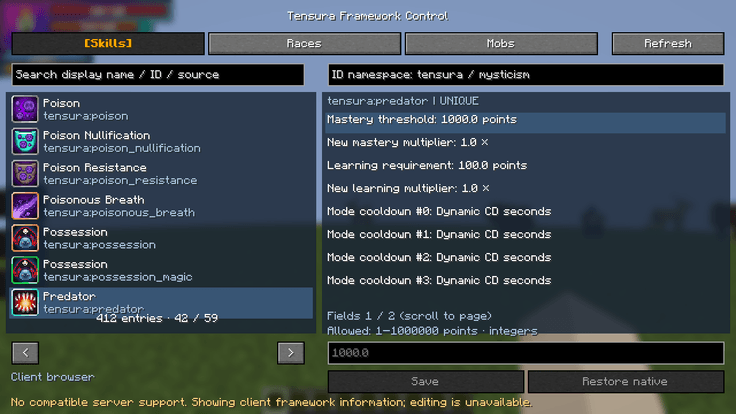
- **Searchable catalogue:** browse registered skills, races and mob types by display name, registry ID or source mod, including translated names.
- **Native visuals:** view skill icons, adapted race appearances and rotating 3D mob models.
- **Skill framework controls:** configure per-mode cooldown assignment, mastery requirements and gain multipliers, and shared learning requirements and gain multipliers.
- **Race settings:** inspect supported attributes and initial Aura/Magicule ranges, and configure intrinsic or learnable skill lists for registered races—including Human.
- **Mob settings:** configure skill lists by entity type and add extra EP, divided equally between Aura and Magicule.
- **Related skills:** open skill details directly from race and mob entries.
The controls focus on shared framework values. Individual skill mechanics such as damage, range, projectiles and special effects remain under their original implementation.
## Client browsing and server management
Install the mod on your **client** for local, read-only browsing, even when the remote server does not have it.
With compatible builds installed on **both client and server**, every player can view the server’s effective settings. Administrators with permission level **2** can edit supported rules.
Client-only browsing shows local framework information. Server management requires compatible copies of the same build on both ends.
## Progress-friendly rules
Race skill changes apply during **future race selection, death respawn or evolution**. Mob skill changes apply only to **newly spawned mobs**.
Saving or reloading rules preserves existing skill progress. Grants follow framework requirements and events; learnable additions require Tensura’s shared learning stage.
## Independent settings for each world
Global defaults are stored in:
`config/tensura_framework_control/rules.json`
A world without an independent rule file copies this template once into:
`serverconfig/tensura_framework_control/rules.json`
Each world then maintains its own settings. Partial configuration files are supported, and temporarily unavailable registry IDs are retained for later use.
## Getting started
Install the matching loader file and required dependencies, enter a world, and press **Right Shift** to open the panel. The key can be changed in Minecraft’s controls.
On a compatible server, `/tensuracontrol` also opens the panel.
tensura framework control Team


Owner