


Team Economy
- By
Team Economy
Recycle spare materials, share a team wallet and build a playable arcade in your survival world.
Team Economy combines a points economy with physical game machines. Sell excess vanilla materials to the system shop, buy supplies, unlock five equipment levels and play six games directly in the world. Use a personal wallet or add FTB Teams to share funds with friends.
团队经济 · 梭哈吧,史蒂夫 — by 洁柔厨. Available in English, 简体中文 and 繁體中文.

Source · Downloads · English guide · 中文指南 · Report an issue
Blocks and items
Build an arcade with eight machine blocks, then carry the handbook, Wireless Terminal or one of eight scratch ticket types.
| Content | Purpose | How to obtain |
|---|---|---|
| Shop Machine | Buy supplies, recycle materials, buy equipment and tickets, upgrade your wallet | Craft; also accessible with /teamecon shop |
| Mystery Box Machine | Preview prize pools and open boxes | Craft; boxes are purchased at the machine |
| Six game machines | High / Low, Slime Ice Hop, Lucky Wheel, Red & Black Roulette, Slots and Multiplier | Craft or buy; using each game requires its wallet level |
| Team Economy Guide | Illustrated controls, probabilities and recipes | Given on first entry, or craft a book with an iron ingot; Patchouli is optional |
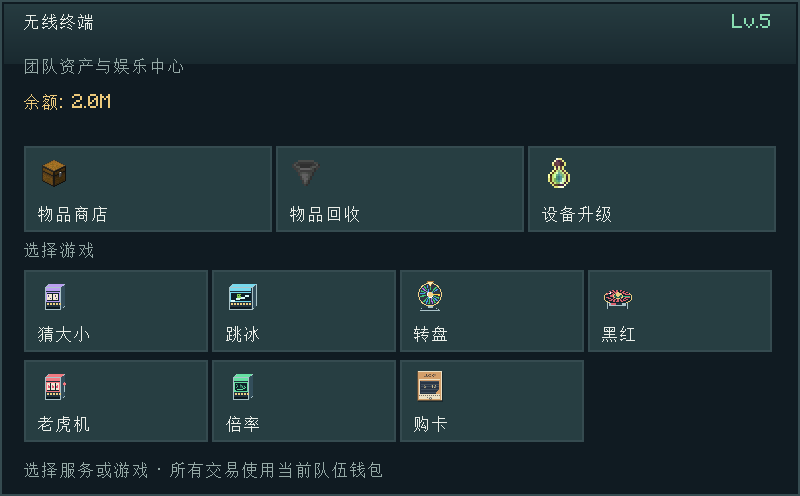
| Wireless Terminal | Portable shopping, recycling, upgrades, games and ticket purchases | Default: Lv.5, Free the End advancement and 100,000 points; no crafting recipe |
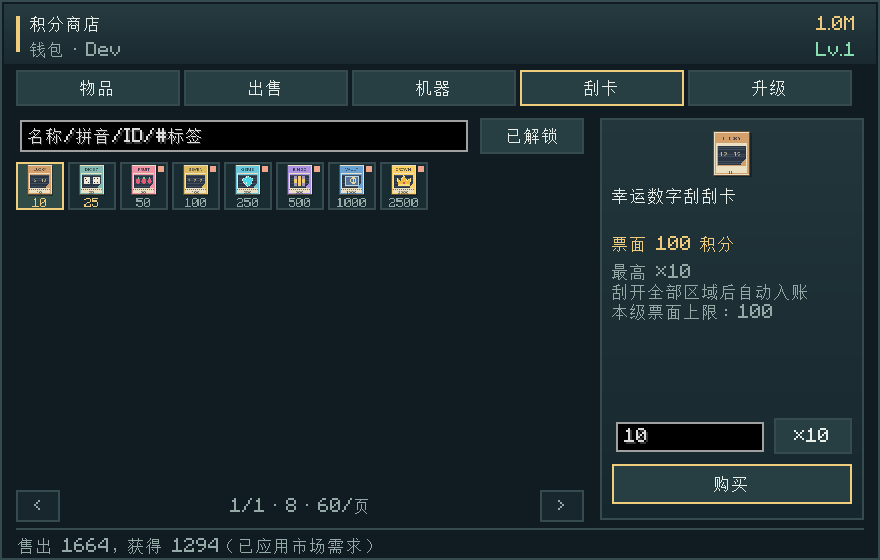
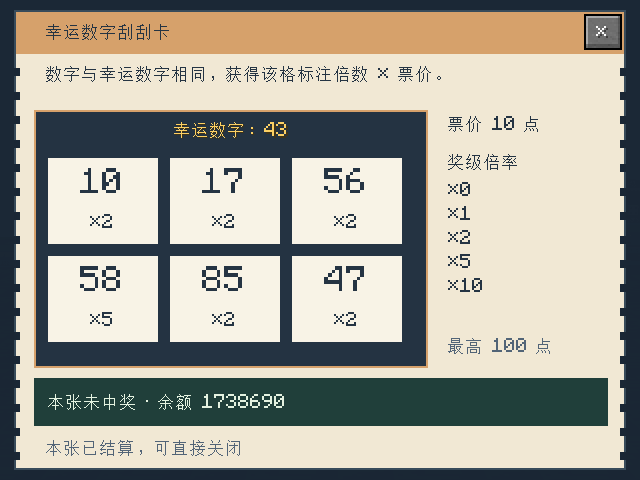
| Eight scratch tickets | Lucky Numbers, Dice Seven, Fruit Lines, Lucky Sevens, Gem Hunt, Golden Bingo, Secret Vault and Crown Jackpot | Buy in the shop or terminal; ticket types unlock with wallet level |
The terminal does not open mystery boxes; use the separate machine. Items do not store a wallet balance, and passing a terminal to another player does not bypass its access requirements.
Economy and team play
Material recycling and shopping. The Sell tab provides 27 staging slots and a quote before you confirm. Recycling demand decreases as the same materials are sold. Shop for vanilla items and enchanted books using categories, names, item IDs, tags, full pinyin or Chinese initials. The shop remembers each player’s last tab across game restarts. Default advancement requirements keep exploration useful.
Shared team progression. With optional FTB Teams integration, teammates share their wallet and equipment level. The sidebar shows the balance and members' net contributions. Personal advancement requirements still apply to the player making a purchase.

Wallets and progression
Without FTB Teams, points and equipment levels belong to your personal wallet. With FTB Teams, teammates use a shared wallet and level; joining a team does not merge your personal funds. Vanilla advancement requirements are still checked for the player making the purchase.
Upgrades unlock access rather than giving you a machine. Under the default settings, reaching Lv.2, Lv.3, Lv.4 and Lv.5 costs 1,200, 10,000, 50,000 and 200,000 points respectively, paid one level at a time. Prices, requirements and prize pools can be adjusted by the server owner.

Six games, one arcade
Six physical games. Place machines and right-click their controls:
- High / Low Machine — Lv.1: guess whether a number from 1–10 will be low (1–5) or high (6–10); each choice has a 50% chance.
- Slime Ice Hop Machine — Lv.2: make the next jump, then continue or cash out.
- Lucky Wheel — Lv.3: spin a colored wheel and receive the selected segment's payout.
- Red & Black Roulette — Lv.4: choose red, black or a single number.
- Slot Machine — Lv.5: match symbols on three reels.
- Multiplier Machine — Lv.5: cash out while the multiplier rises, before a crash.
Multiple machines can run independently for the same player. Stakes are charged at the start and payouts return to the wallet that funded the round. The Wireless Terminal has its own separate round.


Tickets, mystery boxes and portable access
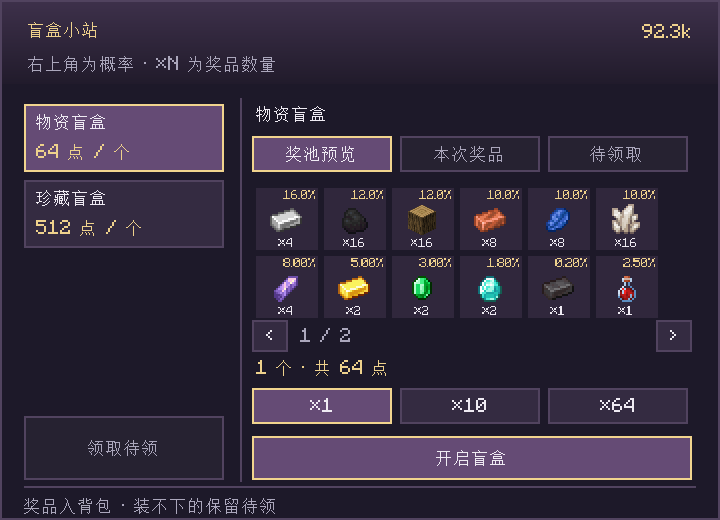
Scratch tickets and mystery boxes. Buy one of eight physical ticket types, hold it in your main hand and left-click to open it. Drag to scratch; a revealed ticket settles automatically. The separate Mystery Box Machine previews prize pools and supports batches of 1, 10 or 64 boxes. Prize previews display quantities and probabilities. Pools include valuable materials, normal, splash and lingering potions, and friendly or neutral mob spawn eggs from the selected Minecraft version. Overflow prizes are saved for collection at the machine or with /teamecon claimboxes. Batch size does not change individual draw odds.
Optional integrations and handbook
JEI is optional. It adds sidebar prize dragging to the mystery-box editor; inventory editing works without it.
A portable terminal and illustrated handbook. The late-game Wireless Terminal gives access to shopping, recycling, upgrades, games and ticket purchases. Optional Patchouli integration adds a handbook with controls, event probabilities and recipes. English, Simplified Chinese and Traditional Chinese are supported.


Screenshots show the Chinese interface; English is also available in game.
Installation
Install one file matching both your Minecraft version and loader:
| Minecraft | Loader | Java |
|---|---|---|
| 1.20.1 | Forge 47.4.10 | 17 |
| 1.21 | NeoForge 21.0.143+ | 21 |
| 1.21.1 | Forge 52.1.0 | 21 |
| 1.21.1 | NeoForge 21.1.1+ | 21 |
Put the JAR in mods/. Multiplayer requires the same file on the client and server. Each file supports only its named combination. The 1.20.1 catalog and rewards use content available in that version.
FTB Teams and Patchouli are optional. Install their matching releases and any libraries they require. Team Economy's personal economy and games work without them. Forge 1.21.1 currently has no corresponding Patchouli release; the web guide is available without it.
Commands
Player commands
Player commands require no operator permissions. Angle brackets mark required arguments and should be replaced with actual values.
| Command | Purpose |
|---|---|
/teamecon |
Show brief help |
/teamecon shop |
Open the shop for purchases, recycling and upgrades |
/teamecon claimboxes |
Collect pending mystery-box prizes into available inventory space, without another charge |
/teamecon balance |
Show the current personal or team wallet balance |
/teamecon price <item_id> |
Look up an item's estimated value, e.g. /teamecon price minecraft:diamond; recycling income also depends on demand |
/teamecon sell |
Immediately sell the entire stack in your main hand; use the shop's Sell tab to review a quote first |
/teamecon buy <item_id> <amount> |
Buy a quantity, e.g. /teamecon buy minecraft:bread 16; requires sufficient funds, inventory space and purchase eligibility |
Administrator commands
These require operator permission level 2 or higher. Enable cheats to use them in singleplayer. [player] is an optional online player name and defaults to yourself. When using a command with a player argument from the server console, supply that name.
| Command | Purpose |
|---|---|
/teamecon admin kit |
Give yourself six game machines, a Vending Machine and a Mystery Box Machine; admin machine is an alias |
/teamecon admin balance <points> |
Set the current wallet balance to the specified amount |
/teamecon admin unlock [player] |
Set the target's current wallet to Lv.5 and enable their personal Team Economy advancement bypass |
/teamecon admin level <level> [player] |
Set the target's current wallet level to 1–5, retaining their personal bypass setting |
/teamecon admin bypass <true/false> [player] |
Enable or disable the personal advancement bypass without changing wallet level |
/teamecon admin status [player] |
Show the target's wallet level, balance and personal bypass status |
/teamecon admin boxes |
Manage box types, names, prices, prizes, quantities and percentages |
/teamecon admin prices |
Open the item pricing panel, selecting the held item when present |
/teamecon reward <reward_id> <points> [player] |
Add a one-time quest reward to the target's current wallet |
/teamecon_quest_reward <FTB_reward_id> <points> [player] |
Grant team points using an FTB reward ID |
/teamecon admin reload |
Reload the mod's JSON configuration |
The advancement bypass applies to Team Economy purchase and access requirements, is stored per player, and does not modify vanilla advancements. Wallet levels and balances belong to the current personal or team wallet; changes to a team wallet affect all members. Prices and trading restrictions apply while the bypass is enabled. /teamecon admin advancements [player] is an alias for enabling it.
Configuration
Server owners can customize prices, market demand, progression, equipment access and prize pools. After editing JSON files, run /teamecon admin reload.
| File | Purpose |
|---|---|
<world>/serverconfig/teamecon-server.toml |
Starting balance, global stake limits, recycling demand and purchase markup |
config/teamecon_base_prices.json |
Base valuation of vanilla materials |
config/teamecon_shop_prices.json |
Purchase price floors for rare items and enchantments |
config/teamecon_progression.json |
Advancement requirements and items that can be recycled but not purchased |
config/teamecon_casino_levels.json |
Level costs, machine limits, terminal access and ticket levels |
config/teamecon_enchants.json |
Enchanted book catalog and prices |
config/teamecon_shop_catalog.json |
Custom shop items, exclusions and purchase prices |
config/teamecon_blindbox.json |
Mystery box prices and prize pools |
config/teamecon_slots.json |
Slot reel weights and payouts |
config/teamecon_risk_tiers.json |
Risk tier settings |
Server owners can replace the default item catalogue, hide items, set purchase prices and explicitly add installed mod items. Mystery box pools support custom rewards, quantities, percentages and per-pool switches. File changes apply with /teamecon admin reload; panel saves apply immediately. Modded items require an explicit recycling price in the pricing panel to enable recycling. See the shop and mystery box examples and the balance guide (Chinese).
In-game administration
Item pricing
/teamecon admin prices opens an item pricing panel with creative-inventory category tabs and an item grid. Clicking an icon selects the item for editing. Search covers the full catalogue by display name, item ID, Chinese pinyin or initials; jinding and jd match 金锭.
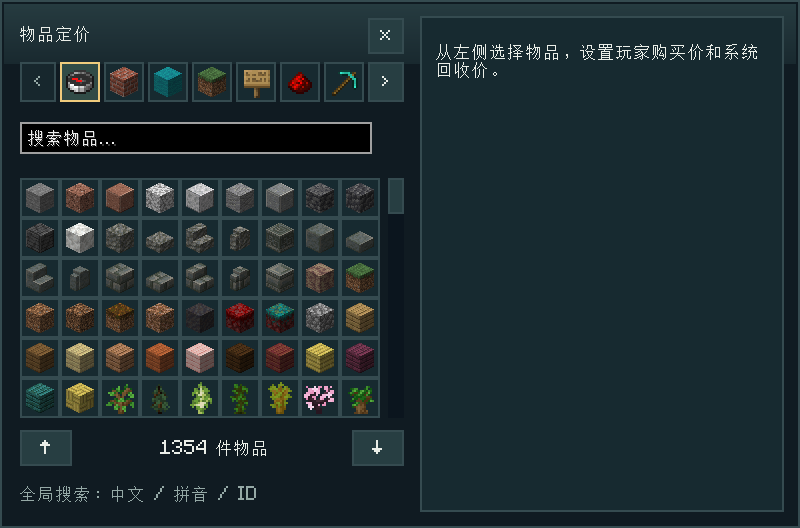
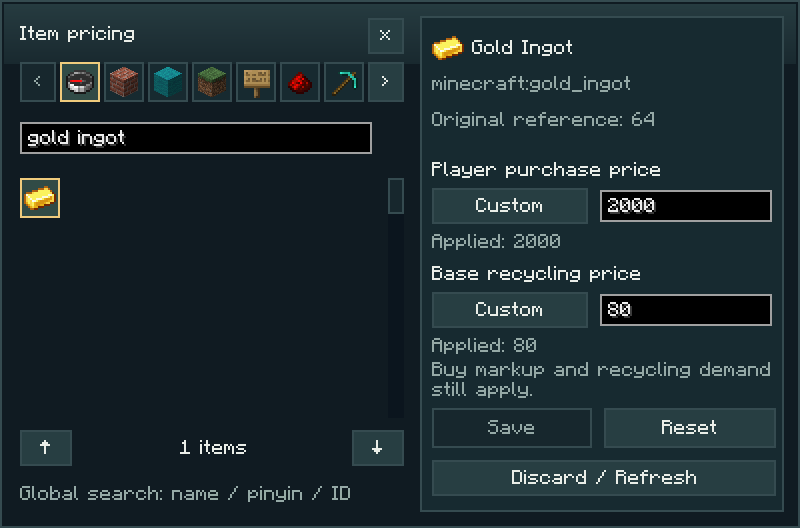
Purchase and base recycling prices independently support Inherit, Disabled and Custom. Changes are stored in config/teamecon_price_overrides.json and apply immediately; Reset removes the item’s overrides. Purchase prices are subject to markup and equipment floors, recycling proceeds depend on demand, and trades require the relevant advancements. The image shows custom prices.
Modded items require an explicit recycling price. Recycling supports their default item state; variants with extra data or stored contents are excluded. See pricing configuration.
Mystery box editor
/teamecon admin boxes opens the mystery box editor. Operators can create, edit and delete box types, set names and prices, control availability and assign optional stages.
The prize template grid appears above the player’s inventory. Drag or Shift-click inventory items to add templates, drag templates to rearrange them, and right-click to remove them. Templates do not consume the originals; empty cells are excluded from draws. With a matching JEI installation, the item list appears on the right and items can be dragged directly into prize cells without enabling cheat mode. Inventory templates also work without JEI. Hover over inventory or JEI items to view their tooltips.
Each prize has a quantity and a percentage from 0 to 100, with up to six decimal places. Editing a percentage keeps that value and redistributes the remainder among the other prizes in their existing ratio. For example, changing the first prize in 50%, 30%, 20% to 60% produces 60%, 24%, 16%. A new prize receives 100 ÷ new prize count percent; removing a prize redistributes its share. The total stays at 100%. A single prize has a 100% chance; a prize at 0% is excluded from draws.
Supported templates include ordinary items, vanilla spawn eggs (including Husks) and specific potion effects. Enable the pool’s modded-item option for modded prizes. Samples with names, enchantments or container contents are not supported; the message distinguishes this from a disabled modded-item option. Box names use the same translations as the player’s machine and can also be customized.
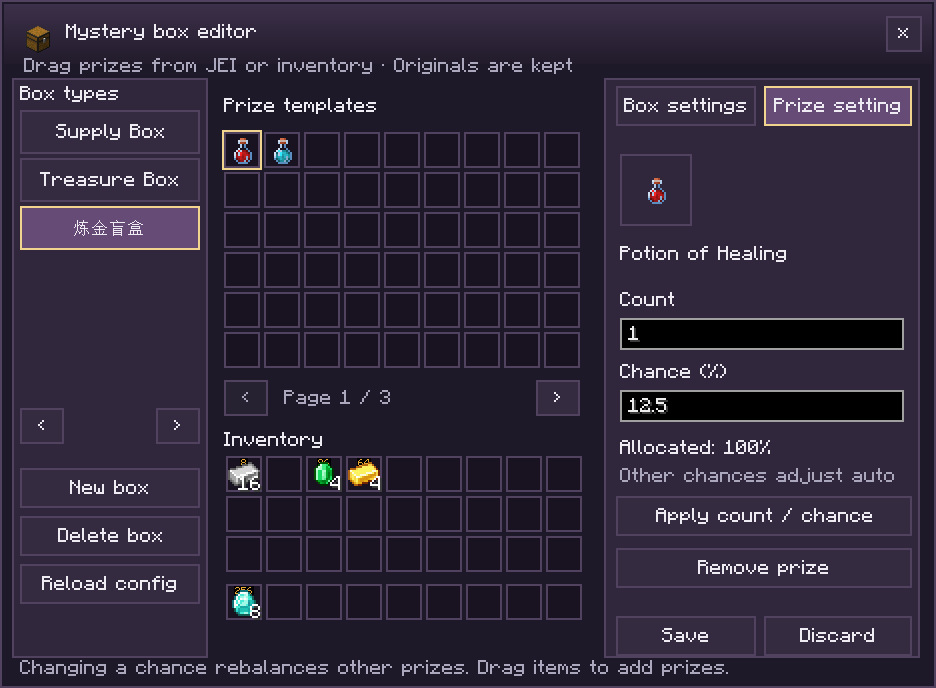
Changes are saved to config/teamecon_blindbox.json, apply immediately and retain a .bak backup. Each pool has separate controls for modded prizes and value checks. See configuration details.
Quest reward integration
The main mod provides reward commands for quest systems such as FTB Quests:
teamecon reward yourpack:chapter1/start 100For FTB Quests command rewards, execute as the claiming player, use permission level 2, and enable team_reward. Rewards add to the player's current personal/team wallet, once per reward ID per wallet, with claims persisted in the world save. Console calls must append an online player name. Amounts range from 1 to 1,000,000,000; use a unique namespace for your pack.
The compatible teamecon_quest_reward 7445429B27FE4CD5 25 command grants points using an FTB reward ID. Quest content, IDs and amounts are defined in the quest configuration. Command specifications and the Java API are documented in the quest integration guide.
Trading scope
The default shop catalogue provides vanilla items and enchanted books. Server owners can add installed mod items to the shop, enable recycling through the pricing panel, or include them in mystery boxes. Third-party enchantments are not sold. Team Economy equipment, terminals and tickets have dedicated acquisition menus and cannot be recycled.
Some purchases require the buying player’s vanilla advancements; elytra, nether stars and other key loot are unavailable for purchase by default. The system shop is managed through server configuration and does not provide player-operated listings, prices or stock.
Guides, source and feedback
Source · Downloads · English guide · 中文指南 · Report an issue
For a bug report, include your Minecraft version, loader, Team Economy version and steps to reproduce it.
Credits and permissions
Created by 洁柔厨, with AI assistance for code, documentation and some artwork. Thanks to the developers of Forge, NeoForge, FTB Teams, FTB Library, Architectury and Patchouli.
MIT License. You may use, modify, distribute and use the project commercially, provided that the copyright and permission notices are retained. Third-party materials remain under their respective licenses. The source is available on GitHub.
Points exist only within the game and have no real-world monetary value. The mod provides no real-money purchases, withdrawals or real-world prizes. This is an unofficial Minecraft project, unaffiliated with Mojang or Microsoft.
Team Economy Team
