Target HUD (by finnikks)
- By
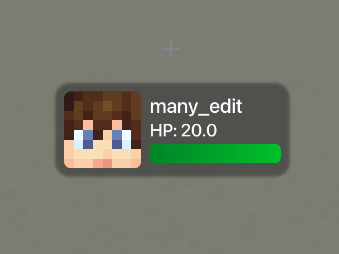
Modern frosted-glass TargetHUD with GLSL shaders, halo shadow, dual gradient health bars, and Hit/Aim modes.
# 🌟 Target HUD (by finnikks)
**Target HUD** is a modern, high-performance TargetHUD mod for Minecraft Fabric 1.21.11. Designed with custom **GLSL hardware shaders**, it brings an aesthetic frosted dark-glass card, ambient halo drop shadows, smooth spring animations, dual gradient health bars, and an in-game drag-and-drop editor.
---
## ✨ Features
- 💎 **Frosted Dark-Glass Aesthetic**: Real-time multi-pass Gaussian background blur powered by custom GLSL post-processing shaders and soft SDF ambient halo drop shadows.
- 🎯 **Dual Trigger Modes (Hit & Aim)**:
- **Hit Mode (On Attack)**: Automatically displays upon striking **Players**, **Animals / Passive Mobs**, or **Monsters / Hostiles** (defaults to 3.0 seconds after last hit).
- **Aim Mode (On Hover)**: TargetHUD displays smoothly when looking/aiming your crosshair at an entity without needing to hit it!
- **Both Mode**: Combines instant aim detection with persistent on-hit tracking.
- 💚 **Dual Emerald & Gold Health Bar**:
- Emerald green gradient for base health (0 -> 20 HP).
- Warm golden overlay gradient for absorption hearts (Golden Apples, Absorption potions).
- Accurate numerical HP display (HP: 20.0).
- 👤 **Rounded Entity Head & Avatars**:
- Dynamic rounded avatar with damage hurt-tint effect.
- Automatically renders player skin layers (base head + outer hat overlay).
- Custom fallback icon for animals and hostile mobs.
- ⚙️ **In-Game Drag & Drop GUI**:
- Press **H** (customizable in Controls) or type `/finnikkshud` to open the configuration screen.
- Simply **click and drag** the TargetHUD anywhere on your screen.
- Switch trigger modes (`Hit`, `Aim`, `Both`) with a single click.
- Live preview with real-time scaling and toggle controls.
- ⚡ **Zero Lag & Maximum FPS**:
- Submits single batched quads directly to Minecraft's GPU Render Pipeline.
- High-precision 4x supersampled font rasterization with zero bilinear halos.
---
## 🎮 Controls & Commands
- **Open Config GUI**: Press **H** (rebindable in Options -> Controls -> Key Binds)
- **Reposition HUD**: Left-click and drag the HUD card inside the config screen
### Chat Commands:
- `/finnikkshud` or `/fhud` — Opens the interactive settings GUI.
- `/finnikkshud mode hit` — Enables Hit-only trigger mode.
- `/finnikkshud mode aim` — Enables Aim-only (crosshair hover) trigger mode.
- `/finnikkshud mode both` — Enables both Hit and Aim triggers.
- `/finnikkshud duration <seconds>` — Sets the display timeout (e.g. `/finnikkshud duration 4.5`).
- `/finnikkshud toggle` — Toggles the TargetHUD on or off.
---
## 📋 Requirements
- **Minecraft Version**: `1.21.11`
- **Mod Loader**: `Fabric Loader 0.20.1+` (or 0.16+)
- **Fabric API**: Required
- **Java**: `Java 21`
🌐 Need a Server?
Looking for a fast, reliable server to play with friends? Check out BisectHosting!
Get 25% off your first month for any gaming server using our link:
👉 Click here to get your server (25% OFF)
Screenshot:
Target HUD (by finnikks) Team