Untitled design.png
icywhenhot | Take a Seat
Create a server, get 25% off your first month

Description


⚠️ Player Animation Library is a required dependency for this mod.
Take a Seat
Sit, lounge, and relax
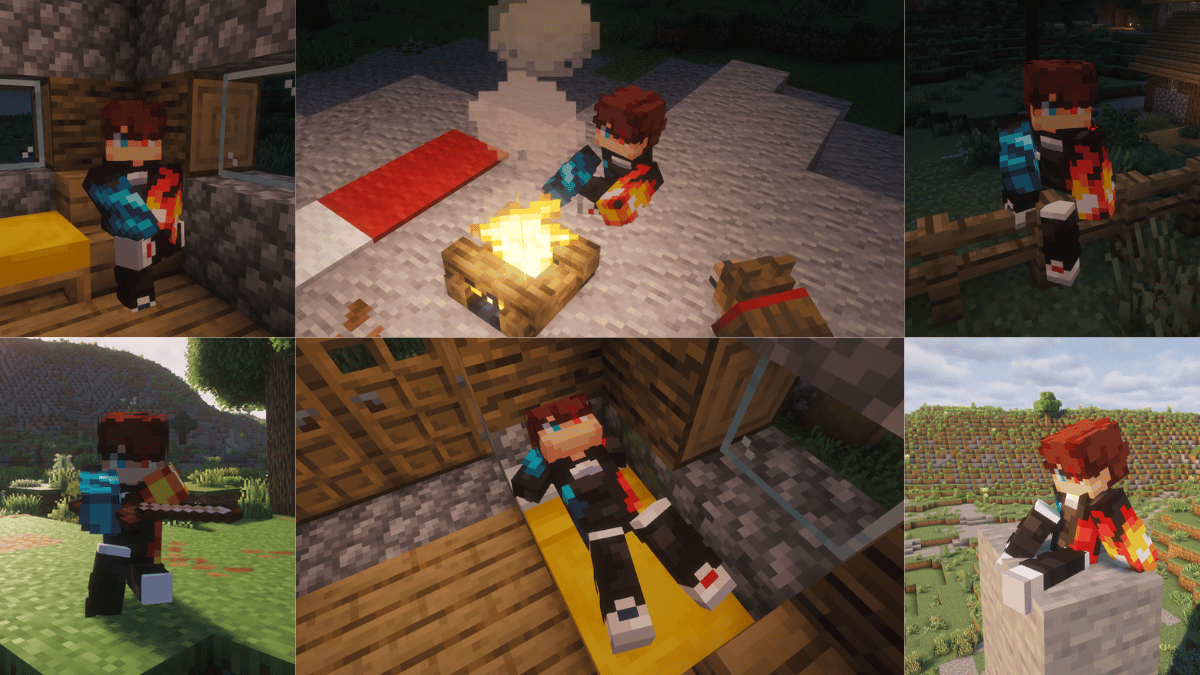
Press a key and Take a Seat plays a context-aware sitting animation on your player, it figures out what you're near or holding and picks a fitting pose, then keeps your model in frame with a smooth camera. Other players see you sitting too, when they also have the mod.
Take a Seat is a from-scratch rebuild of the discontinued Sitting Plus, running on the Player Animation Library backend.
These are cosmetic animations. You don't actually mount the block — your model poses in place, and moving stands you back up.
How to use
- Press
X(rebindable in Options → Controls → Take a Seat) to sit. - Press it again while seated to cycle to the next variation of the current pose.
- Move (WASD / jump / sneak / sprint) to stand back up.
- Right-click a stair with an empty hand to snap onto it and sit (can be disabled in the config).
- Or use the
/sitcommand:/sitfor context detection,/sit <pose>to force a pose (e.g./sit chair), or/sit <pose> <variant>(e.g./sit bed 2). - You can't sit while airborne, swimming/underwater, or riding something.
How the pose is chosen
When you press the key, Take a Seat checks these in order and uses the first match:
| # | Trigger | Pose | Notes |
|---|---|---|---|
| 1 | Looking at a campfire (within ~2 blocks) | campfiresit |
Looping idle |
| 2 | Looking at a furnace (furnace / blast furnace / smoker) | furnacesit |
Looping idle |
| 3 | Holding a sword | swordsit, swordsit2 |
2 variants |
| 4 | Holding an axe | sittingaxe |
1 variant |
| 5 | Holding a shovel | sittingshovel |
1 variant |
| 6 | Holding a fishing rod | fishing |
Looping cast |
| 7 | Standing on stairs | chairsitting 1–4 |
"Sit in a chair" — 4 variants |
| 8 | Standing on a fence | fencesitting 1–2 |
Perched higher, 2 variants |
| 9 | Standing on a bed | bedlyingdown 1–3 |
Lie down, 3 variants |
| 10 | Standing on a bottom slab | chairsitting 1–4 |
Treated as a chair |
| 11 | Standing on a carpet | Ground poses | Treated as floor |
| 12 | Standing on a #takeaseat:sittable block |
chairsitting 1–4 |
Datapack-defined chairs, incl. modded |
| 13 | Anywhere else (ground) | kneesitting, buttsit, buttsit2, kneeleaning |
Default, 4 variants |
Because the list is checked top-down, what you're looking at or holding wins over what you're standing on, holding a sword while standing on stairs gives you the sword pose, not the chair pose. Empty your hand and look away from campfires and furnaces to get the stair, fence, bed and ground poses.
That's 20 hand-made animations in total, cycled per category by tapping the key again.
Camera
- Auto third person — sitting flips you to third person so you can see the pose (toggle:
enableThirdPersonOnSit). Standing restores your previous view. - Focus on the model — the camera eases downward while seated so the sitting body stays centered (toggle:
enableSitCameraFocus, distance:cameraFocusOffset). - Your F5 is respected — once you're seated you can change view freely, and cycling through poses will not snap the camera back.
Configuration
Edit config/TakeASeatConfig.json, created on first launch:
| Option | Default | Description |
|---|---|---|
enableClickToSit |
true |
Right-click stairs with an empty hand to sit on them |
enableThirdPersonOnSit |
true |
Switch to third person while sitting |
enableSitCameraFocus |
true |
Smoothly lower the camera to focus on the seated model |
cameraFocusOffset |
0.55 |
How far (in blocks) to lower the camera while sitting |
onlyLowerCameraInFirstPerson |
false |
Only apply the camera lowering effect in first person |
enableAfkSit |
false |
Auto-sit after being idle — off by default, as it was non-functional in the original Sitting Plus |
afkSitDelaySeconds |
60 |
Idle seconds before AFK auto-sit triggers |
Multiplayer
Take a Seat syncs poses to other players: when you sit, your client tells the server, which relays it so everyone running Take a Seat mirrors your animation.
The mod should be installed on the server and on each client that wants to see the animations. Players who were already sitting when you join are synced to you automatically — no need for them to stand and sit again.
For datapack and modpack makers
Make any block sittable — it'll use the chair pose — by adding it to the #takeaseat:sittable block tag. Create data/<your_pack>/tags/block/sittable.json:
{
  "replace": false,
  "values": [
    "mymod:fancy_chair",
    "minecraft:lectern"
  ]
}
Bottom slabs and carpets are recognised automatically, so you only need the tag for extra or modded blocks.

Requires: Player Animation Library
I will be fixing bugs across various versions, but the most maintained port is still 26.2 fabric.

Q: Do I need this on the server?
Only if you want other players to see your animations. Install it on the server and on every client that should see people sitting.
Q: What happens if another player doesn't have the mod?
They simply won't see the animation. Nothing breaks for them, and nothing breaks for you.
Q: Am I actually sitting on the block?
No. The poses are purely cosmetic — you don't mount anything, and any movement stands you back up.
Q: Can I use your mod in a modpack?
Yes, feel free to include it.
Q: Can I repost your mod to another site?
No, you cannot.

- SaltyWater: creator of the original Sitting Plus, which inspired this rebuild
- Original Sitting Plus page: curseforge.com/minecraft/mc-mods/sitting
- Stradat: for making the "EMF Compat: Take a Seat" mod which makes Take a seat work with fresh animations: player extensions, and detailed animations!


The Take a Seat Team