/tminus restart 460 im bored

/tminus cancel

/tminus reload
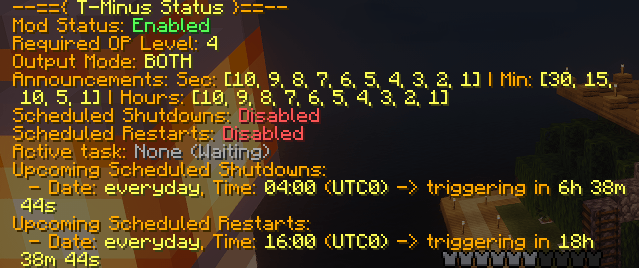
/tminus status

/tminus cancel
Description
T-Minus
T-Minus is a lightweight, robust, and highly customizable server-side utility designed to manage server restarts and shutdowns. Whether you are running a small private server or a massive public network, T-Minus ensures your scheduled maintenance and manual restarts run seamlessly, keeping your players informed every step of the way.
Unlike older restart utilities, T-Minus features an optimized, non-blocking scheduler that broadcasts quiet countdown announcements hours in advance without locking up server commands or causing pre-emptive lag.
Key Features
- Flexible Scheduling Engine: Schedule shutdowns or restarts at specific times of the day (everyday) or on a targeted date (YYYY-MM-DD).
- Time Zone Support: Define your scheduled tasks using standard time zones (e.g., UTC offsets like +3, -5, or 0), making coordination with global players effortless.
- Smart Announcements: Create custom announcement intervals for hours, minutes, and seconds (e.g., alert players at 10 hours, 2 hours, 30 minutes, 5 minutes, and then count down every second for the last 10 seconds).
- Multiple Output Modes: Broadcast countdowns directly to the player Chat, on the Action Bar (above the hotbar) for high visibility, or Both.
- Fully Customizable Messages: Modify every prefix, warning, error, kick screen, and reason. Full support for standard Minecraft color formatting codes (
§) is included. - Live Configuration Reloads: Tweak settings, adjust upcoming schedules, or localize message text, then reload the configuration live without rebooting the server.
- Operator Level Security: Set a required Operator (OP) permission level (from 1 to 4) to restrict who can manage server cycles.
Commands & Usage
All commands require operator permissions (configured via opLevel in the configuration file).
/tminus status - Displays the mod's current state, required operator level, broadcast output modes, and lists upcoming scheduled shutdowns and restarts along with their exact remaining time.
/tminus reload - Reloads the configuration file (config/tminus.toml) live. Useful for quick schedule or message updates.
/tminus stop <seconds> [reason] - Initiates a manual shutdown sequence with a custom countdown. If no reason is specified, it defaults to the configuration's fallback shutdown reason.
('/tminus stop 120 gn yall'):

/tminus restart <seconds> [reason] - Initiates a manual restart sequence with a custom countdown. If no reason is specified, it defaults to the configuration's fallback restart reason.
('/tminus restart 460 im bored'):
/tminus cancel - Abruptly stops any active countdown (manual or scheduled) and notifies players that the sequence has been canceled.
Configuration (tminus.toml)
Upon your first launch, the mod generates a clean, well-commented configuration file located at config/tminus.toml. Below is an example configuration showcasing its flexibility:
# T-Minus Mod Configuration

# Enable or disable the entire mod
enabled = true

# Required Operator (OP) level to execute commands (1 to 4)
opLevel = 4

# Message broadcast mode:
# "CHAT" - only in player chat
# "ACTIONBAR" - only on actionbar (above hotbar)
# "BOTH" - both in chat and actionbar
outputMode = "BOTH"

# Prefix before all mod messages in chat (supports Minecraft color codes like §)
textPrefix = "§r§f[Server] §r"

# Announcement intervals for shutdown/restart notifications
[announcements]
seconds = [10, 9, 8, 7, 6, 5, 4, 3, 2, 1]
minutes = [30, 15, 10, 5, 1]
hours = [10, 9, 8, 7, 6, 5, 4, 3, 2, 1]

# Enable/disable scheduled shutdowns and restarts separately
shutdownScheduleEnabled = false
restartScheduleEnabled = false

# Scheduled shutdowns
# date: can be "everyday" or specific "YYYY-MM-DD"
# time: in "HH:MM" (24-hour format)
# timezone: UTC offset (e.g., "-5", "0", "+3")
# repeatHours: (optional) repeat every N hours starting from the specified date & time
[[shutdownSchedule]]
date = "everyday"
time = "04:00"
timezone = "0"

# Scheduled restarts
[[restartSchedule]]
date = "everyday"
time = "16:00"
timezone = "0"

# System messages and phrases
[messages]
shutdownInitiated = "§cServer is shutting down in §6%time%§c for: §e%reason%§r"
shutdownCancelled = "§aServer shutdown cancelled by administrator!§r"
restartInitiated = "§eServer is restarting in §6%time%§e for: §6%reason%§r"
restartCancelled = "§aServer restart cancelled by administrator!§r"
countdownHours = "§cTime remaining: §6%time% hr.§c Reason: §e%reason%§r"
countdownMinutes = "§cTime remaining: §6%time% min.§c Reason: §e%reason%§r"
countdownSeconds = "§cTime remaining: §6%time% sec!§c Reason: §e%reason%§r"
shutdownKickMessage = "§cServer is shutting down for maintenance.\n§cReason: §6%reason%§r"
restartKickMessage = "§eServer is restarting.\n§eReason: §6%reason%§r"
noActiveTask = "§7There is no active shutdown or restart process.§r"
shutdownActive = "§6Active task: §cShutdown§r"
restartActive = "§6Active task: §eRestart§r"
waitingForTask = "§6Active task: §7None (Waiting)§r"
timeRemaining = "§cTime remaining: §6%time% sec.§r"
currentReason = "§cReason: §e%reason%§r"
prefixRequired = "§cOnly operators with level §e%level%§c can use this command!§r"
configReloaded = "§aT-Minus configuration reloaded successfully!§r"
alreadyRunning = "§cA task is already running! Cancel it first.§r"
shutdownInitiatedCommand = "§cInitiated shutdown in §6%time% seconds.§c Reason: §e%reason%§r"
restartInitiatedCommand = "§eInitiated restart in §6%time% seconds.§e Reason: §6%reason%§r"
statusHeader = "§6--=={ §eT-Minus Status§6 }==--§r"
statusEnabled = "§6Mod Status: §aEnabled§r"
statusDisabled = "§6Mod Status: §cDisabled§r"
statusOpLevel = "§6Required OP Level: §e%level%§r"
statusOutputMode = "§6Output Mode: §e%mode%§r"
statusCountdownTrigger = "§6Announcements: Sec: §e%seconds%§6 | Min: §e%minutes%§6 | Hours: §e%hours%§r"
statusShutdownScheduleEnabled = "§6Scheduled Shutdowns: §aEnabled§r"
statusShutdownScheduleDisabled = "§6Scheduled Shutdowns: §cDisabled§r"
statusRestartScheduleEnabled = "§6Scheduled Restarts: §aEnabled§r"
statusRestartScheduleDisabled = "§6Scheduled Restarts: §cDisabled§r"
upcomingShutdowns = "§6Upcoming Scheduled Shutdowns:§r"
upcomingRestarts = "§6Upcoming Scheduled Restarts:§r"
noUpcomingTasks = "§7  No upcoming scheduled tasks.§r"
scheduledTaskFormat = "§6  - Date: §e%date%§6, Time: §e%time%§6 (§eUTC%timezone%)§6 -> triggering in §e%remaining%§r"
modDisabledError = "§7T-Minus mod is currently §cdisabled§7 in the configuration!§r"
errorMissingSecondsStop = "§cError: Missing required argument 'seconds'! Usage: §6/tminus stop <seconds> [reason]§r"
errorMissingSecondsRestart = "§cError: Missing required argument 'seconds'! Usage: §6/tminus restart <seconds> [reason]§r"
errorInvalidNumber = "§cError: Invalid number format for 'seconds'! Must be a positive integer, got: §6'%input%'§r"
errorNegativeNumber = "§cError: 'seconds' must be a positive integer (1 or more)! Got: §6'%input%'§r"
repeatsEveryFormat = " §6(Repeats every §e%hours%h§6)§r"
scheduledRestartReason = "Scheduled Restart (%time% UTC%timezone%)§r"
scheduledShutdownReason = "Scheduled Shutdown (%time% UTC%timezone%)§r"
defaultShutdownReason = "Maintenance"
defaultRestartReason = "Restart"
How It Works Under the Hood
Unlike traditional shutdown scripts that spawn a heavy, continuous task hours before execution, T-Minus implements a dual-phase scheduling logic:
- Passive Announcements Phase: As long as the scheduled event is far in the future, the mod runs passive hourly/minutely checks. If a time match hits one of your predefined intervals (e.g., 2 hours remaining), a clean alert is sent directly to players, leaving the main server loop unaffected.
- Active Countdown Phase: When the remaining time drops to your configured
[announcements], the mod initializes the real-time visual countdown engine, displaying ticking warnings on the action bar and completing the task with a clean disconnect kick screen.
The T-Minus Team