SyncSettings
- By

New modpack, new launcher instance, or a quick switch from 1.20.1 to the latest version, and you are back to default mouse sensitivity, default key bindings and full-volume music. Again.
SyncSettings fixes that for good. It keeps your options in one shared profile and applies it to every Minecraft instance you start, on every version from 1.20 to 26.x, on Fabric, NeoForge and Forge. Set things up once, and every game feels like your game.
No account. No server. No setup screen. It just works in the background.


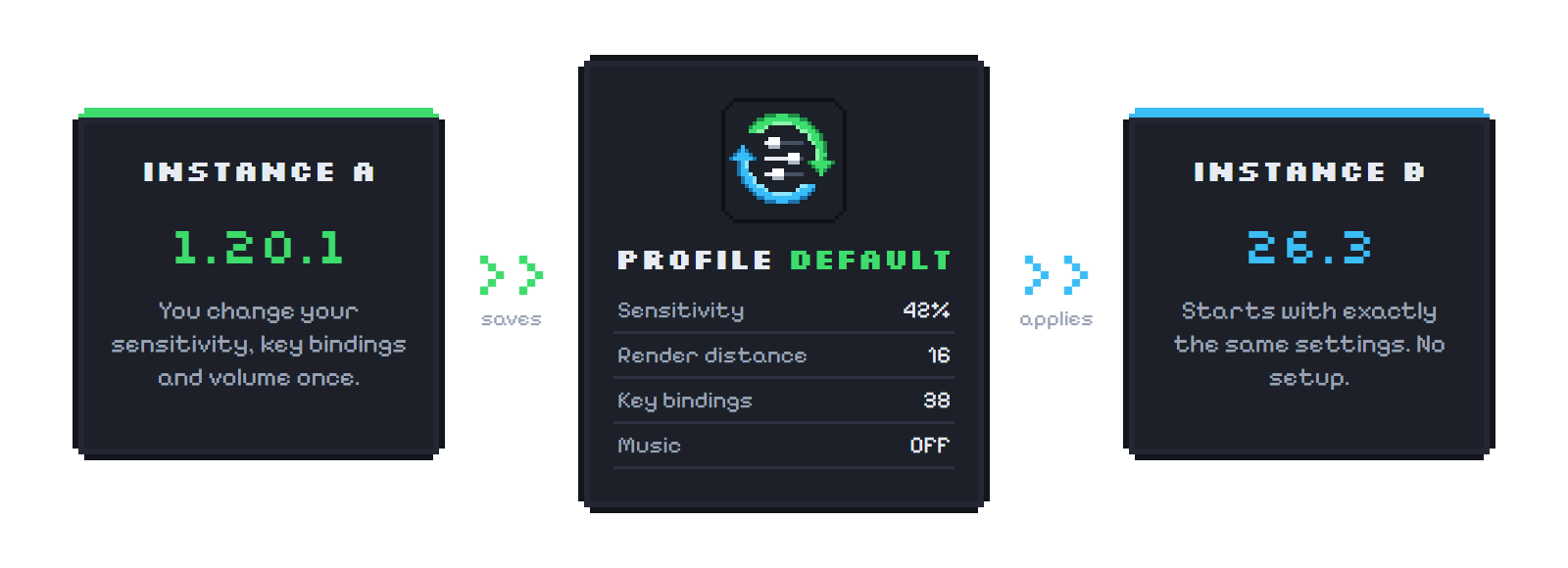
- Install SyncSettings in every instance you play.
- On the first start, your current settings become the profile "Default".
- Every other instance with SyncSettings starts with exactly these settings.
- Change something anywhere, and the next game you start gets the change too.
🔁 Works across Minecraft versions
- Settings from older versions are upgraded with Minecraft's own upgrade code, the same code Minecraft runs when you update
- Options that only newer versions have are kept safe in your profile and come back when you return to that version
- Key bindings of other mods are synced too
🗂️ Profiles for every situation
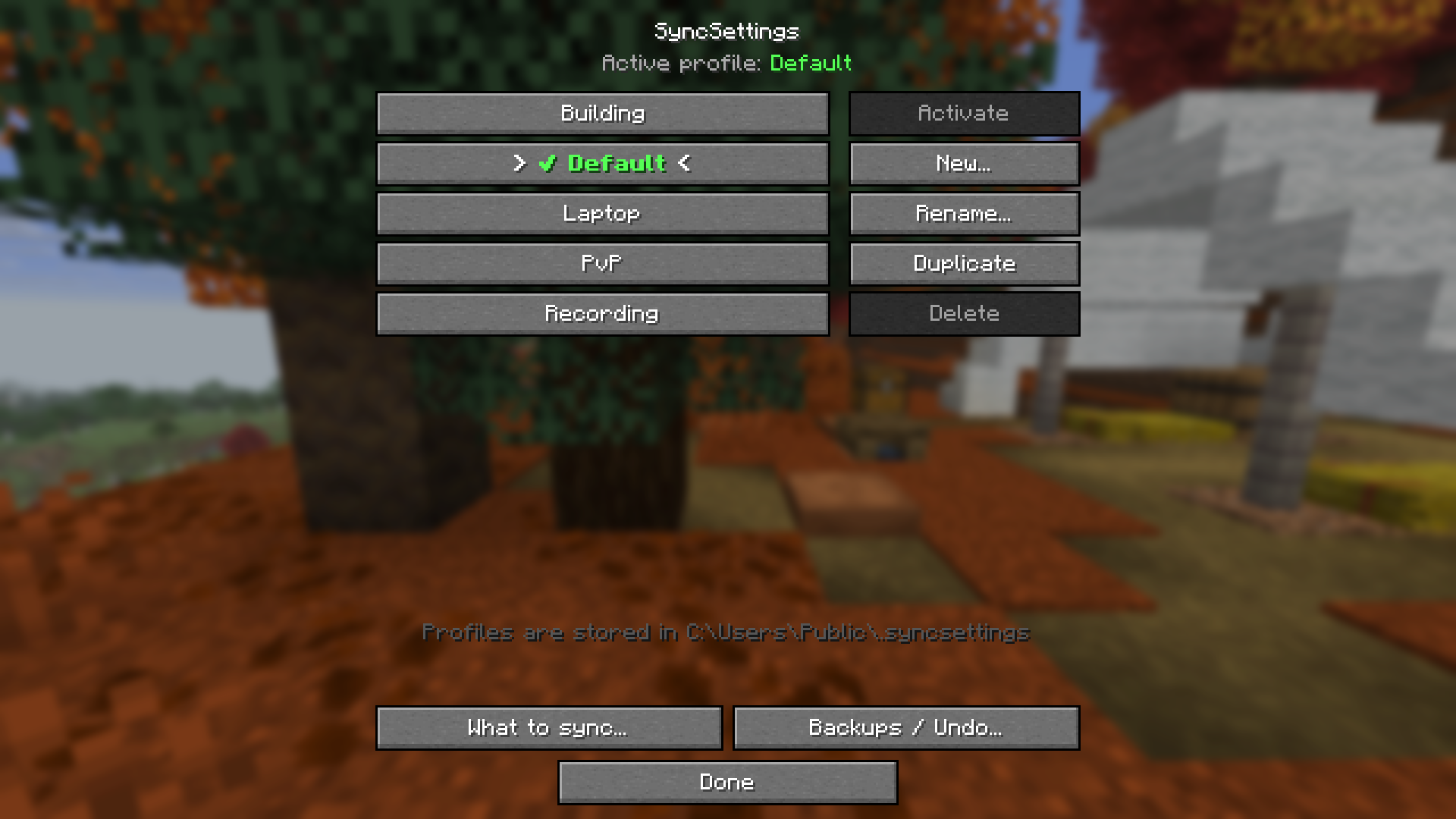
- Create profiles like PvP, Building, Laptop or Recording
- See how many settings will change before you switch
- Switch in-game, without restarting
- Open the menu with the SyncSettings button in the Options screen, from Mod Menu (Fabric) or with Config in the mod list (NeoForge/Forge)
🎛️ You decide what is shared
Turn categories on or off: Video, Controls, Sound, Window & GUI, Chat, Accessibility, Language, Resource packs, Skin and Other. Different monitors on your PCs? Keep Window & GUI separate and share everything else.
🛡️ Safe by design
- Backups & undo: options.txt is backed up before every change, and you can restore the last 10 in-game
- Damaged values are never written, so Minecraft can't throw away your options because of a broken value
- Reset protection: if Minecraft ever resets your options, the defaults are not spread to your other instances
- Several games at once: instances running at the same time cannot corrupt your profile
☁️ Sync between PCs
Profiles live in .syncsettings in your user folder. Point SyncSettings at a cloud folder (OneDrive, Dropbox, Google Drive …) with the environment variable SYNCSETTINGS_HOME or the JVM argument -Dsyncsettings.home=<folder>, and all your PCs share the same settings.

| Minecraft | Fabric | NeoForge | Forge |
|---|---|---|---|
| 26.1 and newer | ✅ | ✅ | |
| 1.21 – 1.21.11 | ✅ | ✅ | |
| 1.20.5 – 1.20.6 | ✅ | ✅ 1.20.6 | |
| 1.20.2 – 1.20.4 | ✅ | ||
| 1.20 – 1.20.1 | ✅ | ✅ |
| Requirement | Details |
|---|---|
| Side | Client only, not needed on servers |
| Fabric | Loader 0.15 or newer, Fabric API not required, Mod Menu optional |
| NeoForge | Any NeoForge build for your Minecraft version |
| Forge | 47 or newer (1.20.1) |
| Languages | English, German |
Download the file that matches your loader and Minecraft version. Profiles are shared between all loaders: a profile saved on Fabric works on NeoForge and Forge too.
Does it sync mod config files, the server list or shader settings?
Not yet. SyncSettings syncs Minecraft's own options (options.txt). Key bindings added by other mods are included.
Do I need the resource packs in every instance?
Yes. SyncSettings syncs which packs are enabled, but each instance needs the pack files itself.
Can I undo a sync?
Yes: Options → SyncSettings → Backups / Undo.
I uninstalled it, are my settings gone?
No. Every instance keeps its normal options.txt, and your profiles stay in .syncsettings.
🖥️ Need a server for you and your friends?
SyncSettings itself is client-only, but if you want your own Minecraft server, BisectHosting gives you 25% off your first purchase through this link. It is a partner link: you save money and support the development of SyncSettings at the same time.
You are free to include SyncSettings in any modpack.
SyncSettings Team