Strand Studio(DragonMine Z)
- By
Strand Studio
Strand Studio expands DragonMineZ’s hair editor with precise, segment-by-segment customization. Adjust the position, rotation, shape, and color of individual hair segments to recreate anime-inspired hairstyles or design an original look.
Features
-
Segment shaping: Adjust each segment’s length, width, rotation, and bend.
-
Independent positioning: Fine-tune each segment’s offset along the X, Y, and Z axes.
-
Individual colors: Give each segment its own color using RGB sliders or a hex code, or let it inherit the strand’s color.
-
Scale and bend propagation: Control how adjustments carry through to later segments.
-
Physics and swing controls: Customize hair movement.
-
Texture options: Switch between HD and pixel-style hair textures.
-
Live preview: Rotate the character while editing to check the hairstyle from different angles.
How to use
-
Right-click with the Hair Salon Scissors to open the hair editor.
-
Select the hair strand you want to customize.
-
Press P to open the segment editor.
-
Choose a segment and adjust its shape, position, and color.
-
Save your hairstyle through the hair editor.
For best results, edit your hair while in your base form.
Requirements
Minecraft 1.20.1, Forge, DragonMineZ, and GeckoLib.
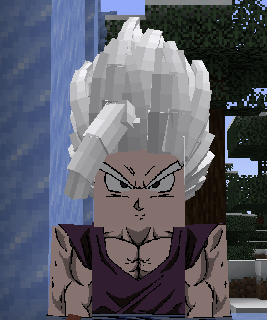
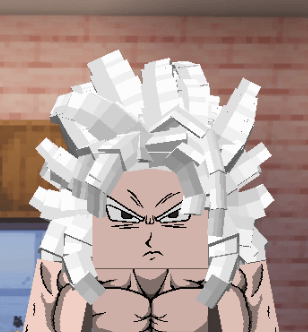
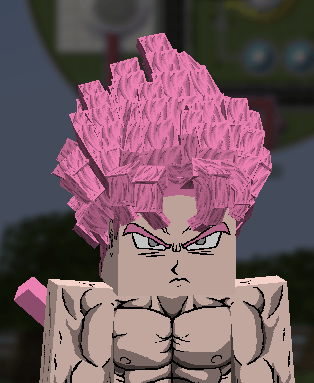
Example Hairstyles
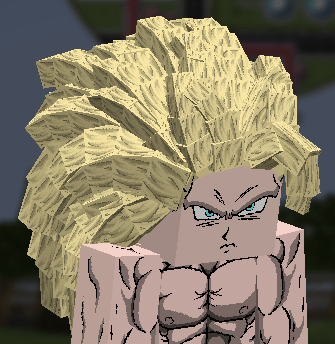
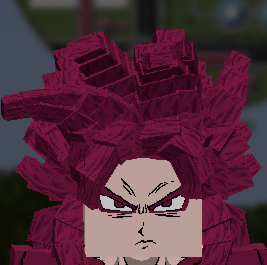
The screenshots below show examples of the hairstyles you can create with detailed segment editing and color customization.
Strand Studio(DragonMine Z) Team