Storybound is a story engine for modpacks, adventure maps and servers.
Quests with a story log, NPCs who talk, dialogues with a cinematic camera, built-in cutscenes, letters, a Codex, bosses and waypoints, built in an in-game editor or written as JSON. No code needed.
By default the mod has no content. It is the engine a story runs on: nothing happens in your world until a story is written for it. Players get a story from a modpack or a map that uses Storybound.
Why not FTB Quests? FTB Quests is a checklist: many small tasks on a map. Storybound is for telling a story: NPCs who give the quests and talk about them, choices, cutscenes, letters to read, and a log that grows as the plot goes on. The two can live in one pack.
For NeoForge 1.21.1. Install it on both the client and the server.
Quests
Each stage of a quest adds an entry to its log, so the log reads like a diary of what happened. Objectives can ask the player to kill, collect, hand in, go somewhere, look at something or talk to someone. Things the player did before the quest began still count, and hints appear when they get stuck.
Rewards stay in the Journal until claimed. A quest can belong to one player, a party or the whole server, and it can have a time limit, a way to fail, or a cooldown before it repeats.
Dialogues
On the dialogue screen the camera cuts from one speaker to the other over their shoulders and keeps out of walls. A single line can move it to a close-up, turn it toward a tower on the horizon, or fade the screen to black.
An answer can cost emeralds and stay greyed out until the player has them. It can also disappear once picked, or be chosen for the player when a timer runs out. Shorter talks show as subtitles while the player keeps walking, or as a bubble over the NPC. If a fight starts, the subtitles stop and continue after it.
Cutscenes
Storybound includes its own cutscene engine built for generated worlds: instead of fixed coordinates, every shot anchors to the player, an NPC, an entity, a waypoint or a structure like a village. Shots fly along smooth straight or curved paths with custom FOV, letterbox bars, chapter titles, captions, voiced lines, music, fades and dialogues right inside the scene.
Set up every shot live in the game with Camera view: drag 3D camera handles or sliders, arrange events on the timeline and preview the whole cutscene without leaving Minecraft. While a scene plays, the player stays safe and nearby mobs leave them alone.
NPCs
Any mob can be an NPC, modded ones included. You can pick a single mob by its tag, or every mob of a kind in some place, such as all villagers in villages. These choices stack. One binding gives every villager a name, a second gives smiths their own chatter, and a third makes one villager the elder.
NPCs greet players who come near and react when someone hits them. They can stand in one spot or keep to their home, and come back after they die if you allow it. Each NPC can keep track of how a player treated it, shown on the HUD as stars or skulls.
Documents and the Codex
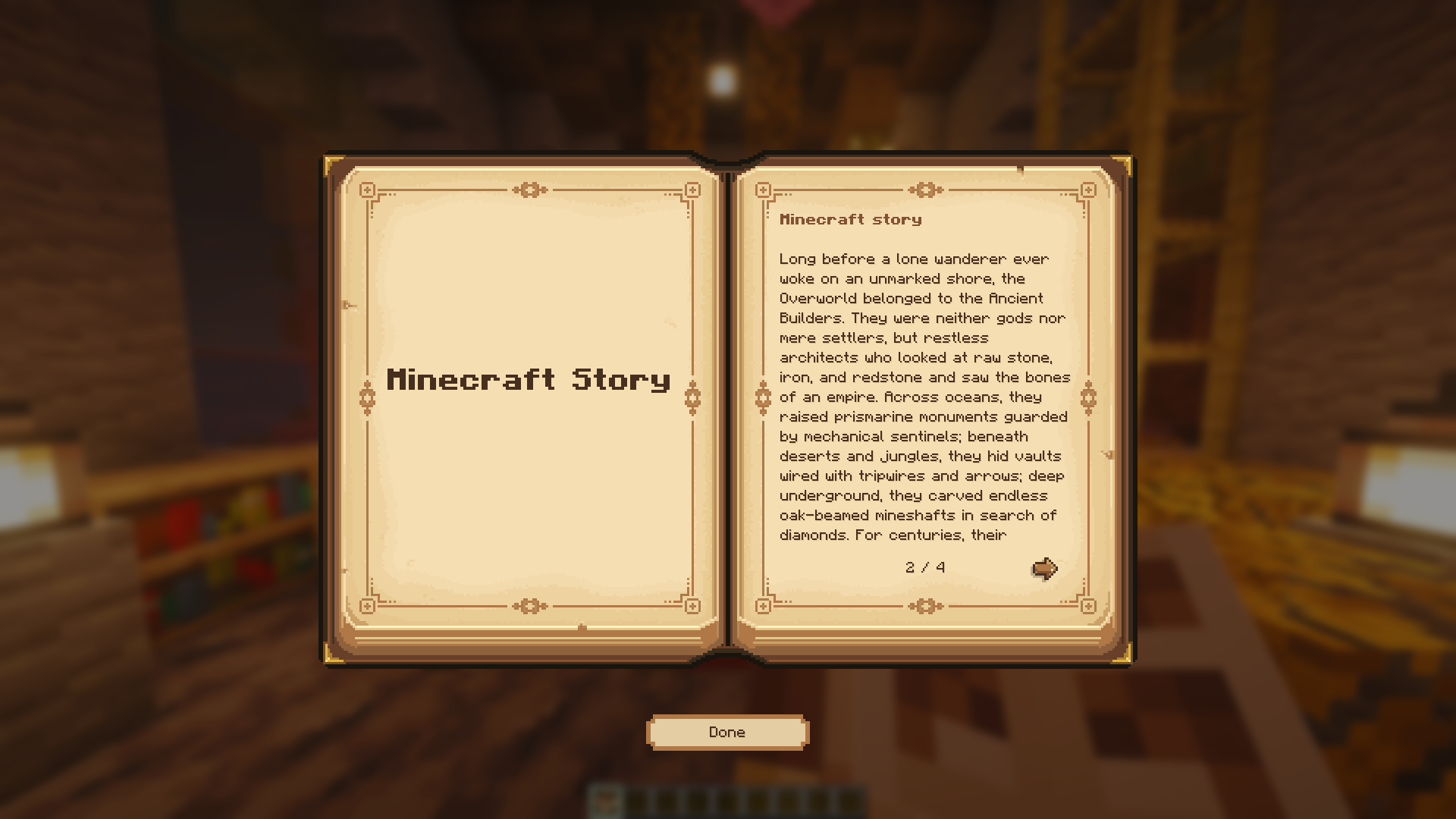
Letters, books, notes, scrolls and contracts are items with their own text and look. Reading one can start a quest, and a book can be put on a lectern for everyone to read.
The Codex fills in a creature's entry as the player meets it, kills it and reads about it. A boss gets a page that records every fight with it.
Waypoints
A waypoint can lead to a fixed spot, the nearest structure of a kind, an NPC, a boss or the nearest mob of some type. Instead of an exact point it can mark an area to search, with its edge drawn on the ground. The quest tracker lists waypoints that are in another dimension. They also appear on Xaero's Minimap and JourneyMap, though neither is needed.
The editor
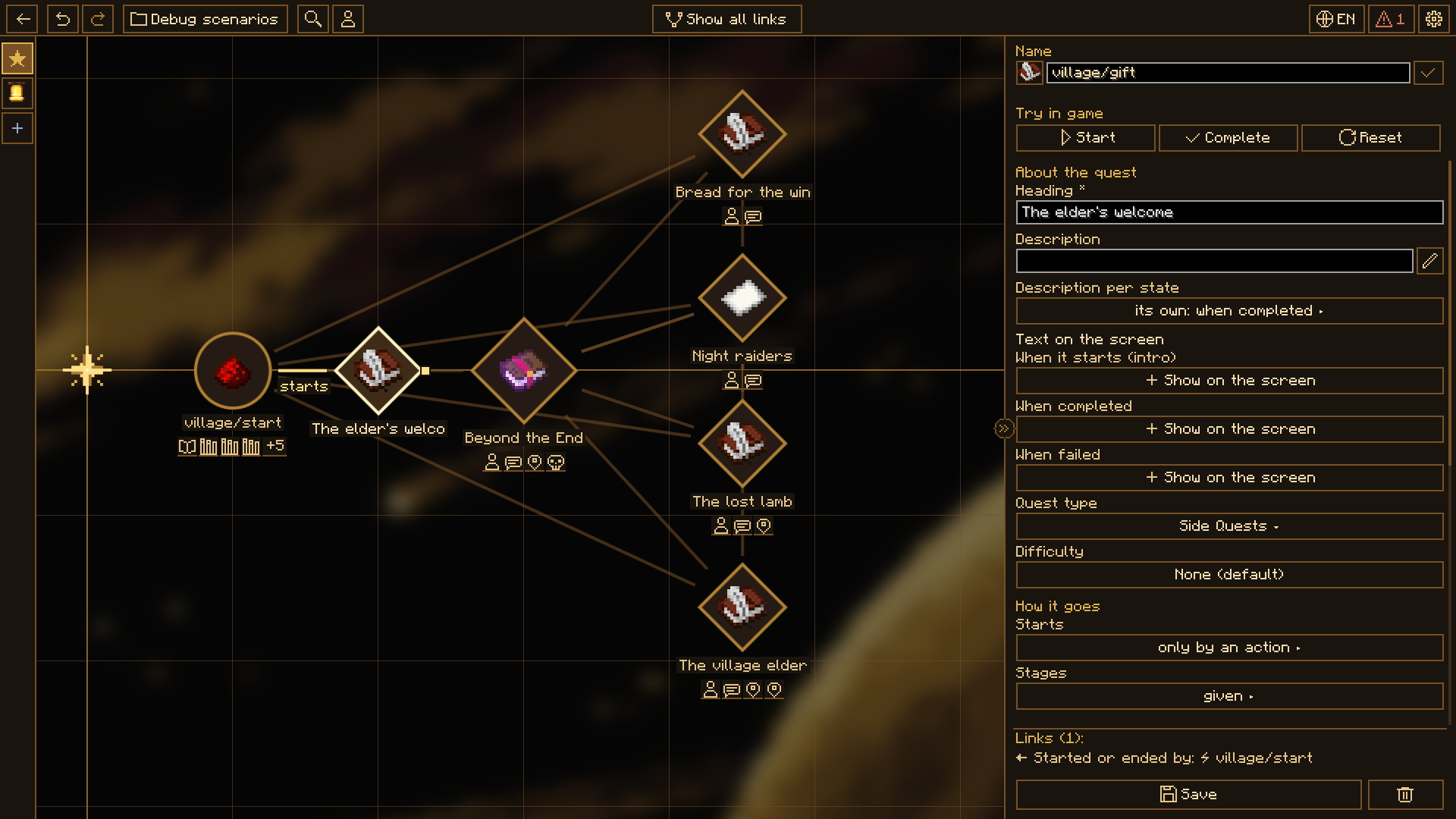
Operators can edit the story without leaving the game. Quests sit on a map with arrows between them, dialogues open as graphs, and every node has a form with tooltips. Positions and mobs are picked by clicking in the world, and most things have a button that tries them at once.
For modpack authors
Every part of a story is a JSON file. The file config/storybound/my_story/quests/mypack/wolf_hunt.json is the quest mypack:wolf_hunt. You can edit these files in VS Code, where the schemas give completion and mark mistakes, then run /reload. The in-game editor writes the same files and keeps your formatting, so you can use either one, or both. A story can also ship inside a datapack.
- Quests, dialogues, scenes, documents, bosses and story events share one set of triggers, conditions and actions.
- Vanilla commands can be grouped into scripts that run at the player or at an NPC. Every command is parsed when the story loads, so a typo shows up as an error with its line number.
- The validator names the file and the field that is wrong. It can also run on a headless server in CI and fail the build.
- When you rename a quest or a dialogue after release, players' saved progress moves to the new id.
- Several stories can live side by side and be turned on or off one by one.
- Texts are kept in language files. English and Russian come with the mod.
- With KubeJS installed, you can add conditions and actions of your own.
Getting started
- Install Storybound on the server and on every client. No other mods are needed. The first start creates the folder
config/storybound/. - Run
/storybound debug scenario campfireand follow the hint in chat. The other scenarios areduel,reputation,village,dimensions,raidandscene, and/storybound debug scenario clearremoves them all. - Press J, then Dev Mode, to see how the scenario is put together.
- The wiki has a page for every part of the mod.
Files and settings
| What | Where |
|---|---|
| Stories | config/storybound/my_story/, or data/mypack/storybound/ in a datapack |
| Server settings | config/storybound-common.toml: which parts of the mod are on, dialogue distance, command permission level |
| Player settings | config/storybound-client.toml: HUD, text speed, markers, the dialogue camera |
| Problems in a story | logs/storybound-validation.txt, or /storybound debug validate |
Compatibility
None of these are required. Each one is picked up when it is installed.
| Mod | What it adds |
|---|---|
| KubeJS | Conditions and actions written in JavaScript |
| JEI | The items quests ask for and give, shown as recipes |
| Cutscene API | Cutscenes as part of the story |
| Xaero's Minimap, World Map, JourneyMap | Waypoints on the map |
| Shoulder Surfing, Epic Fight | Paused while the dialogue camera is in use |
| Easy NPC | Its NPCs work as Storybound NPCs |
Storybound runs on NeoForge 1.21.1 only. There is no Fabric version.
FAQ
Does it work with modded mobs, biomes and structures?
Yes, without any setup. The editor reads the choices from the world and from the mob itself.
Can I add it to a world I already play?
Yes. It does nothing until a story is written for it.
Does it work in singleplayer?
Yes. In singleplayer the story folder is in your own game folder, and on a server it is on the server.
Reporting issues
Report bugs on the issue tracker and attach logs/latest.log. If a story behaves wrongly, also attach logs/storybound-validation.txt. The command /storybound debug trace on records why each step of a story did or did not happen, which helps to find the cause.
Credits
The villages in the gallery and screenshots are from Epic Structures: Villages by ATi.
License
All Rights Reserved. You may include Storybound in modpacks without asking. Please do not reupload the jar elsewhere.
Storybound: Narrative Engine Team