Screenshot_20261107_213004.png
Description
Proper Steam Controller support for Minecraft with full support for the trackpads, gyro, grips, etc and power user features like action sets without needing steam to be running in the background.
It's client-side only and works on any server (however it may flag some servers' anticheat because of analog input).
Aiming
- Gyro aiming while your thumb rests on the right trackpad, the way steam does it by default. On controllers without a right trackpad (DualSense, Switch Pro) it's always on. Action sets can switch it to always on or off.
- Optional gyro acceleration, so fast turns go further while slow aiming stays precise.
- The right trackpad turns the camera like a mouse, and a flick keeps it spinning like a trackball. The right stick works too, but like you didn't buy a steam controller to NOT use the trackpads did you?
- Horizontal Turning makes left and right follow the horizon however you hold the controller, so yawing or rolling it both turn, like Steam Input's Player Space.
- Steady Aim lowers gyro sensitivity while you draw a bow or aim a crossbow or trident, so its easier to line up shots.
- Optional aim assist, limited to singleplayer by default.
Hotbar
The left trackpad by default is used for choosing a hotbar slot. By default it's a 3x3 grid that pops up in the middle of the screen while you touch the pad. You can also pin the grid to a corner, where it replaces the vanilla hotbar, or keep the vanilla hotbar and slide along it.
Menus
- The right trackpad and right stick move the mouse cursor.
- The left trackpad can be used to navigate menus and inventories in a way that feels more natural
- X shift-clicks
- An on-screen keyboard pops up for chat, signs, books and text boxes in general, including ones added by other mods like Scholar. It works with a touchscreen too.
Controls
You can rebind controller binds in the vanilla Controls screen, next to the keyboard ones. You can bind button combos, the back buttons, the grips and stick touches. Right-click a bind (LT) for a more advanced bind editor.
Sticks and trackpads can be bound like buttons too: pushing a stick or finger past a threshold, touching a trackpad, or swiping on it. For example bind Sprint to L Stick Up to sprint when the stick is pushed all the way forward. Any input can also be picked from a list instead of pressed.
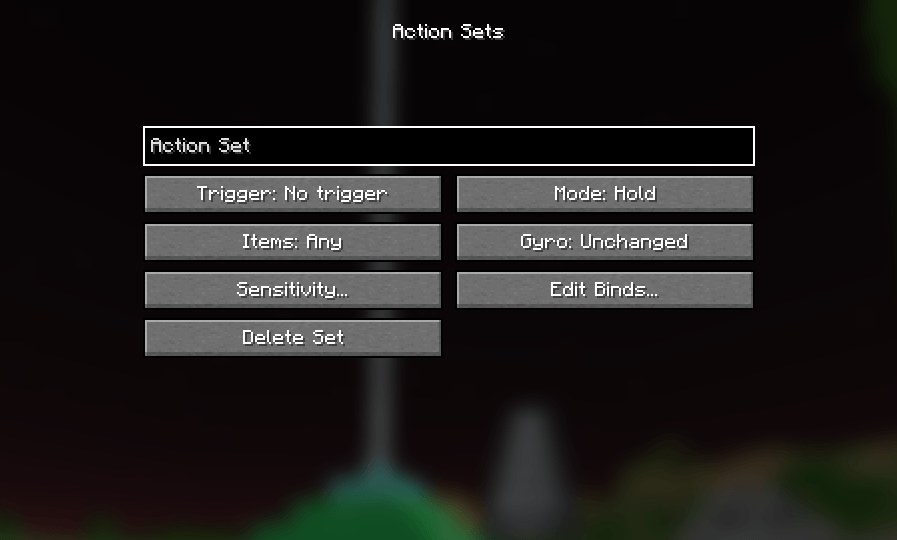
Action sets are extra layers of binds on top of the normal ones. A set can switch on while you hold a button, toggle on a press, follow a grip, or follow the item in your hand, and can be limited to in game, menus, or certain worlds and servers. Each set can also change sensitivity and gyro behaviour, for example lower trackpad speed while holding a bow, and press a keybind when it switches on or off or hold one the whole time it's on.
I personally use it for zooming (R5 as the trigger, my zoom keybind held while it's on, and swiping up and down on the left trackpad bound to Scroll Up and Scroll Down.)
Profiles
Profiles are whole configs (binds, action sets and Controller Settings) you switch between with one click. Every controller gets its own profile the first time it connects, and picking it up switches to that profile automatically. Profiles and action sets can be copied as one line of text and pasted into someone else's game.
Haptics
There's customizable rumble for footsteps, damage, landing, block breaking, mining, flying, falling, fishing bites, bow draw, shield blocks, explosions, thunder and a low-health heartbeat. Each one can be adjusted individually.
Other stuff
- There's a first time onboarding that helps you configure the mod in a way thats comfortable for you
- Optional button hints in the bottom right corner for what you can do right now, like Bedrock Edition
- Battery level on the title and pause screens, with low battery warnings
- Translated into Bulgarian, German, Hebrew, Russian, Ukrainian, French, Spanish, Portuguese, Italian, Swedish, Czech, Greek, Turkish, Arabic and Persian, plus Pirate Speak, Upside Down, Shakespearean English and Anglish
Controllers
Steamify is built for the Steam Controller (2026) and Steam Deck. The original Steam Controller should work too, but it's untested. Other controllers that support SDL (DualSense, Switch Pro, Xbox and so on) work too, with gyro if. With more than one connected, Steamify uses whichever you touched last. If you're using the steam deck, play it in desktop mode with Steam closed so it doesn't cause double inputs.
If Steam is running, turn Steam Input off for Minecraft or your launcher. Otherwise Steam grabs the controller first and the game only sees a plain gamepad.
Requirements
- Minecraft 26.3 with Fabric Loader 0.20.1 or newer
- Fabric API
- Fabric Language Kotlin
- On Linux, Steam's udev rules (the
steam-devicespackage, or Steam itself) so the game can read the controller
Steamify Team