

Stay
- By
Description
Stay is a simple, focused mod that solves one very common problem in heavily modded Forge 1.20.1 packs:
You want to leave your grinder or spawner running while you go explore but the moment you walk away, everything stops.
Stay creates a stationary fake player that:
- Properly registers as a real player on the server
- Force-loads the exact chunk it stands in
- Keeps spawners, grinders, and farms ticking even when no real player is nearby
- Survives server restarts
- Can use any player’s UUID to display their skin.
It was made specifically because existing solutions either break in large modpacks or require Fabric/Carpet.
Stay — GUI & Anchor Management Update
Stay has received a major update focused on making anchor management easier, faster, and more intuitive.
✦ New: Stay Management GUI
/stay now opens a fully custom management interface.
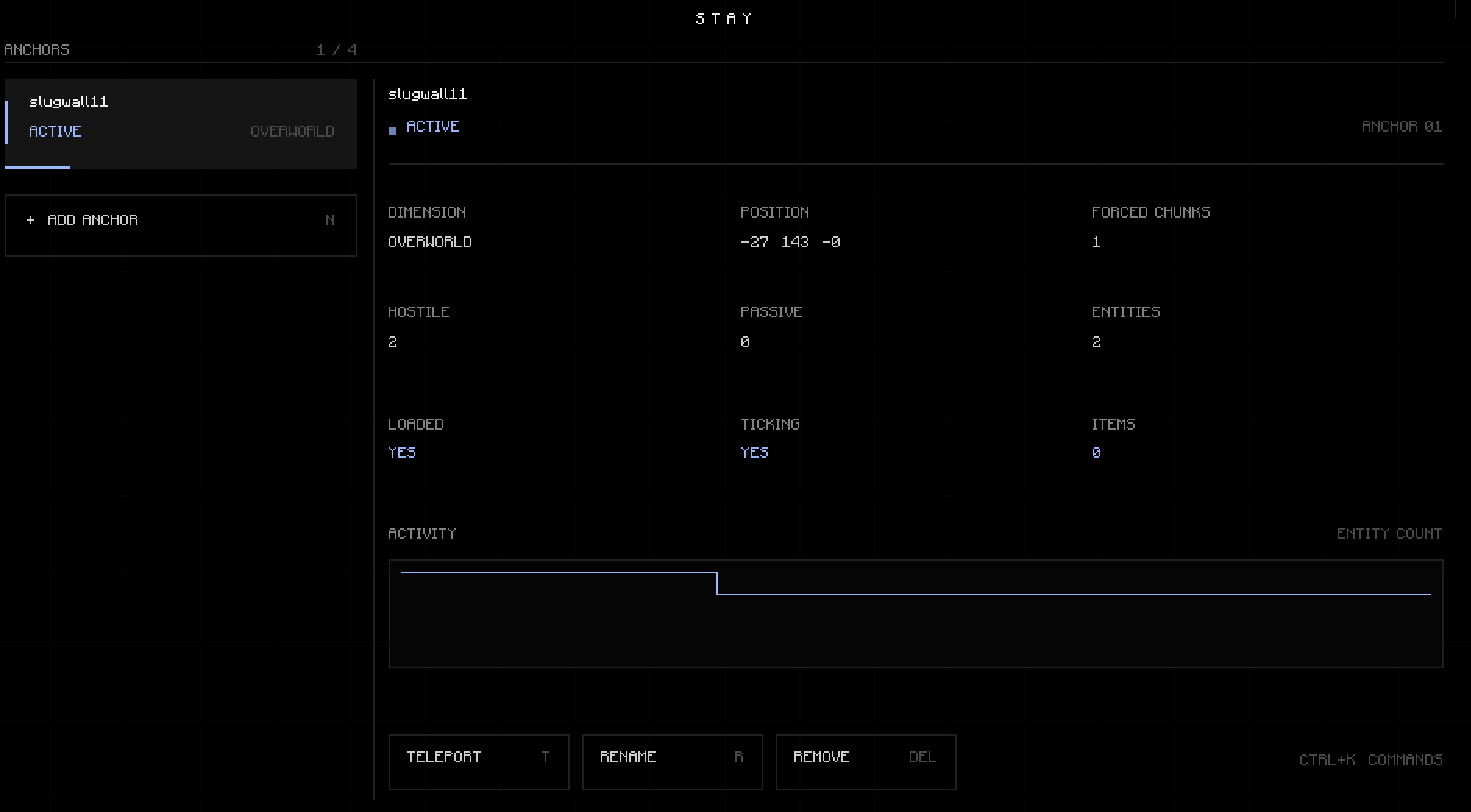
The new GUI gives you a centralized view of every Stay anchor currently saved in the world, including:
* Anchor name and display name
* Active / idle state
* Dimension
* Position
* Forced chunk count
* Hostile entity count
* Passive entity count
* Total entity count
* Loaded state
* Ticking state
* Item count
* Activity history
The interface is completely custom-rendered and does not rely on Minecraft's default GUI widgets.
✦ Anchor Management
Anchors can now be managed directly from the GUI.
Available actions include:
* Create anchors
* Remove anchors
* Remove all anchors
* Rename anchors
* Teleport to anchors
* Refresh anchor data
The GUI also keeps the existing command-based functionality available for players who prefer commands.
✦ `/stay` Command
`/stay` now opens the Stay management GUI by default.
The existing commands are still available:
- /stay here
* /stay here <name>
* /stay here <name> as <player>
* /stay remove <name>
* /stay remove all
* /stay list
* /stay tp <name>
* /stay info <name>
✦ Player Skins / Profiles
When creating an anchor, you can optionally provide a player name to resolve a profile and use its appearance for the anchor.
This allows anchors to use different player appearances instead of being limited to a single default look.
✦ Keyboard Shortcuts
The GUI includes a number of keyboard shortcuts for faster management:
* N — Create anchor
* R / F5 — Refresh
* T — Teleport
* E — Rename
* Delete / Backspace — Remove
* Enter — Refresh
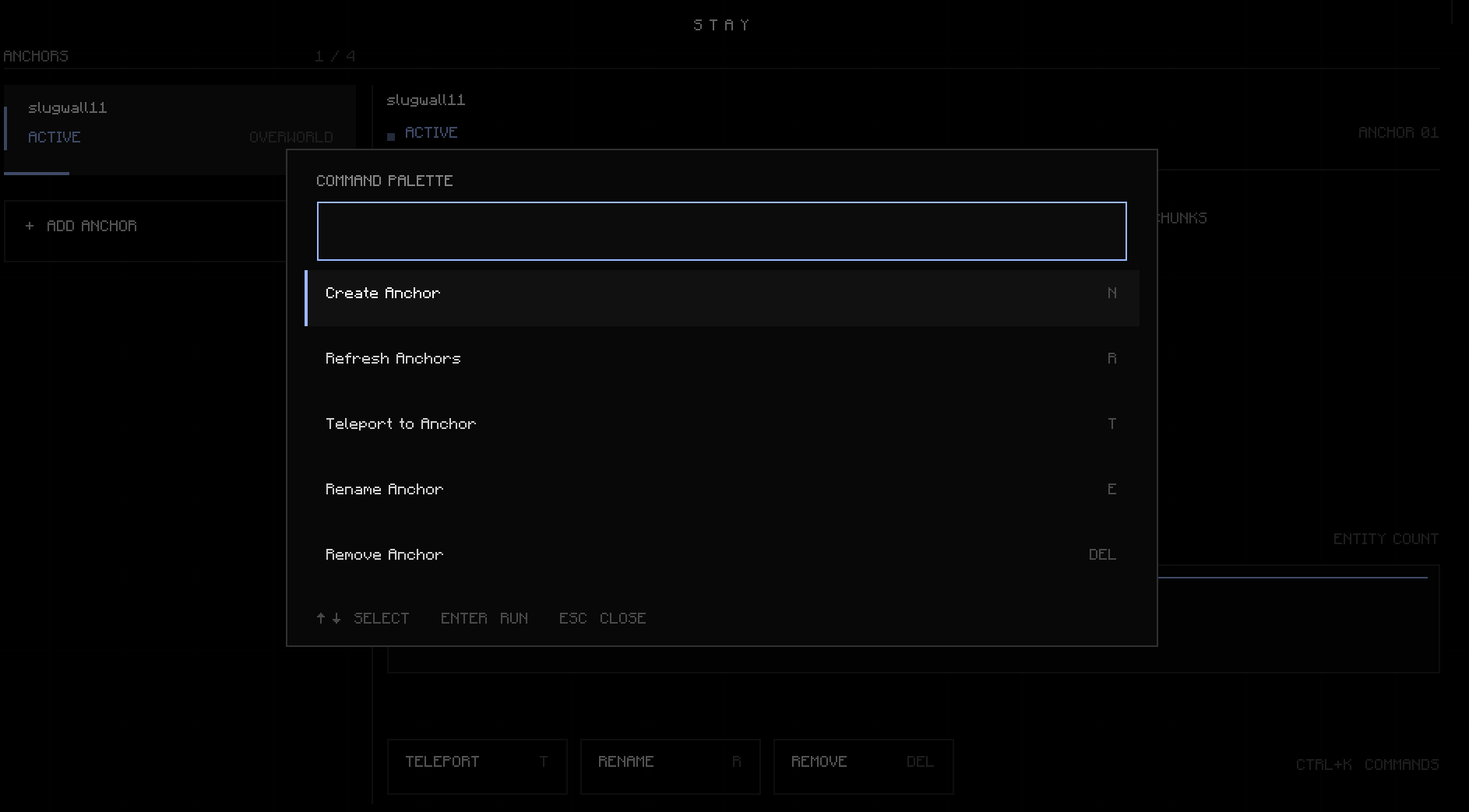
* Ctrl + K — Open command palette
* ↑ / ↓— Select anchors
* Esc — Close menus / GUI
✦ Command Palette
A built-in command palette can be opened with Ctrl + K or /.
It provides quick access to common Stay actions without requiring the player to navigate through the interface.
✦ Custom Text Input
The new interface includes custom text input functionality with support for:
* Cursor movement
* Word navigation
* Text selection
* Copy / paste
* Cut
* Select all
* Home / End
* Backspace / Delete
* Shift-selection
* Ctrl + arrow navigation
✦ Server-Side Synchronization
The GUI communicates with the server through Stay's networking system.
Anchor information is synchronized from the server, while GUI actions are validated server-side before being performed.
This keeps the interface synchronized with the actual state of the world's anchors.
✦ Visual Improvements
The new interface uses a custom monochrome design with a subtle blue accent.
It includes:
* Custom layout scaling
* Anchor sidebar
* Detailed information panels
* Activity visualization
* Animated UI elements
* Custom modals
* Toast notifications
* Custom command palette
* Custom borders and separators
* UI interaction sounds
The GUI also does not pause the game while open.
Existing Features
Stay's core functionality remains unchanged: anchors can remain active at their locations while you travel elsewhere, allowing systems such as mob farms to continue operating without requiring you to physically remain at the location.
---
Stay — manage your world without staying there.
The Stay Team
