Description
★ Starshadow Splash
Watch your mods load — in style.
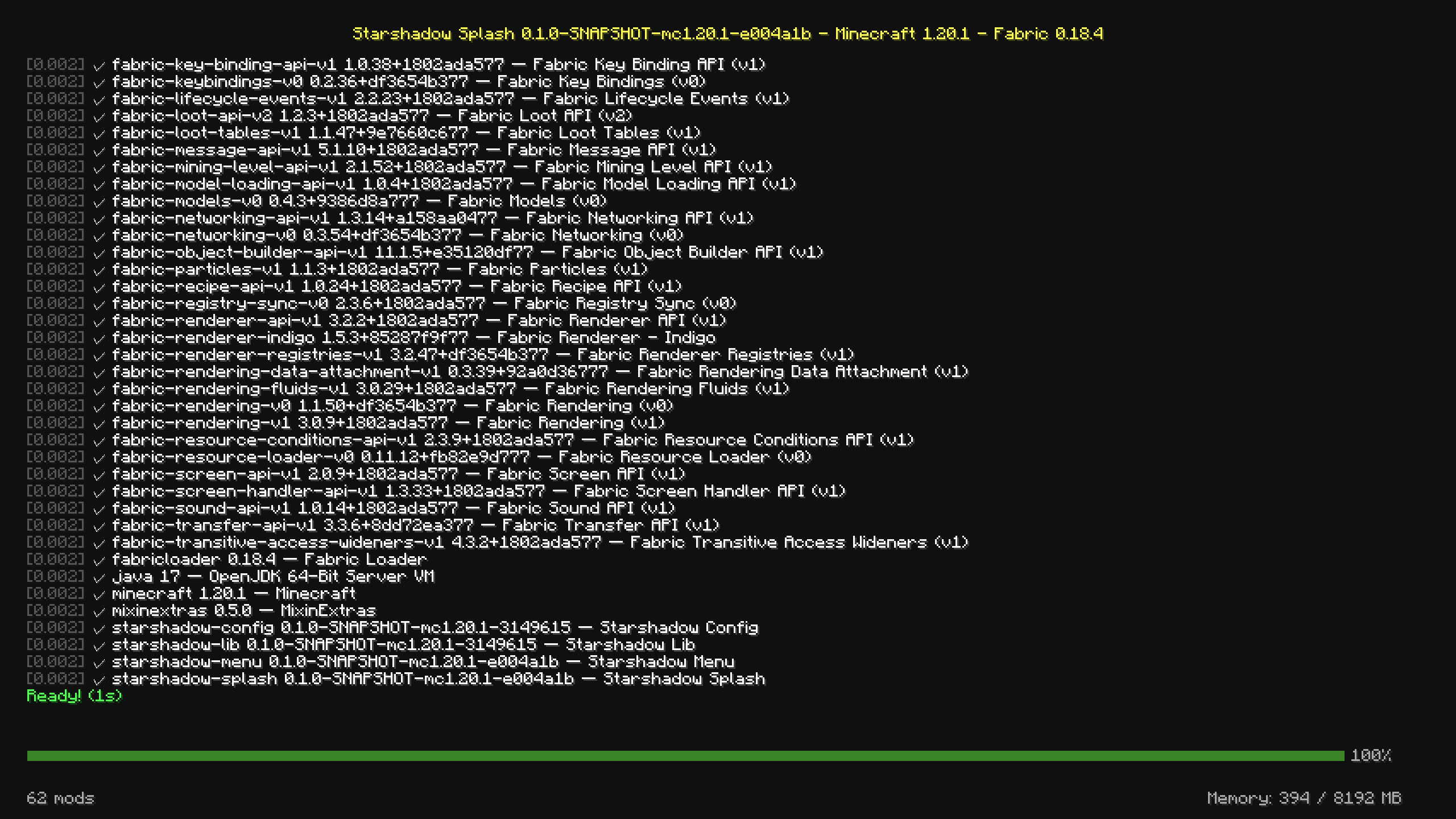
Tired of staring at the same boring Mojang logo while your modpack boots? Starshadow Splash replaces the vanilla loading screen with a beautiful, real-time boot log that shows exactly what's happening as your game starts up.
"Like watching the Matrix, but for Minecraft mods."
🪄 How It Works
- Install the mod and launch Minecraft
- Watch the magic — a scrolling boot log appears, showing each mod as it initializes
- See everything — timestamps, init times, memory usage, mod count
- Jump in — press any key or click to skip straight to the title screen
That's it. No setup. No config needed. Just a better loading experience.
✨ Features
📜 Real-Time Boot Log
Watch your mods initialize one by one in a scrolling console-style display. Each mod gets its own line with initialization time, so you can spot which mods are slow.
🎨 Three Display Modes
- Detailed — Full scrolling boot log with per-mod initialization lines (default)
- Summary — Static info card showing mod count and system info
- Vanilla — Standard Mojang logo splash screen (disables Starshadow rendering)
⏱️ Smart Pacing
The boot log replay adjusts its scroll speed to match your actual loading time:
- Adaptive — Automatically adjusts speed to finish when loading completes (default)
- Comfortable — Fixed pace at your configured lines-per-second rate
- Fast — Faster fixed pace for those who like speed
📊 At-a-Glance Info
- Timestamps before each log line (e.g.,
[0.032]) - Init times showing how long each mod took to initialize
- Memory gauge in the footer showing current heap usage
- Mod count so you always know your modpack size
⏸️ Pause Until Ready
Enable "Pause Until Input" to keep the boot log visible until you press a key or click. Perfect for reading through your mod list or checking init times before the title screen appears.
⚙️ Fully Configurable
Every aspect of the splash screen can be tweaked:
- Display mode (Detailed / Summary / Vanilla)
- Pacing mode and scroll speed (1–20 lines per second)
- Ready pause duration (0–10 seconds)
- Toggle timestamps, init times, and memory gauge individually
- All settings accessible via Mod Menu or the config file
📥 Get It
Recommended: Modrinth
Download on Modrinth — the preferred platform for Starshadow Splash.
Also available on CurseForge
Download on CurseForge — same mod, same releases.
📦 Installation
From Modrinth (recommended)
- Go to the Starshadow Splash Modrinth page
- Select your Minecraft version (1.20.1, 1.20.4, or 1.21.1)
- Click Install — dependencies are installed automatically if using a compatible launcher
- Launch and enjoy the new boot screen! 🚀
Manual Install
- Install Fabric Loader for your Minecraft version
- Install Fabric API
- Drop the following into your
mods/folder:- Starshadow Splash
.jar - Starshadow Config
.jar(required dependency) - Starshadow Lib
.jar(required dependency)
- Starshadow Splash
- (Optional) Install Mod Menu or Starshadow Menu to access settings in-game — either one works, you don't need both
- Launch Minecraft! 🚀
Supported: Minecraft 1.20.1 · 1.20.4 · 1.21.1 — Fabric only
⚙️ Configuration
All settings are accessible via Mod Menu → Starshadow Splash → Settings, or by editing config/starshadow-splash.json directly.
| Setting | Default | Options |
|---|---|---|
| Splash Mode | Detailed | Detailed · Summary · Vanilla |
| Show All Mods | ✅ On | On · Off |
| Pacing Mode | Adaptive | Adaptive · Comfortable · Fast |
| Lines Per Second | 4 | 1–20 |
| Ready Pause | 3 seconds | 0–10 seconds |
| Pause Until Input | Off | On · Off |
| Show Timestamps | ✅ On | On · Off |
| Show Init Times | ✅ On | On · Off |
| Show Memory | ✅ On | On · Off |
🧩 Compatibility
| Mod | Compatibility |
|---|---|
| Fabric API | ✅ Required |
| Mod Menu | ✅ Optional — config screen integration (not needed if Starshadow Menu is installed) |
| Starshadow Menu | ✅ Optional — provides config screen access and mod list |
| Other splash mods | ⚠️ May conflict — only one splash overlay should be active |
📋 Requirements
| Dependency | Required? |
|---|---|
| Fabric Loader | ✅ Yes |
| Fabric API | ✅ Yes |
| Starshadow Config | ✅ Yes |
| Starshadow Lib | ✅ Yes |
| Mod Menu or Starshadow Menu | Optional — either provides config screen access |
🌟 Make Loading Fun Again
No more staring at a static logo wondering if your game crashed. Starshadow Splash turns the most boring part of Minecraft into something you'll actually enjoy watching.
Download it. Watch your mods boot. Marvel at how fast (or slow) they are.
Made with ❤️ by Ghent Starshadow Licensed under MPL-2.0 — free to use, share, and modify.
Starshadow Splash Team