SpawnCheck
- By
Adds tools to help debug monster spawns. This includes visualise cues for spawnability of blocks, interregotion of spawn blocking cause, and fake players for testing.
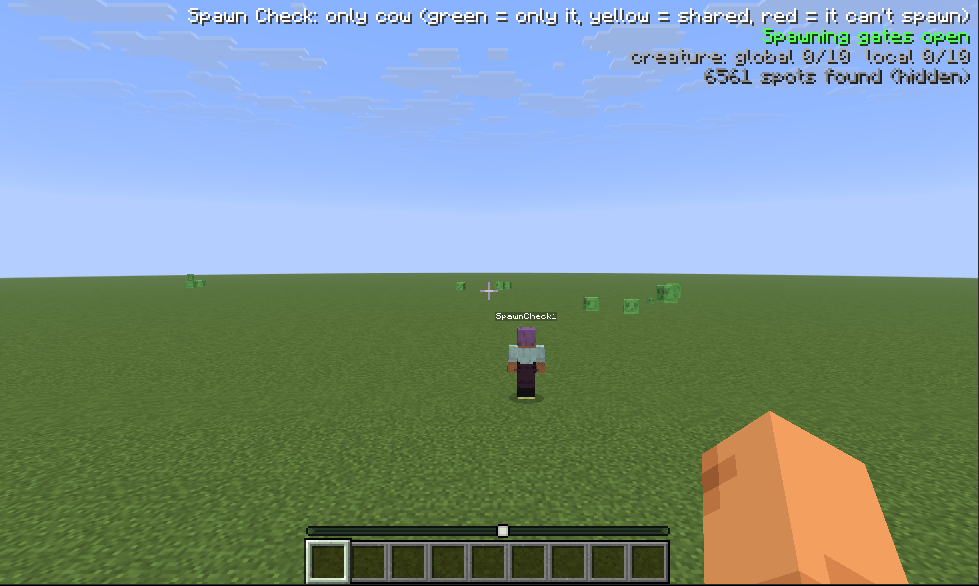
fake-player.png
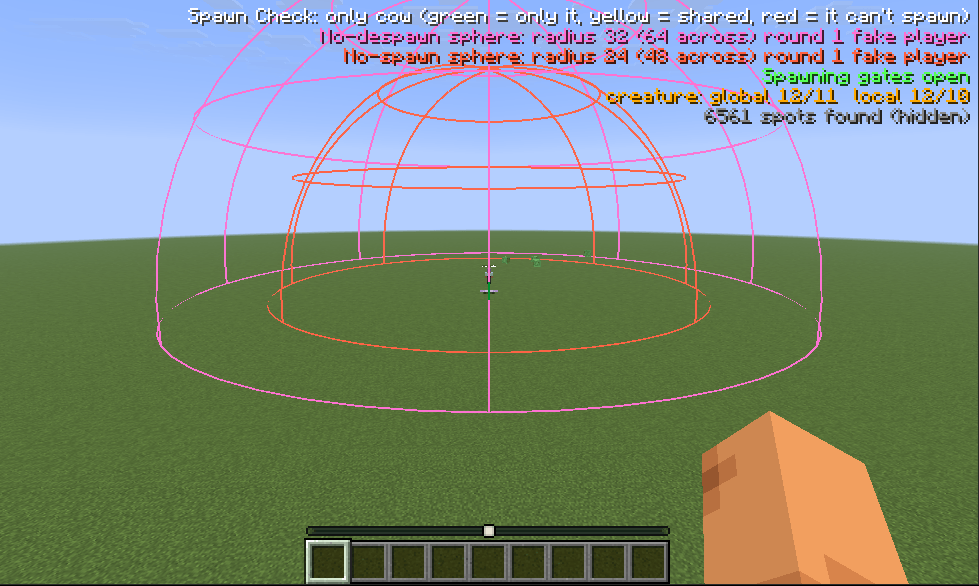
fake-player-spheres.png
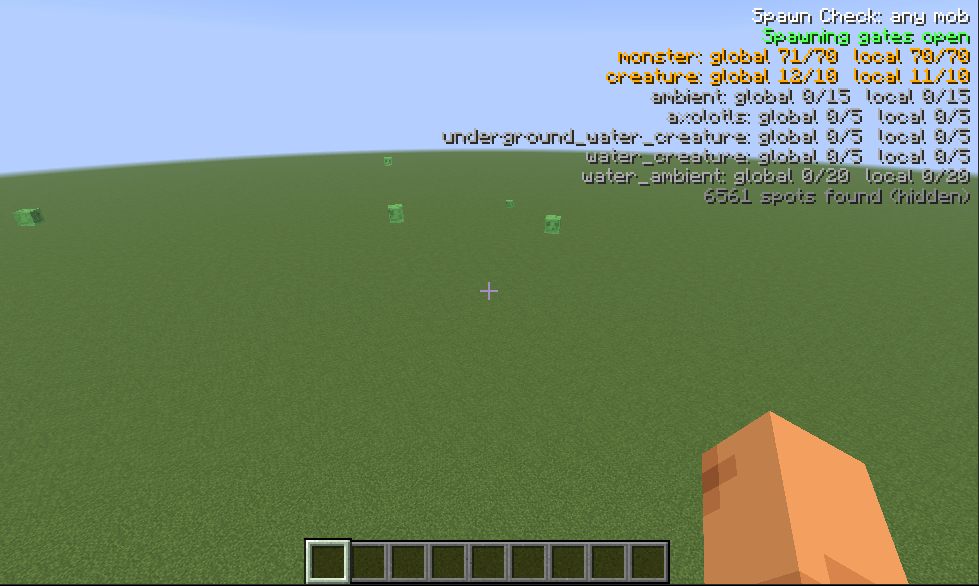
hud.png
spots-any.png
spots-only.png
Description
<!-- GENERATED FILE: edit README.template.md instead (see tools/RenderReadme.java). -->
Spawn Check
A Fabric and NeoForge mod for Minecraft that shows where mobs will actually spawn, and tells you exactly why they won't where they don't. It is built for debugging mob farms.
Looking at light levels and block types only gets you so far: a spot can look perfect and still never spawn anything because the mob cap is full, the chunk isn't entity-ticking, the nearest player is 23 blocks away, the biome has no entry for that mob, or a spider's 1.4-block-wide hitbox doesn't fit. Spawn Check re-implements the checks vanilla's natural spawner makes for a single block position, runs them for every open floor spot around you, and paints the answer in the world.
Features
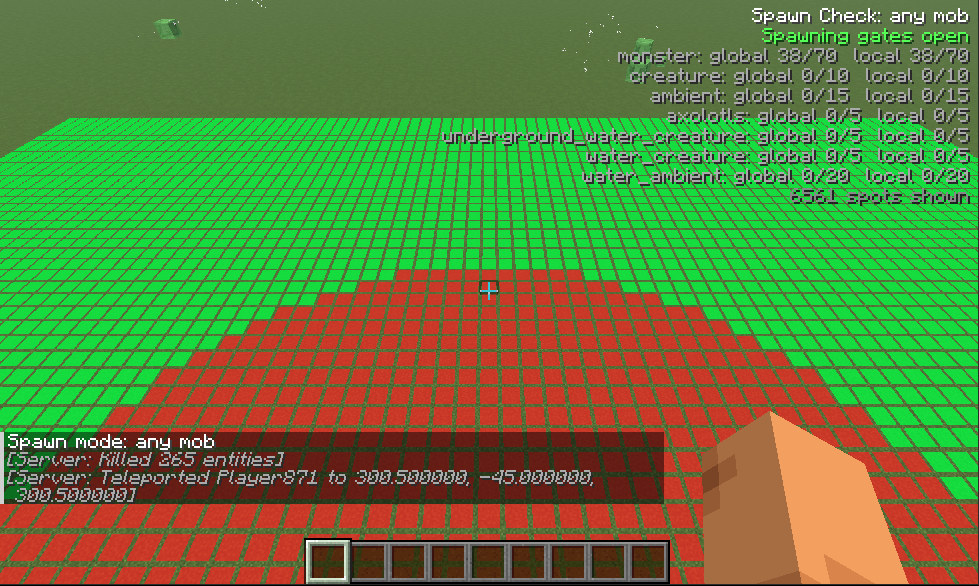
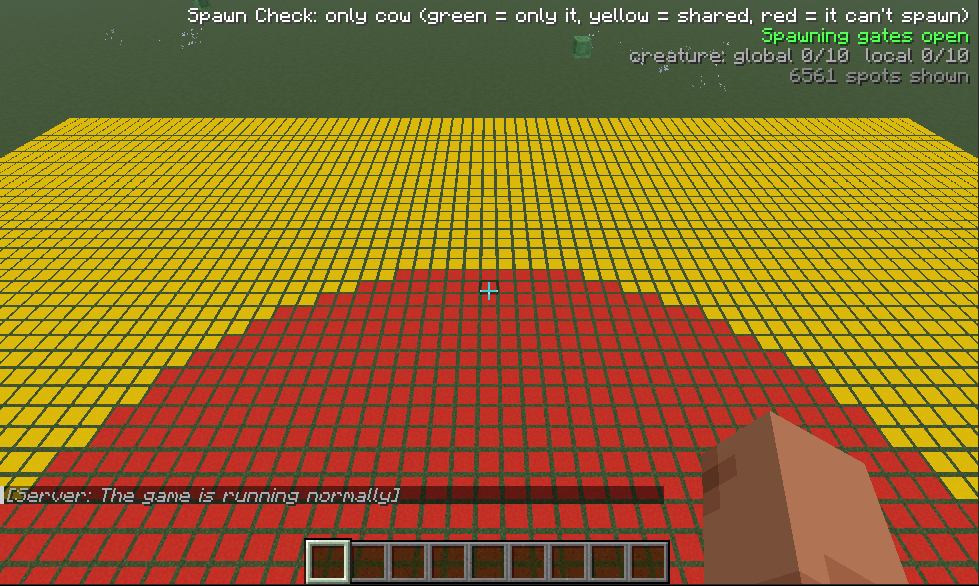
- Spawn spots painted on the floor: green where the mob can spawn right now, red where it can't. Three modes: any mob, one specific mob, or only that mob (yellow where other mobs can spawn there too).
- "Why not?": look at a spot and press a key (or run
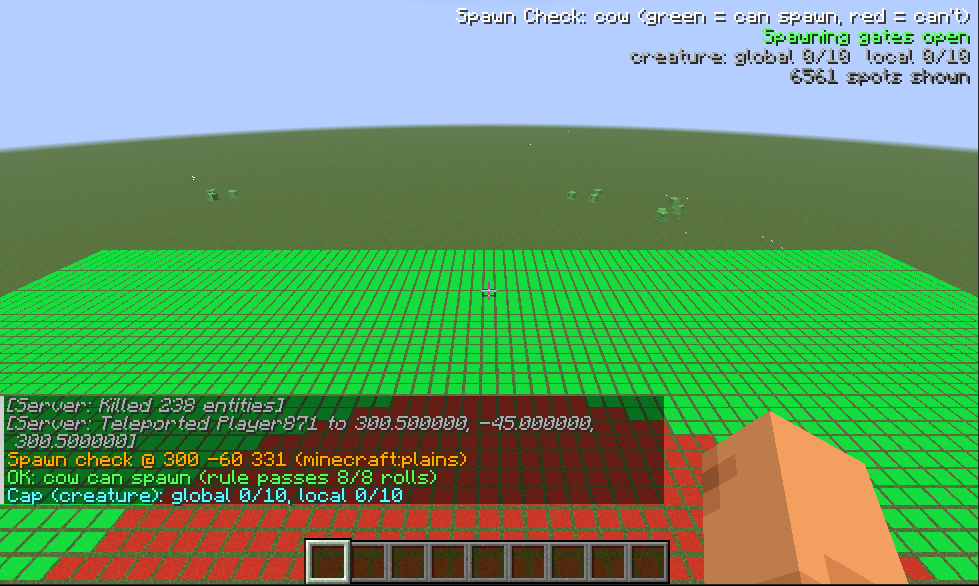
/spawncheck why) for every failed requirement in chat: light, block below, headroom, hitbox size, biome spawn list, distance to players, mob caps, difficulty, gamerules and more. - HUD in the upper right: whether spawning is switched off level-wide, the global and local mob caps for the category, how many spots were found.
- Spheres around a player for the three distances that matter to a farm: nothing spawns within 24 blocks, mobs never despawn within 32, and mobs despawn at once beyond 128.
- Fake players: stand-in players that count for spawning, so you can test a farm while you watch from spectator mode, and draw the spheres around them.
- Scan any area (
/spawncheck at), up to 128 blocks horizontally and as tall as the world.
Screenshots
Spawn spots in any mode. Green is a spot where something can spawn; the red disc is the 24 blocks around the player, where nothing can.
|
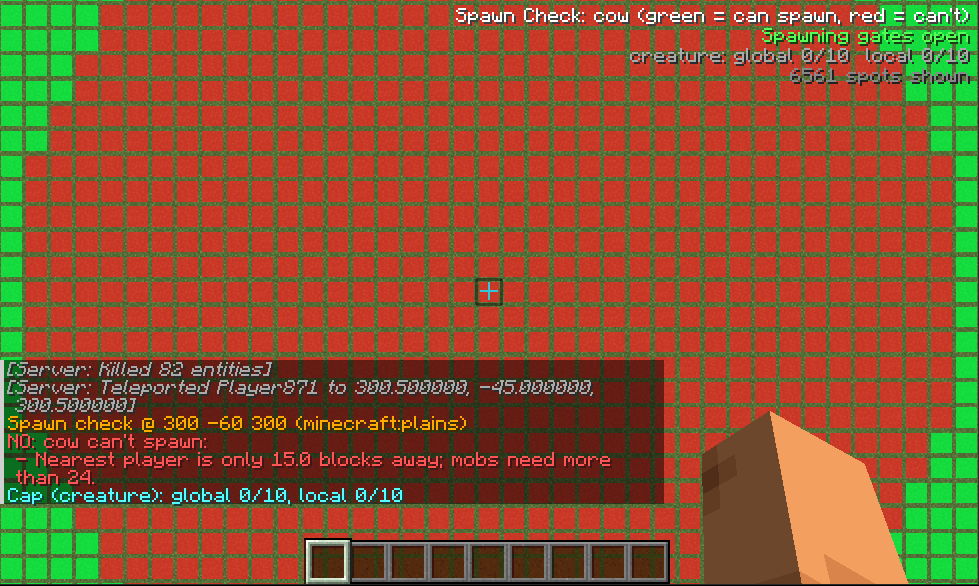 |
| HUD. Spawning gates, the global and local mob cap of every category (orange when full) and the number of spots found. | N on a red spot. Every failed requirement, in chat. Here: a player is closer than 24 blocks. |
 |
|
N on a green spot. The rule passes, and how many of its 8 rolls did. |
only mode. Yellow means the chosen mob can spawn there, but so can others. |
|
|
| Fake player. A stand-in that counts for spawning, so you can test a farm from spectator mode. | With spheres. The 24-block no-spawn sphere (orange) and the 32-block no-despawn sphere (pink) around the fake player. |
Requirements
- Minecraft 26.3
- Fabric: Fabric Loader 0.19.5 or newer and Fabric API. NeoForge: NeoForge 26.3.0.40-beta or newer.
- Java 25 (the Java Minecraft 26.3 itself uses)
The analysis runs on the server, so the mod must be installed there too (in single player that is automatic), and each player who wants the overlay needs it on their client. On a server, only operators (permission level 2 or higher) can use it; a player without the permission gets a message instead of results. A client that joins a server without the mod simply sees "Server doesn't have Spawn Check".
Using it
Keys
| Default key | Action |
|---|---|
V |
Show / hide the spawn spots |
B |
Cycle the mode: any mob → the chosen mob → only the chosen mob |
N |
Explain, in chat, why the spot you are looking at (or, if you aren't looking at a block, the spot you stand on) does or doesn't work |
Changing the keys: open Options → Controls → Key Binds… and scroll to the Spawn Check category. Click a key, then press the key you want instead (a key that is already used elsewhere is highlighted in red, so you can see the clash). Minecraft stores these choices in its own options.txt, not in the mod's config file.
Reading the spots
Each open floor spot within the scan area gets a marker on the ground:
| Mode | Green | Yellow | Red |
|---|---|---|---|
any |
at least one mob can spawn here | nothing can | |
mob <name> |
that mob can spawn here | it can't | |
only <name> |
only that mob can spawn here | it can, but so can other mobs | it can't |
Red in only mode means the chosen mob can't spawn there. It says nothing about other mobs: a spider can spawn on a spot the creeper can't, because they have different hitboxes (a creeper is 0.6 wide and 1.7 tall, a spider 1.4 wide and 0.9 tall). Press N on a spot to see exactly who can and can't spawn there, and why.
Commands
All commands start with /spawncheck. They are client commands, so they work on any server that has the mod.
| Command | What it does |
|---|---|
toggle |
Show / hide the spots (same as V) |
hud |
Show / hide the HUD. The HUD works with the spots off |
mode any |
Spots where any mob can spawn |
mode mob <mob> |
Spots where <mob> can spawn (e.g. mode mob creeper; tab-completes) |
mode only <mob> |
Spots where <mob> is the only mob that can spawn |
why / why <x> <y> <z> |
Explain the block you look at / a given position, in chat |
at player / at <x> <y> <z> |
Scan around you (default) / around a fixed position |
radius <1-128> |
Horizontal scan radius (default 128) |
height <1-2032> |
Vertical scan radius (default 6); it is clamped to the world height |
size <1-128> |
Sets radius and height to the same value |
fake / fake <x> <y> <z> / fake remove [<name>] |
Place a fake player at your position / a position, or remove one by name (all of them if no name) |
despawn |
Show / hide the 128 despawn sphere (despawn far does the same) |
despawn near |
Show / hide the 32 no-despawn sphere |
nospawn |
Show / hide the 24 no-spawn sphere |
despawn around you\|fake\|both |
Centre the spheres on you, the fake players, or both (also nospawn around ...) |
Operators can also run /spawncheckfake (no argument places a fake player where they stand), /spawncheckfake <pos> and /spawncheckfake remove [<name>] on the server itself.
Settings (mode, mob, radius, which overlays are on, ...) are saved in config/spawncheck.json. Big scans cost the server time, so the scan refreshes every 0.5 to 5 seconds depending on its volume. At most 30,000 spots are shown; the HUD tells you when the limit is hit.
The spheres
Mobs spawn and despawn according to the 3D distance to the nearest player, so the limits are spheres, not boxes. Spawn Check draws them around you and/or your fake players:
| Sphere | Radius | What it means | Colour |
|---|---|---|---|
| No-spawn | 24 | A natural spawn needs the nearest player to be farther than this. Nothing spawns inside it. The world spawn point has the same 24-block rule, so it gets its own sphere (amber) whenever it is within your render distance. | orange (players), amber (world spawn) |
| No-despawn | 32 | Mobs inside it never despawn. Beyond it, a mob that has done nothing for 30 seconds can vanish at random. | pink |
| Despawn | 128 | Mobs beyond it despawn immediately. A farm whose mobs fall or are carried outside this sphere loses them before they reach the killing area. | purple |
The 32 and 128 distances belong to the mob's category (they are the monster values unless you are checking a mob of another category), and the HUD lists the radius and diameter of every sphere that is on. Spectators don't count as players for any of this, so if you watch from spectator mode, use despawn around fake.
Fake players
/spawncheck fake adds a creative, flying, invulnerable stand-in player (named SpawnCheck1, SpawnCheck2, ...) at your position. It counts for spawning like a real player, so you can switch to spectator mode (which doesn't count) and test a farm with the fake player as the only one. Mobs spawn more than 24 blocks from it. They are removed with /spawncheck fake remove (all) or /spawncheck fake remove SpawnCheck2 (one), and when the server stops.
How accurate is it?
Spawn Check mirrors the checks in vanilla's NaturalSpawner for one block position at a time: the level-wide switches (spawn_mobs, difficulty), the global and per-player mob caps, whether the chunk is entity-ticking and near a player, the 24-block rule and the world spawn point, the biome and structure spawn lists (so data packs that change them are respected), the block and headroom requirements, the mob's hitbox, and the mob's own spawn rule (light level and so on). Light rules use random numbers, so a spot counts as spawnable if the rule passes on any of 8 fixed-seed rolls (why shows how many passed).
What it does not model
Spawn Check answers "is this spot allowed to spawn this mob right now?". It is a checker for the rules, not a simulation of the game, so keep these gaps in mind when a farm behaves differently from the overlay:
- How likely or how often. Green means possible, not frequent. It does not model how the game chooses where to try (start positions are picked at random in each chunk, then group members wander off a few blocks), the weights in a biome's spawn list, group sizes, the limit on attempts per chunk per tick, or that passive mobs only attempt to spawn every 400 ticks. Two green spots can have very different spawn rates.
- Change over time. The mob caps are read as they stand when the server answers; it does not predict how a cap will fill up or drain while a farm runs. It only sees the moment it is asked, so a mob standing in a spot, or a block that changes a moment later, can flip a result.
- Checks made on the finished mob. After picking a spot the game builds the actual mob and runs a few more checks on it (some mobs add their own rules there). Spawn Check evaluates the mob's static spawn rules and hitbox, not that final instance.
- Anything that isn't the natural spawner. Mob spawners and trial spawners, spawn eggs and commands, structure and world-generation spawns (the animals that come with new chunks, the mobs placed in structures), raids, and the special spawners (phantoms, patrols, wandering traders, cats, village sieges).
- Other mods. Mods that hook into spawning (for example NeoForge's spawn events, or mixins that change spawn rules) aren't consulted, and neither are mods that add their own mob caps.
- Despawning in detail. The spheres show the distances; Spawn Check doesn't track individual mobs, so it can't tell you when a particular mob will despawn, only whether it is inside the safe, random or instant range. Mobs that were name-tagged, picked up an item or are otherwise marked as persistent don't despawn this way at all.
Licence
Spawn Check is licensed under the GNU Lesser General Public License v3.0 (LGPL-3.0-only), which supplements the GNU GPL v3. The mod icon is generated by tools/make_icon.py and is covered by the same licence.
SpawnCheck Team