Snurbo's Shops
- By
Screenshot 2026-07-01 132353.png

Screenshot 2026-07-01 132309.png
Screenshot 2026-07-01 132504.png
Description
# Snurbo's Shops
A player-driven shop mod for Fabric 1.21.1, inspired by Donut SMP.
Players can open shops, list items for sale, and buy from each other — all through real in-game chest GUIs with no physical blocks required.
---
## Features
- Real chest GUIs — no custom rendering, no blur, just vanilla Minecraft chests
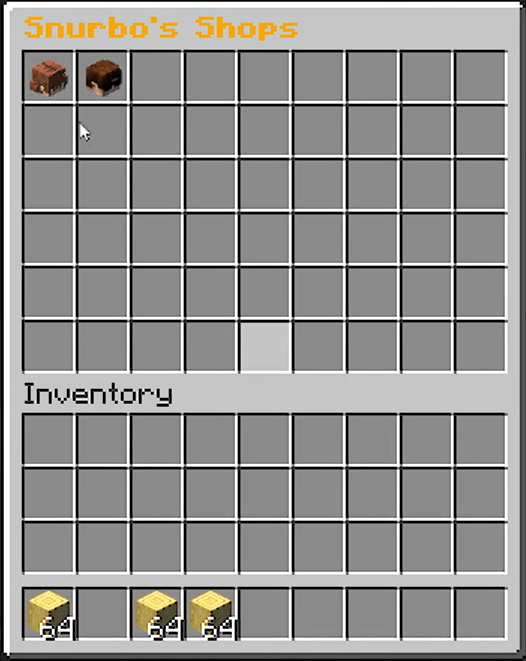
- Player head browser — `/shops` opens a chest showing every player's head; click to browse their shop
- Buy items — left-click any listing to purchase it
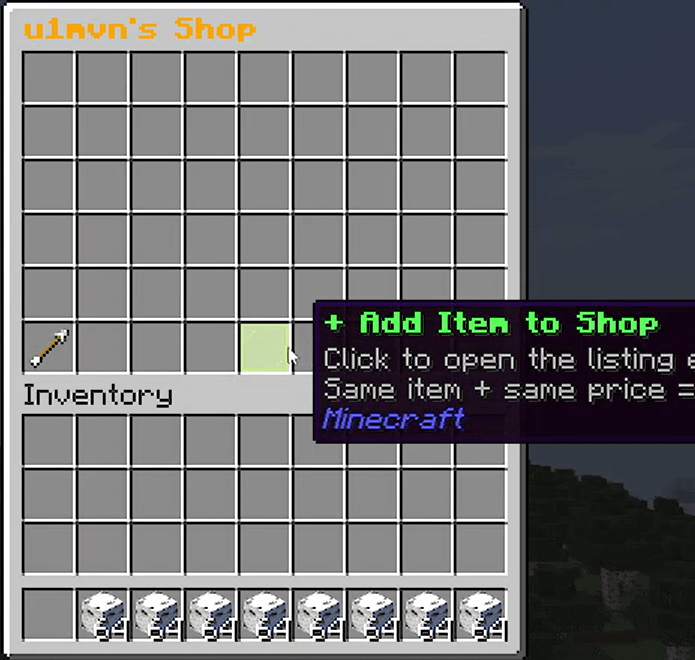
- Sell items — open your own shop, click "+ Add Item", place items, set a price and quantity per sale, then confirm
- Stock is physical — stock equals exactly what you deposited; you can't inflate it
- Restock via double chest — open a listing's edit screen and click "Add Stock" to open a double chest that only accepts the matching item, deposit more anytime
- Quantity per sale — control how many items the buyer receives per purchase (+1/+10/−1/−10 buttons)
- Edit listings — left-click your own listing to adjust price and quantity per sale
- Remove listings — right-click your own listing to remove it and get your remaining stock back
- Out of stock display — sold-out listings show clearly and can't be purchased
- Restock via re-adding — add the same item at the same price via "+ Add Item" and it merges into the existing listing
- Back button — arrow item in the bottom-left always returns you to the shop browser
- Currency mode — optional virtual currency system (op-only to enable)
- Diamond mode — default payment method; buyers pay in physical diamonds
- Auto-pause on currency switch — when an op changes currency mode, every listing across every shop is paused until its owner reviews and re-saves the price, preventing accidental cheap sales at outdated rates
- Scoreboard — when currency mode is on, a live balance sidebar is shown
- Particles & sounds — purchase effects for buyers
Commands
| `/shops` | Everyone | Opens the shop browser |
| `/shops info` | Everyone | Shows this command list in-chat |
| `/shops hideboard` | Everyone (only shown while currency mode is ON) | Toggles the currency scoreboard for yourself |
| `/shops currency true` | **OP (level 2+)** | Enables virtual $ currency mode, pauses all listings for review |
| `/shops currency false` | **OP (level 2+)** | Disables currency mode, reverts to diamonds, pauses all listings for review |
| `/shops reload` | **OP (level 2+)** | Reloads shop and currency data from disk |
## How to Use
### Browsing shops
1. Run `/shops`
2. A chest opens showing player heads — one per player
3. Click any head to browse that player's shop
4. Left-click an item to buy it
5. Click the **← Back** arrow (bottom-left) to return to the browser
### Selling items
1. Run `/shops` then click your own head
2. Click **+ Add Item** (lime glass pane, bottom-center)
3. A staging GUI opens:
- Place items in the **top row**
- Use **Price** buttons (−10/−1/+1/+10) to set your asking price
- Use **Quantity** buttons to set how many items the buyer receives per purchase
- Click the **Emerald Block** to confirm
4. Your listing now appears in your shop
### Editing a listing
1. Open your shop via `/shops`
2. **Left-click** any of your listings to open the edit screen
3. Adjust price or quantity per sale with the +/− buttons
4. Click **📦 Add Stock** to open a real double chest and deposit more of that exact item
5. Click **Save Changes** (Emerald Block) to confirm — this also resumes a paused listing
### Removing a listing
- **Right-click** any of your listings to remove it
- Remaining stock is returned to your inventory automatically
### Restocking
Two ways:
- **Quick way:** open "+ Add Item" and place more of the same item at the same price — it merges automatically
- **Direct way:** left-click the listing → "📦 Add Stock" → a double chest opens that only accepts the matching item type — deposit as much as you want
---
## Currency Mode (Op only)
Enable: `/shops currency true`
Disable: `/shops currency false`
- When enabled, prices are in **$** (virtual money) instead of diamonds
- Every new player starts with **$1000**
- The only way to earn money is by **selling items**
- A sidebar scoreboard shows everyone's balance
- Use `/shops hideboard` to hide it for yourself (only available while currency mode is on)
### ⚠ Important: switching currency modes pauses all shops
Because prices set for diamonds don't make sense as dollars (and vice versa), **every listing on the server is automatically paused** the moment an op changes currency mode. A server-wide message notifies all players. Paused listings show **"⚠ PAUSED"** and cannot be bought.
Shop owners must open each paused listing (left-click it), review/adjust the price for the new currency, and click **Save Changes** to resume selling it. This prevents buyers from snapping up items at prices that no longer make sense after a currency switch.
---
## Data Storage
All shop and currency data is saved in your world folder under:
```
world/snurbos_shops/
shops.json — all player listings
currency.json — all player balances
settings.json — currency mode toggle
```
Snurbo's Shops Team