SmartFPS - Adaptive Graphics
- By
Holds your target FPS automatically by lowering and restoring video settings step by step in real time. Learns heavy areas, eco mode, works with Sodium.
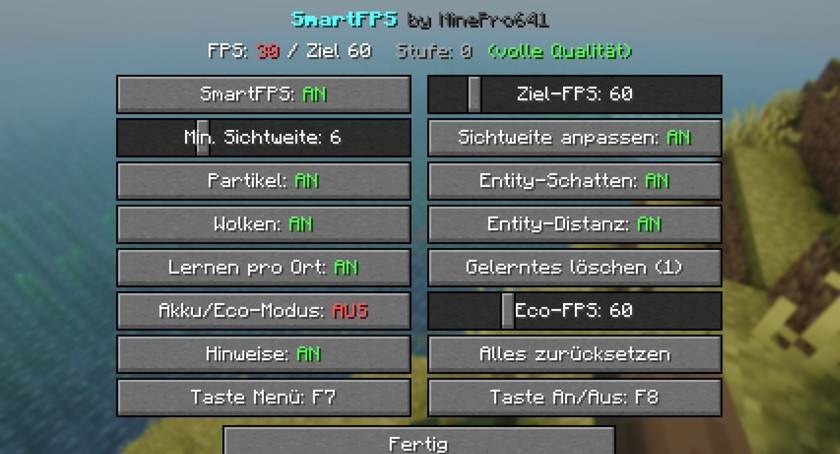
Target FPS, minimum render distance, what may be adjusted, eco mode, live status
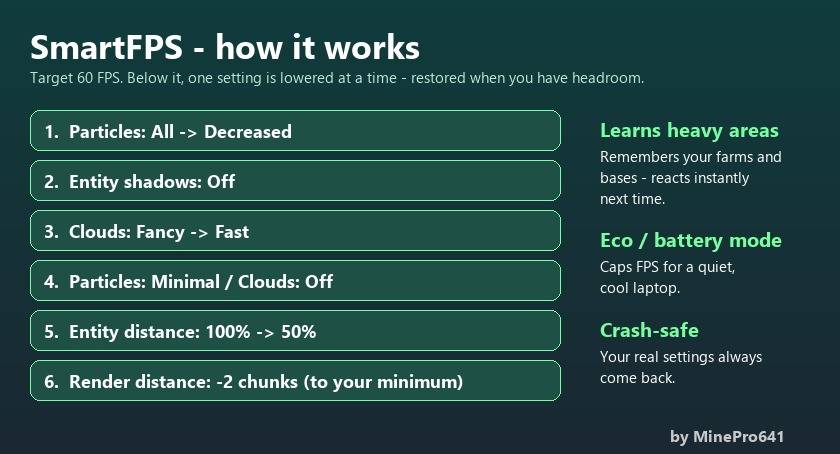
Settings are lowered one step at a time and restored when FPS recover
Description
SmartFPS - Adaptive Graphics
Performance mods make Minecraft faster - but nobody adjusts your settings for you. SmartFPS does it automatically, in real time.
How it works
- Set a target FPS (e.g. 60). If you drop below it, SmartFPS lowers one setting at a time: particles, entity shadows, clouds, entity distance, render distance
- When you have headroom again, everything comes back step by step
- Learns per area: it remembers that your mega farm or base is heavy and reacts there instantly next time
- Eco / battery mode: caps your FPS - quieter, cooler laptop, longer battery life
- Never goes below your minimum render distance, smart backoff so it does not flicker between settings
- Crash-safe: your real settings are always restored, even after a crash
- Pauses automatically while ShaderLab benchmarks a shader
Controls
- F7 - settings and live status
- F8 - SmartFPS on/off
- Also available through Mod Menu
Compatibility
Works together with Sodium, Iris, Distant Horizons, Lithium and other performance mods. Client-side only - works on every server. No Fabric API needed.
Supported versions
1.20 - 1.20.6, 1.21 - 1.21.11 and 26.1 (pick the file for your version).
More by MinePro641
Check out my shaders and my other mods ShaderLab (live shader editor) and Chronicle (build timelapses)!
Made by MinePro641
SmartFPS - Adaptive Graphics Team