SLR: Better Admin Control
- By
An add on mod for SLR that adds an admin panel and more scaling options for server owners, admins, operators and people in singleplayer that want a better experience when customizing options.
Description
SLR: Better Admin Control
An add on for SoloCraft: Reawakening
Two panels for server operators: one for every world rule, one for a player's hunter data.
Requires SoloCraft: Reawakening. This mod does nothing on its own.
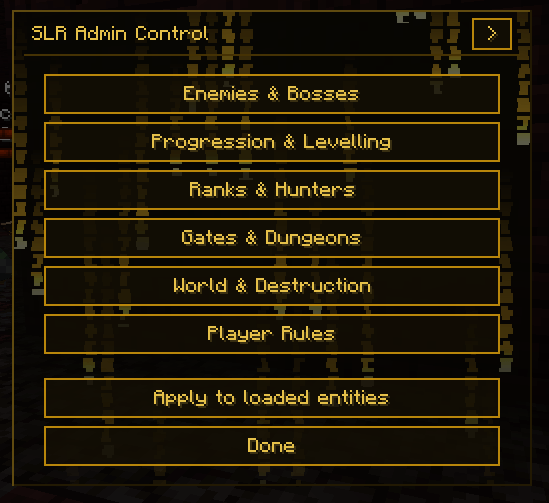
/slradmin panel
Every world rule SoloCraft registers, sorted into six pages so that forty settings are never on one screen at once.
| Page | Holds |
|---|---|
| Enemies & Bosses | enemy scale, boss power, the scaling axes, health ceiling |
| Progression & Levelling | story mode, presets, XP rate, level cap, job change |
| Ranks & Hunters | lore accurate ranks, ranked gates, monarch limit, rank odds |
| Gates & Dungeons | spawning, notifications, delay, progression only, daily quests |
| World & Destruction | block breaking, griefing, ability destruction, misc items |
| Player Rules | death rules, fatigue, punishment, blood effects |
Booleans are toggles, numbers have a slider and a box you can type into, and rules that store a number standing for a named choice are dropdowns. Death rules reads Standard, Forgiving, Harsh. The difficulty and progression presets read by name. Hovering anything explains it in a box beside the panel.
Scaling split by axis
SoloCraft drives enemy health and enemy damage from one value, and all five boss attributes from another. Seven rules override them one at a time.
| Rule | Controls |
|---|---|
slradminEnemyHealthScale |
enemy health only |
slradminEnemyDamageScale |
enemy damage only |
slradminBossHealthScale |
boss health only |
slradminBossDamageScale |
boss damage only |
slradminBossArmor |
boss armour |
slradminBossArmorToughness |
boss armour toughness |
slradminBossKnockbackResistance |
boss knockback resistance |
Each defaults to Inherit, leaving that axis to the base mod. Set one and only that one changes, so beasts can be tankier without being deadlier.
Health ceiling
Minecraft clamps maximum health at 1024, which large multipliers hit long before they take effect. slradminMaxHealthCap raises it and defaults to no limit. Set it back to 1024 for vanilla behaviour.
Apply to loaded entities
Scaling attaches when a mob enters the world. One button reapplies it to everything already loaded and reports how many it touched.
/slradmin viewplayer <name>
The player's SoloCraft data, all two hundred and fifty six fields, split into eleven pages: progression, stats, currency, shadows, quests, dungeons, skills, combat, interface, positions and the rest.
Fields are shown as what they are. Flags are on and off. Hunter class, class style, rank, title and vessel are dropdowns naming the real options, read from the base mod's registries, so classes and styles added by a datapack appear on their own. Class styles list only the ones belonging to the player's class. Hovering a field explains it.
Nothing is written until you press apply. Edits collect in a buffer across every page, the pending count sits on the hub, and closing the panel discards them. Applying writes only the fields that changed, so anything the player did in the meantime is kept.
Every apply is logged with the operator, the target, and each value before and after.
Dungeon Expansion support
With SoloCraft: Dungeon Expansion installed, an arrow in the panel header opens a second page holding all sixty two of its world rules, grouped the same way. Its rules govern dungeon instances and these govern the overworld, so the two stay on separate pages.
The page reads whatever that mod has registered rather than a fixed list.
It works from the console
Everything in the rule panel is a real gamerule.
/gamerule slradminEnemyHealthScale 300
/gamerule slradminEnemyDamageScale 100
Start scripts, command blocks, datapacks and headless servers all behave as expected, and settings save with the world.
Both commands need operator level 2, the same bar vanilla uses for /gamerule.
Compatibility
| Minecraft | 1.21.1 |
| Loader | NeoForge |
| Requires | SoloCraft: Reawakening 1.3.1+ |
| Optional | SoloCraft: Dungeon Expansion |
Works in singleplayer and on servers.
Not affiliated with the creators or rights holders of Solo Leveling. This is a fan add on to a fan mod.
SLR: Better Admin Control Team