BlueMap Unlocked: Sky’s Map Exposer
- By
Bring BlueMap to Xaero’s World Map with a quick and easy set up. Realtime updates that acts as an overlay so your Xaero’s map data is left intact. Has everything that BlueMap has. Players, markers, borders, etc. Fully customizable and no clutter.
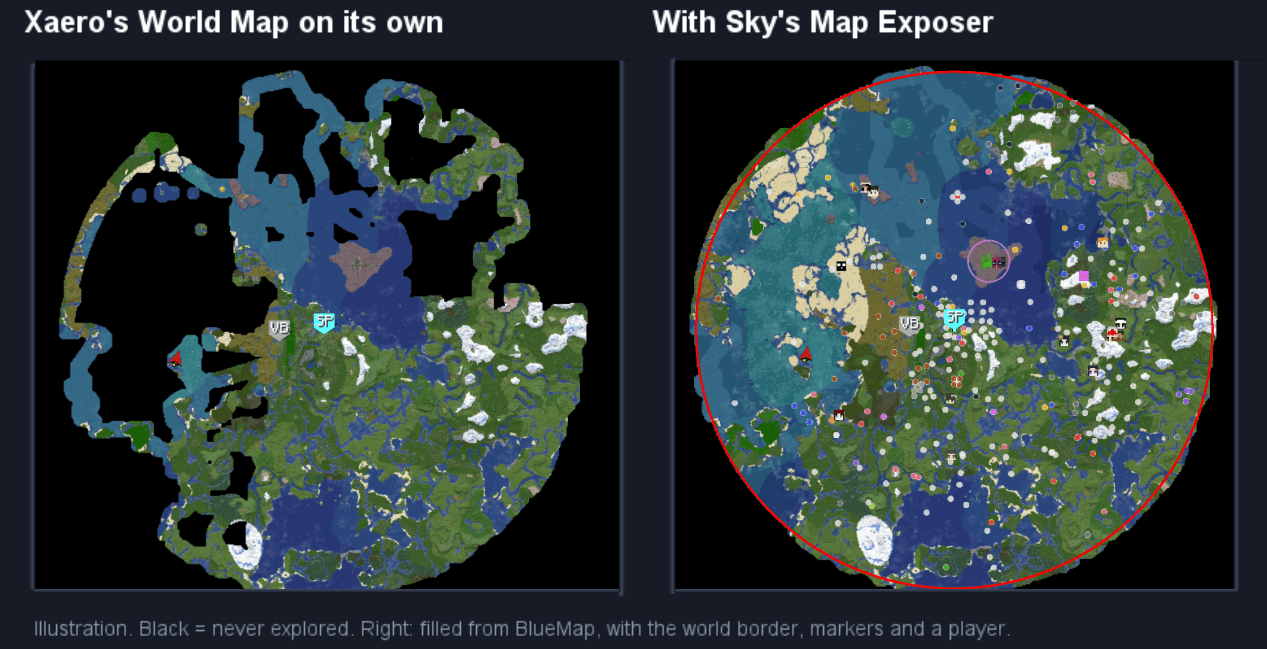
world-map.png
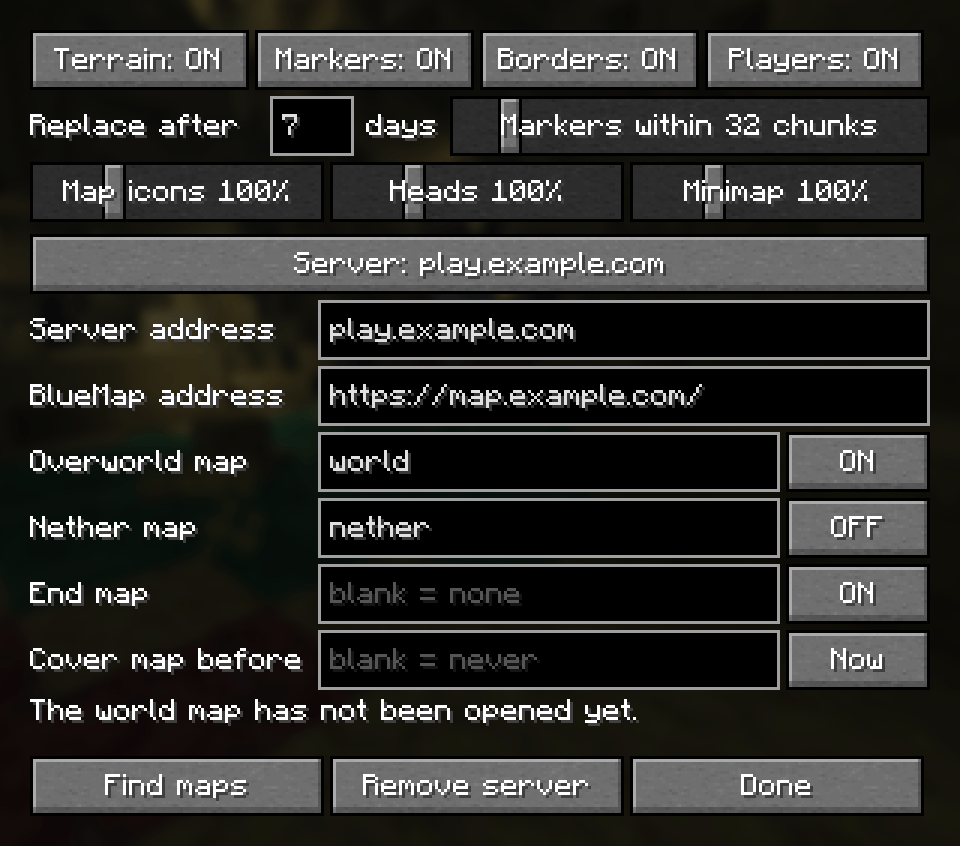
This is a template for how to set up the server in your settings.
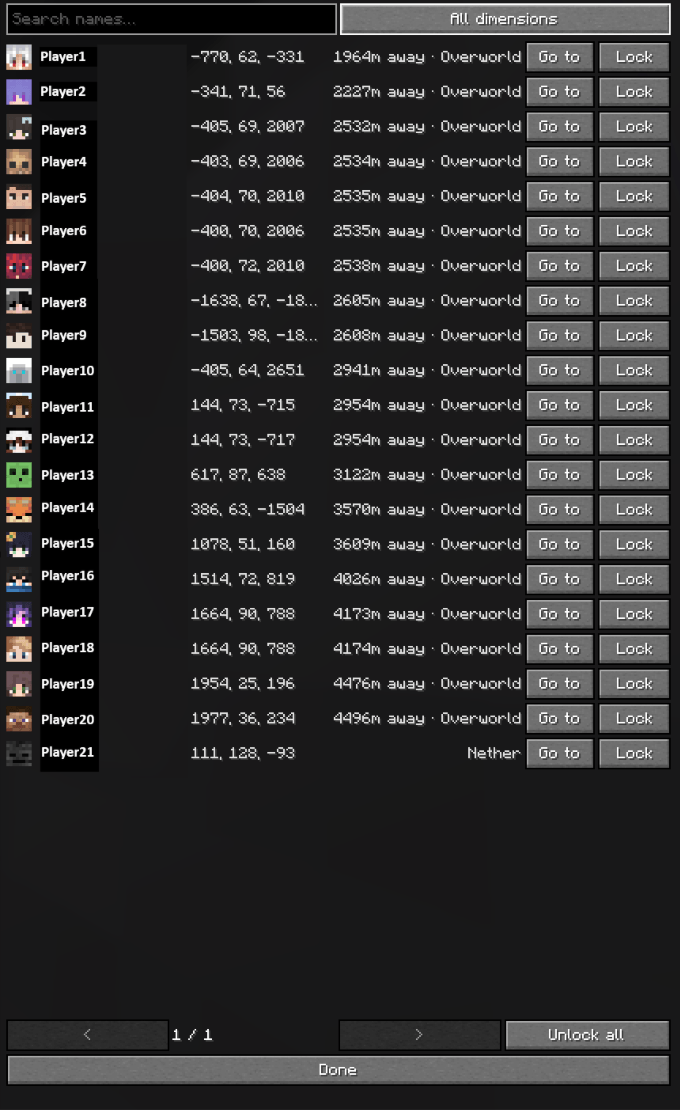
This is what your player list will look like in the map. It makes look up easy if you play on a server with many people.
Description
BlueMap Unlocked: Sky's Map Exposer
A client-side Fabric mod for Minecraft 26.2 that brings a server's BlueMap into Xaero's World Map, Xaero's Minimap and even more.
An unofficial, fan-made mod. Not made by, endorsed by or affiliated with the BlueMap or Xaero's Minimap / World Map projects.
What it does
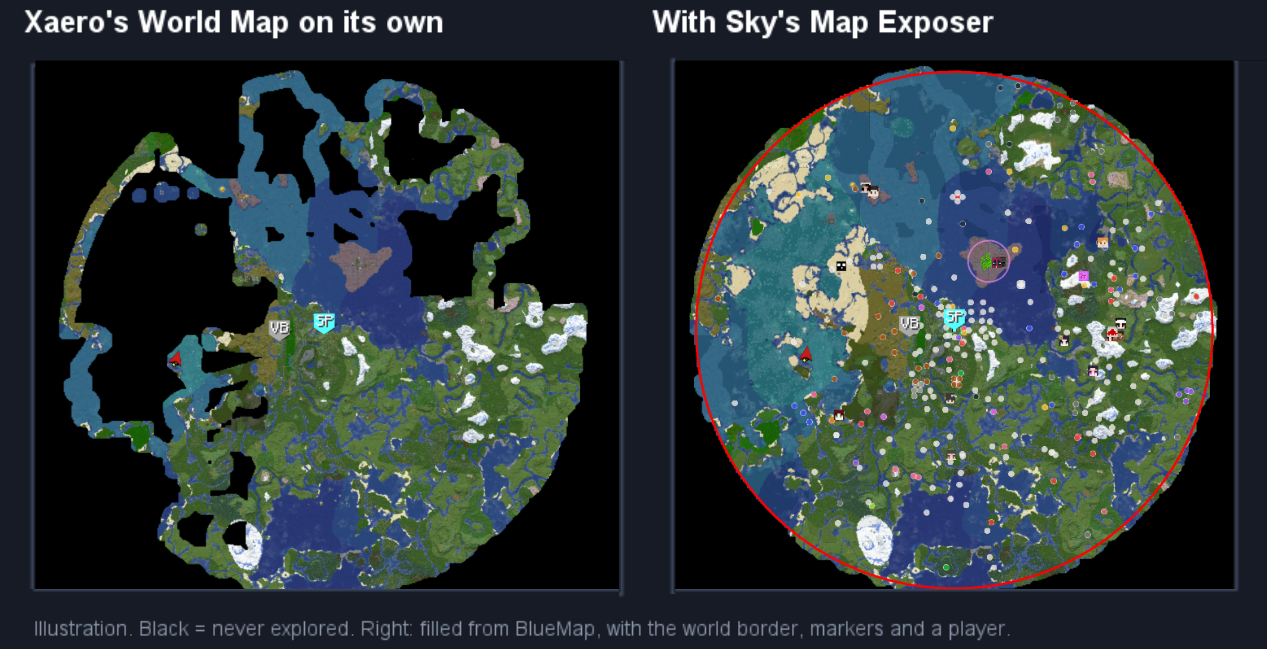
- Fills in your map. Anywhere your map is blank shows BlueMap's terrain instead, including the gaps inside areas you explored. So does any part you haven't seen for a while (7 days by default) if BlueMap has a newer picture, and anything mapped before a date you choose, for a map left over from a previous season. While BlueMap's detailed pictures download, a blurry one from BlueMap's coarser tiles stands in, with a small spinner, so nothing waits on a blank map.
- Finds biomes. Search for a biome in the bar on the world map and click it: every place your map recorded it is tinted in its own colour, on the minimap too if you like. Pick several to see them side by side.
- Shows the world border and zones. BlueMap's outlines are drawn on both maps in their own colours, and update when the server changes them.
- Shows BlueMap's markers. Shops, banners and the like appear as icons on the world map and minimap only, never floating in the world. Hover one for its name. Right-click it on the world map and choose Save as waypoint to turn it into an ordinary, permanent Xaero waypoint, or Set temporary waypoint for one that goes when you leave. With Sky's Map Shapes installed, Add shape here draws a shape centred on it. The Markers switch in the bar on the world map hides or shows them all in one click.
- Shows other players on the world map and minimap of the dimension they are in, with their face. BlueMap knows where everyone is, so they stay on your minimap after they walk out of your render distance and Xaero's own radar loses them.
- Locks on to a player. Right-click someone and choose Lock on: their pin follows them wherever they go, and their head floats over them in the world like a waypoint, until you unlock them. The head hides itself the moment you can actually see the player.
- Lists everyone online. List in the bar on the world map opens a screen with search, distance and coordinates, a Go to that jumps the map to anyone, and Lock.
- Copies coordinates. Right-click anywhere on the world map, or any marker or player, and choose Copy coordinates. The dimension comes with them.
- Keeps up live. Terrain on screen is re-checked every minute, markers every 30 seconds, players every 2 seconds.
- Downloads BlueMap into your own map, if you ask it to. Write BlueMap's terrain into Xaero's map for good, so it stays after the mod is removed and shows everywhere Xaero's map does. See "Downloading into your own map" below. Please note: Biome data is GUESSED if you download from BlueMap because BlueMap does not include biome data. It is fairly accurate (75%) but may cause discoloration. Most errors are from areas where biomes are similar color and blocks (Birch Forest vs. Old Birch Forest). It is corrected upon loading the chunks.
- Shares your map with friends. Send another player who has the mod the biomes of part of your map or some of your waypoints by private message, or save a piece of your map to a file they drop onto their game. See "Sharing with other players" below.
- Clears out old map. Take your map from a previous season, or everything past the world border, off your map in one go, with a backup to undo it. See "Seasons and clearing your map" below.
Until you download, your own map is never changed. Remove the mod and Xaero's map is exactly as it was, and wherever you go, Xaero maps the area again and your own map takes over from BlueMap.
Installing
You need:
- Minecraft 26.2 with Fabric Loader 0.19.3 or newer
- Fabric API and Fabric Language Kotlin
- Xaero's World Map 1.44 or newer
- Recommended: Xaero's Minimap (for the minimap and for saving waypoints) and Mod Menu (for the settings screen)
Then download the file and put it in your mods folder with the others.
Setting up a server
The mod does nothing until you tell it where a server's BlueMap is. You do this once per server.
- Find the server's BlueMap. It is a website, usually linked from the server's Discord or website, and often at the server's address on port 8100. Open it in your browser and copy the address from the address bar, for example
https://map.example.com/. - Join the server, then open the settings: press Esc, click Mods, find Sky's Map Exposer and click the cog.
- The screen opens on the server you are on, with Server address already filled in. Paste the address from step 1 into BlueMap address.
- Press Find maps. The line above the buttons lists the maps that BlueMap has, and the overworld is filled in for you. Type the right map names into Nether map and End map if you want them. Leave a box blank to not use BlueMap there.
- Press Done. Open the world map (M). Unexplored areas now show BlueMap's terrain.
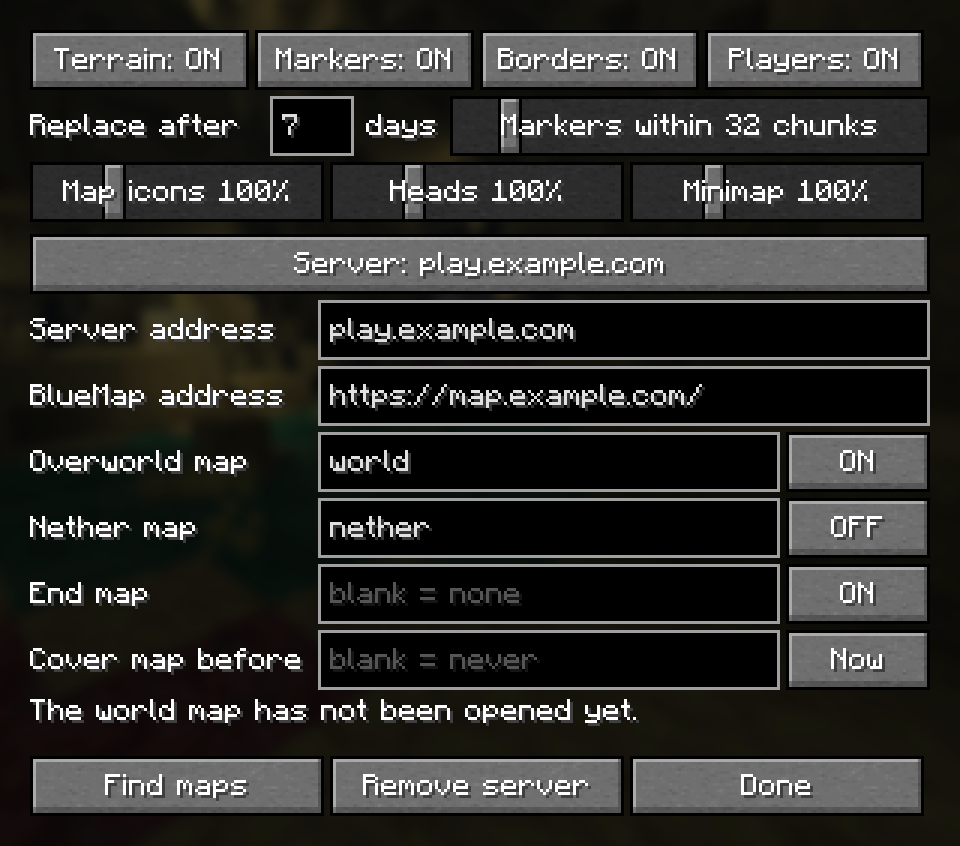
The settings
Hover over any setting in the game for an explanation.
| Setting | What it does |
|---|---|
| Terrain / Markers / Borders / Players | Switch each part on or off, for every server. |
| Minimap players | Which players the minimap shows: none, only the ones out of your render distance (so Xaero's radar handles the rest and nobody is drawn twice), or all of them. |
| Players… | Opens the player list. |
| Replace after … days | How old your own map must be before BlueMap's newer picture replaces it. |
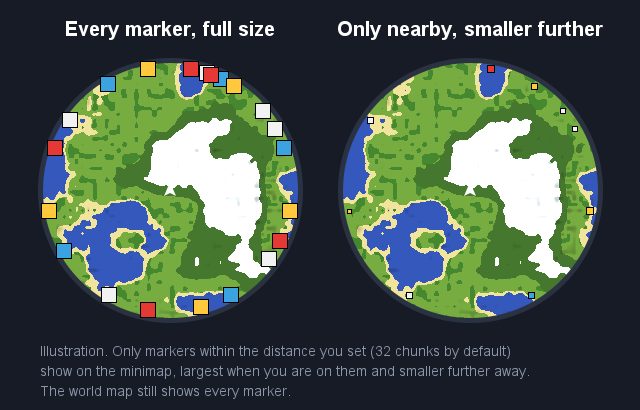
| Markers within … chunks | How far away BlueMap markers show on the minimap. |
| Map icons / Heads / Minimap | How big markers and players' heads are drawn. Heads covers the world map, the minimap and locked players' heads in the world. |
| Server | Which server you are editing. Click through to switch, or to add one. |
| Server address | Every name you join this server by, separated by commas, e.g. play.example.com, 203.0.113.7. |
| BlueMap address | The web page of the server's BlueMap. |
| Overworld / Nether / End map | Which BlueMap map to use for each dimension. The ON/OFF button beside it switches that dimension's terrain. Borders, markers and players still show with terrain off. |
| Cover map before | Your overworld map from before this date and time (yyyy-MM-dd HH:mm) is covered by BlueMap however recent it is. Useful when a new season starts on a new world. Now fills in the current time. Leave blank for never. |
| Find maps | Asks the BlueMap which maps it has. |
| Download… | Downloads BlueMap into your own map; see below. While a download runs, this button stops it. |
| Remove server | Forgets the server shown. |
| Experimental tab | Settings that may get you warned on some servers, all off as the mod comes. Share through spam warnings: sharing in chat normally stops at the first spam warning from the server; with this on it waits, slows down and only stops at a second. |
The nether: many servers render their nether BlueMap from above the roof, which looks nothing like Xaero's nether map. So nether terrain starts OFF. Its world border, markers and players still show. Switch it on if your server's nether map shows the inside.
The bar on the world map
A small see-through panel on the world map holds the mod's switches and the biome finder.
- Terrain / Markers / Borders / Players switch each part on or off, as the settings do. Minimap (only with Xaero's Minimap) chooses whether picked biomes are tinted there too. List opens the player list, and Set the settings.
- The biome finder lists the biomes of the dimension the map is showing. Type to search and click a biome to tint it; click again to stop,
- or Clear to stop them all. The tint shows wherever Xaero recorded that biome, so it covers the parts of the map Xaero has, not BlueMap's terrain. If you downloaded an unexplored area from BlueMap, the biome is GUESSED and is subject to error, but is usually accurate. Downloading from BlueMap allows you to use the Biome finder on BlueMaps data, but to ensure the biomes are 100% accurate, you need to explore the chunks.
- Moving and folding: drag the title to move the bar, click it to fold the bar down to its title.
- Sizing: drag the bottom edge for more or fewer lines, the right edge to widen it, and the bottom-right corner to make everything bigger (only when you drag right and down together). The list scrolls with the mouse wheel, or drag its scroll bar.
- Docking: with another one of my mods installed, drag one panel's title up under the other's bottom edge and it docks there: the two move as one, share a width and a size, and the lower one comes off again when dragged away. Neither mod needs the other.
Nothing is ever pushed off screen, and everything is remembered. panelMaxScale in config/skysmapexposer.json sets how big the corner may make it (2 by default).
Markers on the minimap
The minimap only shows BlueMap markers near you, so a busy server doesn't crowd its edge. The world map always shows every marker.
Saving a marker as a waypoint
On the world map, hover over a BlueMap marker to see its name, right-click it, and choose Save as waypoint. It becomes a normal Xaero waypoint in your current waypoint set, with its name, initials and colour, and stays even if the marker is later removed from BlueMap. Waypoints are saved to the dimension you are standing in, so the world map must be showing that dimension.
Set temporary waypoint puts one of Xaero's own temporary waypoints on the marker instead, the same as Xaero's "Set Temporary Waypoint": handy for walking to a shop, and gone when you leave.
Players
Everyone BlueMap can see shows up as their face, on the world map and on the minimap of the dimension they are in. The minimap keeps them after they leave your render distance, which is the point: zoomed out, you can watch someone cross the map.
By default the minimap only draws the players your game has not loaded, because Xaero's own radar already draws the near ones and you would otherwise see two heads for the same person. If you have that radar switched off, set Minimap players to All players.
Locking on
Right-click a player on the world map and choose Lock on. From then on:
- their pin keeps following them on both maps, and is pinned to the edge of the minimap when they are off it, the way a waypoint is;
- their head floats over them in the world, with their name and how far away they are, whenever you look their way;
- that head disappears as soon as you can genuinely see the player: loaded, visible and with nothing between you. Behind a hill, through a wall, or far out of render distance, it stays.
Locks are remembered per server, so they survive relogging. Right-click them again to unlock, or use Unlock all in the player list.
The player list
Open it with List in the bar on the world map, from the map's right-click menu, from the Players… button in the settings, or with /mapexposer players. Search by name, switch between your dimension and all of them, and for anyone: Go to (jumps the world map to them) and Lock / Unlock. Locked players sort to the top, then the nearest.
Go to works across dimensions: for someone in the Nether while your map is showing the Overworld, the map switches to the Nether to show them, and switches back to what it was on as soon as you leave the map.
Looking at another dimension
Under the coordinates of the block under your mouse, the world map also shows the same spot in the other dimension: the Overworld's coordinates while you look at the Nether, and the Nether's while you look at the Overworld. Other dimension XZ in the settings switches it off.
The world map can be switched to a dimension you are not standing in. Xaero draws your own arrow, your own waypoints and the entities around you there anyway, converted into that dimension's coordinates, which is useful for lining a Nether tunnel up with the Overworld, and confusing the rest of the time, because none of it is where it appears to be. While the map is showing somewhere you are not, this mod:
- hides your player arrow and the entity radar, leaving your own dimension's map untouched;
- starts you at 0, 0 rather than eight times further out on chunks nobody has mapped;
- switches on Xaero's own "only display current map waypoints" the first time you join a world, so the waypoints change with the dimension. It is only ever turned on, never off: undo it from the toggle in the world map's waypoint menu, or set
matchWaypointsToDimensiontofalseinconfig/skysmapexposer.jsonto stop the mod touching it.
Downloading into your own map
Everything above only draws BlueMap over Xaero's map. A download goes further and writes BlueMap's terrain into Xaero's own map files, so it becomes part of your map.
Starting one, for the dimension the world map is showing:
- A selection: on the world map, hold the right mouse button and drag over the chunks you want, then choose Download from the menu. A single right-click picks the chunk under the mouse.
- Everything: the Download… button in the settings, then Unexplored only (fills in chunks you have never mapped and leaves everything you explored as it is) or Everything (also updates what you mapped wherever BlueMap shows something different).
- Or type
/mapexposer download all,/mapexposer download unexplored, or/mapexposer download cancel.
You can close the map and keep playing while it runs; its progress shows at the top of the world map and in the action bar. A whole server takes a few minutes.
What gets written. BlueMap publishes a finished picture, but Xaero stores a block, a height and a biome for every spot and draws the picture itself. So each spot gets the block Xaero draws closest to BlueMap's colour, BlueMap's height, and water as deep as BlueMap's colour suggests. The biome is the one your map recorded, or else a guess from the colours around it (right about three times in four in the overworld; set guessBiomes to false in config/skysmapexposer.json for a plain placeholder). It looks like BlueMap, but the blocks are stand-ins: hovering a spot on the map may name a block that is not really there. Where BlueMap has nothing, nothing is written, and anything of yours that already looks like BlueMap is left exactly as it was.
Backups. Each region of your map is copied just before a download first changes it, into skysmapexposer/<server>/backups/ in your game folder, one folder per download. To undo:
/mapexposer backupslists them, newest first;/mapexposer restore <name>puts one back, with the world map showing the same dimension;/mapexposer backupcopies the whole dimension's map at any time, to go back to later.
/mapexposer restore on its own puts back the newest backup, and pressing Tab after restore lists their names.
Restored regions are read again as soon as you zoom in on them. The ones right around you, which Xaero is busy mapping, show as restored once you move a few regions away or after a restart.
Sharing with other players
Right-click the world map for these. The ones that send by private message only work with a player who also has the mod: they are asked first, with one readable line, and if they don't answer, nothing more is sent. Everything else travels hidden from both chats.
- Share biomes…: drag over some chunks with the right mouse button, then pick a player. They get which biome is where, at Minecraft's own 4×4-block detail, in a few messages even for a big area. An [Add biomes] button keeps them. They are kept by the mod, not written into their map: picked biomes in the biome finder are tinted there too, and the world map names the biome under the mouse where their own map has none.
- Share waypoints…: tick some waypoints of the dimension you are in, then pick a player. An [Add waypoints] button adds them to their selected waypoint set, leaving out any they already have. Needs Xaero's Minimap at both ends.
- Save terrain file: drag over some chunks, then choose it. Every block of your map there, exactly as Xaero keeps it, is saved to a
.smemapfile in theshared mapsfolder of your game folder; a link in chat opens the folder. Send the file however you like. Whoever gets it drops it onto their game window, then chooses [Add to unexplored only] or [Add all]. Each of their regions is backed up first, the same as a download. In the Nether it saves and adds the cave layer the world map is showing, not the roof.
Messages go out slowly, well under a vanilla server's spam limit, and at half speed on a server with a chat plugin. A spam warning from the server stops sharing; whatever arrived is kept. /mapexposer share cancel and /mapexposer terrain cancel stop a share or a save.
Seasons and clearing your map
A new season. /mapexposer season set <yyyy-MM-dd HH:mm> (or a date alone, or now) sets when the season began, for the dimension the world map is showing. Your map from before then counts as never explored: downloads and maps shared with you write over it even with Unexplored only, and it is left out of anything you share or save. /mapexposer season lists the dates and /mapexposer season remove takes one away. The Overworld's is the same date as Cover map before in the settings, and the other dimensions' cover your map the same way.
Clearing. Right-click the world map:
- Clear old season… takes your map from before the season began off the dimension the world map is showing.
- Clear past border… takes off everything wholly beyond the world border. It uses the border BlueMap draws (as a border plugin such as Chunky puts on it), so a round border works, and else the game's own world border. For a border neither shows, type
/mapexposer clear border <radius> [<centerX> <centerZ>].
Each says in chat what it would take off and waits for you to click [Clear]. Every region is backed up just before it is changed, and a [Restore] button at the end puts it all back. Zoomed out, a cleared region may look blank until you zoom in on it once.
Copying coordinates
Right-click anywhere on the world map for Copy coordinates, which puts -350 200 (Overworld) on your clipboard. On a marker or a player you get their height too, as -350 72 200 (Overworld). The numbers come first, the way /tp and most chat messages want them, with the dimension after: the map can be switched between dimensions, so coordinates without it can mean the wrong place.
How "old" is decided
- Your map: from the moment the mod is installed, it records when each chunk was last loaded, which is when Xaero last redrew it. For areas mapped before that, the date of Xaero's own save file for that area is used.
- BlueMap's map: BlueMap does not say when it drew each part, so the mod dates each part by the first time it saw the current picture.
Privacy
Everything stays on your computer. The mod only downloads from the BlueMap address you enter, and sends nothing to the Minecraft server or anywhere else. Its data is kept in skysmapexposer/ in your game folder, and its settings in config/skysmapexposer.json. The one exception is sharing: when you share biomes or waypoints with a player, they go to that player as private messages through the server.
Limits
- Surface only: in Xaero's cave mode only borders and markers are drawn, not terrain, and a download writes only the surface. Shared terrain files and clearing work on the layer the world map is showing.
- Biomes are only guessed in the overworld; downloads into the nether and the end use one biome each.
- Gaps inside explored areas are found by asking Xaero, which only knows while that area is loaded on its map, which it always is around you and when you zoom in. Once seen, a gap is remembered, including after you rejoin.
- Typing
/mapexposershows a status line if something is not drawing. It stays on your computer and is never sent to the server.
Originality
Written from scratch; no code was copied from any other project.
- MapLink (GPL-3.0) does similar things. It was looked at only to see what it does, not how.
- BlueMap (MIT) is used only as a website: its tile, marker and player files were checked against a live server.
- Xaero's World Map and Minimap are closed source. They are compiled against, never bundled. Their class, method and field names, and the layout of their map files, were read to place the mixins, use their element and waypoint systems, and write downloads through Xaero's own map code. None of their code was copied.
The pictures of the maps are illustrations drawn for this page; the settings screen is a real screenshot.
Source and licence
Source code, issues and the latest builds: github.com/SkyStormer1/SkysMapExposer. MIT © 2026 SkyStormer1.
BlueMap Unlocked: Sky’s Map Exposer Team