
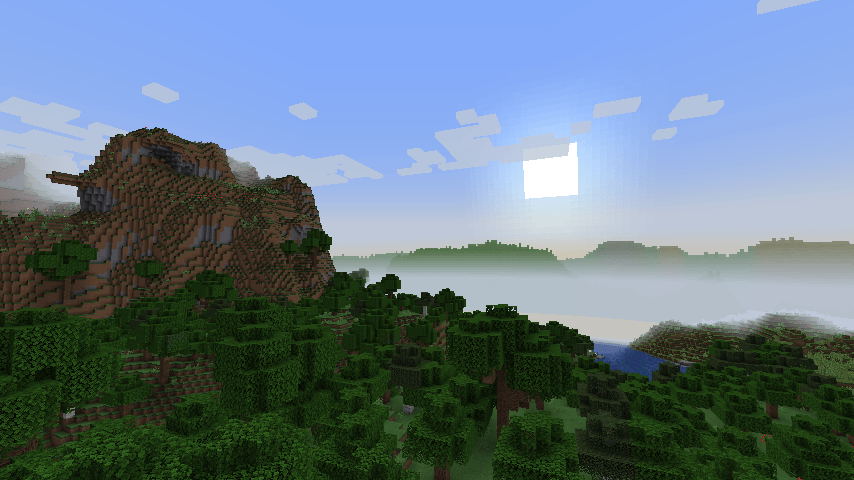
Skylines
Skylines draws the real terrain past the edge of your world as layered silhouettes on the horizon. If you turn your render distance down, you'll still see distant lands!
The ranges you see are the actual hills and mountains of YOUR world and they change as you travel!
What it looks like
- Three silhouette layers by default (up to eight), from just past your render distance out to about 3,200 blocks (up to 12,000). Distant ranges are paler and hazier, like real air.
- Forested hills are green, high ground turns to bare rock, snowy peaks look like real snow-covered mountains, deserts are sandy and badlands red. Towards the open sea the ridges slope down into the horizon.
- Keep the real biome colours, or switch to grey, hazy blue or sky-tinted silhouettes. Optionally (experimental), put an endless ocean or a sea of clouds in front of the mountains.
How it works
The server knows your world's seed, so it can ask the world generator how high the land is anywhere, (without loading or generating a single chunk). For each of 256 directions around you, Skylines checks a few points in each layer and keeps the one that rises highest above the horizon. Those heights match the real terrain within a block or two.
Light on resources
- All sampling happens on one low-priority background thread, one player at a time. A full skyline takes about two seconds of that thread.
- It only re-samples after you've moved about 100 blocks, changed height a lot, or once a minute.
- A skyline is a few kilobytes. The client turns it into a few small textures.
- Colours update for the time of day every two seconds from what's already there, with no new sampling. New skylines fade in smoothly over three seconds.
Settings
Open Mods → Skylines → Config in game (on Fabric: the settings button in Mod Menu). Changes apply right away.
| Setting | Default | What it does |
|---|---|---|
| Draw skylines | on | Turns the silhouettes on or off. |
| Opacity | 1.0 | How solid the silhouettes are. |
| Height scale | 0.6 | How tall the ranges rise. 1.0 is their true height. True height can look imposing, because each range shows the highest points around it. |
| Start distance | 0 (automatic) | Where the nearest silhouettes begin, in blocks. Automatic starts them at the edge of your render distance. |
| Automatic start margin | 0 | Chunks added to your render distance in automatic mode. Set −1 or −2 to tuck the silhouettes slightly into the fog so there's never a gap. Real terrain always covers them. |
| Procedural ranges | on | On servers without Skylines, draw made-up ranges instead of nothing. |
| Colour mode | Biome | Biome follows the biomes out there. Grey, Blue (the hazy blue of real distant mountains) and Sky (tinted in the sky's colour) recolour the silhouettes, keeping their light and shade. |
| Colour mode strength | 0.75 | How strongly Grey, Blue or Sky replace the biome colours. |
| Realistic snow | on | Snowy mountains like real ones from afar: snowfields above a snow line, streaks down the gullies, rock ribs, and a sunlit and a shadowed side. Off gives a simple snow cap. |
| Sea of clouds (experimental) | off | Under Experimental. A sea of clouds below you out to the horizon, with the peaks rising out of it, as if you're high on a mountain. |
| Cloud height (experimental) | 0 | The height of the cloud tops. 0 keeps them just below you. |
| High-res mode (experimental) | 1× | Under Experimental. Multiplies the resolution of the silhouettes (up to 4×) for finer pixels. |
| Infinite ocean (experimental) | off | Under Experimental. An endless sea from the edge of your world to the horizon, with the mountains rising out of it like distant islands. |
| Layers | 3 | How many silhouette layers to draw, from 2 to 8. More layers give more depth. |
| Farthest layer distance | 3,200 | How far away the farthest layer reaches, up to 12,000 blocks. The server may cap it. |
Sampling (applies to whoever does the sampling: your game in singleplayer, or the server)
| Setting | Default | What it does |
|---|---|---|
| Sample the real terrain | on | Turn off to stop all sampling. |
| Directions | 256 | Points around the horizon. More gives finer silhouettes but more work. |
| Samples per layer | 4 | Points checked per direction in each layer. |
| Farthest layer distance allowed | 3,200 | The furthest any player's layers may reach. |
| Most layers per player | 8 | The most layers a player may ask for. |
| Re-sample after moving | 96 blocks | |
| Re-sample at least every | 60 seconds |
Compatibility
- Works with any world type built on Minecraft's noise generator: default, Large Biomes, Amplified, and modded world types and biome mods that use it.
- Skylines only draws on the sky, behind the terrain, so it stays out of the way of shaders, performance mods and other sky mods as much as it can. If another mod also draws distant terrain (such as level-of-detail mods), you'll probably want only one of the two.
Requirements
- Minecraft 1.21.1
- NeoForge 21.1 or newer, or Fabric with Fabric API
- or Minecraft 26.3 with Fabric (with Fabric API)
- On Fabric, Mod Menu to open the settings in game (optional: the settings are also in
config/skylines-client.tomlandconfig/skylines-common.toml)
FAQ
Does it slow down my game? The heavy lifting happens rarely, on a single background thread at the lowest priority. Drawing the silhouettes is a handful of textured quads per frame.
Does it generate chunks or bloat my world? No. It only does the maths the world generator would do, so nothing is generated, loaded or saved.
Why do the mountains look different on some servers? If the server doesn't have Skylines, your game can't know that server's seed, so it shows made-up ranges instead. Ask the server owner to add Skylines to see the real terrain.
The silhouettes are too tall or too flat. Change Height scale. 1.0 is true height; the default 0.6 is a little gentler.
There's a gap between the world and the silhouettes. Set Automatic start margin to −1, or use Start distance to place them exactly.
Skylines Team
