

sky-islands
- By
c3ccaa2661dd290e683f3fef7b3763a6451f2057_350.png
e2471ffb6f963b130577d805cb0fe358aef8cddb_350.png
be3a133871ec3ef0cc545f5e49c1fbdf3bd734a4_350.png
c830de60055a7643ab59e9c848d1e9b3ca02f2df_350.png
a747a2a459b995b81fb6853e34b5edabda92e213_350.png
Description
🏝️ Sky Islands
Minecraft 1.20.1 / 1.21.1 · Forge 47.3+ / NeoForge 21.1+
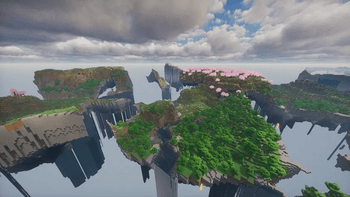
Overwrite the entire Overworld with a skyblock realm filled with floating islands, equipped with comprehensive island and team management systems. Suitable for single-player survival, multiplayer servers and custom modpack development.
✨ Brief Overview
Sky Islands reworks Minecraft’s Overworld into a vast skyblock dimension made of countless floating islands. Every player gets a private island of their own—invite friends to build together, or brave the void alone in a solo survival challenge.
Version 2.0.0 introduces a brand-new archipelago system. Deep in the distant void, noise-generated massive archipelagos consist of multiple uniquely shaped sub-islands, bringing brand-new exploration goals to your world.
Version 2.0.10 further optimizes hub spawn island management, adding the admin command /skydev hubspawn to adjust teleport positions of the hub island in-game. Functionality is fully synchronized between Forge 1.20.1 and NeoForge 21.1.1224+.
Core Features
🌍 Grid-based floating world with 3 configurable island sizes: Small / Medium / Large
🏝️ Archipelago System (Added in v2.0.0): Organically shaped noise-generated archipelagos with layered, staggered sub-islands
⛏️ Base ore density multiplied by 1.2 by default to offset resource scarcity on skyblocks
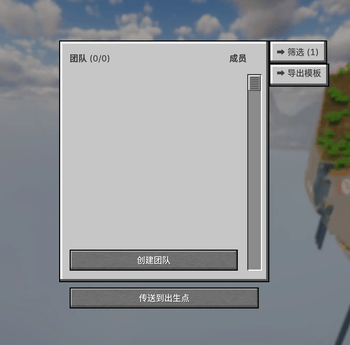
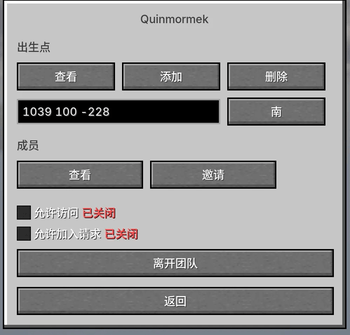
👥 Complete team system: Team creation, member invites, island access control & spawn point management
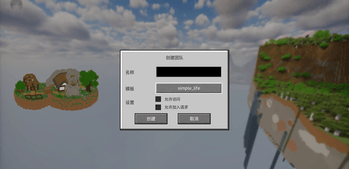
🏗️ Template Island System: 3 built-in presets (default / two / chushi) + custom NBT support with real-time 3D rotating preview
🎯 Hub Spawn Management (Added in v2.0.10): Admins use /skydev hubspawn to tweak teleport positions; exclusion zones update automatically
⚙️ Highly configurable, ideal for deep modpack customization
Basic Controls
Operation Command / Hotkey
Open Team GUI Hotkey V or /sky gui
Teleport back to your island /sky home
Travel to Hub Spawn Island /sky spawn
Hot-reload island templates (Admin Only) /skydev template reload
Manage hub spawn teleport positions (Admin Only) /skydev hubspawn
Global team administration (Admin Only) /skydev manage
📖 Full Documentation
Basic Mod Info
Item Content
Mod ID skyislands
Current Version 2.0.10
Supported MC Versions 1.20.1 (Forge) / 1.21.1 (NeoForge)
Loaders Forge 47.3+ / NeoForge 21.1.224+
Java Requirement Java 17+ (Forge) / Java 21+ (NeoForge)
Side Compatibility Client + Server
Forge and NeoForge builds share identical features, with fully cross-compatible commands, configs and template systems.
🌍 World Generation
Sky Islands fully replaces vanilla world generation. The entire Overworld is composed of floating islands boundless empty void stretches between landmasses.
Island Distribution
The world is split into configurable 800-block grid cells. Each cell randomly generates a standalone island or an archipelago. Island layouts are fully seed-locked; identical seeds produce identical worlds.
Island Sizes & Spawn Weights
Type Diameter Range Default Weight Description
Small Island 60 ~ 300 blocks 40% Most common; perfect for early-game settlement
Medium Island 200 ~ 750 blocks 25% Abundant resources for long-term base building
Large Island 750 ~ 1500 blocks 10% Rare, expansive land with diverse terrain
Archipelago Radius 550 ~ 750 blocks 25% Clustered organic sub-islands designed for exploration
Total combined weights determine spawn ratios; all values are editable in config files.
Auto-Generated Connecting Bridges
Adjacent medium and large islands with edge gaps under 75 blocks will automatically generate natural connecting bridges for easy inter-island travel.
⛏️ Ore Multiplier
All ores spawn at 1.2x base density by default, including Coal, Iron, Copper, Gold, Redstone, Lapis Lazuli, Diamond, Emerald, Quartz and Ancient Debris. The multiplier value can be freely adjusted in configs.
Hub Spawn Exclusion Zone
Centered on the hub island’s main teleport point, procedural islands and player template islands maintain a safe buffer distance to avoid overlapping the spawn area. Exclusion zones refresh automatically whenever admins edit teleport positions via /skydev hubspawn.
🏝️ Archipelago System (v2.0.0 New Feature)
Archipelagos are an independent terrain type introduced in v2.0.0, generated separately from regular sky islands with no overlap conflicts.
Generation Pipeline
Dual Layer Domain Warp + Simplex Noise
↓
Generate organic terrain masks
↓
BFS connected-region detection to split into distinct sub-islands
↓
Assign unique XYZ offset coordinates to each sub-island
↓
Form layered, three-dimensional archipelago landscapes
Sub-Island Traits
Naturally tapered conical base shape with tweakable shape parameters
Classified into 4 tiers by land area: Tiny / Small / Medium / Large
No XZ-plane overlaps; vertical Y-axis stacking creates multi-level scenery
Spawn Rules
Only generate beyond 4000 blocks from the hub spawn
Occupy 25% of all grid cells (shares weight pool with regular islands)
Archipelagos take generation priority over standard islands in overlapping grid cells
👥 Team & Island Ownership
Every player or player team owns a permanent private island with a seed-locked fixed position in the world.
New Player Workflow
First world join
↓
Teleported to the hub spawn island
↓
Create team → Select island template → Obtain private island
↓
Invite teammates / Toggle visitor access / Customize team spawns
Team Functionalities
Feature Details
Member Invites Send invites for other players to join your team and co-develop the island
Join Requests Players may submit applications; team owners approve or deny requests
Visitor Permissions Allow sightseeing access for outsiders while preventing block destruction
Multi-Team Spawns Set multiple directional spawn points (North / South / East / West)
Death Teleport Auto-respawn on your team island upon death
Teleport Command Table
Destination Command Default Cooldown
Personal Island /sky home 3 minutes
Hub Spawn Island /sky spawn 3 minutes
Other Players’ Islands /sky visit <TeamName> 3 minutes
Each teleport cooldown can be configured independently. An optional toggle removes fall damage after teleportation.
🏗️ Template Island System
Built-In Presets
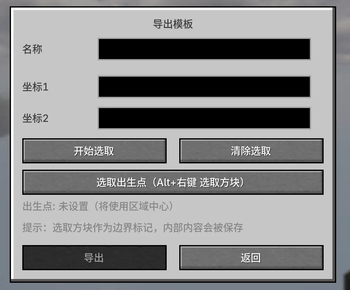
3 starter templates ship with the mod: default, two, chushi. Files auto-copy to the config directory on first launch. The hub spawn island uses a separate template file moban.nbt.
Custom Template Support
Place .nbt or .snbt structure files into this directory:
config/skyislands/templates/islands/
Configure spawn coordinates and facing directions inside templates.json5. Run /skydev template reload for live hot-reloading—no server restart required.
Real-Time 3D Preview
When creating a team, the GUI renders a rotatable real-time 3D preview of your selected template for visual previews before confirmation.
Multiplayer Sync
Template assets auto-sync from server to client with local caching; previews render normally while offline.
Hub Spawn Island Setup
Define the global spawn island via mainSpawnIsland in templates.json5. All new players spawn here on their first login. Admins can fine-tune in-game teleport positions with /skydev hubspawn—changes save to world data only and do not alter global template files.
📋 Full Command List
All commands work under both /sky and /skyislands aliases.
Player Commands
Command Description
/sky gui Open team management main menu
/sky create [TeamName] Create a new team and claim a private island
/sky leave Exit your current team
/sky home Teleport to your team island
/sky spawn Travel to the global hub spawn island
/sky visit <TeamName> Visit another team’s island
/sky invite <PlayerName> Send a team join invite to a player
/sky accept <TeamName> Accept a pending team invite
/sky decline <TeamName> Reject a pending team invite
/sky join <TeamName> Submit a join request to a team
/sky team rename <NewName> Rename your team
/sky team toggle visits Toggle visitor access permission
/sky team toggle requests Toggle public join request function
/sky team accept <Player> Approve a player’s join request
/sky team deny <Player> Reject a player’s join request
/sky team spawns add <x> <y> <z> Add a custom team spawn point
/sky team spawns remove <x> <y> <z> Delete a specific team spawn point
/sky team spawns reset Revert spawn points to template defaults
Admin Commands (/skydev, Permission Level 4 Required)
Template Administration
Command Description
/skydev template reload Hot-reload all template configs and sync updates to all online players
Hub Spawn Island Management (v2.0.10 New)
Adjust teleport locations for the global hub island; edits save to world save data only and do not modify template files.
表格
Command Description
/skydev hubspawn here [south/north/east/west] Overwrite all spawn points with your current standing position
/skydev hubspawn set <x> <y> <z> [Direction] Set a single main spawn coordinate, replacing all existing points
/skydev hubspawn add <x> <y> <z> [Direction] Append an extra spawn point while preserving existing ones
/skydev hubspawn remove <x> <y> <z> Delete a spawn point at the target coordinate
/skydev hubspawn list List hub island center, exclusion zone data and all active teleport positions
/skydev hubspawn reset Restore spawn points to the default values in moban.nbt
/skydev hubspawn tp Instantly teleport to the hub spawn island
Exclusion zones recalculate automatically around the primary spawn coordinate after any edits.
Global Team Administration
表格
Command Description
/skydev manage create <TeamName> Create a team with the specified name
/skydev manage create <TeamName> join Create a team and automatically add the executing admin as a member
/skydev manage delete <TeamName> Permanently delete a team and its island data
/skydev manage clear <TeamName> Remove all members from a target team
/skydev manage add <TeamName> <Players...> Force-add specified players to a team
/skydev manage remove <TeamName> <Players...> Force-kick specified players from a team
⚙️ Configuration Files
Main world settings file: config/skyislands-common.toml
Auto-generated on first mod launch, all parameters include native Chinese comments.
toml
[island_sizes]
# Island diameter range (blocks)
small_min = 60
small_max = 300
medium_min = 200
medium_max = 750
large_min = 750
large_max = 1500
[island_weights]
# Total weight sum controls spawn probability ratios
small_weight = 40 # Small Islands ~40%
medium_weight = 25 # Medium Islands ~25%
large_weight = 10 # Large Islands ~10%
archipelago_weight = 25 # Archipelagos ~25%
[world]
ore_multiplier = 1.2 # Ore spawn density multiplier (1.0 = vanilla rate)
island_spacing = 800 # Grid cell spacing between islands (blocks)
[teleports]
spawn_cooldown = 3600 # Teleport cooldown (ticks; 3600 ticks = 3 minutes)
home_cooldown = 3600
visit_cooldown = 3600
negate_fall_damage = false # Disable fall damage after teleportation
[archipelago_carving]
arch_max_depth_large = 55 # Maximum base depth for large sub-islands (blocks)
arch_mid_threshold = 0.55 # Base tapering threshold; lower values create thicker island bottoms
Template layout config: config/skyislands/templates.json5
Structure file storage path: config/skyislands/templates/islands/
📦 Modpack Customization Guide
Sky Islands offers extensive tweak options for modpack creators:
Customization Demand Implementation Method
Custom starting islands Add custom NBT structures and configure spawns in template files
Adjust world island density Modify spawn weight values in config
Balance resource generation Tweak the global ore density multiplier
Alter teleport pacing Set individual cooldowns for all teleport types
Restrict server permissions Configure command permission levels (0–4)
Live template edits Use /skydev template reload without server restarts
Instant hub spawn adjustments Use /skydev hubspawn for real-time in-game edits
🔧 Installation Requirements
Forge 1.20.1
✅ Minecraft 1.20.1
✅ Forge 47.3 or newer
✅ Java 17+
NeoForge 1.21.1
✅ Minecraft 1.21.1
✅ NeoForge 21.1.224 or newer
✅ Java 21+
Single-player: Install the mod only on your client
Multiplayer Servers: Mod must be installed on both client and server; loader and Minecraft versions must match exactly
The sky-islands Team
