Skin Mixer
- By
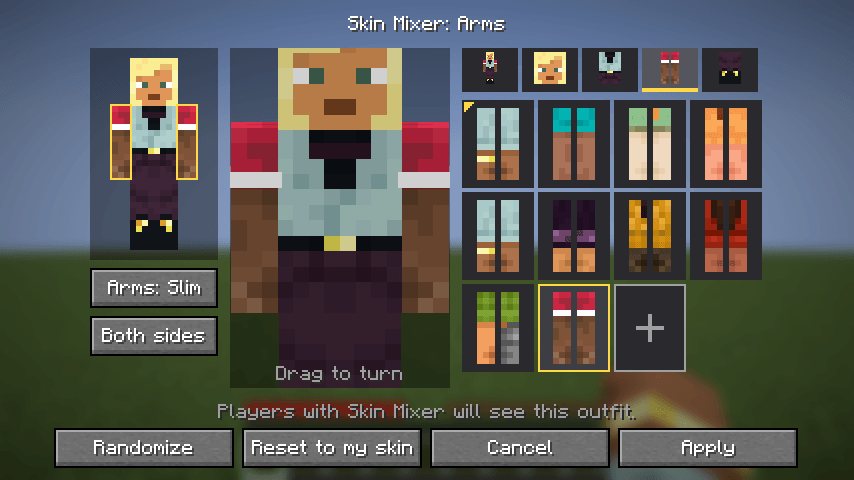
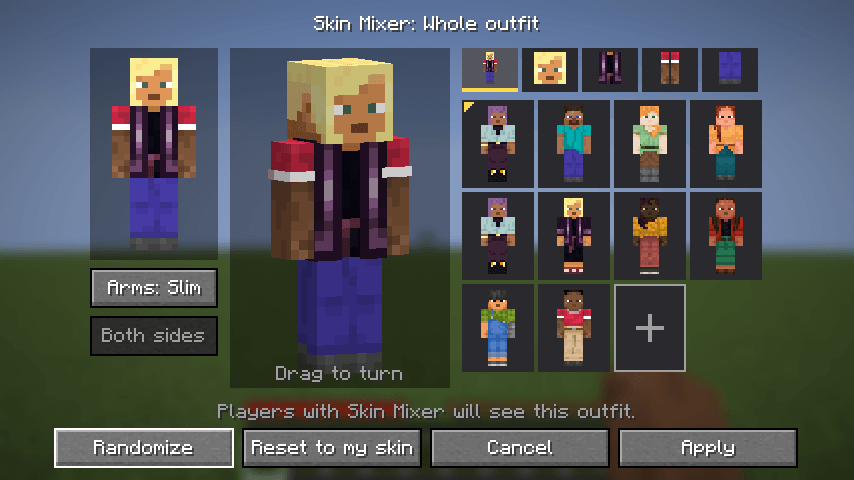
Mix and match the head, body, arms and legs of any skins into one outfit, live in game, with no skin editor needed.
LetsMine | Skin Mixer
Create a server, get 25% off your first month

Description
Skin Mixer
Mix and match the head, body, arms and legs of any skins into one outfit, right in game, with no skin editor needed.
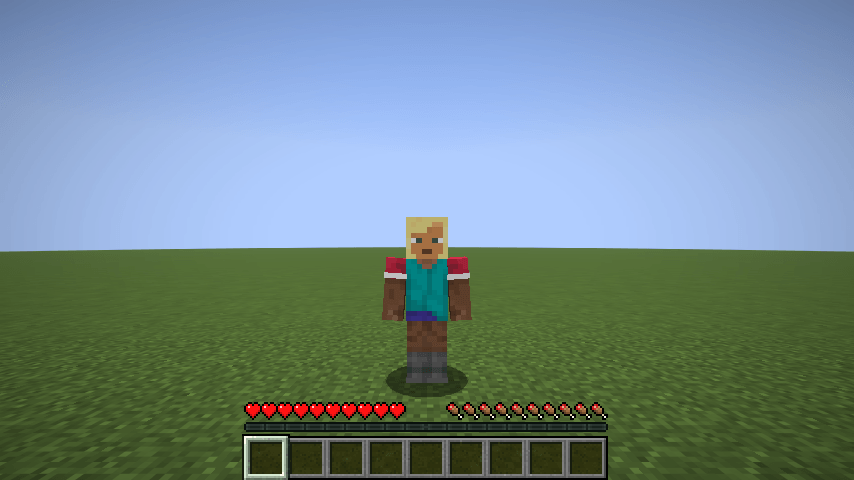
Skin Mixer lets you change your skin without leaving the game. Take Kai's head, Steve's shirt, Zuri's arms and Alex's legs, see the result on a 3D preview, and press Apply. Other players who have the mod see your new outfit too.
Where to find skins
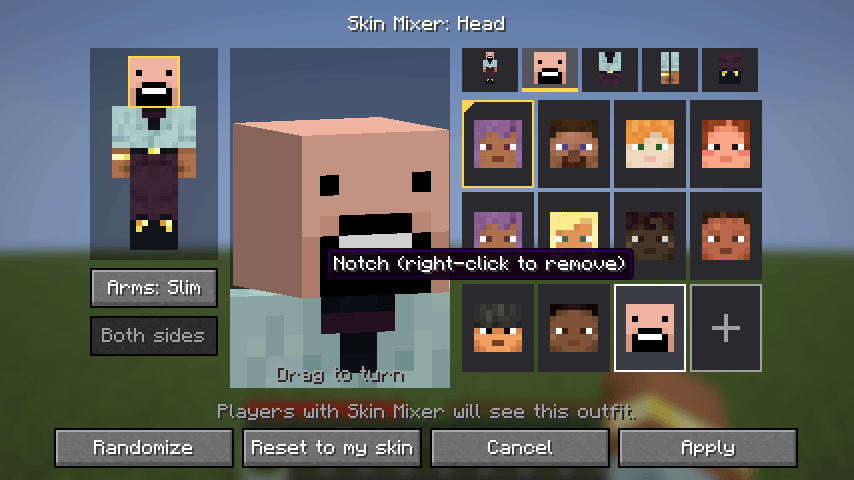
Any Minecraft player's skin can be added by typing their username on the + card. To find usernames:
- NameMC trending skins: click a skin to see the players wearing it, then type any of their names.
- NameMC new skins: the latest skins people are wearing.
- MC Heads: preview a player's skin before adding it. Swap
Notchin the address for any username.
These sites aren't affiliated with Skin Mixer. The mod always fetches skins from Mojang, so you get the player's current skin.
Early version (0.1.0)
This is the first release and an early look at the idea. Everything listed below works, but it's still rough in places. Next up are a full overhaul of the menu, more ways to customise each part, and saved outfits. The Planned section below lists what I have in mind.
Feedback is very welcome, especially on what you'd like the menu to do.
Features
- Mix six parts: head, body, right arm, left arm, right leg and left leg can each come from a different skin.
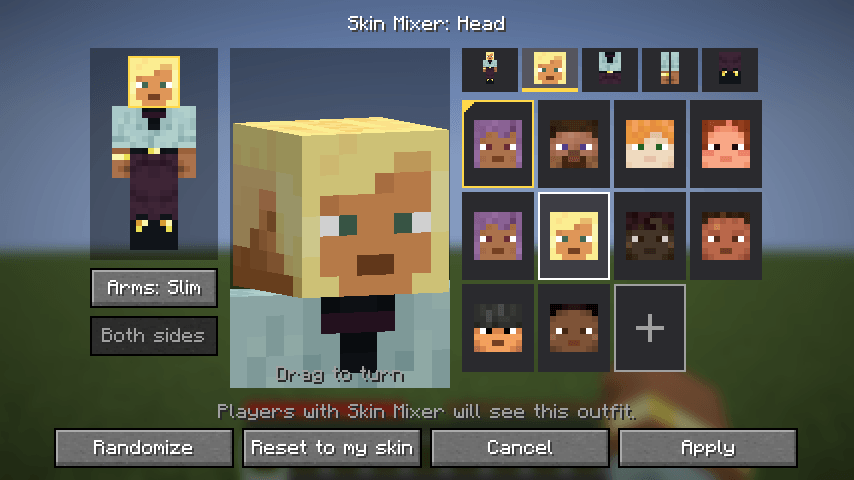
- Live 3D preview: zooms in on the part you're editing and turns it towards you. Drag to turn it yourself.
- Try before you pick: hover a choice to see it on the preview, and click to keep it.
- Every default skin: Steve, Alex, Ari, Efe, Kai, Makena, Noor, Sunny and Zuri, plus your own skin.
- Add any player's skin: type a Minecraft username to add that player's current skin to your choices.
- Wide or slim arms: switch arm models at any time. Arms taken from the other model are resized to fit.
- One side or both: set an arm or leg on both sides at once, or each side on its own.
- Randomize: a random outfit made from the default skins, in one click.
- Multiplayer: players with the mod see each other's outfits, and the server remembers yours.
How to use it
Press U in game, or open Options → Skin Customization → Skin Mixer….
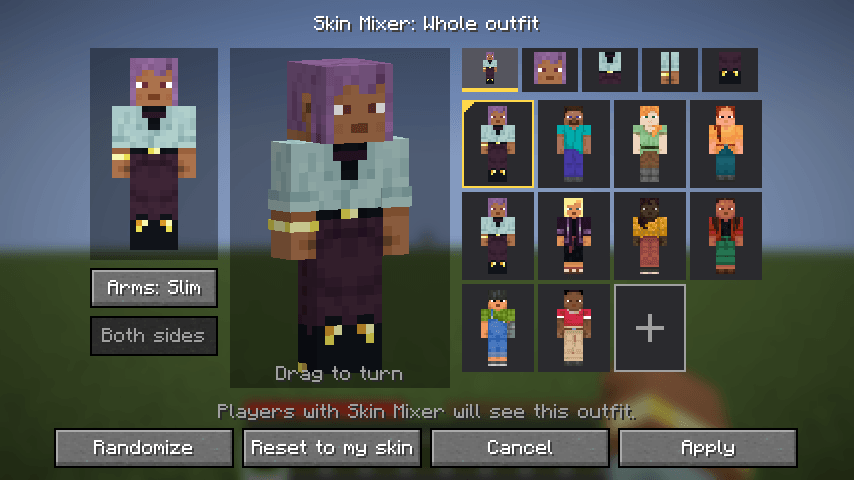
- Body map (left): your outfit laid flat. Click a part to edit it. The part you're editing is outlined in yellow.
- 3D preview (middle): your outfit as it will look in game.
- Tabs (top right): Whole outfit, Head, Body, Arms and Legs.
- Choices (right): that part of every skin. The gold corner marks your own skin.
- + card: add a skin by username (see Where to find skins). Right-click an added skin to remove it.
- Randomize, Reset to my skin, Cancel and Apply along the bottom.
You can rebind U in Minecraft's Controls menu, under Skin Mixer.
Commands
| Command | Who | What it does |
|---|---|---|
/skinmixer reset |
Anyone | Puts your real skin back |
/skinmixer reset <players> |
Operators | Puts those players' real skins back |
Known limits in 0.1.0
- Players without the mod see your real skin, not your outfit.
- No PNG imports yet. Skins come from the default skins, your own skin, or a username.
- Added skins follow their player. If that player changes their skin, your outfit changes too. Adding skins needs an internet connection.
- A part's two layers move together. The overlay (hat, jacket, sleeves, trousers) always comes with its part.
- Outfits are per world. Each server and each singleplayer world keeps its own outfit for you.
- Player heads (items and blocks) still show the real skin.
- Before Minecraft 1.19.3 the game only has Steve and Alex as default skins, so those are the only two built in. Adding skins by username works on every version.
Planned
These are the ideas I most want to add. Nothing here is promised yet, and the order may change.
- A full overhaul of the menu
- A skin browser inside the menu, so you can find and add skins without leaving the game
- Saved outfits you can name and switch between, with a quick-switch key
- Mixing the overlay separately, for example one skin's jacket over another's shirt
- Finer parts: face, hat, shoes and gloves
- Recolouring a part so pieces from different skins match
- Importing your own PNG skins
- Original outfits made for the mod
- Sharing an outfit with a short code
- Letting players without the mod see your outfit too
Ideas and bug reports are welcome.
Installation
- Install it on your client to use the menu, and on the server so other players see your outfit and it's remembered.
- The mod is optional on both sides. Players without it can join a server that has it, and you can join a server without it. On a server without the mod, only you see your outfit.
- Fabric: needs Fabric Loader 0.19.5 or newer and Fabric API.
- Forge / NeoForge: no other mods needed.
Supported versions
- Fabric: 1.16.5, 1.18.2, 1.19.2, 1.20.1, 1.21.1, 1.21.4, 1.21.11, 26.1.2, 26.2, 26.3
- NeoForge: 1.21.1, 1.21.4, 1.21.11, 26.1.2, 26.2, 26.3
- Forge: 1.16.5, 1.18.2, 1.19.2, 1.20.1
The features are the same on every version and loader.
FAQ
Does it change my real Minecraft skin? No. Your account's skin stays the same. The outfit only shows in game, to players who have the mod.
Does it include any skin files? No. It uses the default skins already in your game and fetches added skins from Mojang, the same way the game loads player heads.
What happens if I remove the mod? You go back to your real skin. Nothing else changes.
Can I use this in my modpack? Yes. Skin Mixer is released under the MIT License: you can use it, modify it, redistribute it and include it in modpacks, as long as the license notice stays with it.
Skin Mixer Team