1000002876.png
Description
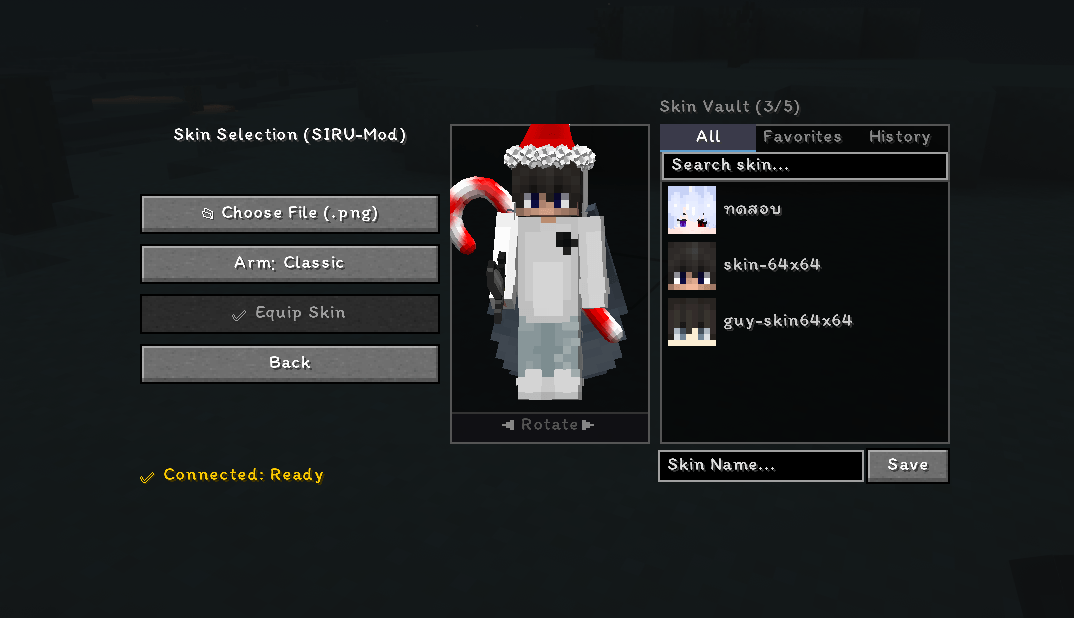
SIRU-Skin is an in-game custom skin management mod for Minecraft. It allows players to seamlessly upload, preview, and switch high-resolution skins on the fly using hotkeys or a radial menu—without ever leaving the server or restarting the game. Works completely on the client side, no server-side mod required!
✨ Features
- 🎮 In-Game Skin Manager: Open the built-in GUI to manage and change your skins.
- 🖼️ High-Resolution Support: Supports HD skins up to 2048x2048 resolution (including standard 64x64).
- 🧍 3D Live Preview: View your character model in 3D with interactive rotation before equipping.
- 📁 Local Skin Library & Drag & Drop: Easily save your favorite skins locally or simply drag and drop `.png` files straight into the GUI.
- ⚡ Real-Time Skin Sync: Instant skin synchronization across players using the SIRU-Skin-Service.
- 🌐 Language UI: Fully localized GUI supporting both English (en_us) and Thai (th_th), automatically adapting to your game language settings.
- ⚙️ Model Switching: Seamlessly toggle between Classic (4-pixel arms) and Slim (3-pixel arms) models.
🔒 Security & Requirements
- Official Minecraft Accounts Only: To ensure security and fair play, custom skin features require an Official Minecraft (Version 4 UUID) account.
- Multi-Loader Support: Compatible with both Fabric and Forge (Minecraft 1.20.1).
🌐 Network & Remote Service Disclosure
To enable real-time skin previewing, custom skin uploads, and multiplayer skin synchronization, SIRU-Skin connects to our remote API server.
- What is transmitted: Skin texture image files (
.png), skin metadata preferences (classic/slim arm model), and public Minecraft account UUIDs. - Privacy Assurance: No sensitive personal data, hardware identifiers, or background user activities are collected, tracked, or shared.
🚀 How to Use
1. Install SIRU Skin System into your .minecraft/mods folder.
2. Launch Minecraft and press the Skin Menu Keybind (Default: K or check Keybind settings).
3. Select a skin file or drag & drop a .png skin image into the window.
4. Choose your arm model (Classic or Slim) and click Equip Skin!
🎨 SIRU-Skin (ระบบสกินใช้ง่ายสุดๆ พัฒนาโดยคนไทย)
ม็อดสำหรับจัดการและเปลี่ยนสกินคัสตอมได้จากในเกม Minecraft โดยไม่ต้องรีสตาร์ทเกม!
คุณสมบัติเด่น:
- ระบบเลือกสกินในเกม (In-Game GUI): เปิดเมนูเลือกและสลับสกินได้ทันทีตลอดเวลา
- รองรับสกินความละเอียดสูง (HD): อัปโหลดสกินความละเอียดสูงสุดถึง 2048x2048 pixel
- พรีวิวตัวละคร 3D: แสดงตัวอย่างสกินแบบ 3D หมุนดูรอบทิศทางก่อนเลือกใช้งาน
- คลังสกิน & ลากไฟล์วาง: มีระบบเซฟสกินโปรด และรองรับการลากไฟล์รูปภาพ .png มาวางในเกมได้ทันที
- ซิงก์สกินเรียลไทม์: จะมีระบบตัวนี้ที่ช่วยให้มองเห็นสกินซึ่งกันและกันได้ทันที
- รองรับ 2 ภาษา: เปลี่ยนภาษา GUI ตามภาษาในเกมอัตโนมัติ (อังกฤษ และ ไทย)
- สลับประเภทแขน: เลือกสลับระหว่างแขนปกติ (Classic) และแขนเล็ก (Slim) ได้อิสระ
ข้อกำหนด:
- รองรับเฉพาะ ID แท้ (Official Account) เพื่อความปลอดภัยและป้องกันการแอบอ้างสิทธิ์ UUID
- รองรับทั้ง Fabric และ Forge (เวอร์ชัน 1.20.1)
- ม็อดมีการเชื่อมต่อไปยัง API เพื่อรับส่งไฟล์รูปภาพสกินและซิงก์สกินระหว่างผู้เล่นเท่านั้น (ไม่มีการเก็บข้อมูลส่วนตัวหรือฮาร์ดแวร์ใดๆ ทั้งสิ้น)
📜 License
MIT License
Developer by SIRU-DEV.
SIRU-Skin-System Team