


SimpleSoundChenger
- By

mod-icon.png
ã¹ã¯ãªã¼ã³ã·ã§ãã 2026-10-22 191349.png
ã¹ã¯ãªã¼ã³ã·ã§ãã 2026-10-22 191425.png
Description
Simple Sound Chenger
Your Minecraft. Your Sounds. Your Rules.
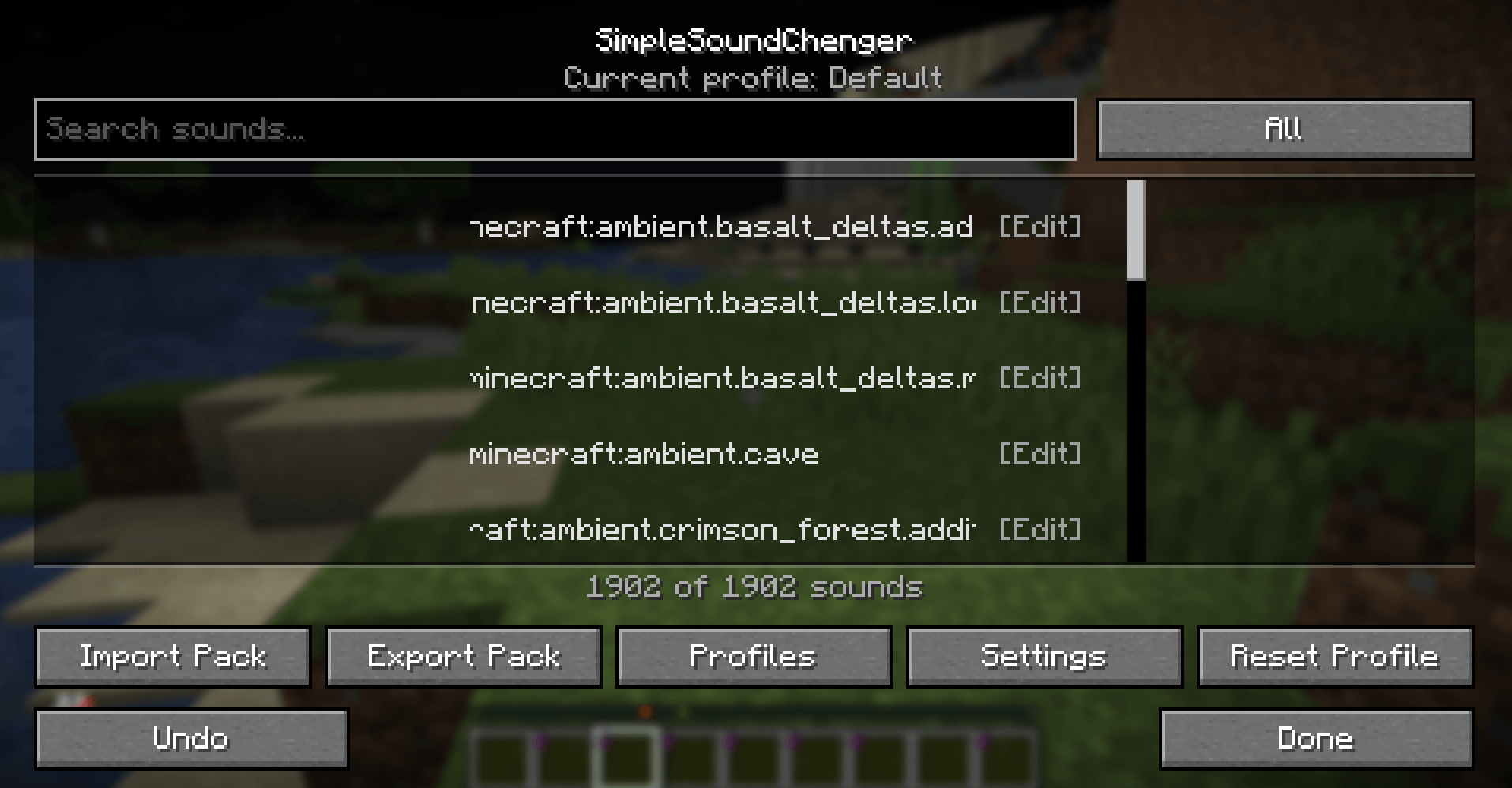
Simple Sound Chenger is a Fabric client-side mod that lets you easily replace, customize, and manage Minecraft sounds directly from an in-game GUI.
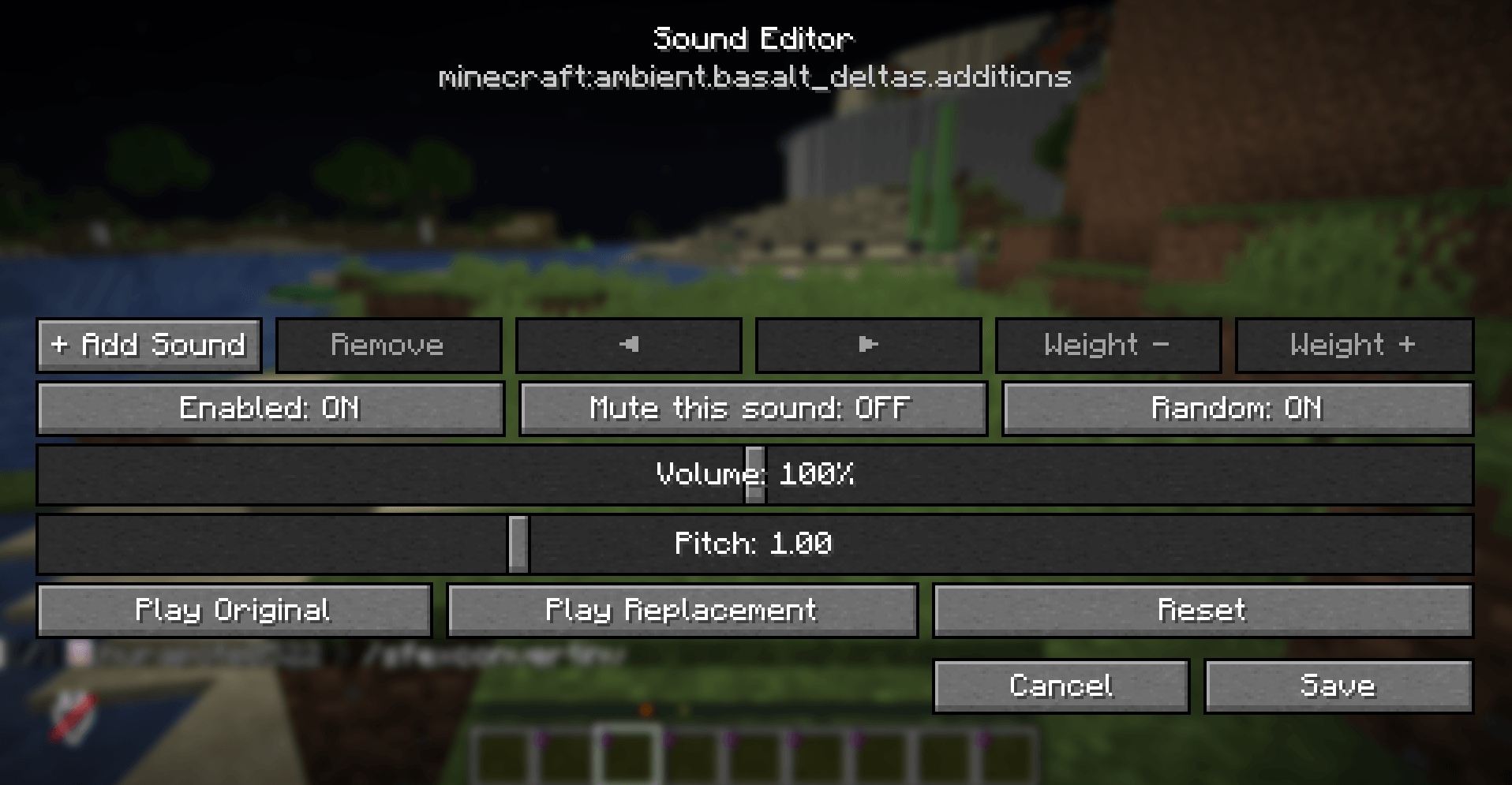
Change mob sounds, customize block sound effects, adjust volume and pitch, or mute unwanted sounds without manually editing resource packs.
The project also includes SimpleSoundChengerBridge, an optional server-side plugin that enables custom sound sharing between players in multiplayer!
Features
Sound Customization
- Custom Sound Replacement — Replace Minecraft sounds with your own MP3 or OGG audio files.
- Volume Control — Adjust the volume of individual sounds.
- Pitch Control — Customize the pitch of sound effects.
- Random Playback — Assign multiple sounds to a single event with customizable playback weights.
- Sound Muting — Disable specific sounds completely.
- Sound Preview — Preview original and replacement sounds directly in-game.
Easy-to-Use Sound Manager
- Simple and intuitive in-game GUI.
- Search for Minecraft sound events.
- Browse sounds by category.
- Mark frequently used sounds as favorites.
- Quickly access recently edited sounds.
- Undo recent changes.
Profiles & Sound Packs
- Create and manage multiple sound profiles.
- Rename, duplicate, and delete profiles.
- Switch between different sound configurations.
- Import and export custom sound packs.
- Share your custom sound configurations with friends.
Multiplayer Support — SimpleSoundChengerBridge
Simple Sound Chenger also includes SimpleSoundChengerBridge, an optional companion plugin for compatible Bukkit-based servers, including Paper.
With the Bridge plugin installed, players using Simple Sound Chenger can share custom sound playback with nearby players.
Bridge Features:
- Share custom sounds with nearby players.
- Configurable sound hearing distance.
- Enable or disable sharing your custom sounds.
- Choose whether to receive other players' custom sounds.
- Server-side audio caching and playback rate limits.
- Configurable audio size limits.
- Optional multiplayer integration.
Note: Players must have the client-side mod installed to receive shared custom sounds. The Bridge plugin is not required for singleplayer or normal sound customization.
Installation
Client Installation
- Install Fabric Loader and Fabric API.
- Place
SimpleSoundChengerin your Minecraftmodsfolder. - Launch Minecraft.
- Open the Sound Manager using the configured keybind.
- Start customizing your Minecraft sounds!
Server Installation (Optional)
- Use a compatible Bukkit-based server, such as Paper.
- Place
SimpleSoundChengerBridgein the server'spluginsfolder. - Restart the server.
- Adjust settings in
config.ymlif necessary. - Players with Simple Sound Chenger installed can use multiplayer sound sharing.
Requirements
| Component | Requirement |
|---|---|
| Minecraft | 26.1.2 |
| Mod Loader | Fabric Loader 0.19.3+ |
| Fabric API | Required |
| Java | 25+ |
| Mod Menu | Optional |
| Server Plugin | SimpleSoundChengerBridge (Optional) |
Language Support
- English
- Japanese (日本語)
日本語 / Japanese
Simple Sound Chenger とは?
Minecraftの音を、もっと自由に。
Simple Sound Chengerは、Minecraftの効果音や環境音をゲーム内GUIから簡単に変更・カスタマイズできるFabric製クライアントModです。
Mobの鳴き声、ブロックの効果音、環境音などを自分好みに変更できるほか、音量やピッチの調整、ランダム再生、特定の音のミュートなど、さまざまな機能を利用できます。
従来のようにリソースパックを手動で編集する必要はなく、ゲーム内の操作だけで音声をカスタマイズできます。
さらに、専用のサーバープラグイン SimpleSoundChengerBridge にも対応しており、マルチプレイでほかのプレイヤーとカスタムサウンドを共有することも可能です!
主な機能
サウンドのカスタマイズ
- サウンドの置き換え — Minecraftの効果音を好きなMP3・OGGファイルに変更できます。
- 音量調整 — サウンドごとに音量を細かく調整できます。
- ピッチ調整 — 音の高さを自由に変更できます。
- ランダム再生 — 1つのサウンドイベントに複数の音声を登録し、再生時にランダムで選択できます。各音声の抽選比率も調整可能です。
- ミュート機能 — 不要な効果音を個別に無効化できます。
- プレビュー機能 — 元のサウンドと変更後のサウンドをゲーム内で試聴できます。
使いやすいサウンドマネージャー
- 直感的に操作できるゲーム内GUI。
- サウンドイベントの検索機能。
- カテゴリ別のサウンド管理。
- よく使うサウンドを登録できるお気に入り機能。
- 最近編集したサウンドへのクイックアクセス。
- 編集内容を元に戻せるUndo機能。
プロファイル・サウンドパック
- 複数のサウンドプロファイルを作成・管理。
- プロファイルの名前変更・複製・削除。
- プロファイルの切り替え。
- カスタムサウンドパックのインポート・エクスポート。
- 作成したサウンド設定をほかのプレイヤーと共有。
マルチプレイ対応 — SimpleSoundChengerBridge
Simple Sound Chengerでは、専用サーバープラグイン SimpleSoundChengerBridge を利用することで、マルチプレイ環境でもカスタムサウンドを共有できます。
BridgeはPaperなどの互換Bukkit系サーバーで使用できるオプションプラグインです。
Bridgeの主な機能
- 近距離サウンド共有 — 周囲にいるプレイヤーにカスタムサウンドを共有できます。
- 再生範囲の設定 — サウンドが届く距離をサーバー側で調整できます。
- 共有設定 — 自分のカスタムサウンドをほかのプレイヤーに共有するか選択できます。
- 受信設定 — ほかのプレイヤーのカスタムサウンドを受信するか選択できます。
- キャッシュ管理 — 音声データのキャッシュを管理します。
- レート制限 — サウンド再生の頻度を制限できます。
- ファイルサイズ制限 — 共有する音声データのサイズを制限できます。
注意: 共有サウンドを受信するプレイヤーにもSimple Sound Chenger本体の導入が必要です。シングルプレイや通常のサウンド変更にはBridgeは必要ありません。
導入方法
クライアント側
- Fabric LoaderとFabric APIを導入します。
SimpleSoundChengerのJARファイルをMinecraftのmodsフォルダに配置します。- Minecraftを起動します。
- 設定されたキーからサウンドマネージャーを開きます。
- 好きなサウンドを選択してカスタマイズしてください!
サーバー側(任意)
- Paperなどの対応サーバーを用意します。
SimpleSoundChengerBridgeのJARファイルをpluginsフォルダに配置します。- サーバーを再起動します。
- 必要に応じて
config.ymlを編集します。 - Modを導入したプレイヤー同士でサウンド共有機能を利用できます。
動作環境
| 項目 | 必要環境 |
|---|---|
| Minecraft | 26.1.2 |
| Modローダー | Fabric Loader 0.19.3以上 |
| Fabric API | 必須 |
| Java | 25以上 |
| Mod Menu | 任意 |
| サーバープラグイン | SimpleSoundChengerBridge(任意) |
Simple Sound Chengerの特徴
Minecraftの音声を変更するために、複雑なリソースパックを作成する必要はもうありません。
Simple Sound Chengerなら、ゲーム内GUIだけでサウンドの置き換えや調整、プロファイルの管理まで簡単に行えます。
面白い効果音を追加したい人、Minecraftの雰囲気を変えたい人、自分だけのサウンド環境を構築したい人など、幅広いプレイヤーにおすすめです。
さらに、SimpleSoundChengerBridgeを導入すれば、カスタムサウンドをマルチプレイでも共有できます。
あなたのMinecraftを、あなた好みの音に。
SimpleSoundChenger Team
