Simple Updates Checker
A lightweight and asynchronous update-checking library.
- ⚡ Fully Asynchronous: Checks for updates in the background.
- 🌐 Dynamic Remote Changelog Localization: Add new languages for changelogs directly to remote config file.
- 📦 Multi-Version Support: Serve updates for multiple Minecraft versions (e.g.,
1.20.1,1.18.2,1.12.2) from a single JSON Updates Information File. - 🧠 Smart Version Comparison: Uses Maven's
ComparableVersion. Never warns players about "updates" if they are running a newer dev/beta build. - 💬 Interactive Chat Notifications: Provides clickable download links and hover tooltips directly in the player's chat.
How It Works
Host a single updates.json file on GitHub Pages, raw GitHub repo, or wherever you want.
Example updates.json
{
  "1.20.1": {
    "version": "1.2.0",
    "download_url": "" rel="noopener nofollow" target="_blank">https://www.curseforge.com/minecraft/mc-mods/your-mod",
    "changelog": {
      "en_us": "Added new cool features. Fixed crash with some mod.",
      "ru_ru": "Добавлены новые крутые штучки. Пофикшен краш с каким-то там модом.",
      "zh_cn": "新增了炫酷功能。修复了与某些模组冲突导致的崩溃问题。",
      "es_es": "Se han añadido nuevas funciones interesantes. Se ha solucionado un fallo que provocaba que el juego se colgara con algunos mods."
    }
  },
  "1.18.2": {
    "version": "1.0.0",
    "download_url": "" rel="noopener nofollow" target="_blank">https://www.curseforge.com/minecraft/mc-mods/your-mod",
    "changelog": {
      "en_us": "Initial mod release."
    }
  }
}
Localization Fallback Logic:
The library matches the player's client language code. For example: ifes_mx(Mexican Spanish) is not found, it checkses, then falls back toen_us, and finally defaults to the first available language in the JSON.
Developer Guide: How to Use in your mod
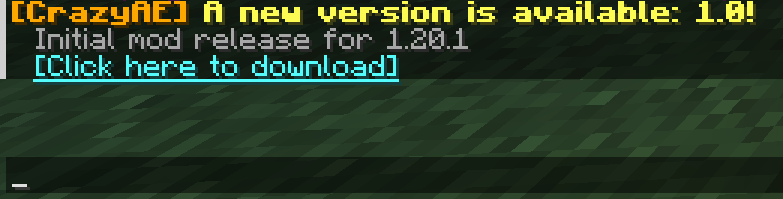
Update message in game:
Simple Updates Checker Team

Owner