Simple Server Utilities
- By
An all-in-one mod for powerful and easy Minecraft server management.
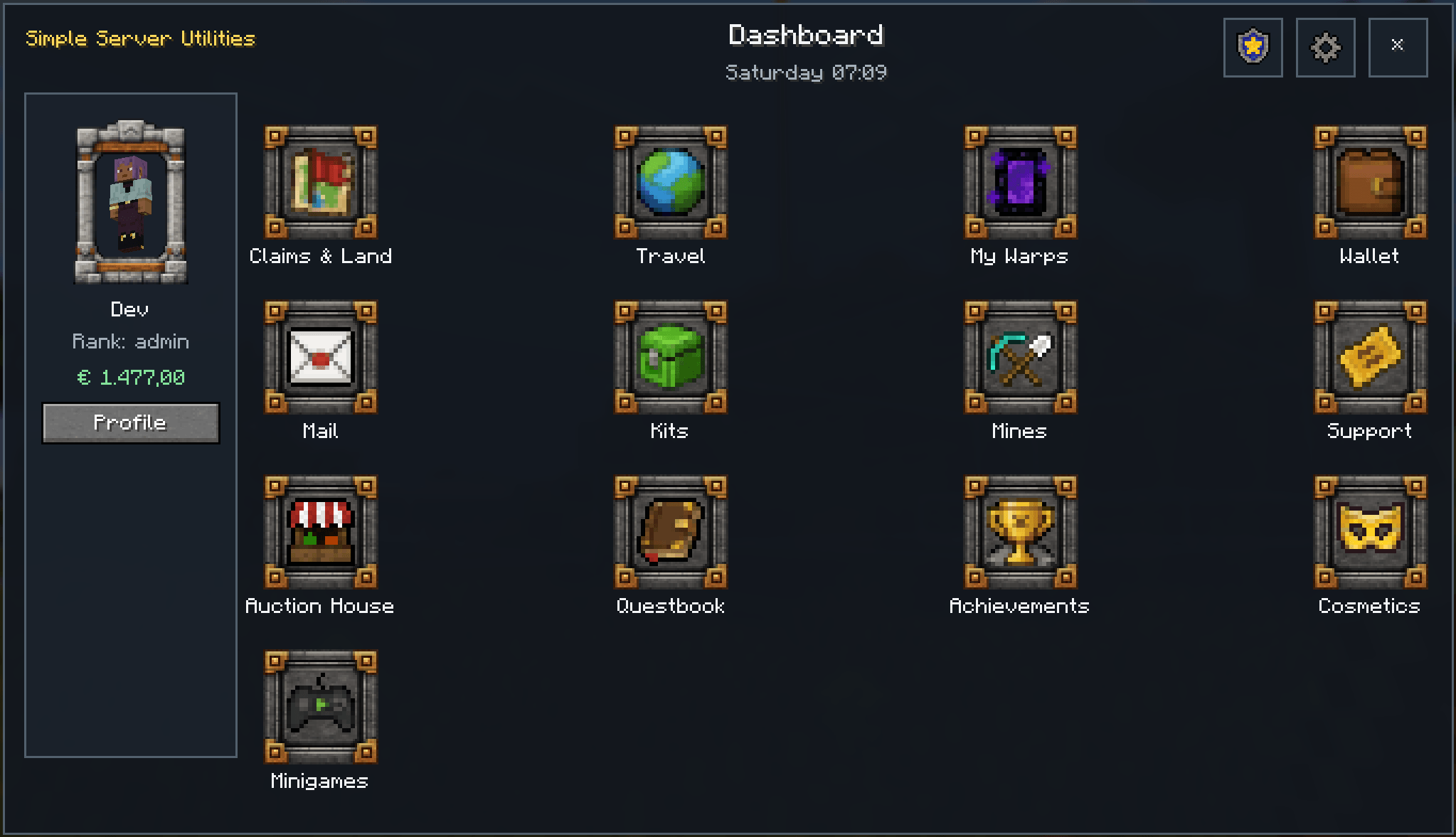
Schermafbeelding 2026-08-09 010940.png
Description
🟩 Simple Server Utilities — SSU
An all-in-one, GUI-first server management & gameplay expansion mod for Minecraft
Simple Server Utilities (SSU) brings a huge collection of server-management, administration and gameplay systems together in one integrated mod.
Instead of installing a separate mod for claims, another one for economy, another one for mail, another one for quests, another one for moderation, and so on, SSU is designed as one modular ecosystem where its systems actually work together.
🟢 GUI-first: almost everything can be configured and managed in-game. 🔐 Permission-driven: modules and actions have granular permission controls. 🧩 Modular: enable the systems you want and leave the others disabled. 🛡️ Server-authoritative: important gameplay and administration actions are validated server-side.
🟢 Land, World & Building
🗺️ Player Claims
Protect your land using an interactive Claim Map.
- Create multiple claim groups
- Expand and shrink claims visually
- Claim access roles
- Per-claim permissions
- Members and co-owners
- Claim borders
- Welcome messages
- Claim-linked Homes
- Optional claim taxation
🟣 Server Regions
Advanced administrator-controlled 3D regions.
- Protection flags
- Priorities and overlapping regions
- Members and managers
- Welcome / leave messages
- Region spawns
- Rentals
- Scheduled resets
- Snapshot restoration
- Region-specific permissions
🟧 World Edit
A powerful GUI-driven World Edit system.
Includes:
Copy • Cut • Paste • Fill • Replace • Clear • Move • Undo • Redo • Rotate • Mirror • Flip • Save • Load
Saved selections support realistic ghost previews before placement, and full snapshots can preserve supported block entities, inventories and structural entities.
⛏️ Custom Mines
Create configurable server/prison mines with:
- Weighted block palettes
- Automatic or manual resets
- Custom drops
- XP multipliers
- Fortune / Silk Touch rules
- Reset warnings
- Live status holograms
- Dedicated mine statistics
🌍 World Management
- Managed/custom dimensions
- Server Spawn
- Lobby Spawn
- Per-dimension World Borders
- Throttled Chunk Pregeneration
🔵 Maps & Navigation
🧭 Minimap
A persistent terrain minimap with:
- Terrain relief
- Lighting
- Claims and Regions
- Personal markers
🗺️ Full World Map
Explore the world through a large interactive map with zooming, panning and marker management.
📍 Map Markers
Create personal markers with:
- Name
- Colour
- Dimension
- Position
- Minimap / World Map visibility
- Optional in-world marker
- Optional vertical beacon-style beam
🚪 Travel System
A central menu for:
- Homes
- Public Warps
- Rented player Warps
- Server Spawn
- Search and filtering
- Pending teleport cancellation
🟡 Economy & Trading
💰 Economy
A complete virtual currency system with:
- Player wallets
- Player-to-player payments
- Transaction history
- Administration tools
- Integration with other SSU modules
🔨 Auction House
Yes — an actual, fully functional Auction House inside Minecraft.
- Create listings
- Search
- Categories
- Sorting
- Seller taxes
- Expiration
- Offline seller payouts
- Purchase recovery
- Economy integration
A complete player mailing system.
Send messages to online or offline players, including:
- Rich-text messages
- Items
- Money
- System rewards
- Inbox / Sent mail
- Offline delivery
🧑🌾 NPC Shops
Create configurable shops connected directly to NPCs with item buy/sell offers and Economy integration.
🏠 Region Renting
Server Regions can be rented by players using the Economy system.
💸 Claim Tax
Optional recurring Player Claim taxation with reminders, dimension multipliers and crash-safe settlement handling.
🟨 Progression & Content
🏆 Achievements
Create your own custom server achievements.
Achievements support:
- Custom ID
- Rich-text title and description
- Icons
- Categories
- Hidden / secret achievements
- Multiple objectives
- Multiple rewards
- Player progress
- Earned / Unearned filtering
- Clickable chat announcements
- Player-to-player achievement comparison
Possible rewards include:
Money • Items • Permissions • Temporary Permissions • Cosmetics • Titles • Claim Capacity • or nothing at all for pure bragging rights
📊 Custom Statistics
Administrators can create persistent custom statistics and leaderboards.
Statistics can also be displayed through Floating Holograms and used by other SSU systems.
📖 Quest System
A data-driven Quest system with:
- Quest chains
- Prerequisites
- Repeatable quests
- Cooldowns
- Multiple objectives
- Rewards
- Progress tracking
- Questbook GUI
- NPC integration
☠️ Dungeons
A configurable Region-backed dungeon framework with:
- Queues / parties
- Player limits
- Lives
- Checkpoints
- Kill stages
- Timed survival
- Rewards
- Spectators
- Arena recovery
- Automatic snapshot restoration
More advanced encounter/boss scripting is still under development.
🔴 Minigames
SSU includes multiple fully integrated minigames:
⚔️ Capture the Flag
🏳️ Domination
👑 King of the Hill
❄️ Spleef
🟪 Block Party
Minigames include:
- GUI-driven arena creation
- Queues
- Teams
- Spectators
- Match HUDs
- Scoring
- Respawning
- Arena validation
- Arena snapshots/recovery
- Rewards
- Match history
- XP and progression
- Ratings
- Weekly challenges
- Cosmetics
🛡️ Roles & Abilities
Supported team games can use combat roles such as:
DPS • Tank • Healer
with role-specific equipment and abilities.
🟩 NPC System
SSU includes an increasingly advanced NPC framework.
🧑 Advanced NPCs
NPCs support:
- Reusable NPC templates
- Different Minecraft entity models
- Custom stats
- Equipment
- Custom loot
- Factions / relations
- Behaviour settings
- Respawning
- Schedules
- Multiple placements
💬 Dialogue System
Create reusable dialogue trees with:
- Dialogue nodes
- Player choices
- Conditions
- Actions
- Branching conversations
🧰 NPC Services
NPCs can perform different server roles, including:
- Merchant
- Quest Giver
- Auctioneer
- Postmaster
- Healer
- Warp Master
- Minigame Host
- Dungeon Host
- General server services
🎭 Custom NPC Skins
Support for compatible 64×64 Wide/Slim player-style skins, from local assets or validated remote sources.
🟡 The NPC system is functional but still actively being expanded.
🟪 Holograms & Media
✨ Floating Holograms
Create floating text anywhere in the world with:
- Multiple colours
- Bold
- Italic
- Underline
- Strikethrough
- Backgrounds
- Scale
- Visibility range
- Multiline text
🖼️ Image Holograms
Display:
- PNG
- JPG / JPEG
- Animated GIF
Images can come from local server resources or validated HTTP(S) URLs.
🔗 Clickable Links
Create floating website links players can interact with.
📊 Dynamic Holograms
Display:
- Scoreboards
- Custom statistics
- Player statistics
- Leaderboards
🟦 Player Information & Visuals
❤️ Entity Insight
Optional overhead information for nearby mobs.
Displays:
- Entity name
- Current / maximum health
- Attitude
Entities can dynamically appear as:
🟢 Friendly 🟡 Neutral 🔴 Hostile 🔵 Fleeing
🔍 Block & Entity Information
Look at blocks or entities to see useful information.
Can also show permission-controlled previews of supported inventories and containers.
⚔️ Damage & Healing Indicators
Optional floating combat numbers with multiple visual styles.
🏷️ Player Titles
Unlockable server-defined player titles.
🎨 Styled Rank Prefixes
Rank prefixes support colours and rich formatting and can be displayed in chat and above players.
🌳 Quality of Life
🪓 TreeCapitator
Smart tree detection that respects:
- Natural trees
- Wood species
- Tools
- Durability
- Permissions
- Server protection
⛏️ Veinminer
Mine connected ore veins while respecting tool durability and server permissions.
🌾 Crop Harvesting
Right-click mature crops to harvest and automatically replant them.
Supports vanilla and many conventionally implemented modded crops.
🎁 Server Kits
Administrators can create custom kits with:
- Exact ItemStacks
- Prices
- Cooldowns
- One-time claims
- Custom permission requirements
🟠 Permissions & Administration
🔐 Granular Permission System
SSU contains permission keys throughout its modules.
Supports:
- Boolean permissions
- Numeric permissions
- Wildcards
- Context-sensitive permissions
🎖️ Ranks
Create server ranks with:
- Priorities
- Permission sets
- Rank inheritance
- Multiple ranks per player
👤 Personal Overrides
Personal player permissions have priority over inherited Rank permissions.
🧩 Module Management
Many SSU systems can be enabled or disabled directly from the administration GUI.
👥 Player Administration
Administrators can inspect and manage online and known offline players.
🔴 Moderation & Jail
🛡️ Moderation Tools
Includes:
- Warn
- Kick
- Temporary Ban
- Permanent Ban
- Unban
- Freeze / Unfreeze
- Whitelist management
- Moderation history
- Name history
- Inventory inspection
- Ender Chest inspection
⛓️ Physical Jail System
Create actual Region-based jail facilities.
Punishments can include:
- Jail time
- Economy buyout
- Mining / community tasks
- Solitude cells
Administrators can monitor active prisoners, remaining sentence time, task progress, buyouts and cell assignment.
🟢 Support & New Players
🎫 Ticket System
Players can create:
- Help requests
- Bug reports
- Player reports
Staff can:
- Assign tickets
- Reply
- Add staff notes
- Resolve
- Reopen
- Close
👋 Onboarding
Create a proper first-join experience.
New players can:
- Spawn in a dedicated Lobby
- See a custom welcome
- Read server rules
- Read an optional server introduction
- Be prevented from normal gameplay until required rules are accepted
Rules and introduction pages support Rich Text.
🟦 Server Operations
SSU also includes built-in tools normally found in dedicated server administration software.
💚 Server Health
Admins get a simple colour-coded health verdict:
🟢 GREAT 🟢 GOOD 🟡 NEUTRAL 🟠 BAD 🔴 VERY BAD
Detailed TPS, MSPT, memory and subsystem information remains available for technical administrators.
💾 Backups
- Manual full-world backups
- Automatic backups
- Configurable intervals
- Backup retention
- Protected restore workflow
🕒 Scheduler / Task Manager
Schedule recurring, daily or one-time server operations.
🛠️ Maintenance Mode
Temporarily restrict normal players while keeping administrators and bypass staff online.
💬 Chat Management
Includes:
- Slow mode
- Flood protection
- Duplicate message detection
- Caps filtering
- Link filtering
- Blocked words / phrases
- Mutes
- Staff chat
📜 Staff Audit Log
Important administrative actions are logged for later review.
↩️ Activity & Rollback
Lightweight player block activity logging with conservative rollback tools.
📈 Economy Analytics
View server economy statistics such as:
- Total money supply
- Transaction volume
- Richest accounts
- Large transaction alerts
🌍 World Operations
Manage World Borders and safely pregenerate chunks.
⚙️ Configuration Profiles
Export and import selected SSU configuration with automatic safety profiles before an import.
🧩 Designed as One Integrated System
One of SSU's biggest goals is not simply having lots of features — it is making those features work together.
For example:
Economy → Auction House → Mail → NPC Shops → Claims → Quests → Achievements → Statistics → Minigames
An Auction House sale can affect Economy and Statistics. Statistics can appear on Holograms. Quest and Achievement objectives can react to gameplay events. NPCs can open Quests, Shops, Mail, Warps, Minigames or Dungeons. Permissions and Ranks control access across the entire system.
All without requiring a separate administration command for every little action.
🎮 GUI-First
SSU is designed around in-game interfaces.
Commands still exist where useful for compatibility, administration and recovery, but normal management is intended to happen through graphical tools.
Open the main SSU interface using the configurable SSU Menu key.
🧪 Development Status
SSU is under active development.
Most listed systems are already functional, but some — especially the more advanced parts of NPCs, Dungeons and future content integrations — are still being expanded and polished.
Bug reports, feedback and suggestions are welcome.
💚 Simple Server Utilities
One mod. One interface. One integrated server ecosystem.
Claims • Economy • Auctions • Mail • NPCs • Quests • Achievements • Minigames • Dungeons • Maps • World Edit • Moderation • Server Operations • and much more.
Why this mod?
The biggest reason i started making this mod, was because i wanted an ALL-IN-ONE mod that had just all the things i need/want. In the past i often had to choose between multiple mods that had overlapping content, no option to disable things, tinkering with script to get-ish what i want or just throwing it all away because they weren't compatible with eachother. Some features weren't even available or non existent.
Fast forward to today i can say i solved this problem (i hope). I made this mod in the first place for myself, but i can imagine that it could potentially be usefull to others. It hasn't been tested with other mods yet, so i can only assure you at this time it is fully functional in vanilla environment.
What makes this mod so different or potentially better
I won't say this mod is better. It is just different and it serves a certain goal. Yet 1 of the greatest features is that everything works with GUI's. No complicated commands needed or file tinkering. You don't need to leave the game to change settings and most settings will work right away, some need a reload and a few might require a restart.
Some menu's might feel a little confusing yet, because there isn't proper documentation (yet).
However, most of it should be self explanatory.
Can i use this mod in a modpack or server?
Well yes ofcourse you can and when you do, please give me some feedback.
Just make sure that every download comes directly from this page. I do not give permission to download or upload this mod to and from any other source then curseforge ( or any source i mention)
If you use this mod in any way, give proper credits to me.
The Simple Server Utilities Team