SideChat
- By
Creates a client console / client terminal to monitor and respond to in-game Chat!
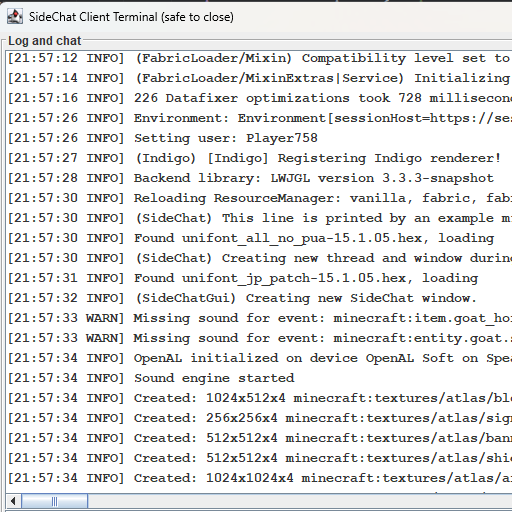
Screenshot_40.png
Description
Hi! Welcome to SideChat. I play on a LAN world with my brother often, and sometimes we ALT-Tab out of the game but still want an easy way to monitor chat; this was my solution.
Re-open the window with CTRL+ALT+SHIFT+L
Need to commission a mod? add me on discord: jason13
Configuration (sidechat.json)
| Option | Description | Default |
|---|---|---|
enabled |
Whether the mod should function at all | true |
fontStyle |
0 = PLAIN, 1 = BOLD, 2 = ITALIC |
0 |
fontSize |
Size of the terminal text | 12 |
openEarly |
Open the window as soon as the mod loads | true |
onlyInWorld |
Open/close the window based on whether you're in-game | false |
startWidth |
Initial window width before resizing | 896 |
startHeight |
Initial window height before resizing | 504 |
Terminal Commands
All commands are prefixed with #/ (e.g. #/stop).
Window
| Command | Description |
|---|---|
#/stop |
Close the SideChat window |
#/stop game |
Close Minecraft entirely |
#/close |
Alias for stop |
#/shutdown |
Alias for stop |
Audio
| Command | Description |
|---|---|
#/mute |
Set master volume to 0 |
#/mute <source> |
Mute a specific sound source |
Sources: master music record weather block hostile neutral player ambient voice
Terminal Appearance
| Command | Description |
|---|---|
#/font size <n> |
Set terminal font size (e.g. 12) |
#/font style <n> |
Set terminal font style: 0=PLAIN, 1=BOLD, 2=ITALIC |
Game Settings
| Command | Values | Notes |
|---|---|---|
#/gamma <n> |
0.0 – 1.0 |
Screen brightness. 0.0=moody, 1.0=bright. Default: 0.5 |
#/fov <n> |
30 – 110 |
Field of view. Default: 70 |
#/render <n> |
2 – 32 |
Render distance in chunks. Default: 10 |
#/fps <n> |
10 – 260 |
Framerate limit. 260=unlimited |
#/narrator <mode> |
off all chat system |
Narrator mode |
#/chat <mode> |
full system hidden |
Chat visibility filter |
#/graphics <mode> |
fast fancy fabulous |
Graphics quality |
#/particles <mode> |
all decreased minimal |
Particle density |
SideChat Team

Owner

![[Let's Do] Camping project image](https://media.forgecdn.net/avatars/thumbnails/1677/154/256/256/639066220085991461.png)
![[Let's Do] Vinery project image](https://media.forgecdn.net/avatars/thumbnails/1681/782/256/256/639068578276109661.png)
![[Let's Do] WilderNature project image](https://media.forgecdn.net/avatars/thumbnails/1681/776/256/256/639068576691624270.png)