Shulker & Bundle
- By
Shulker & Bundle GUI on shift right click, Shulker in offhand collects item when picked up by player bundles have to pre defined inventory slot to do this (multiple bundles work)
Shulker & Bundles - Enhanced Inventory Management!
Tired of inventory overflow? Shulker & Bundles supercharges your storage solutions by allowing seamless interaction with Shulker Boxes and Bundles directly from your inventory! Pick up items into your off-hand Shulker or any Bundle, and access their contents using shift right-click while holding on the fly with intuitive GUIs.
📧 Contact Me & Support Information
💬 Primary Support Channel (Preferred)
All general questions, feature requests, and non-urgent bug reports should be posted in the appropriate channels on our Discord Server. We actively monitor the server and will respond as soon as possible. This ensures that the whole community can benefit from the discussion and solutions.
🆘 Urgent Private Messaging (PM) Policy
While we prefer all issues to be handled via the Discord server first, you are welcome to PM me directly under specific urgent circumstances:
- Allowed Reason: Your server is crashing or experiencing critical, game-breaking errors directly related to one of my mods/plugins.
- Requirement: You must be the owner of the server.
- Time Zone: I am operating in the (CET/CEST) Time Zone.
- PM Hours: Please only send private messages between 10:00 AM and 10:00 PM (Brussels Time).
I will endeavor to answer your PM as soon as I can to be helpful and see what I can do to resolve your urgent issue. However, please understand that immediate responses are not guaranteed, and private messaging is a professional courtesy, not an entitlement. Thank you for your understanding and cooperation!
Also works for: Reinforced Shulker Boxes
Features
Direct GUI Access
- Shulker Box GUI: Shift-right-click a Shulker Box (in main or off-hand) to open its 27-slot GUI without placing it down!
- An "Editing Shulker: [Shulker Name]" placeholder appears in your hand while the GUI is open.
- Permission:
shulkerbundle.open - Note: Stacked shulker boxes in hand cannot be opened.
- Bundle GUI: Shift-right-click a Bundle (in main or off-hand) to open a dynamic custom GUI.
- The GUI size adjusts to 9, 18, or 27 slots based on the number of unique item types already within the bundle (max 27 unique types for manual interaction).
- An "Editing: [Bundle Name]" placeholder appears in your hand while the GUI is open.
- Note: The Bundle GUI cannot be opened if the bundle contains more than 27 unique item types.
- Permission:
shulkerbundle.open_bundle_gui
Automatic Item Collection
- Shulker Auto-Pickup (Off-hand): Items you pick up go directly into your off-hand Shulker Box if space is available.
- Permission:
shulkerbundle.hold.shulker - Notifications: Receive action bar messages showing "Shulker has X empty slots left" when items are picked up, specifically triggered by a new item filling a slot in the third row (slots 18-26).
- Exclusions: Will not pick up other Shulker Boxes, Bundles, or placeholder items.
- Note: Stacked shulker box items in the off-hand are not supported for auto-pickup.
- Permission:
- Bundle Auto-Pickup (Inventory & Off-hand): Items you pick up go directly into any available Bundles in your main inventory or off-hand.
- Permission:
shulkerbundle.hold.bundle - Notifications: Receive action bar messages indicating "Bundle has (X/64) items" if the bundle has 32 or more items but is not full, or "Bundles with space X" otherwise.
- Conditions: Auto-pickup into Bundles is skipped if the player is sneaking, the item is on the auto-pickup blacklist (Cake, Pumpkin Pie, or other Bundles), or if adding a new unique item type would exceed 9 unique types already in the bundle.
- Exclusions: Items marked with the
CrateBundleNoAutoPickupNBT tag are ignored.
- Permission:
Bundle Item Interaction Rules
- GUI Blacklist: Prevents
Cake,Pumpkin Pie,Shulker Boxitems, and otherBundleitems (unless empty) from being manually placed into a Bundle via the custom GUI. Placeholder bundles and shulkers are also blocked. - Manual Inventory Interaction Restrictions: Similar restrictions apply when trying to right-click items from your cursor into a Bundle in your inventory.
- Attempting to add blacklisted items or exceeding unique item limits via right-click will be blocked.
- Any non-empty Bundle cannot be put into another Bundle.
- Bundle Nesting Prevention (Left-Click): Prevents putting a Bundle held on the cursor into another Bundle in an inventory slot by left-clicking.
- Unique Item Limits: Auto-pickup into Bundles is limited to 9 unique item types. Manual insertion into the Bundle GUI is limited to 27 unique item types.
Commands (Admin & Personal)
/shulkerbundleor/sb: Shows the main help page for the mod.
Global Commands (Admin-Only)
Requires the shulkerbundle.admin permission (OP Level 2).
/sb global gui [shulker|bundle]: Toggles the ability to open GUIs for all players./sb global pickup [shulker|bundle]: Toggles auto-pickup functionality for all players./sb global notify [shulker|bundle]: Toggles action bar notifications for all players.
Personal Commands
These commands allow each player to toggle features for themselves. They are saved per-player on the server.
/sb personal gui [shulker|bundle]: Toggles your personal preference for opening GUIs./sb personal pickup [shulker|bundle]: Toggles your personal preference for auto-pickup./sb personal notify [shulker|bundle]: Toggles your personal preference for notifications.
Client-Side Configuration (via ModMenu)
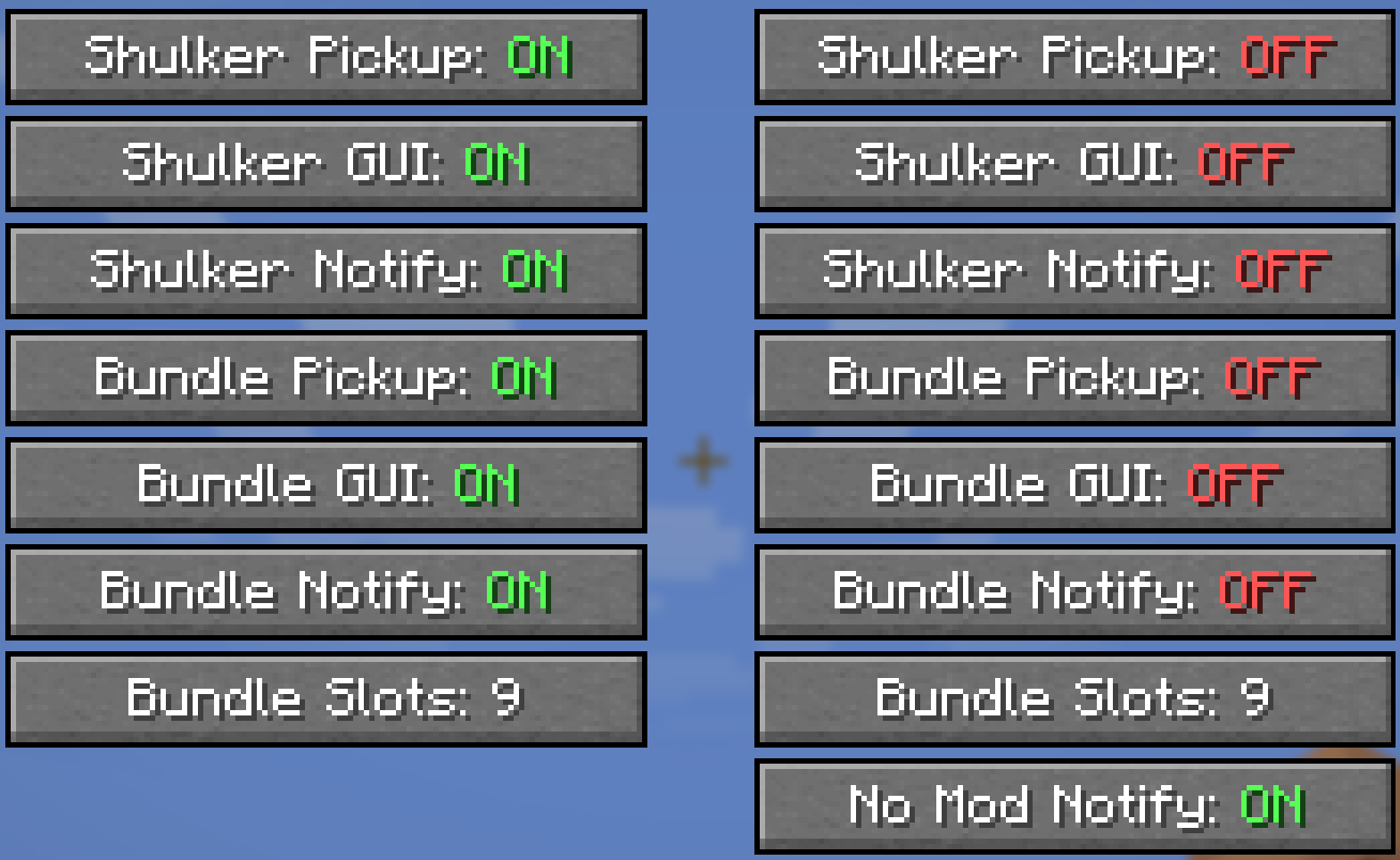
- If you have ModMenu installed, you can access a detailed config screen.
- Settings are split into Singleplayer and Multiplayer categories, allowing you to have different preferences for each context.
- These toggles are an alternative to the
/sb personalcommands and give you full control over your experience.
How Features are Controlled (Permission Hierarchy)
This mod uses a 3-layer system to determine if a feature is active for a player.
- Player's Choice (Client-Side): The player must have the feature enabled in their personal settings (via the ModMenu config or
/sb personalcommand). If a player disables a feature, it will always be off for them, regardless of server settings. - Server's Global Setting: If the player has the feature enabled, the server then checks its global settings. If the feature is enabled globally (via
/sb global), the player can use it. - Server Permissions: If the feature is disabled globally, the server will then check if the player has the specific permission node for it (e.g.,
shulkerbundle.open).
Master Override: The multiplayer config screen has a "Deny Server Permissions" toggle. When enabled, it acts as a "hard opt-out," forcing all of this mod's features to be disabled for you on the server, ignoring any global settings or permissions.
Server Administration
- Client Mod Detection: The server can detect if players have the mod installed. If a player joins without it, they will receive an action bar message with a clickable link to this page. This message only appears twice per player.
- Server Configuration: Server owners can disable this notification message by setting
notifyPlayer: falsein theshulkerbundle.jsonconfig file.
Click to view all permission nodes and their descriptions
shulkerbundle.open: Allows opening the Shulker Box GUI with shift-right-click.shulkerbundle.open_bundle_gui: Allows opening the custom Bundle GUI with shift-right-click.shulkerbundle.hold.shulker: Allows items to be automatically inserted into the off-hand Shulker Box.shulkerbundle.hold.bundle: Allows items to be automatically inserted into Bundles in the player's inventory.shulkerbundle.notify.shulker: Allows players to receive action bar notifications for Shulker Box fill status.shulkerbundle.notify.bundle: Allows players to receive action bar notifications for Bundle fill status.shulkerbundle.admin: Grants administrative permissions, including use of the global toggle commands. (Default: OP Level 2)shulkerbundle.command.use: Allows use of the base/shulkerbundle(and/sb) command to view help pages. (Default: anyone)
Modpack Policy
- You ARE PERMITTED to include this mod in any modpack.
- Please do not modify the mod's JAR file directly.
- The modpack itself, or access to this mod within the modpack, must not be sold.
Shulker & Bundle Team