Shadowed´s Mod Guard (ARCHIVED)
- By
It is a mod for detecting functional duplicates and incompatibilities with installed mods to prevent crashes and instability.
Can't find your mod loader or Minecraft version?
Leave a comment with #MissingMM and specify which ones you need so we can add support for them!



Shadowed's Mod Guard is a client-side tool that detects and alerts you to duplicate or incompatible mods in your mods folder. It offers an easy-to-use interface for managing mod conflicts, thereby improving stability and the gaming experience.
It includes automatic log analysis and detailed reports to facilitate troubleshooting.


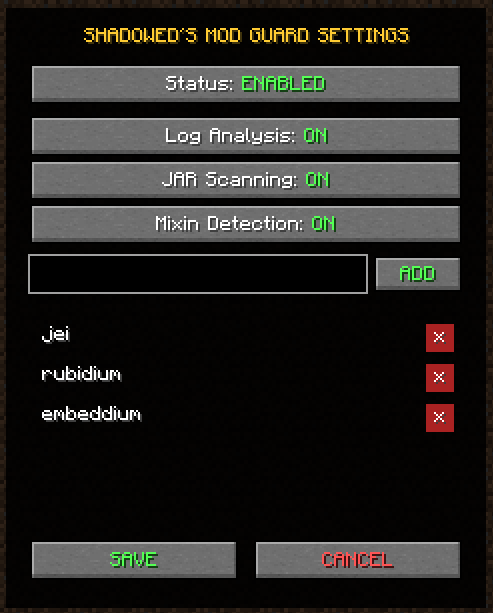
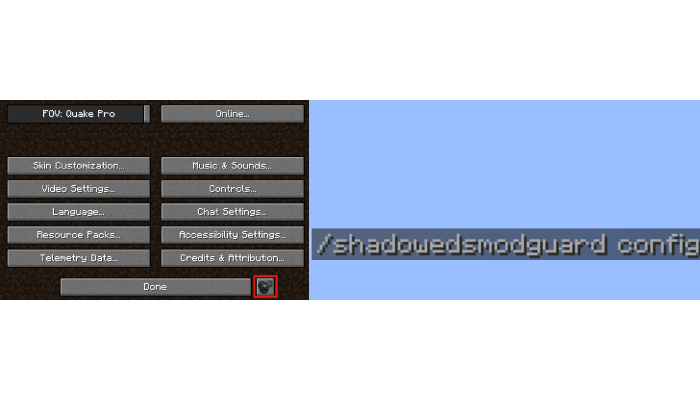
To access the settings menu, you can use the command “/shadowedsmodguard config” or press the mod button in the pause menu settings, and you can configure the following:
- Status: Enable or disable the guard.
- Log Analysis: Enable or Disable Analysis of the Latest Minecraft Log.
- JAR Scanning: Enable or Disable Scanning of Your Mods (
.jar). - Mixin Detection: Enables or Disables mixin detection for the Latest Log and Mods.
- Ignore List: You can add or remove mods so that the guard ignores them (you must enter the ModID; soon to be compatible as a Smart List...)
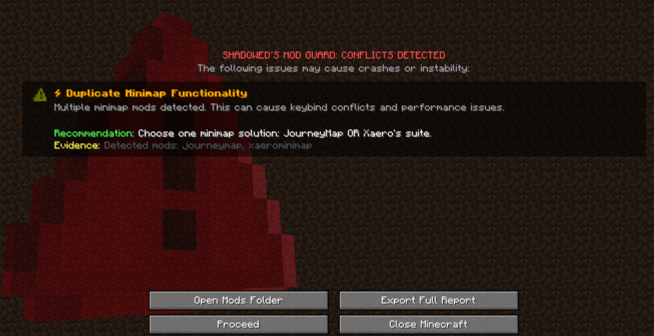
It will warn you if you have corrupted, incompatible, or duplicate mods; you can select the following options:
- Open Mods Folder: Opens the Mods folder for your instance so you can delete the problematic mods listed there.
- Export Full Report: Exports a complete report on the problematic mods listed.
- Procced: Proceed to the Minecraft menu, ignoring the warnings (NOT RECOMMENDED)
- Close Minecraft: As the title suggests, this will close Minecraft so you can remove the problematic mods listed.
RECOMMENDED: First, select “Open Mods Folder,” then “Close Minecraft”.


| Feature | Details |
| Check for incompatibilities | Yes. |
| Mixin Detection | Yes. |
| Log Analysis | Yes. |
| List of Ignored Mods | Yes, and it's customizable. |
| Safety Guard | Yes, it automatically displays warnings once Minecraft has finished loading. |
Languages supported in the latest version of the mod (+ sub-languages):

The Shadowed´s Mod Guard (ARCHIVED) Team