SGOverlay
- By
1_Uebersicht.png
2_Cooldowns.png
3_TPA.png
4_Plots.png
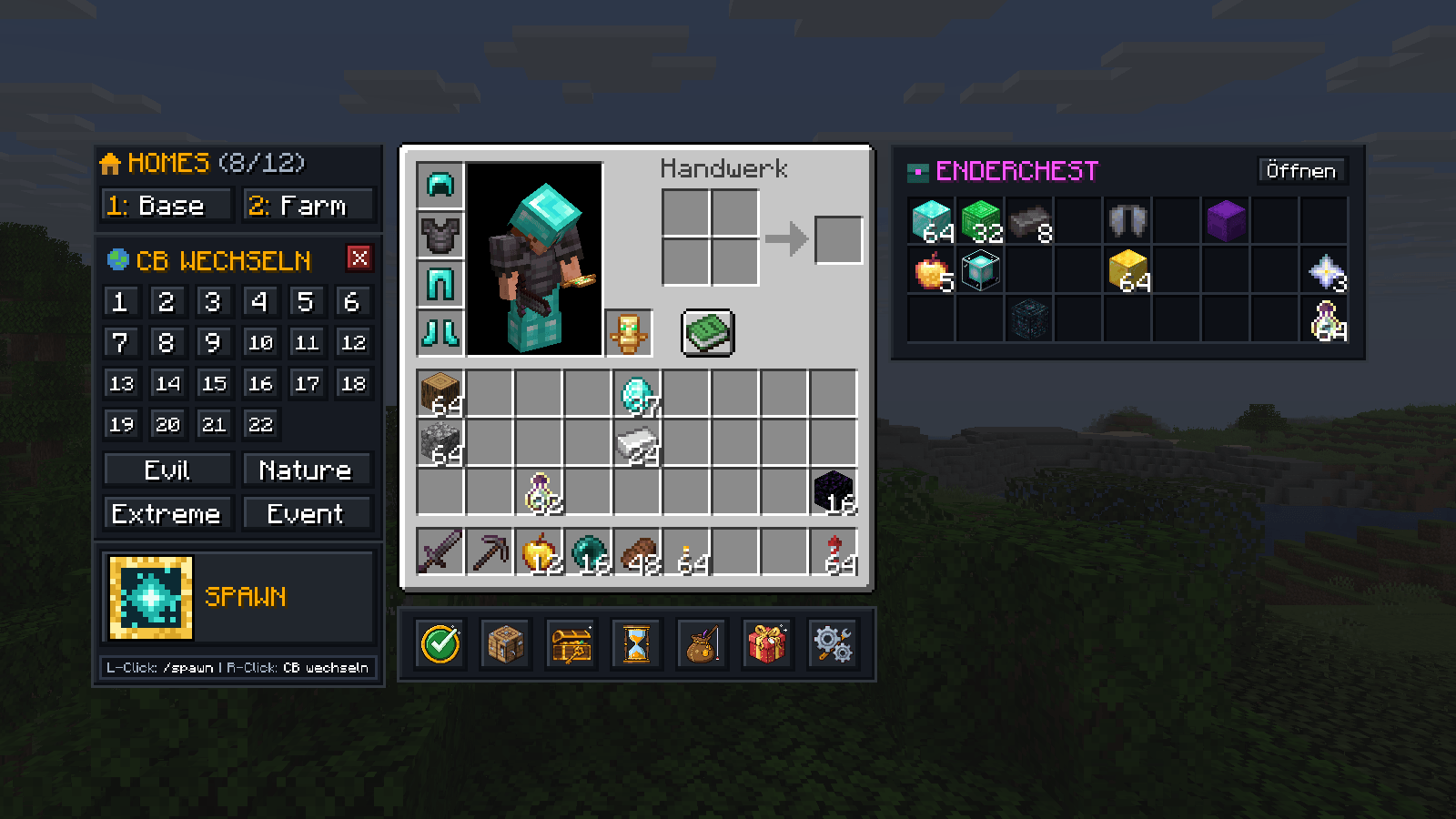
5_1.8_CB_wechseln.png
Description
English
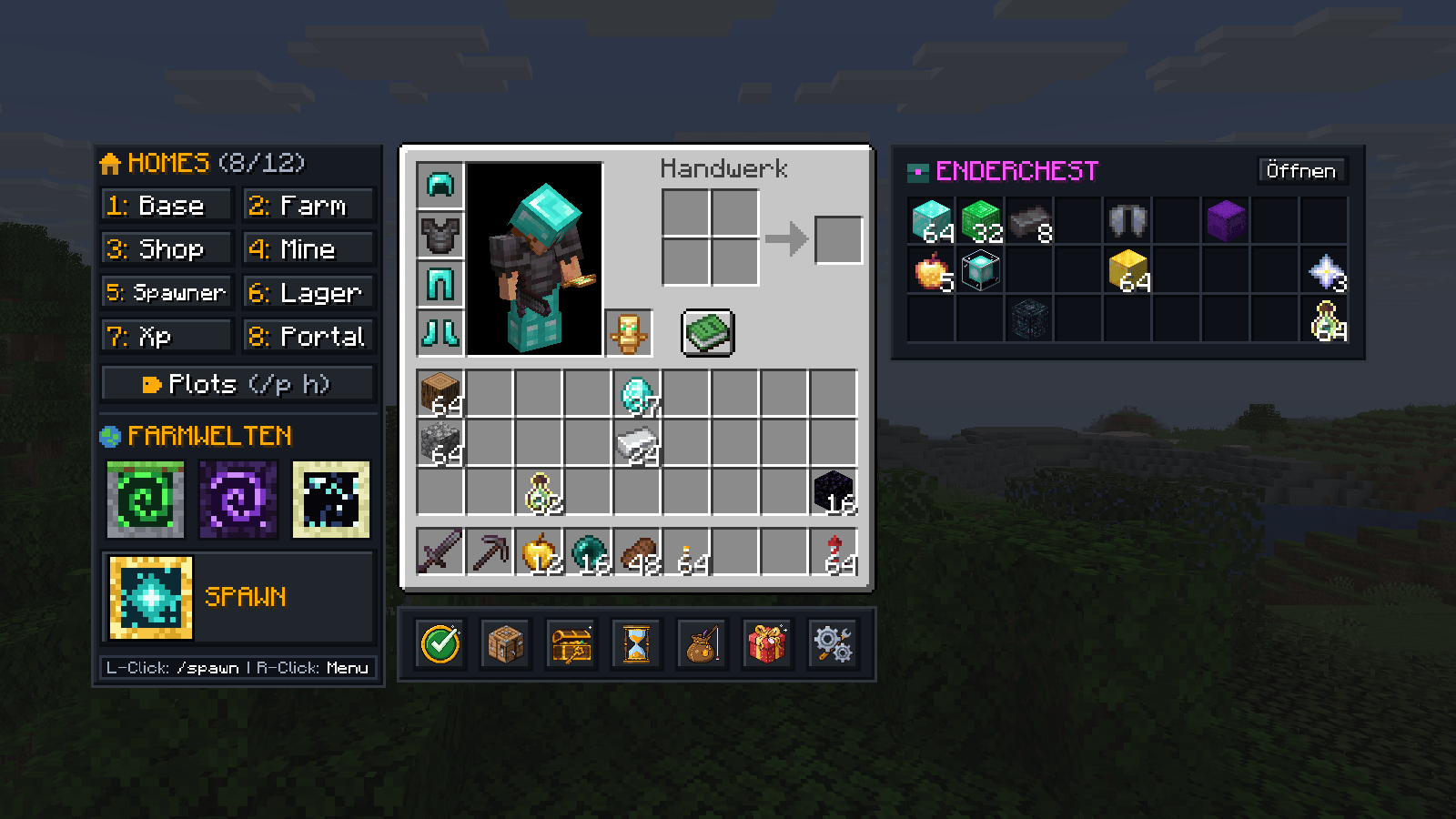
A Fabric mod for GrieferGames that turns the commands you type all day on Citybuild into buttons right inside your inventory: homes, plots, farm worlds, spawn, cooldowns, teleport requests and a live preview of your ender chest.
Open your inventory, click, done. Works on both the cloud and the 1.8 network.
Features
Homes
Up to 12 homes, right next to your inventory. Name each one and its button runs /home <name>. You choose how many are shown in the settings.
Plots
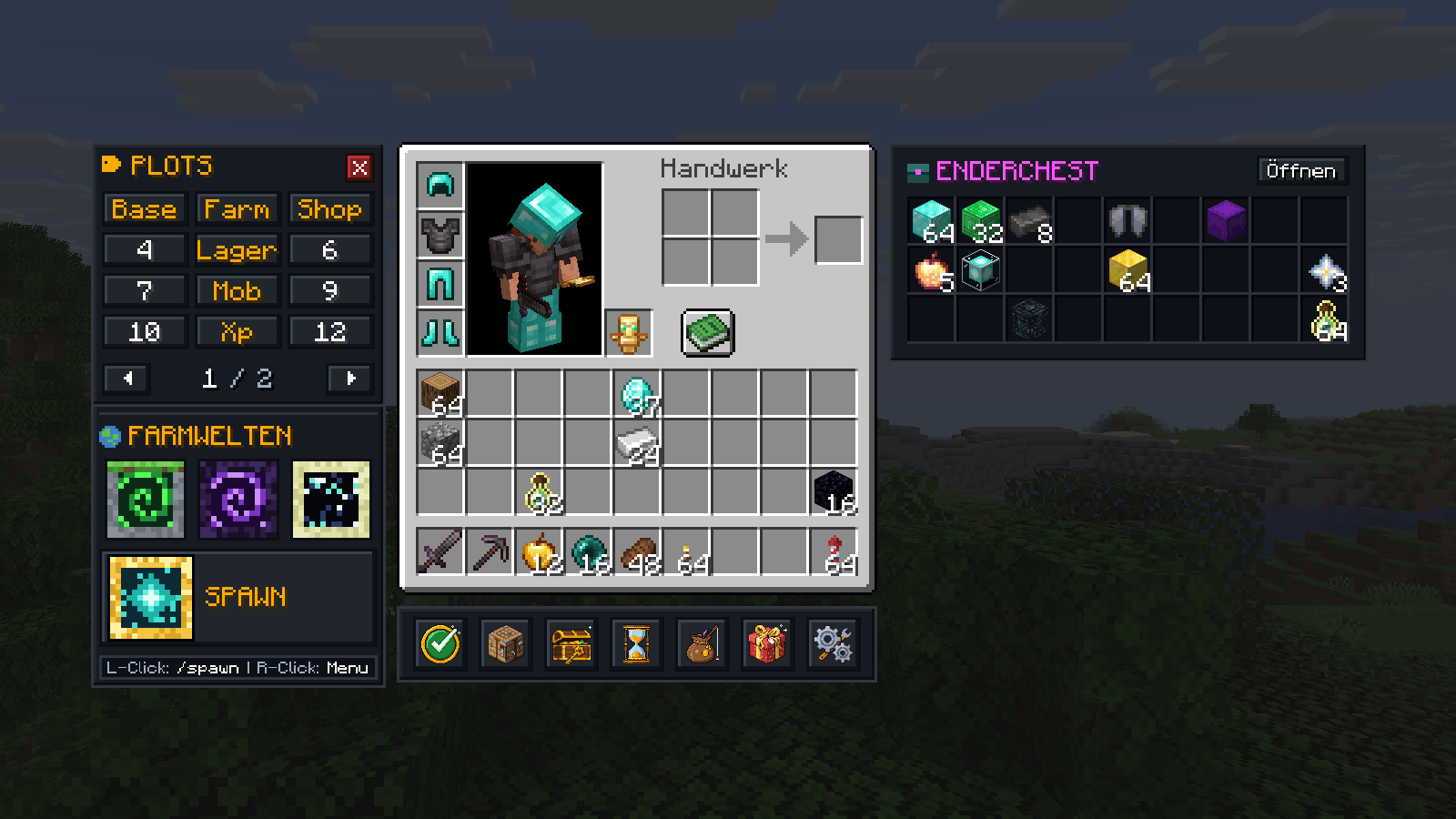
The "Plots" button opens a grid of up to 36 plots, 12 per page. Every plot has two fields: a label for the button (e.g. "Storage") and the target for /p h (e.g. 6). Leave the target empty and the plot number is used. Right-click a plot to jump straight to it in the settings.
Farm worlds and spawn
One click for /warp farmwelt, /warp nether and /warp end. Since 1.8 has no End, the third button takes you to the portal room with /portal there instead. Left-click spawn to run /spawn. Right-click opens /spawn menu on the cloud, and on 1.8 a citybuild switcher (CB 1 to 22, Evil, Nature, Extreme, Event). Portals can be shown as pixel art icons or simple text buttons.
Cooldowns
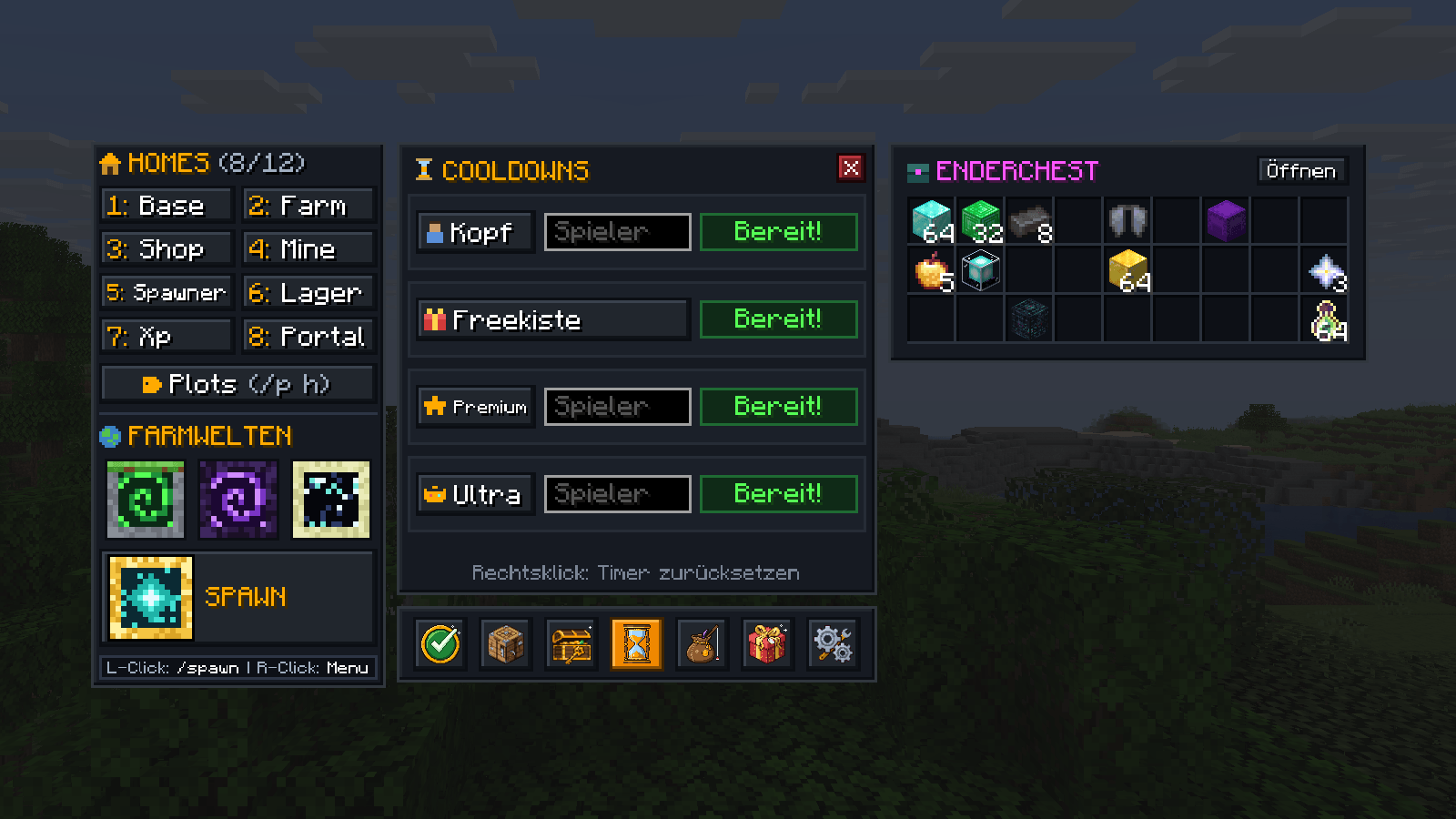
One window for /kopf, /freekiste, /premium and /ultra. See at a glance what's ready and how long the rest will take. /kopf, /premium and /ultra come with a field for a player name. Timers are saved per account and shared between the cloud and 1.8, just like on the server. Timer out of sync? Right-click to reset it.
Teleport requests
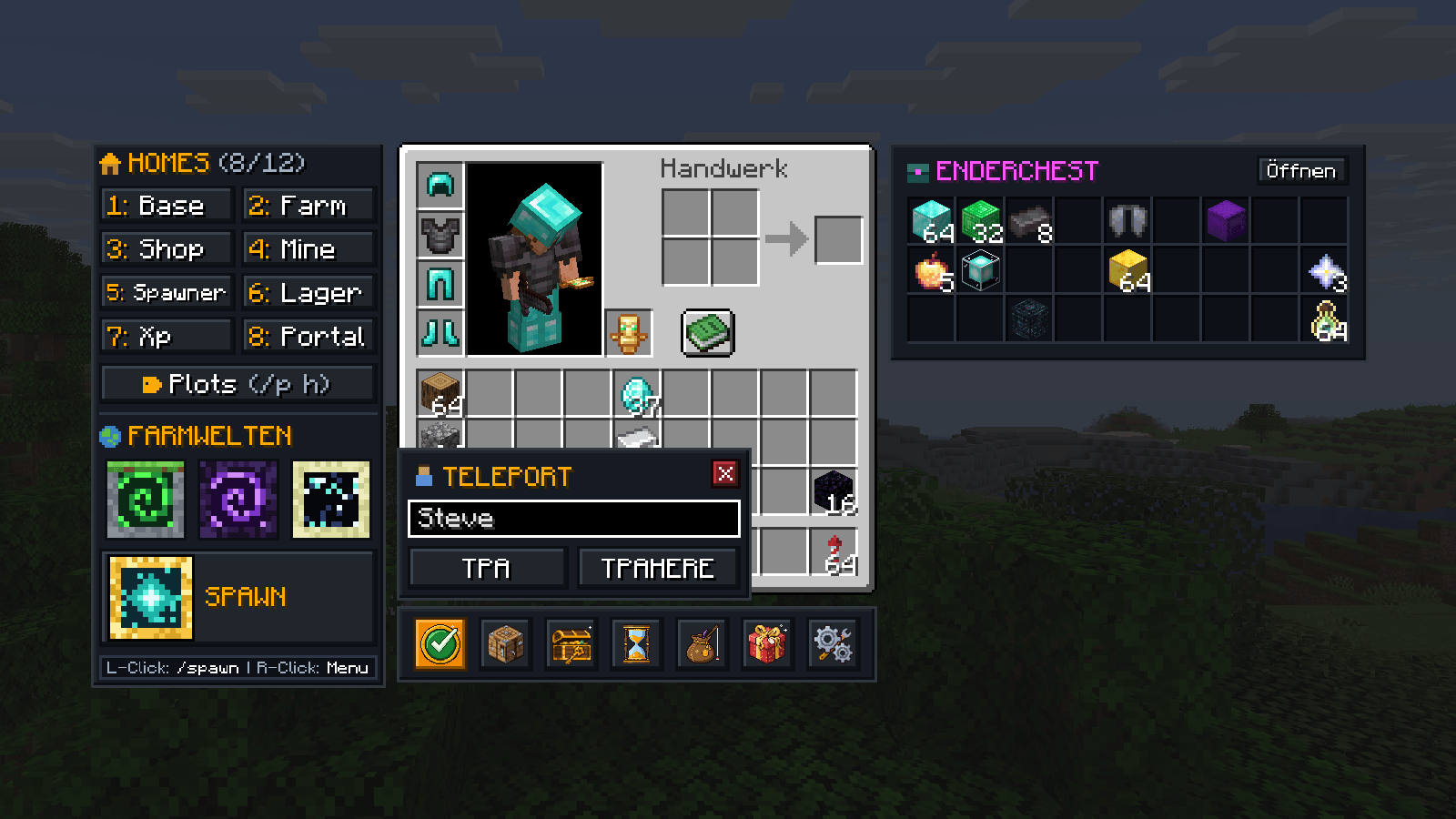
Left-click the TpAccept button to accept a request with /tpaccept. Right-click it for a small window to send /tpa or /tpahere. As you type, it suggests names of players on the server. Press Tab to complete, Enter to send /tpa.
Ender chest preview
Your ender chest is always visible to the right of your inventory, tooltips included. It updates whenever you open your ender chest and survives restarts. One button opens it directly with /ec. Peeking into someone else's with /ec <player> leaves your preview untouched.
Bottom bar
TpAccept, /craft, /battlepass, cooldowns, misc, gifts and settings, each with its own icon. The misc window keeps the less common commands out of the way: Cosmetics, Angeln and Perks on the cloud, Perks, RTP and XP bottles on 1.8. The gifts button sends /geschenke on the cloud and /rewards on 1.8.
Multiple accounts and networks
The mod knows whether you're on the cloud or on 1.8, even when the server transfers you between them. Homes, plots and the ender chest preview are kept separate per account and per network, so every account only sees its own setup. The settings show which profile is currently active.
Settings
- Dark or light design
- Close the inventory automatically after teleporting
- Turn button tooltips on or off (item tooltips always stay)
- Hide status effects in the inventory so they don't cover the ender chest
- Active only on GrieferGames, or everywhere
- Turn homes, farm worlds and the ender chest on or off individually
Open the recipe book and the sidebar moves out of the way. If there's no room left, it hides itself.
Installation
- Minecraft 26.2
- Fabric Loader 0.19.5 or newer
- Fabric API
Drop the .jar into your mods folder and launch Minecraft with Fabric. Settings from older versions are carried over automatically.
The mod only sends regular chat commands, exactly as if you typed them yourself.
SGOverlay is a fan-made project and is not affiliated with, endorsed by or connected to GrieferGames.
Deutsch
Eine Fabric-Mod für GrieferGames. Sie packt die Befehle, die man auf dem Citybuild ständig eintippt, als Buttons direkt ins Inventar: Homes, Plots, Farmwelten, Spawn, Cooldowns, Teleport-Anfragen und eine Vorschau deiner Enderchest.
Inventar auf, draufklicken, fertig. Funktioniert in der Cloud und auf dem 1.8-Netzwerk.
Features
Homes
Bis zu 12 Homes links neben dem Inventar. Du gibst jedem Home seinen Namen und der Button führt /home <Name> aus. Wie viele angezeigt werden, stellst du in den Einstellungen ein.
Plots
Ein Klick auf "Plots" öffnet eine Übersicht mit bis zu 36 Plots, 12 pro Seite. Jeder Plot hat zwei Felder: einen Namen für den Button (z. B. "Lager") und das Ziel für /p h (z. B. 6). Lässt du das Ziel leer, wird die Nummer genommen. Mit Rechtsklick auf einen Plot landest du direkt in den Einstellungen auf der richtigen Seite.
Farmwelten und Spawn
Buttons für /warp farmwelt, /warp nether und /warp end. Auf 1.8 gibt es kein End, dort bringt dich der dritte Button mit /portal in den Portalraum. Linksklick auf Spawn bringt dich mit /spawn zum Spawn. Rechtsklick öffnet in der Cloud /spawn menu, auf 1.8 ein Fenster zum Citybuild-Wechseln (CB 1 bis 22, Evil, Nature, Extreme, Event). Die Portale gibt es als Pixel-Icons oder als normale Text-Buttons.
Cooldowns
Ein Fenster für /kopf, /freekiste, /premium und /ultra. Du siehst, was bereit ist und wie lange du bei den anderen noch warten musst. Für /kopf, /premium und /ultra kannst du einen Spielernamen eintragen. Die Zeiten werden pro Account gespeichert und gelten für Cloud und 1.8 gemeinsam, so wie auf dem Server. Stimmt ein Timer nicht, setzt du ihn mit Rechtsklick zurück.
Teleport-Anfragen
Linksklick auf den TpAccept-Button nimmt eine Anfrage mit /tpaccept an. Rechtsklick öffnet ein kleines Fenster für /tpa und /tpahere. Beim Tippen werden Namen von Spielern auf dem Server vorgeschlagen, mit Tab übernimmst du sie, Enter schickt /tpa.
Enderchest-Vorschau
Rechts neben dem Inventar siehst du den Inhalt deiner Enderchest, inklusive Tooltips. Sie aktualisiert sich jedes Mal, wenn du deine Enderchest öffnest, und bleibt auch nach einem Neustart erhalten. Per Button öffnest du sie direkt mit /ec. Schaust du dir mit /ec <Spieler> die Enderchest von jemand anderem an, bleibt deine Vorschau unverändert.
Leiste unter dem Inventar
TpAccept, /craft, /battlepass, Cooldowns, Misc, Geschenke und die Einstellungen, jeweils mit eigenem Icon. Im Misc-Fenster liegen seltener genutzte Befehle: in der Cloud Cosmetics, Angeln und Perks, auf 1.8 Perks, RTP und XP-Flaschen. Der Geschenke-Button schickt in der Cloud /geschenke und auf 1.8 /rewards.
Mehrere Accounts und Netzwerke
Die Mod erkennt automatisch, ob du in der Cloud oder auf 1.8 bist, auch wenn der Server dich rüberschickt. Homes, Plots und die Enderchest-Vorschau sind pro Account und pro Netzwerk getrennt. Wer mit mehreren Accounts spielt, sieht bei jedem nur seine eigenen Namen. In den Einstellungen steht oben, welches Profil gerade aktiv ist.
Einstellungen
- Dunkles oder helles Design
- Inventar nach einem Teleport automatisch schließen
- Tooltips an den Buttons aus- und einschalten (Item-Tooltips bleiben)
- Buff-Anzeige im Inventar ausblenden, damit sie nicht über der Enderchest liegt
- Mod nur auf GrieferGames aktiv oder überall
- Homes, Farmwelten und Enderchest einzeln an- und ausschaltbar
Öffnest du das Rezeptbuch, rutscht die Seitenleiste daneben. Passt sie nicht mehr hin, wird sie ausgeblendet.
Installation
- Minecraft 26.2
- Fabric Loader 0.19.5 oder neuer
- Fabric API
Die .jar in den mods-Ordner legen und Minecraft mit Fabric starten. Deine Einstellungen aus älteren Versionen werden automatisch übernommen.
Die Mod verschickt nur ganz normale Chat-Befehle, so als würdest du sie selbst eintippen.
SGOverlay ist ein Fanprojekt und steht in keiner Verbindung zu GrieferGames. Es ist kein offizielles Projekt von GrieferGames.
SGOverlay Team